Pondashi, an app for managing audio playback at events and live shows, has officially launched with a subscription model. Basic playback and data management are free, while editing features such as adding groups and customizing players are available through paid plans. Improvements based on user feedback make player management more intuitive and drag-and-drop operations more efficient. A new bulk settings feature also makes the app well suited to large live performances and complex event productions.
A closer look at pricing, new features, and improvements

Pondashi makes it easy to play background music and sound effects at streams, stage productions, live shows, and other events.
The app, which received a strong response when we previously covered it at Sleepfreaks, has now been officially released.
If you are new to Pondashi or want to learn the basics, first see the article below, then return here for the latest information.
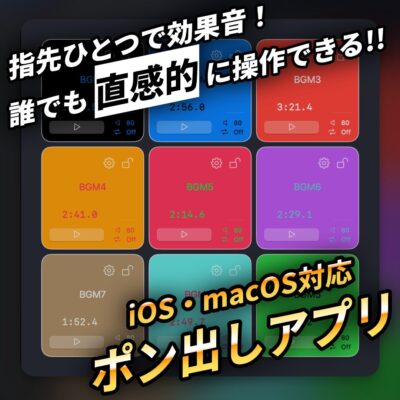
The official release offers a flexible pricing structure: basic playback and data management are free, while more advanced editing features require a subscription.
Improved usability based on user feedback is another highlight.
This article covers the launch pricing and changes in operation since our previous article.
Clear, straightforward pricing
With its official release, Pondashi introduced a subscription model.
| Plan | Price |
|---|---|
| Editor (1 week) | $0.99 |
| Editor (1 month) | $1.99 |
| Editor (1 year) | $12.99 |
The pricing at the time of publication was simple, with three plans distinguished by their duration.
Every plan includes all subscription features.
Prices are in US dollars; Apple determines the exchange rate.
Main subscription features

In addition to the free basic features, a subscription unlocks all editing functions.
A subscription is required for the following operations:
- Adding groups
- Adding, deleting, and rearranging players
- Changing player names and colors
- Configuring player volume, playback mode, fade, and MIDI settings
- Accessing the bulk settings screen
Free features and how to use them

Pondashi also offers features that can be used for free without a subscription.
These include:
- Importing groups
- Exporting groups
- Deleting groups
- Playing players
- Accessing the volume settings screen
As the list shows, creating a new group in the app requires a subscription.
The free plan is therefore suited to specific uses such as:
- Splitting setup and playback duties:A person responsible for playback receives and plays data created by the person handling setup.
- Playback-focused use:Use the app for playback after completing setup, when no further editing is needed.
- Data storage:Keep created data temporarily when there is a gap between events, for example.

For recurring events using the same audio setup, or tours that reuse the same set list, you can configure and export the data with a subscription once, then import it for free for later use.
Downloading the app
The official release of Pondashi can be downloaded from the App Store below.
There is also a beta version, but the beta and official versions cannot coexist on the same device.
The version installed later overwrites the existing app, so take care if you already use the beta.
Even easier to use: key changes
Pondashi is continually improved based on user feedback.
Here are the changes since our previous article.
More intuitive player management

Previously, the number of players was adjusted by specifying rows and columns. The row setting has now been removed, and the layout is adjusted using only the number of columns.

Players can be added individually with the + button at the top right of the player screen.

This means the column setting affects only player arrangement, so you can adjust the on-screen layout while placing as many players as needed.

The + buttons for groups and players now each include a Choose from Files option, allowing you to add the files you need together.

To delete a player, open its gear icon; the option is at the bottom of that page.
Improved drag and drop
Rearranging players has become more intuitive and faster.

The former swap method has been replaced with an insertion method that places the dragged player at the desired position.
You can reorder players much like moving icons on the iOS home screen, making the process quicker and more efficient.
Efficient bulk settings

A new bulk settings feature lets you change settings for multiple players together.
It should be especially useful for managing the many players needed for large live performances or complex events.
Evolving with users: feedback welcome
Rather than ending development after release, the team plans to keep improving Pondashi based on user feedback and add features after launch, both paid and free.
Feedback from users is especially important in identifying features and improvements needed in real-world use.

You can easily send feedback through the form linked from the app's General Settings screen.
The URL below opens the same form, so share any observations or requests you have.
For more detailed information and instructions, see the official website.
At its official release, Pondashi offered reasonably priced subscriptions starting with short terms, along with improved usability.
The free plan also allows playback and data management, so consider how it could fit the scale and needs of your event.
Frequently asked questions
Q1. Can I really use Pondashi for free?
Yes. Basic functions such as importing, exporting, and deleting groups, playing players, and accessing volume settings are free. Creating new groups and making detailed edits require a subscription.
Q2. How much does the subscription cost?
At publication, the plans were $0.99 per week, $1.99 per month, or $12.99 per year. Each plan included all subscription features; the difference was the subscription duration.
Q3. Can I switch from the beta to the official release?
The beta and official versions cannot coexist on the same device. Installing the official version overwrites the beta, so export your data beforehand.
Q4. Can I change settings for multiple players at once?
Yes. The new bulk settings feature lets you change multiple players' settings at the same time, which is useful for large live shows and event productions.
Q5. What is a practical example of using the free plan?
A setup operator can configure and export data with a subscription, then a free user can receive and play that data. This division of work is suitable for recurring events and tours.
NEW ARTICLES
Latest English Articles