
Pad sounds are an essential part of music production, adding thickness and atmosphere to a song. This article explains how to give movement and depth to a pad that might otherwise sound uninteresting when simply sustained. Gradually changing its tone with a filter can make a chorus that feels thin sound much fuller. Learn practical sound-design steps, from choosing a waveform and filter type to setting an envelope, to create polished pad sounds.
Pads That Fill the Space Between Instruments
Here we look at pads that add thickness and atmosphere to a song.
A pad can be especially useful when a chorus feels thin,
but simply sustaining the sound can become uninteresting.
Try gradually changing its tone to give it movement.
A filter can be used to change the sound over time.
How to Create the Sound
Choose a Waveform

Choose the oscillator waveform you prefer.
A sine wave has no harmonics, however, so filtering it will not produce the same tonal change.
Set Up the Filter
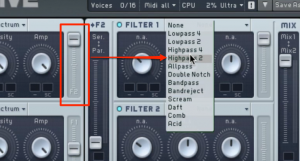
Send the oscillator to the filter.
Move the routing control all the way toward the filter you want to use.
Then select a filter type.
Choose LP, HP, BP, or another type to suit your preference.
Apply an Envelope to the Filter
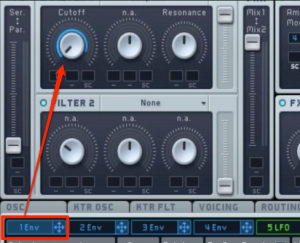
Apply an envelope (ENV) to the filter cutoff.
Use the blue range to set the amount of change.
Control the Envelope
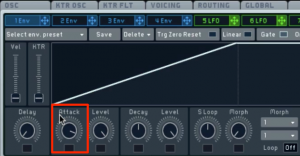
Use Attack to set the speed of the cutoff change.
The sound is now complete.
Frequently Asked Questions
Q1. Which waveform should I choose when making a pad?
The choice is largely a matter of taste, but a sine wave has no harmonics, so filtering it will not produce the same change in tone. For a changing pad, choose a waveform with richer harmonics, such as a triangle or sawtooth wave.
Q2. Why apply an envelope to the filter cutoff?
Applying an envelope to the cutoff makes the tone change automatically over time. The Attack parameter adjusts the speed of that change, giving a static pad movement and expression for a more refined sound.
Q3. What can I do if a pad sounds thin?
Use a filter to gradually change the tone and give the pad movement. Placing the pad in the spaces between instruments and combining it with spatial effects can also add thickness and width to the overall song.
NEW ARTICLES
Latest English Articles


















































































































































































































































































































































































































































































































































































































