
A riser is a staple EDM effect used to build anticipation toward a drop. In this tutorial we create six variations using tools such as Frequency Shifter, Pulse-Saw Sync and Hard Sync waveforms, LFOs, and PERFORMER. Starting with oscillator settings, we work through effect routing and macro automation to build increasingly complex risers while exploring synthesizer sound design.
The Riser: Building Anticipation Toward a Drop

This installment of our Q&A video series is about riser sounds.
As the name suggests, a riser creates a progressively rising or intensifying effect. It is a staple of EDM buildups leading into a drop.
In an earlier video, we introduced a rising siren-like sound. This time we will look at several other ways to create variations.
How to Create the Sound
Questions and Answers from YouTube

I followed the video, but the macro control does not move when I write automation. What could be wrong? I use Logic Pro X.

Try setting the automation recording mode to Latch and moving the macro control to record it. https://sleepfreaks-dtm.com/for-advance-logic/automation-4/
Hello, the video was very helpful. Can I make similarly detailed settings in Omnisphere?
Omnisphere is sample-based, so finding a suitable preset and fine-tuning it may be more practical than making every setting from scratch. Its approach differs from Massive, so choose the one that suits your production. The following video covers Omnisphere 2: https://youtu.be/rMGJbojYQxs
Basic Settings
Oscillator Settings
Use all three oscillators and set each waveform to Saw.
The key point is to set the second oscillator one octave lower.
Use the modulation oscillator to apply ring modulation to OSC1:
- Pitch: 12.00
- RM: Maximum
This creates the basis for a slightly metallic, hard-edged sound.
ENV4 Settings
We do not need the volume to change, so set the attack to its fastest setting and Sustain (Level) to maximum for a non-decaying envelope.
Voicing Settings
In the Voicing tab, use the following settings to thicken the sound:
- Unisono: Set it to seven voices.
- Pitch Cutoff: Turn it on, set the value to 0.04, and move the control fully to the right.
- Pan Position: Set it slightly to the right of center to add width.
Effect Settings
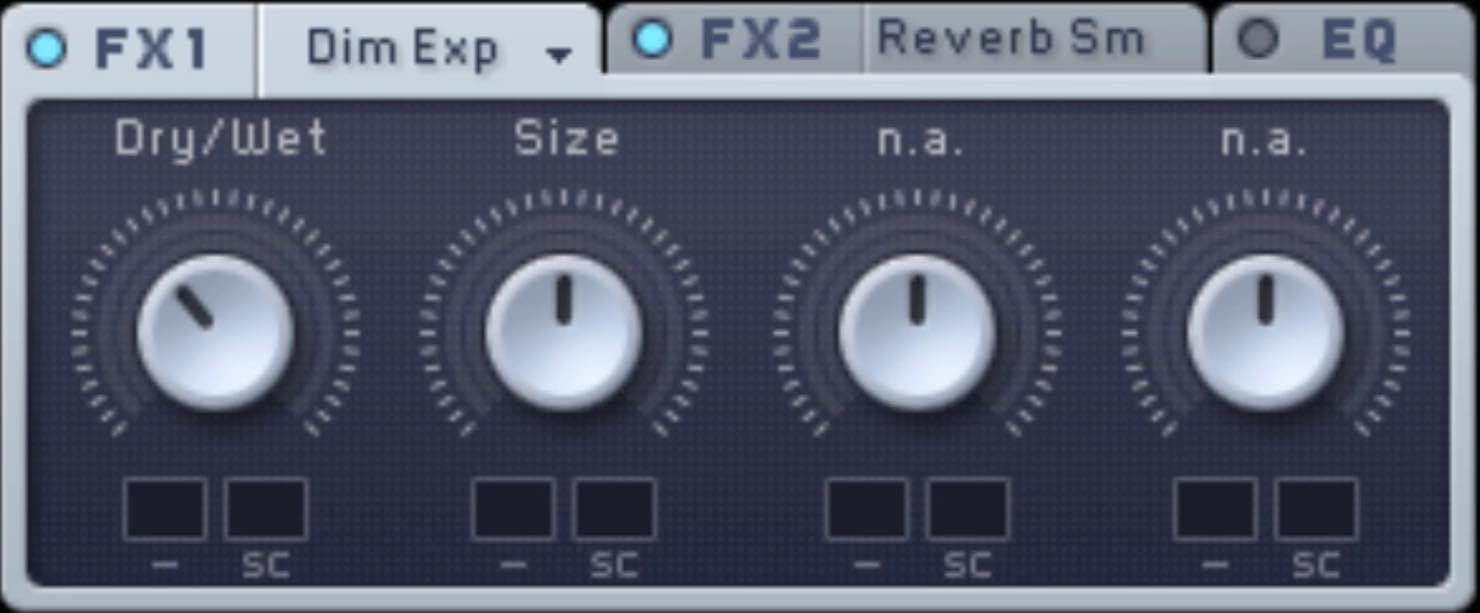
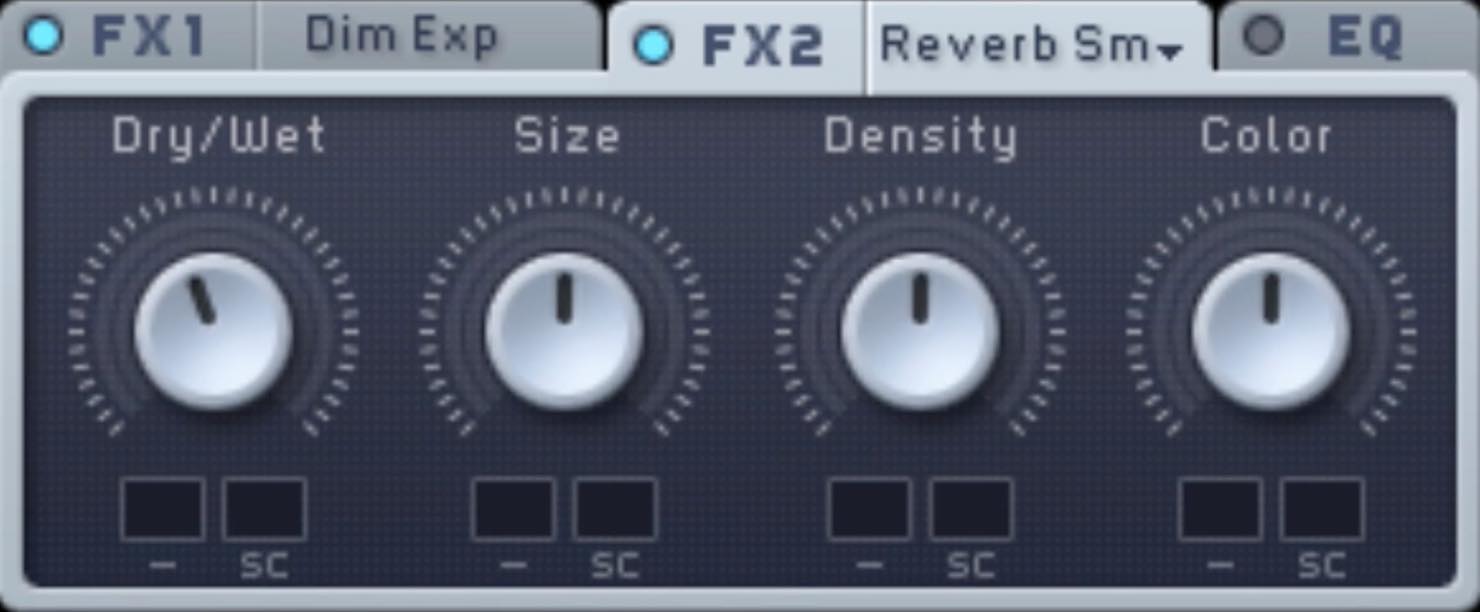
Apply some Dimension Expander and Reverb Small to add spatial width, as shown.
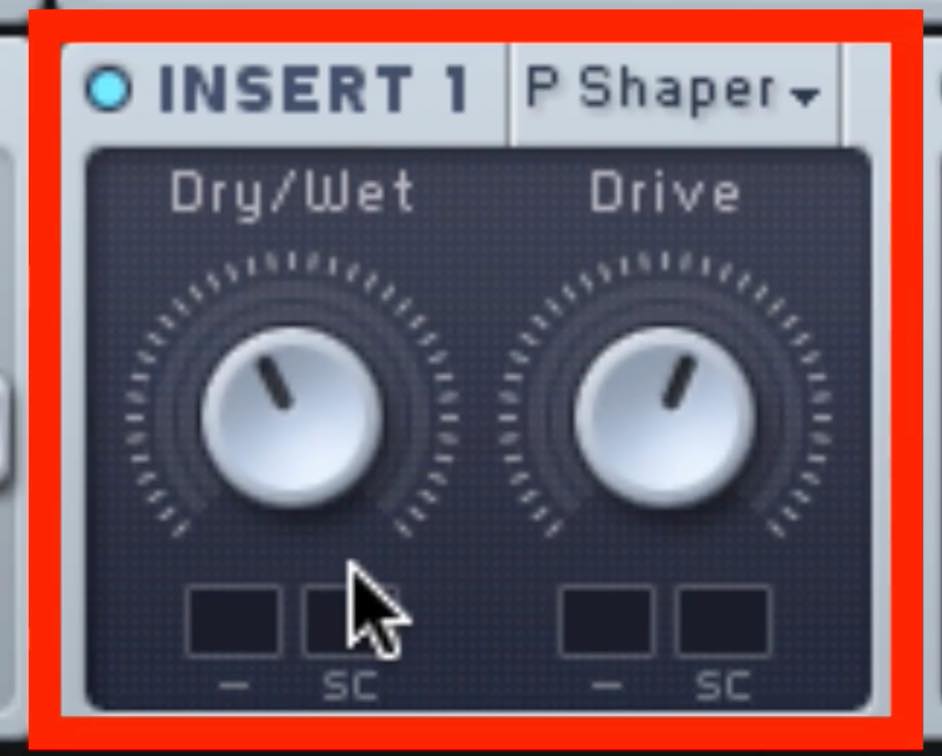
Add a little distortion with Parabolic Shaper.
Pay particular attention to the routing here.
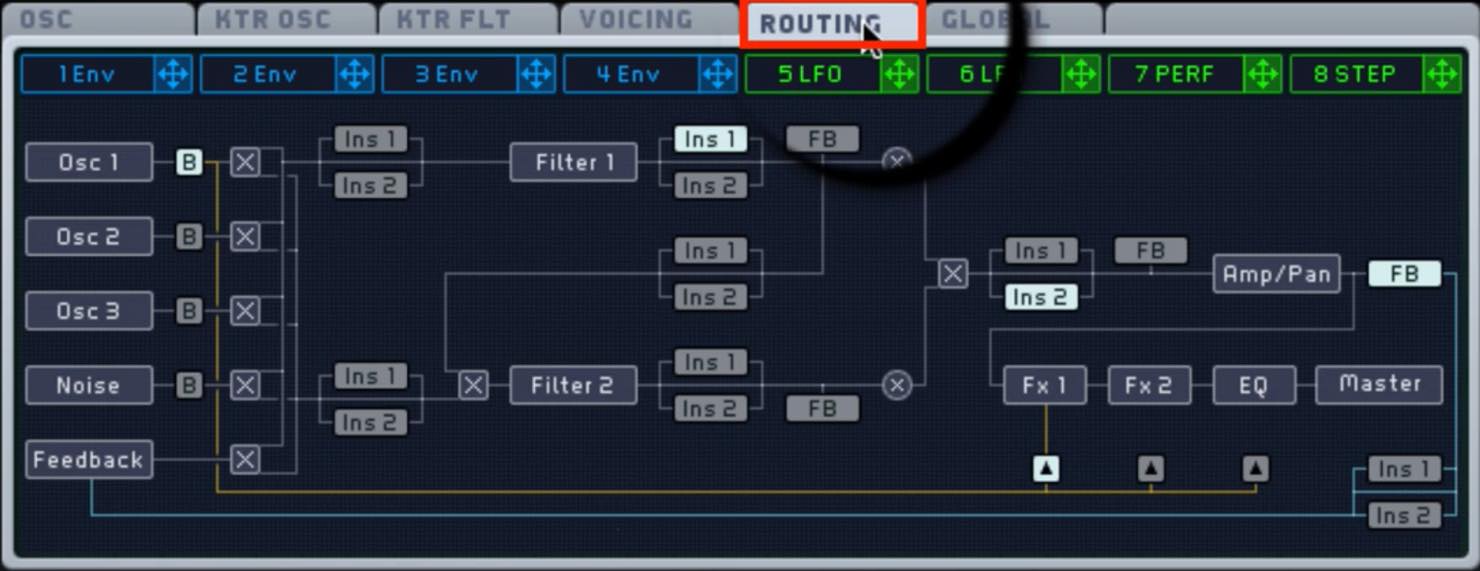
By default, INS1—Parabolic Shaper in this example—is on the FILTER1 path.
To apply INS1 fully to all oscillators, change either the insert position or the filter routing.
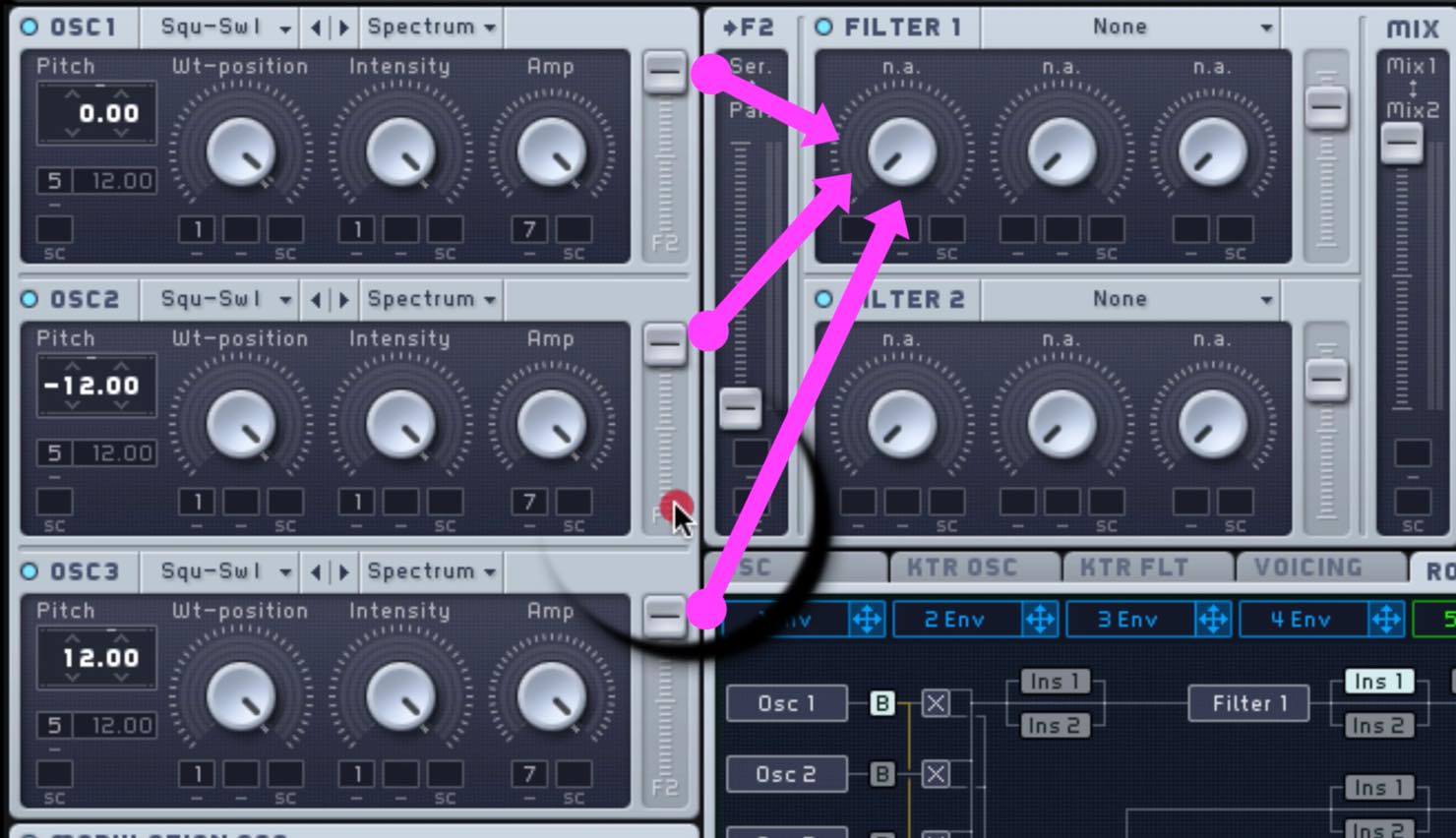
Here we route each oscillator fully toward F1 (FILTER1).
Six Riser Variations
Variation 1: Frequency Shifter
With the basic sound ready, let’s add the riser element.
The first method uses Frequency Shifter.

Frequency Shifter shifts the frequencies of a signal up or down, changing its perceived pitch and timbre.
INSERT2 is placed after the filters, so it can process all of the oscillators together.
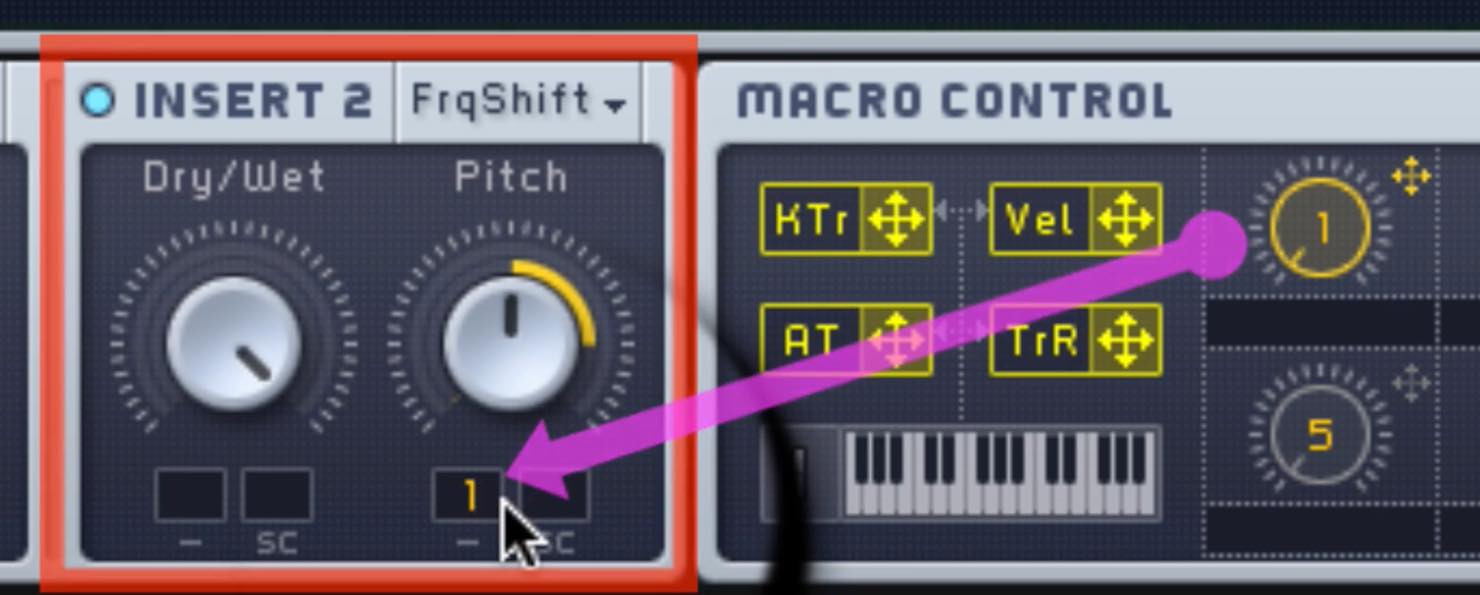
Assign MACRO1 to its Pitch control and set an appropriate modulation range.
In your DAW, program a long note lasting several bars and write automation for the macro.
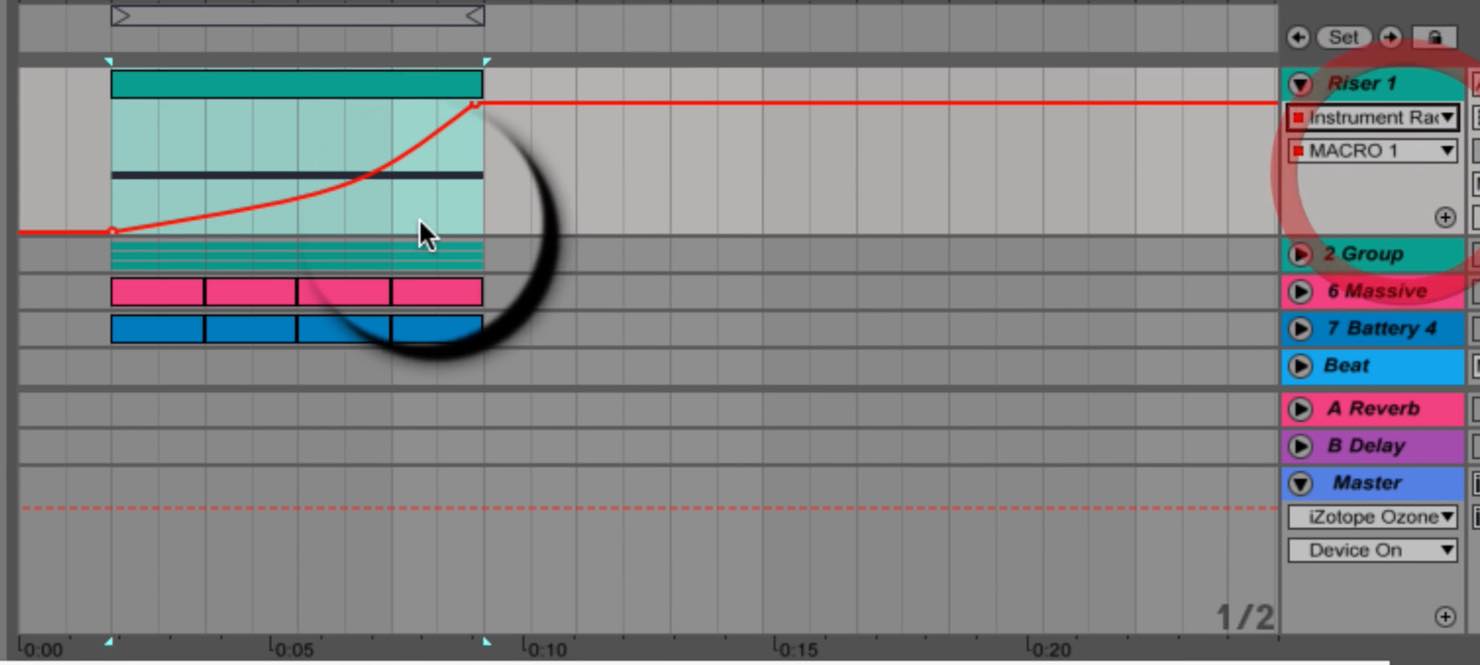
Variation 2: Pulse-Saw Sync
This variation moves away from pitch shifting and uses the Pulse-Saw Sync waveform.
Keep the Macro1 automation you wrote above.
Turn Frequency Shifter off for now.
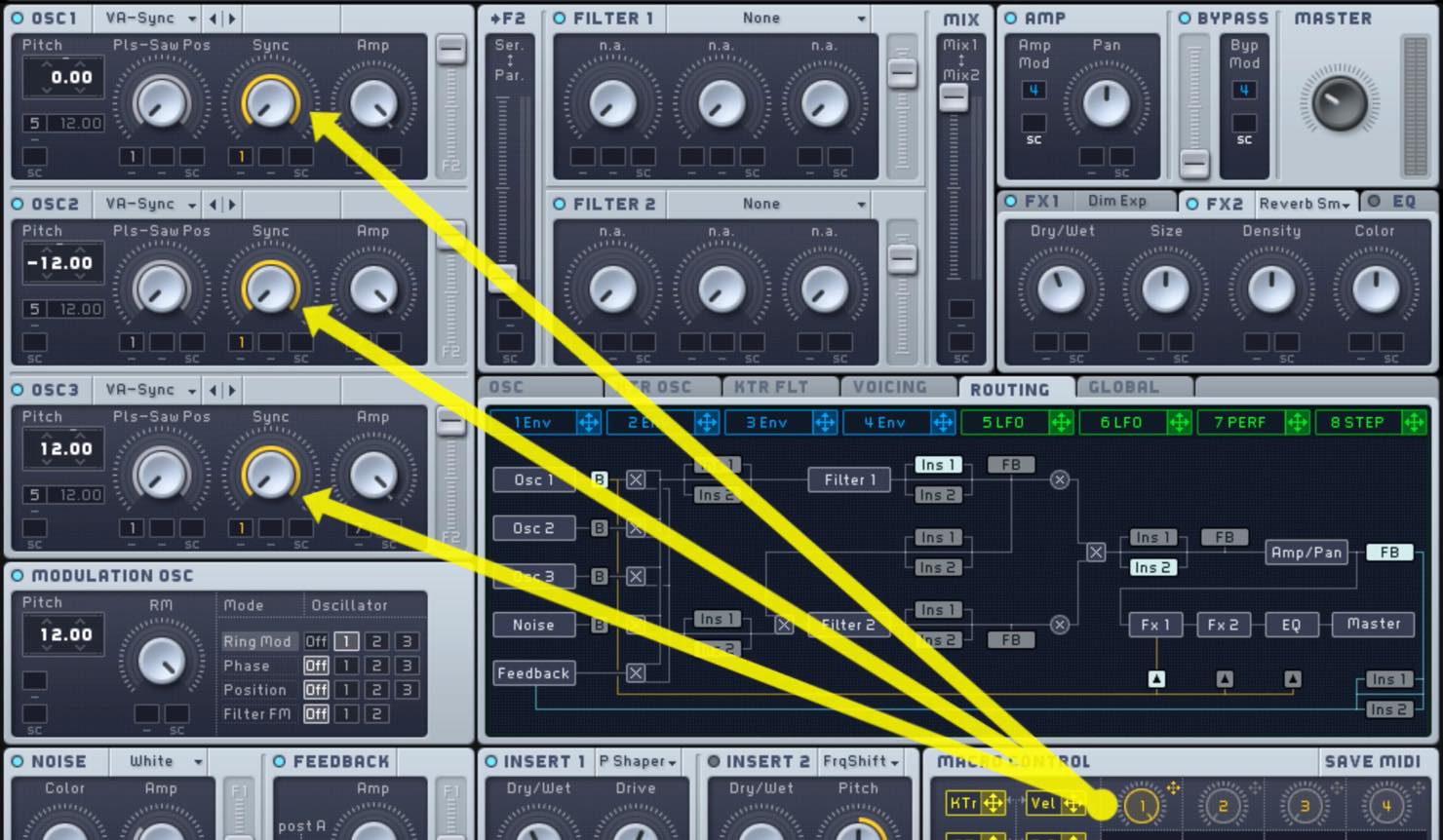
- Set all three oscillators to Pulse-Saw Sync and move them toward the Pulse side.
- Assign Macro1 to the Sync knob.
Playing the same automation should now produce a hard, screaming riser.
Variation 3: Hard Sync
For another waveform-based variation, try Hard Sync.
This time, the key is to assign the macro to Wt-position.
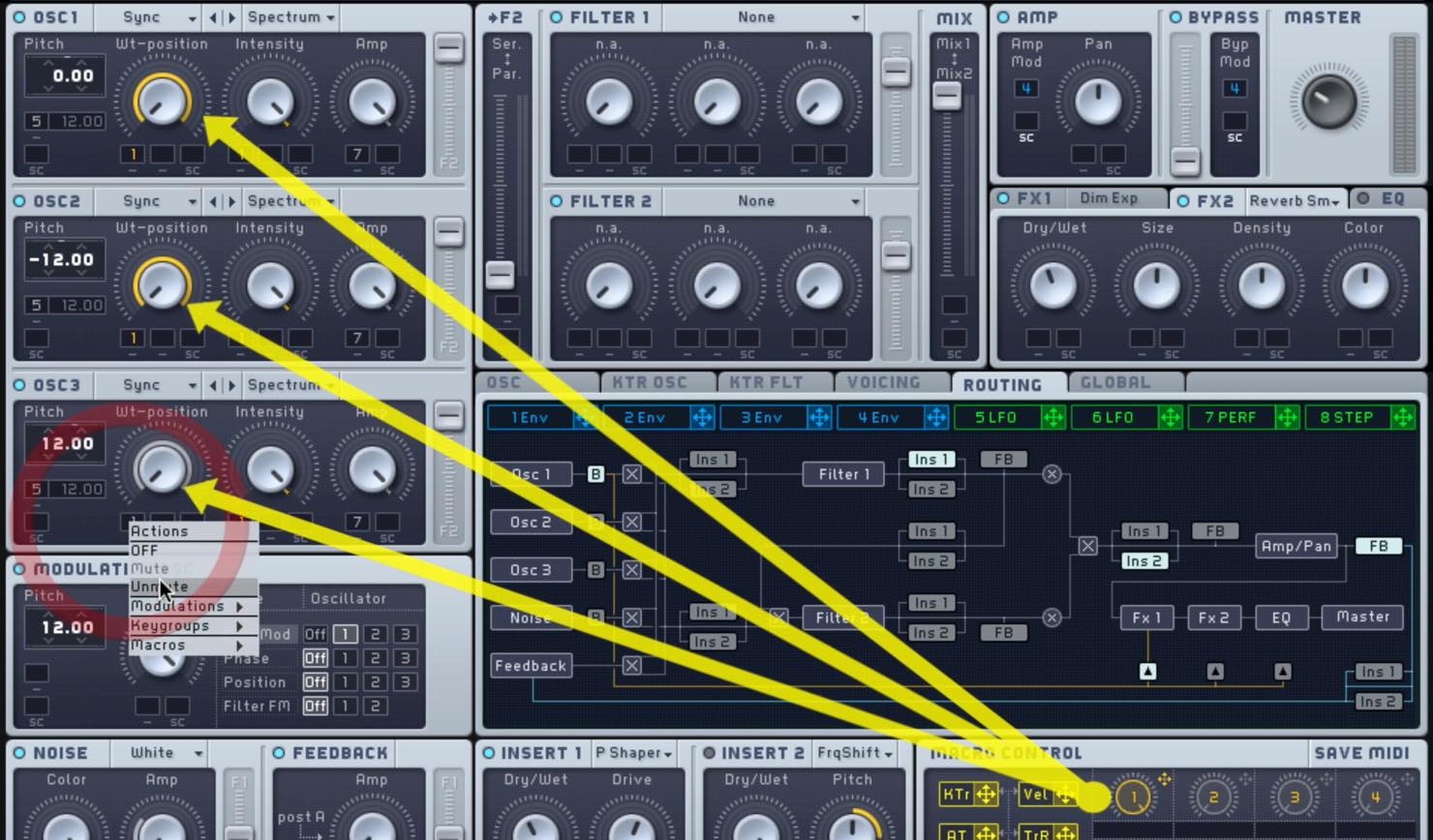
- Set all three oscillators to Hard Sync and turn Intensity up to maximum.
- Assign Macro1 to the Wt-position knob.
The result is a riser with a different character from Pulse-Saw.
Variation 4: Add Movement with an LFO
Next, let’s use an LFO to add another dimension to the riser.
Increasing the pitch modulation over time creates an interesting effect.
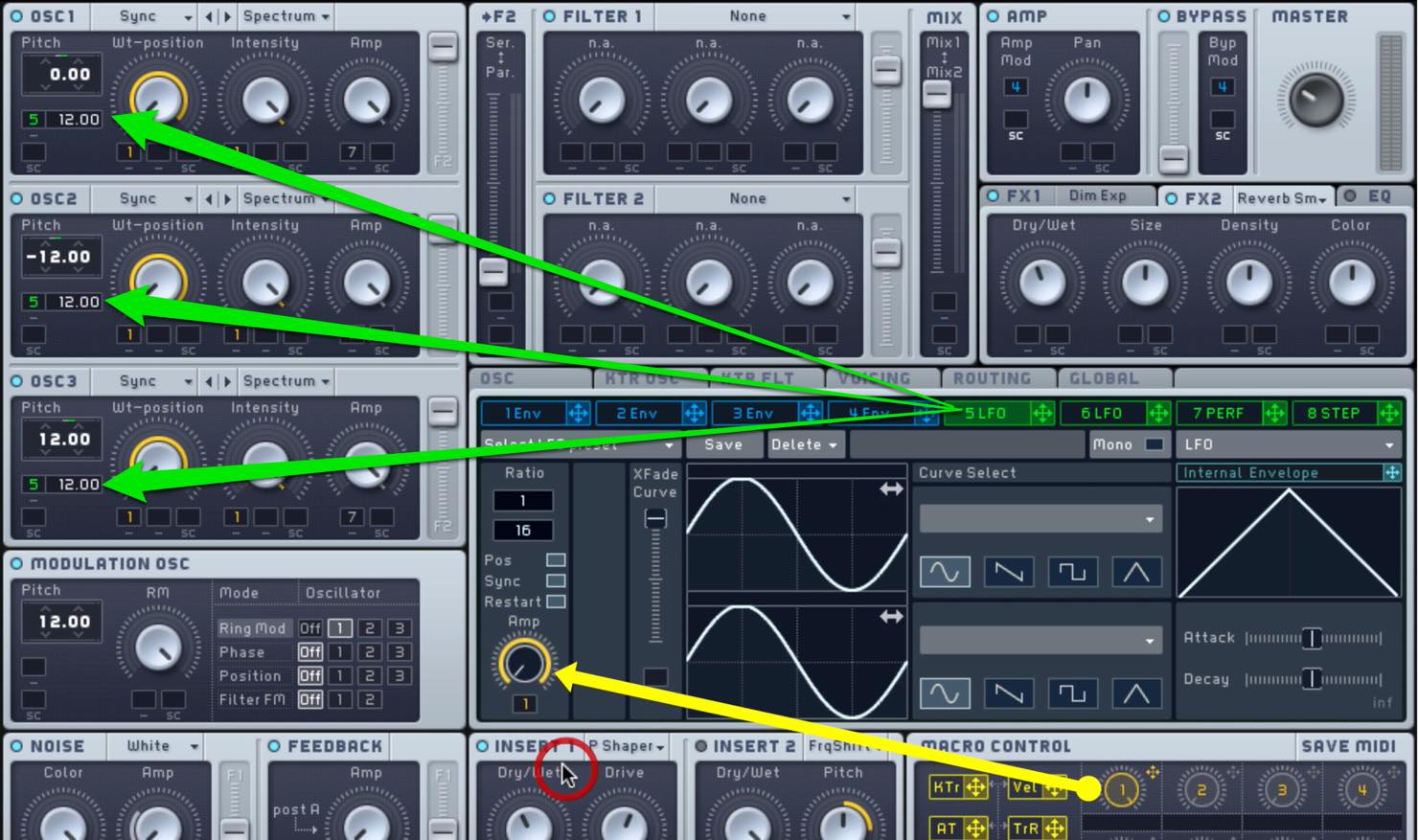
- Assign an LFO to the pitch of all three oscillators and set the range to 12.00.
- Turn on Sync for the LFO rate and assign Macro1 to Amp, which controls modulation depth.
The LFO gradually becomes stronger from an initially unmodulated state, so the pitch movement intensifies toward the end. Try combining this with the earlier variations.
Variation 5: Add Rhythm with PERFORMER
Let’s make the sound more complex.
Add PERFORMER, which lets you set an envelope pattern in time with the rhythm.
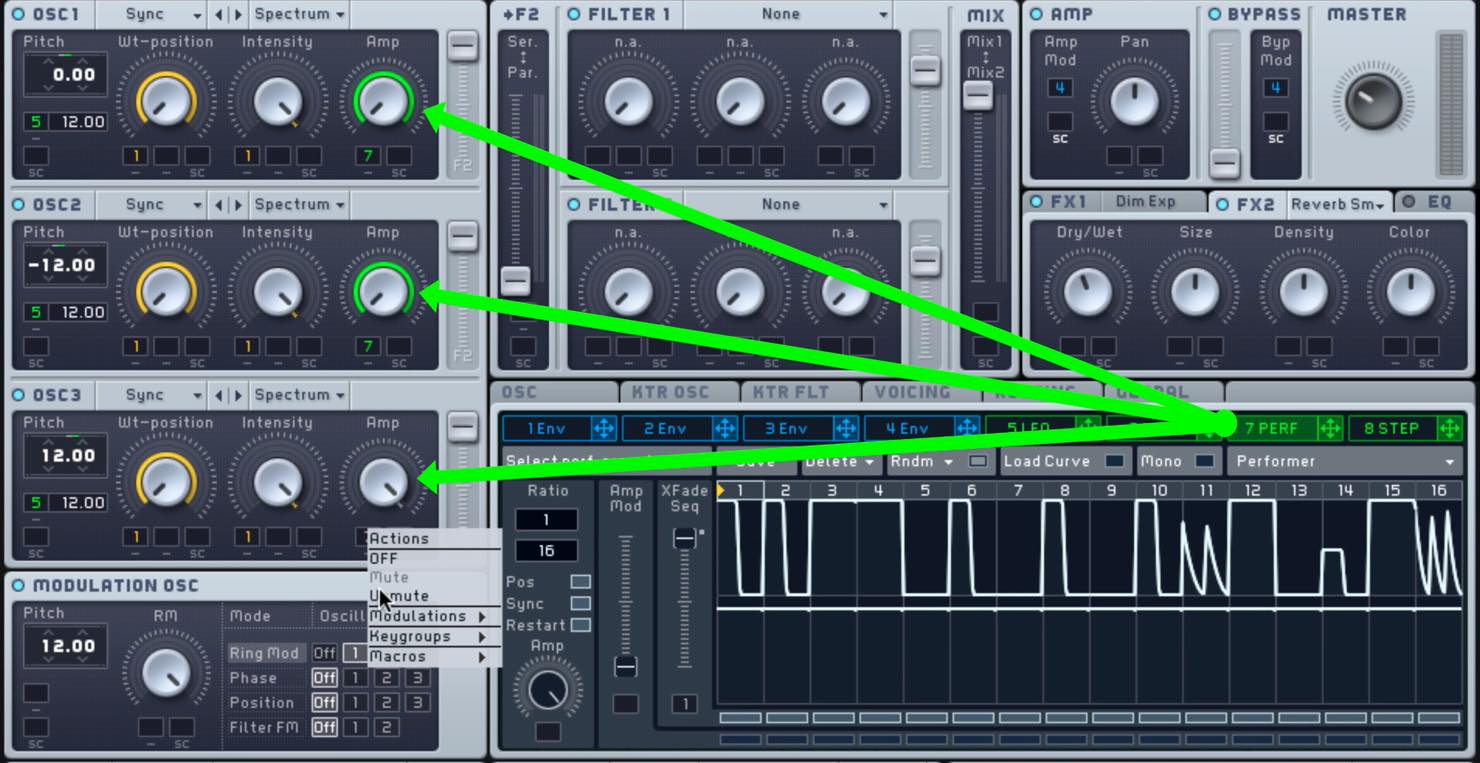
- Switch one LFO to PERFORMER and assign it to the Amp (volume) of all oscillators.
- Turn on Sync in PERFORMER and set Rate to 1/16.
- Draw an envelope for each step. A somewhat random pattern works well.
The rising sound now cuts in and out rhythmically.
Variation 6: Gradually Introduce the PERFORMER Rhythm
Finally, instead of starting the PERFORMER rhythm immediately, let’s gradually blend it in.
The key is XFade Seq, which mixes two PERFORMER sequences.
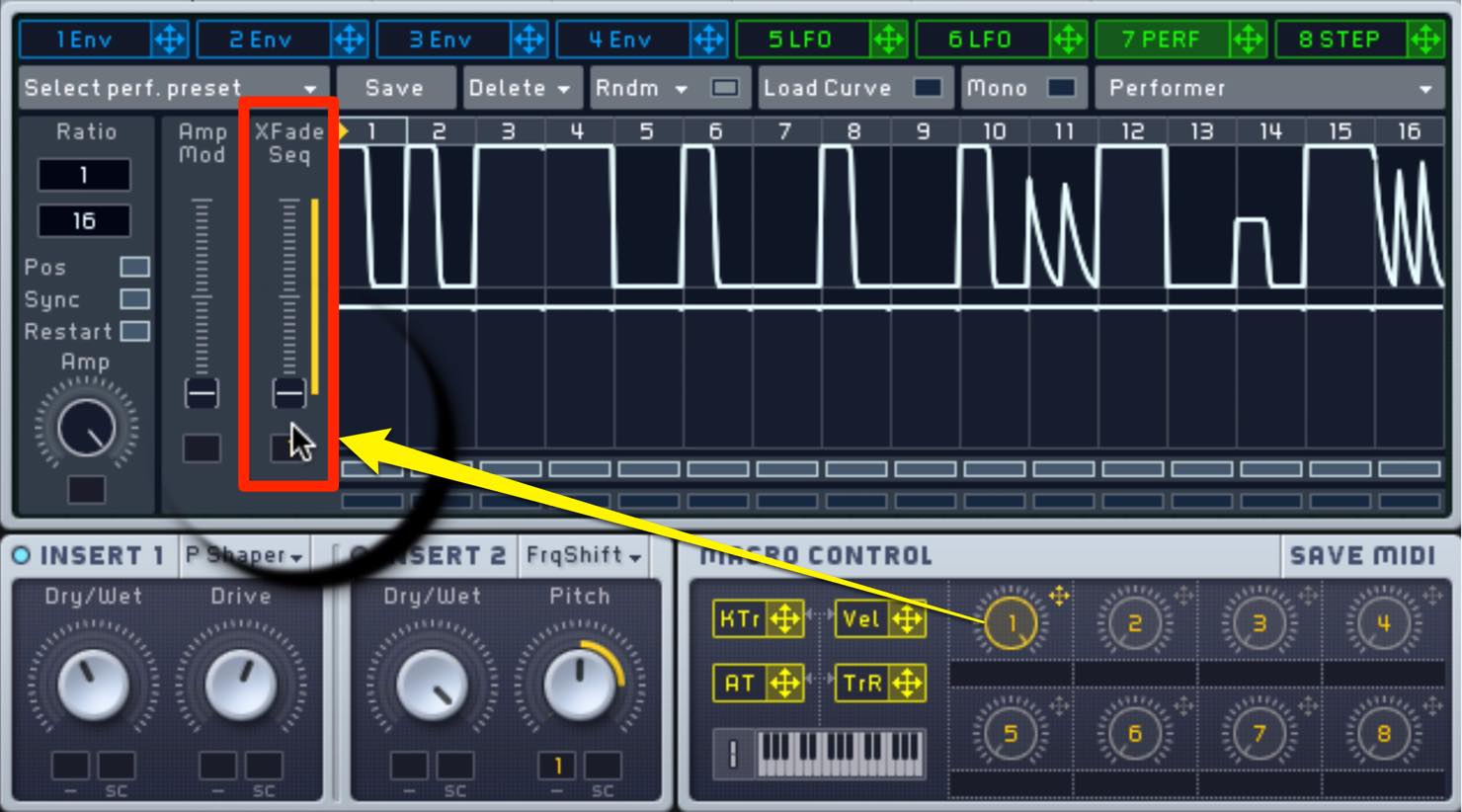
- Set every step of the lower PERFORMER envelope to maximum.
- Assign Macro1 to the sequence crossfade and set it to rise gradually from the lower sequence.
As it plays, the sound moves gradually from the steady lower sequence to the rhythmic upper sequence.
What did you think?
Risers are also excellent material for learning how envelopes and LFOs work.
Use this article as a starting point, experiment freely, and discover your own original sounds.
Frequently Asked Questions
Q1. What is a riser sound?
A riser is an effect that gradually rises in pitch or changes in tone to build tension from an EDM buildup into the drop. Metallic rising sounds and siren-like effects are common examples.
Q2. Can beginners make all six variations?
Yes. Once the basic oscillator setup and effect placement are in place, you can explore the different waveforms, LFOs, and PERFORMER assignments step by step.
Q3. What is an important setting when making a riser?
Effect routing matters. In the routing shown here, change the insert position or the filter routing if you want INS1 to process all oscillators.
Q4. How do Pulse-Saw Sync and Hard Sync differ in these examples?
Pulse-Saw Sync produces a hard, screaming character in this example, while Hard Sync produces a different harmonic character. Choose according to the feel of the track.
Q5. What does the LFO do in variation 4?
Gradually increasing the LFO Amp makes the pitch start steady and become increasingly modulated over time, producing a more expressive riser.
NEW ARTICLES
Latest English Articles
























































































































































































































































































































































































