
Cubase's audio transpose feature lets you change the pitch of recorded audio to fit a song's key. Unlike MIDI, audio can be less straightforward to change, but this feature helps you reuse existing material, adjust the key for a vocal recording or adapt orchestral material. Adjusting the transpose value on the info line by one step raises or lowers the pitch by a semitone. Splitting events also lets you use different transpose values in different sections.
Adjusting Pitch to Fit Your Song
You want to use an audio sample you like, but it doesn't match the song's key...
Or you've prepared a backing track and are ready to record vocals, only to discover that the key needs changing...
It can be a discouraging moment!
Unlike MIDI, audio isn't always easy to change.
That's where the audio transpose feature comes in.
It can help solve the problems described above.
Video Tutorial
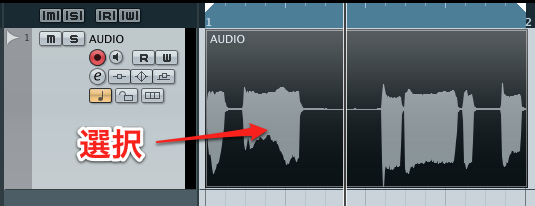
↑ Select the audio event you want to transpose.
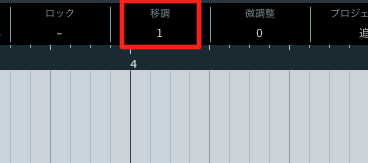
↑ Change the Transpose value on the info line.
Each +1 raises the pitch by one semitone.
Each -1 lowers it by one semitone.
If the Info Line Is Not Visible
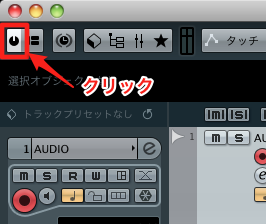
↑ Click the area outlined in red.
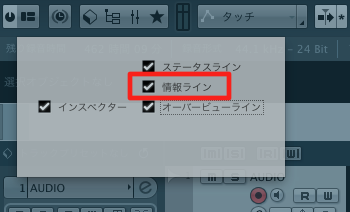
↑ In the menu that appears, check Info Line.
Transpose Individual Events
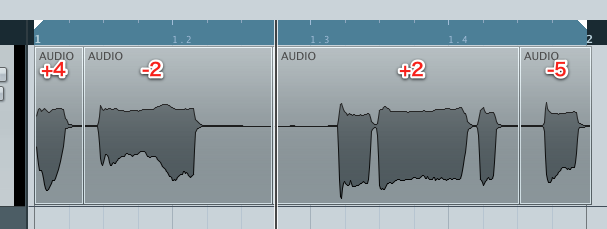
↑ You can also split an event
and transpose each resulting event separately.
This gives you even more creative flexibility!
We also recommend the following article.
Make Transposing Easier with the Transpose Track
Frequently Asked Questions
Q1. How do I change the key of audio in Cubase?
Select the audio event you want to transpose and change its Transpose value on the info line. +1 raises it by a semitone and -1 lowers it by a semitone. If the info line is hidden, enable it in the display settings.
Q2. Where can I show the info line?
Click the area outlined in red at the top of the screen to open the menu, then check Info Line. You can then access the transpose setting.
Q3. Can I create sections in different keys on the same audio track?
Yes. Split the audio event and set a different transpose value for each section to combine different keys in your project.
NEW ARTICLES
Latest English Articles





















































































































































































































































































































































































































































































































































































































































































