
This article explains a simple double-tracking effect using Waves SuperTap. Traditional double tracking builds thickness by recording the same performance more than once; SuperTap offers a delay-based way to create a similar sense of width. We cover setup in Cubase, Pro Tools and Logic, along with delay and stereo placement adjustments.
Creating a Simple Double-Track Effect
Here we introduce an arrangement technique using Waves SuperTap.
Double tracking is a long-established technique in which
the same performance is recorded twice or more, using the subtle differences between takes to add thickness.
Another approach is to duplicate a track and offset its pitch or timing.
Here we explain a simple way to create a similar effect with SuperTap.
First half: untreated; second half: processed
Creating the Sound
Selected Questions and Answers from the YouTube Video

Does this have any advantages over Waves Doubler?

Both can produce similar effects, and Doubler can certainly be used for this kind of doubling. SuperTap also offers feedback, and its simple controls make it convenient when you just want to offset the timing.
This was extremely helpful, thank you. Could this be applied to vocals, with a narrow left-right pan for a slightly wider space? It opens up possibilities, and I might use it as a workaround when production time is limited.
Yes, it can be applied to vocals or other sounds. It is especially useful when you want to place backing vocals a little farther away from the lead vocal.
Product purchase: https://bit.ly/2xZxoli
Setup by DAW
The setup differs slightly depending on the DAW.
Cubase
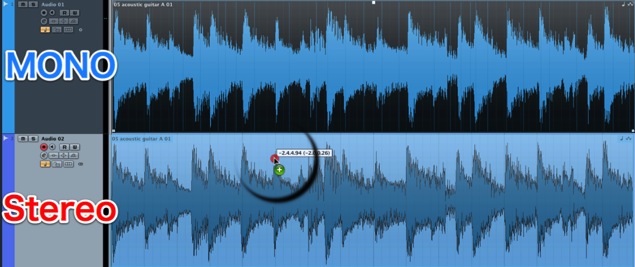
Move the mono audio material to a stereo track.

From the inserts, select SuperTap 2-Taps Stereo.
Pro Tools and Logic
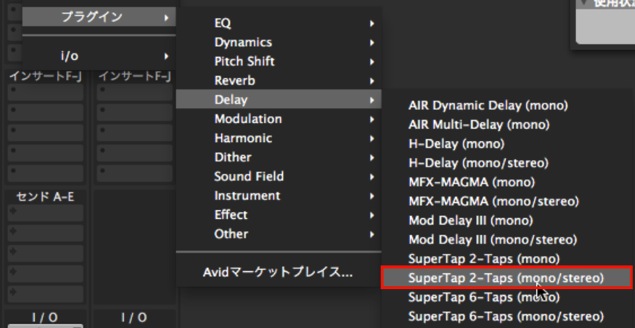
Insert SuperTap 2-Taps (mono/stereo) directly on the mono track.
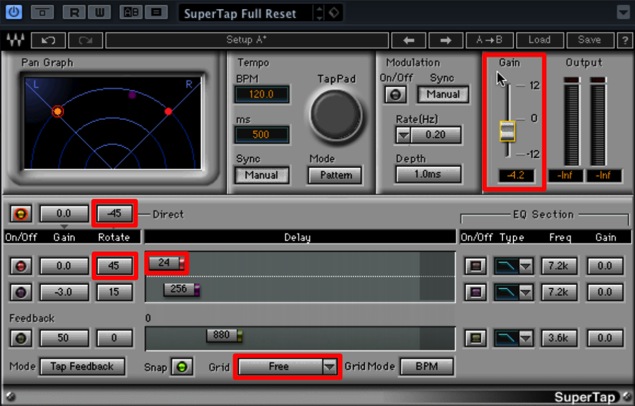
- 1. Use Direct and one tap, panning them fully left and right.
- 2. Change Grid from Sixteenths to Free.
- 3. Set Tap 1 Delay to around 20 ms.
Because the level will increase, lower Gain.
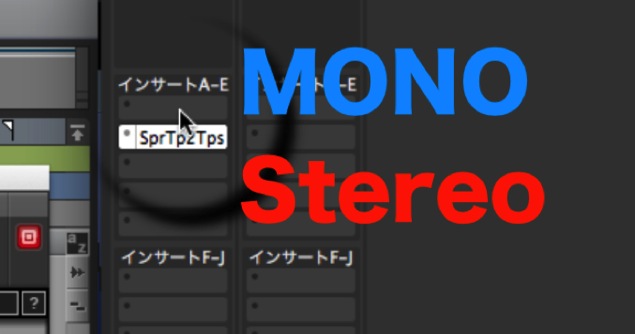
Note that the signal changes from mono to stereo at SuperTap 2-Taps (mono/stereo).
Select stereo versions of all plug-ins after SuperTap.
Frequently Asked Questions
Q1. What are the benefits of double tracking?
Double tracking uses subtle differences between performances to add thickness and dimension. It can make vocal and guitar tracks sound richer and more engaging.
Q2. How does SuperTap differ from reverb?
SuperTap is a delay that creates timed repeats and can be used to add stereo width. Reverb combines many reflections to create a sense of space, so its uses and sound are different.
Q3. Why start with a mono track?
Processing a mono source into stereo makes it easier to control left and right placement when creating the doubling effect.
Q4. Why set the delay to 20 ms?
A delay of around 20 ms is a useful starting point for adding thickness and width. Whether the repeat sounds fused or separate depends on the source, level and listening conditions, so adjust it by ear.
NEW ARTICLES
Latest English Articles



















































































































































































































































































































































































































































































































































































