
If other tracks stop playing while you use Cubase’s Key Editor, its Solo mode may be enabled. This article shows how to turn off the highlighted S button so you can hear the other tracks while editing. It also suggests connecting an audio interface or unresponsive keyboard directly to the computer as a troubleshooting step.
Cannot Hear All Tracks While Editing

Do the other tracks stop playing when you open the Key Editor?
Here is one way to resolve it.
Cubase Troubleshooting: MIDI Problems
Solution
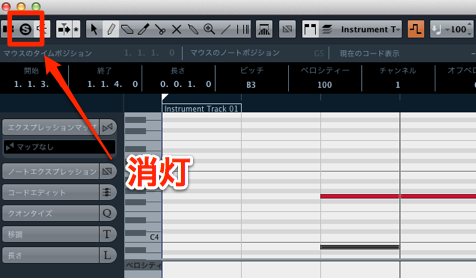
The Key Editor’s Solo mode may be enabled.
Solo mode can be useful, but if you want to hear the other tracks,
turn off the S button outlined in red.
Video: What to Check When Cubase Produces No Sound
Additional note:
The original tutorial recommends connecting an audio interface directly to the computer instead of through a USB hub.
If your keyboard is unresponsive, try connecting it directly as well.
Frequently Asked Questions
Q1. What should I do if I cannot hear other tracks in the Key Editor?
Solo mode in the Key Editor may be enabled. Check whether the S button outlined in red is lit and turn it off if necessary.
Q2. When is Solo mode useful?
It helps when you want to focus on editing one track. Playing that track alone lets you make detailed adjustments without other sounds in the way.
Q3. Why check how an audio interface is connected?
A USB hub may cause connection or power problems in some setups. If an interface or MIDI keyboard is not responding reliably, a direct connection to the computer is one troubleshooting step to try.
NEW ARTICLES
Latest English Articles




















































































































































































































































































































































































































































































































































































