
Plugin Boutique Scaler is a chord-progression assistant that can streamline music production even without a background in music theory. Choose a key and genre to get ready-to-use progressions, then use diatonic chords, voicing changes and MIDI export to add them to a song quickly. It supports DAWs such as Logic Pro X and VST hosts, and can assign chords to a MIDI keyboard for real-time recording.
Find Ready-to-Use Chord Progressions for Your Genre
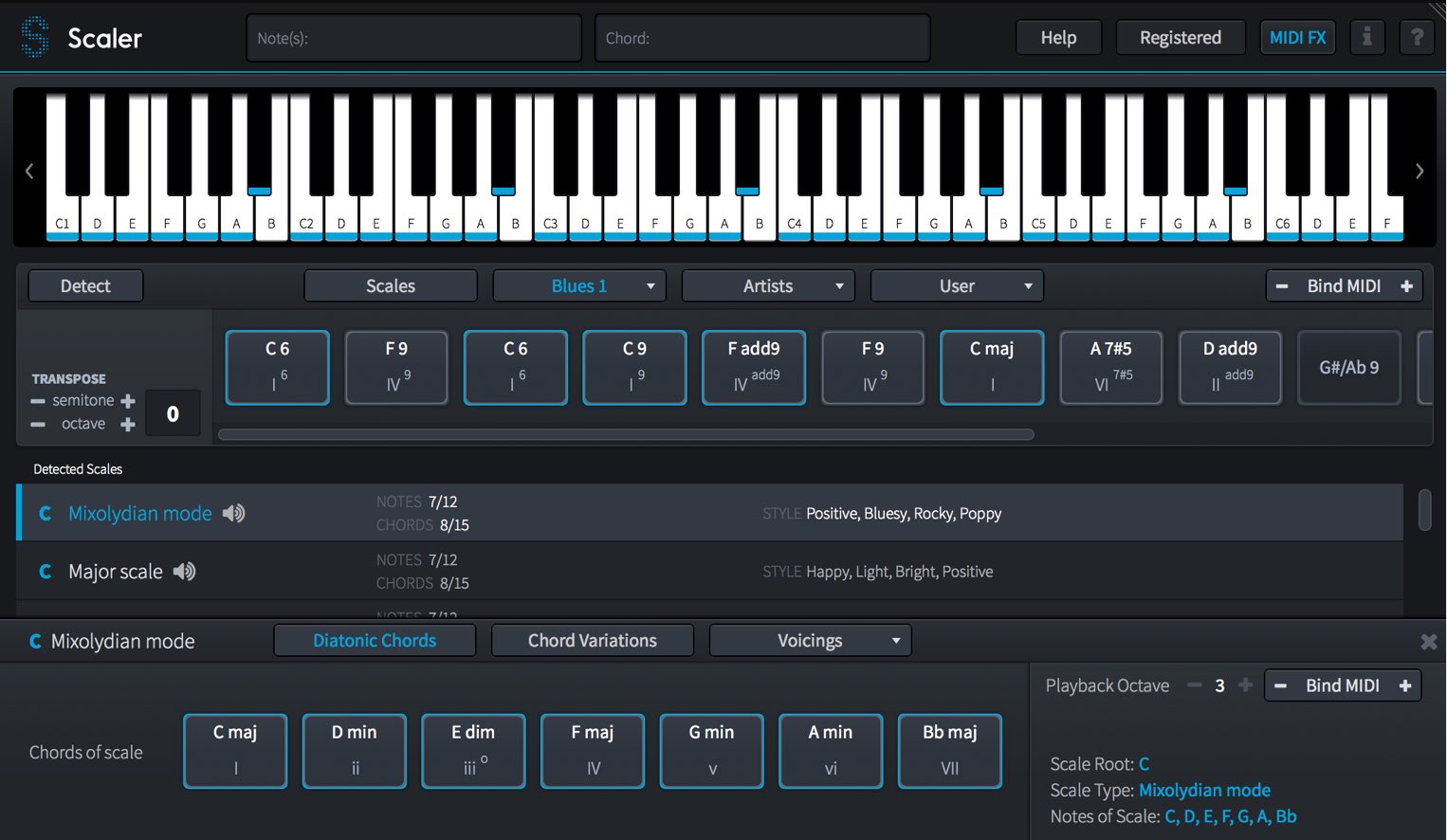
Scaler is software released by Plugin Boutique.
Select your song’s key and genre, and it helps you find chord progressions you can use immediately.
Even if music theory is not your strong point, you can quickly audition chords against a backing track and incorporate them into your music.
Useful features such as changing chord voicings and exporting MIDI files help you develop a more concrete idea of your song.
Let’s get started.
Scaler Video Tutorial
- 1Scaler Tutorial: The Basics
- 2Scaler Tutorial: Practical Applications
- 3Scaler 2: New Features
- 4Scaler 3: Highlights of the New Features
Questions and Answers from the YouTube Video

At 06:17, I have a question about MIDI recording in Cubase. I use Logic, and when I try this there, only the keys I actually press are recorded as MIDI notes. The sound itself is fine: Bind MIDI plays the chords. Is there a DAW setting needed to record the individual notes of the chords Scaler plays instead of only the single key I press?

Logic’s MIDI routing works differently and does not allow MIDI output from the software in this setup. The same applies to questions we often receive about NI MASCHINE MIDI. As we understand it, the workaround is to drag and drop the chords from the pads onto the timeline.
This feels like cheating! Can it be used in Cakewalk too?
We have not used Cakewalk’s DAW ourselves, but we expect it to work if the host supports VST.
I always enjoy your videos. If I set the key to E-flat major, can I register chords outside the scale, such as E7 or G, to my own pads and build a progression?
Right-click a chord as shown in the image and use “Edit Chord” to create and specify a chord.
I use FL Studio 20 on a MacBook Pro, but I cannot open Scaler after installing it. What should I do?
There is a detailed guide to using Scaler with FL Studio; please take a look: https://bit.ly/3egPFey
I bought and installed it on a Mac, but cannot launch it in Cubase. What should I do?
Have you created an instrument track and searched for it as an instrument? https://app.box.com/s/ydfu4zasz2tl3g8hkv0pnlri8vmyxt9y If it still does not appear, go to Studio → VST Plug-in Manager in the top menu. If Scaler appears on the Blacklist tab, select it and try “Reactivate.”
I tried it in Logic Pro, but Scaler’s imported tempo stays at 120 instead of matching the song. How can I match the chords to the original tempo? I also checked “do not show again” on the dialog asking whether to match the song tempo or keep the Scaler chord project’s BPM. How can I show that dialog again?
In the selection window that appears when importing MIDI, choose “Import tempo” to synchronize the tempo. To show the window again, open Preferences and choose “Reset selected items.” https://app.box.com/s/djx9uuczojuqj99b88xlayh61pqont73
I downloaded Scaler after buying it, opened Scaler.license, and launched my DAW, but Scaler makes periodic noise. I learned that it needs activation. I use Studio One on a Mac; clicking the piano icon on the Scaler track only shows “Scaler 1.8 Discover the new features in Scaler 1.8,” with no activation area. The piano roll does not appear either, although my MIDI keyboard responds. Do I need to register on another site before activation? Sorry for the long question!
Click the area shown in the image and select the license file. https://app.box.com/s/z0hb9z9rg34rwxhm1telgdd6r2dmp15u You can download the license file from the area shown in your Plugin Boutique account. https://app.box.com/s/mfef0u0wxtoa7sayqcgrrsq1tw51attj
I use Logic Pro on macOS. After downloading the software and the license file from My Account, I try to register it, but the download folder appears empty in the license-file dialog and I cannot complete registration. Support pointed me to https://support.pluginboutique.com/knowledgebase/articles/1887493-manufacturer-technical-support-contact-list, but I cannot find Scaler’s developer there. How can I get it working?
Load the license file into Scaler. Click the area shown in the image; when prompted, select the license file. https://app.box.com/s/i6lsqwtd8u3niywsme7b1gcz1w6fn65f That should activate it.
I purchased and installed Scaler, but cannot use it in Logic X. It appears under MIDI FX, but only the words “Scaler 1.8” appear instead of the piano screen. How can I fix this?
At the time of this reply, Scaler 1.8.1 was available from the Plugin Boutique account page. Install it and check whether it launches. https://app.box.com/s/26iyfgdmmdsbsggs2ymlmb5o978clyak
When I launch Scaler on a track, a static-like noise fades in roughly every 10 seconds and lasts about five seconds. Is this a fault? Reinstalling did not help. I purchased the latest version in March 2019 and use an iMac with Cubase 9.
It is probably running in demo mode, which produces periodic noise. Purchasing and activating the product should resolve it.
I enjoy your clear tutorials. I have kept composing without studying music theory, but I am stuck on chord progressions. Would Cubase Pro 9.5’s Chord Pads or Scaler be better for me? 1. Which is easier without theory knowledge? 2. I want complex progressions like Steely Dan or Hello! Project songs. 3. Can either identify a song’s key from a vocal melody I composed and converted to MIDI? 4. Which has more scales? 5. Is there a better option for these uses? Sorry for all the questions; I am unsure which to buy.
Each product has its own strengths, so there is no single answer. These are personal opinions based on the versions discussed at the time: 1. Cubase Chord Pads may be easier because they integrate with Cubase. 2. Cubase may be useful because it suggests chords. 3. Neither supported identifying the key from a converted melody in this comparison. 4. Scaler offers more scales. 5. Komplete Kontrol is also a good option: https://sleepfreaks-dtm.com/softsynth/komplete-kontrol-4/
How can I use Scaler to play a chosen instrument in Studio One?
Change the instrument’s MIDI input to Scaler and enable its record icon. https://app.box.com/s/t1xax2cs0zg0uh4kabyd1zjtxlhlcu4v
Can I use it in FL Studio?
Yes, it is available as a VST plug-in.
A Note on Importing MIDI in Logic Pro X
Authorizing Scaler
After installing the product, you need to authorize it.
Scaler Installation and Activation
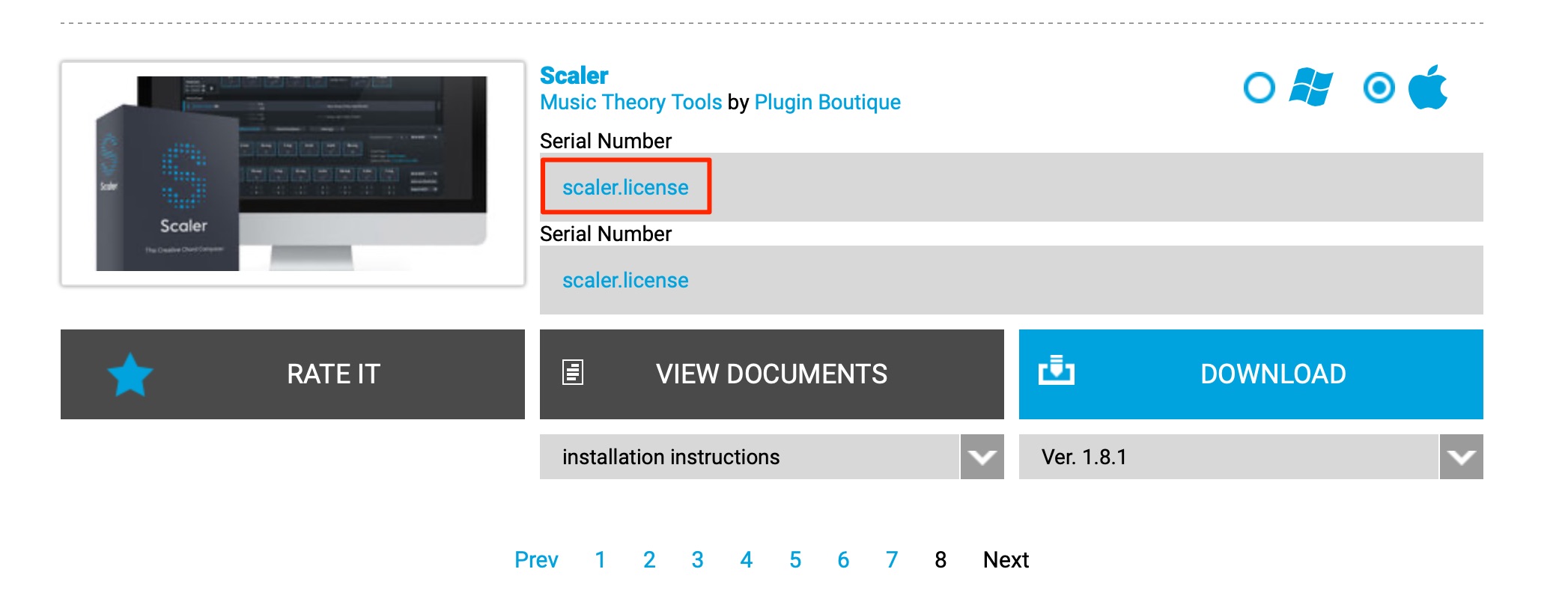
Download the license file shown on your Plugin Boutique account page (login required).
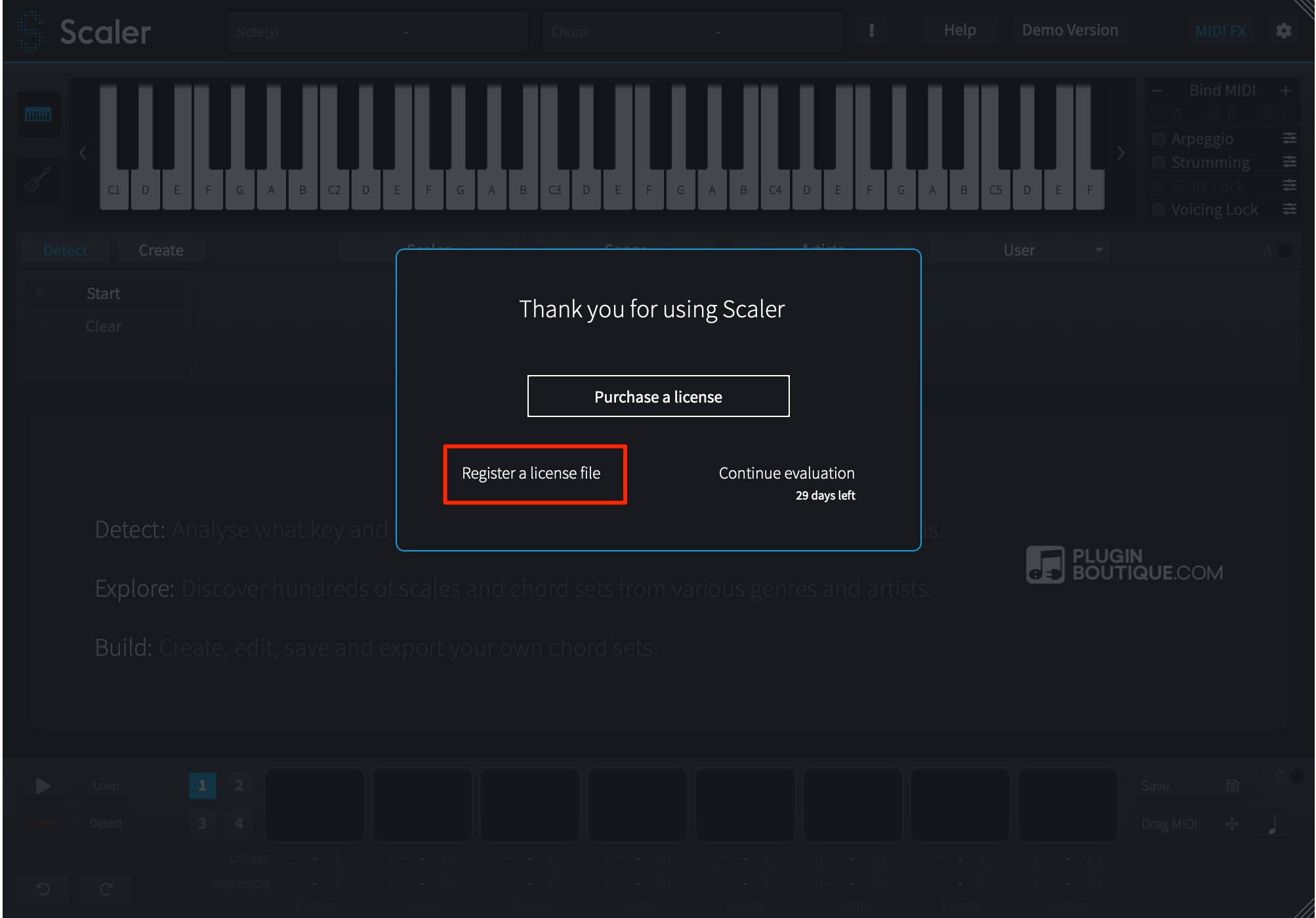
In the window shown when you launch the product, select “Register a licens file” and choose the downloaded license file.
Authorization is now complete.
Setting Up Scaler
First, set up Scaler so that its chords play your chosen instrument.
Logic (AU)
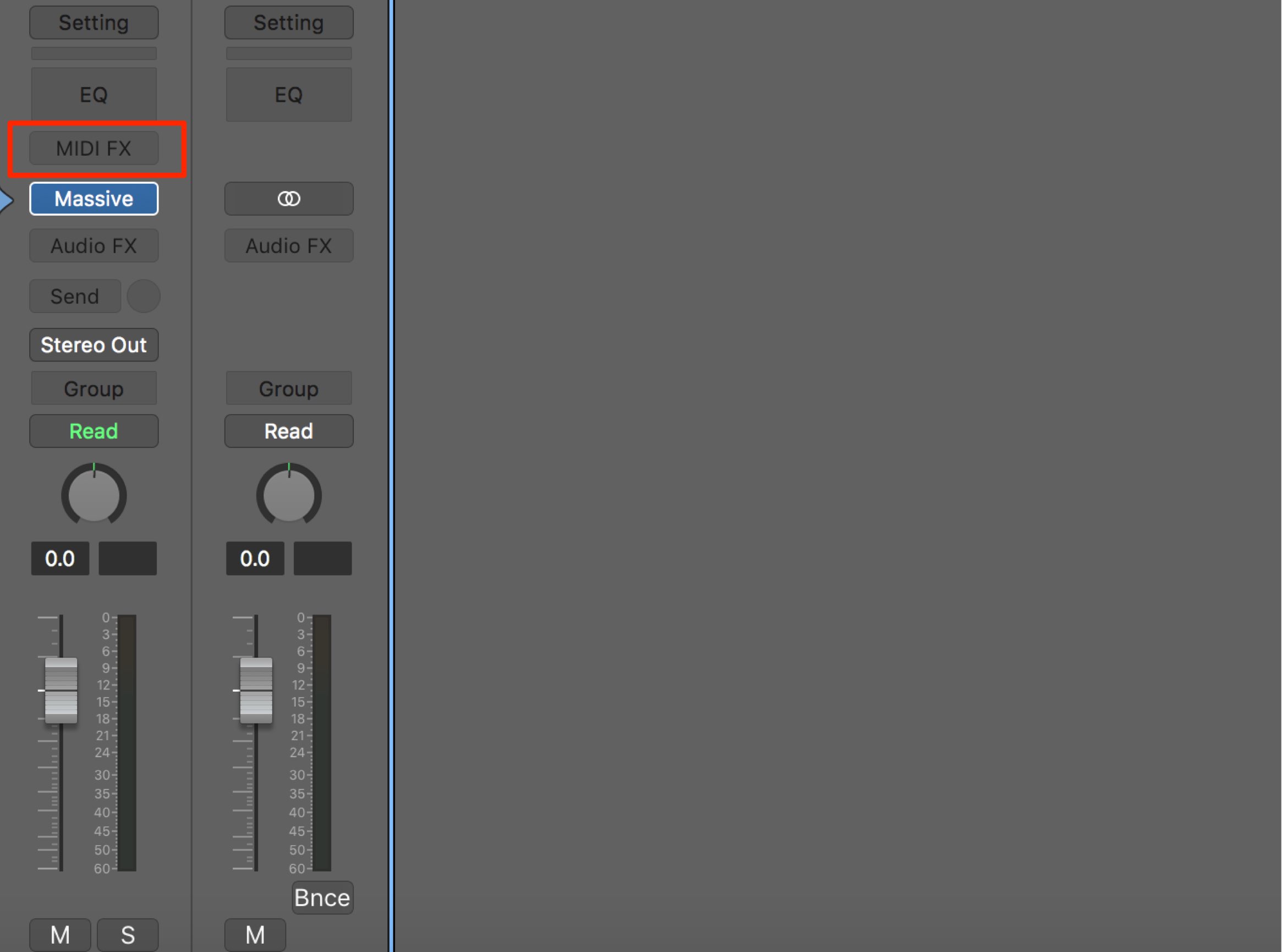
Launch the instrument you want to use as a software instrument.
Then click “MIDI FX.”
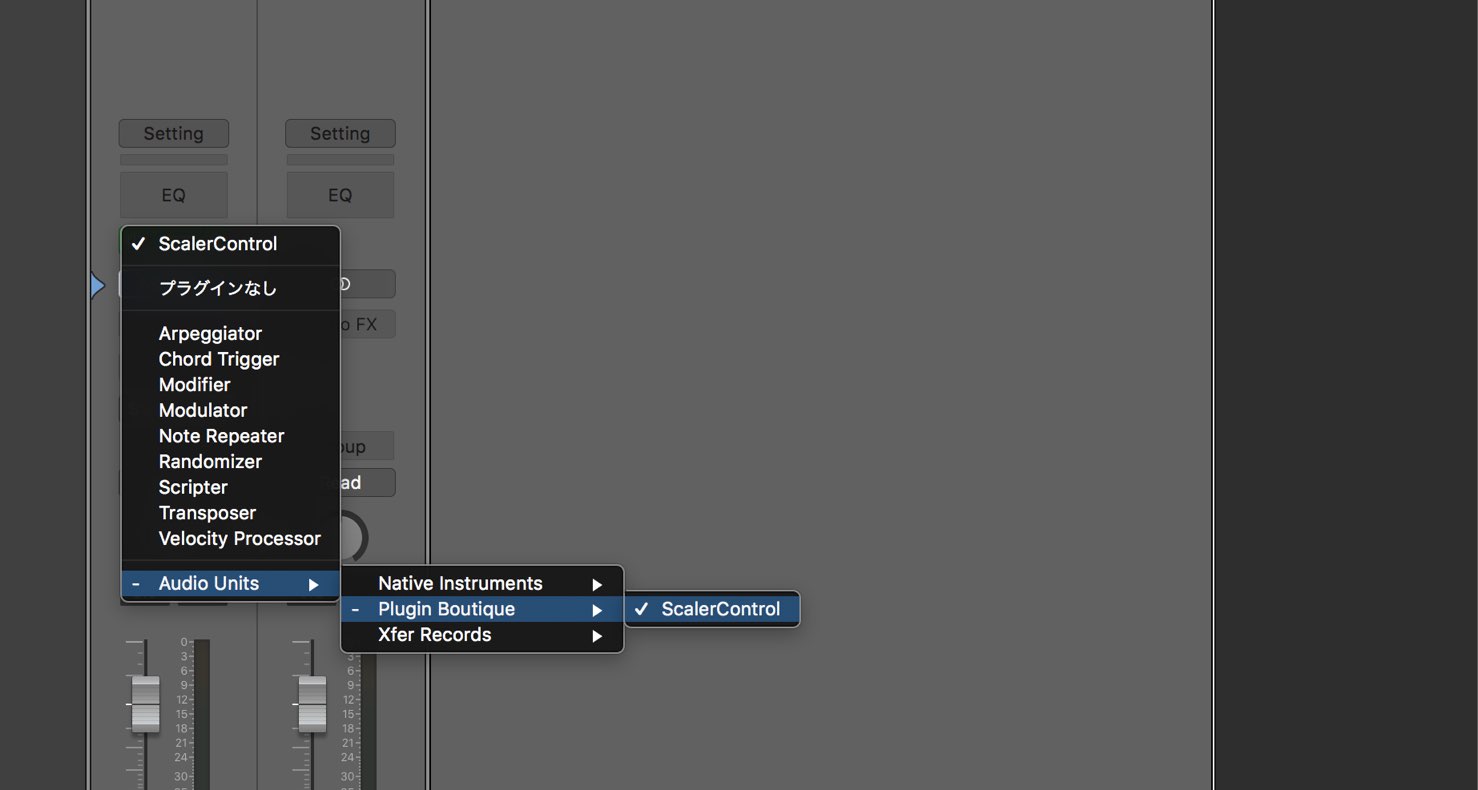
Choose Audio Units → Plugin Boutique → Scaler.
Setup is complete.
VST
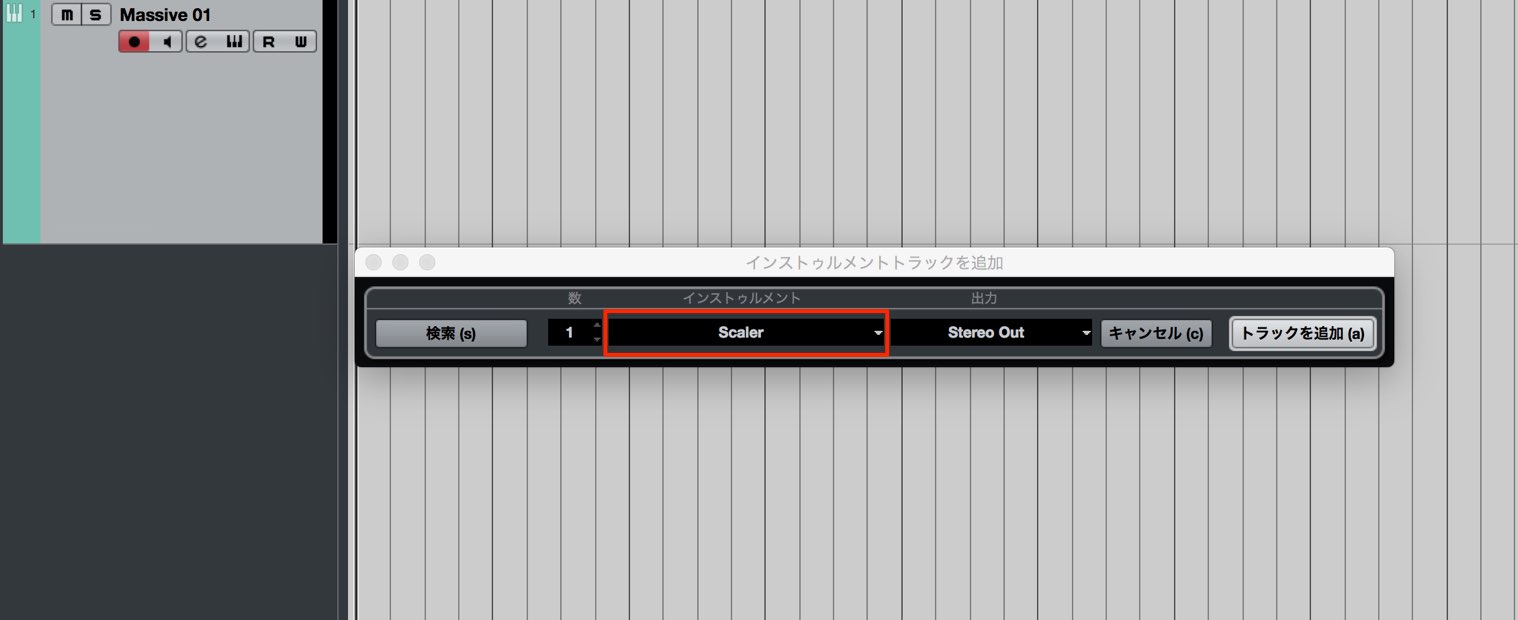
Launch the instrument you want to use.
Then launch Scaler as an instrument, just as you would another virtual instrument.
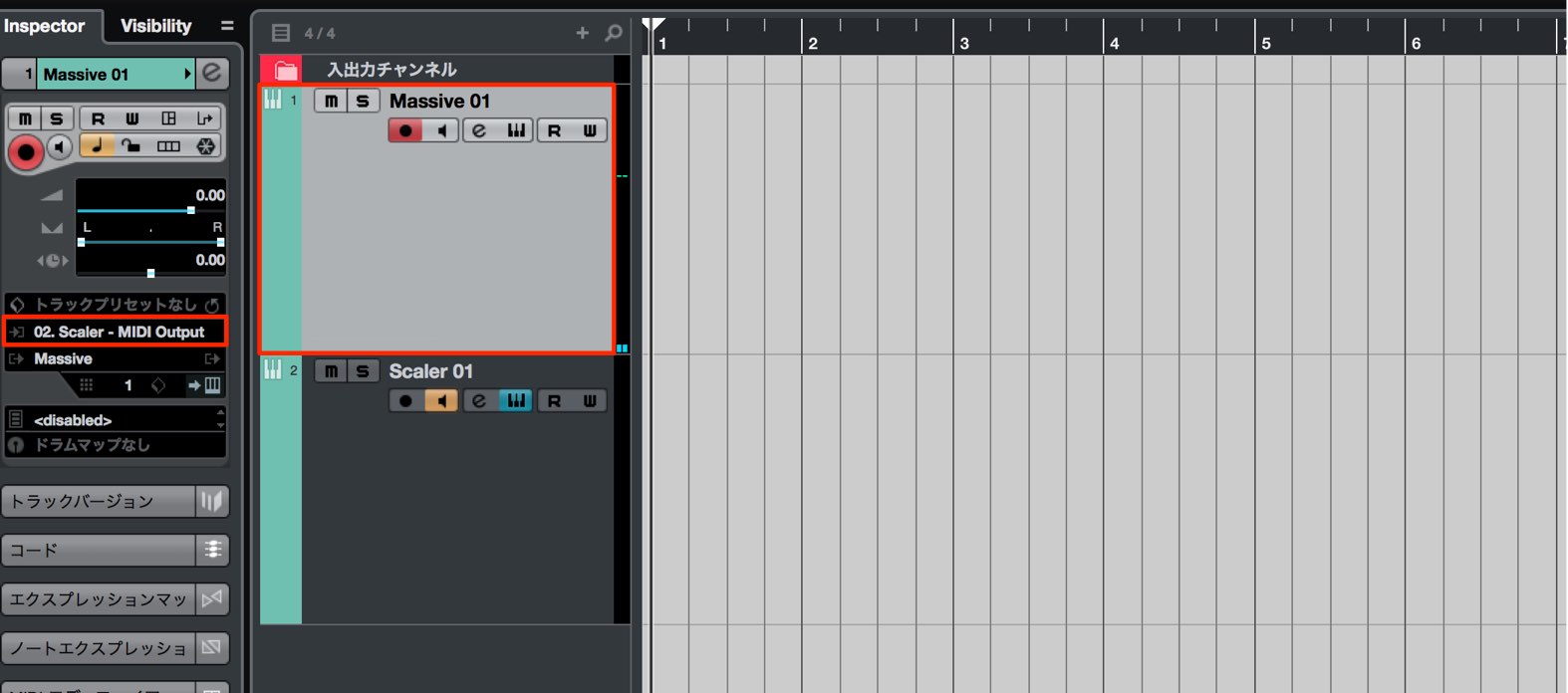
Select the sound source and choose “Scaler” as its MIDI input.
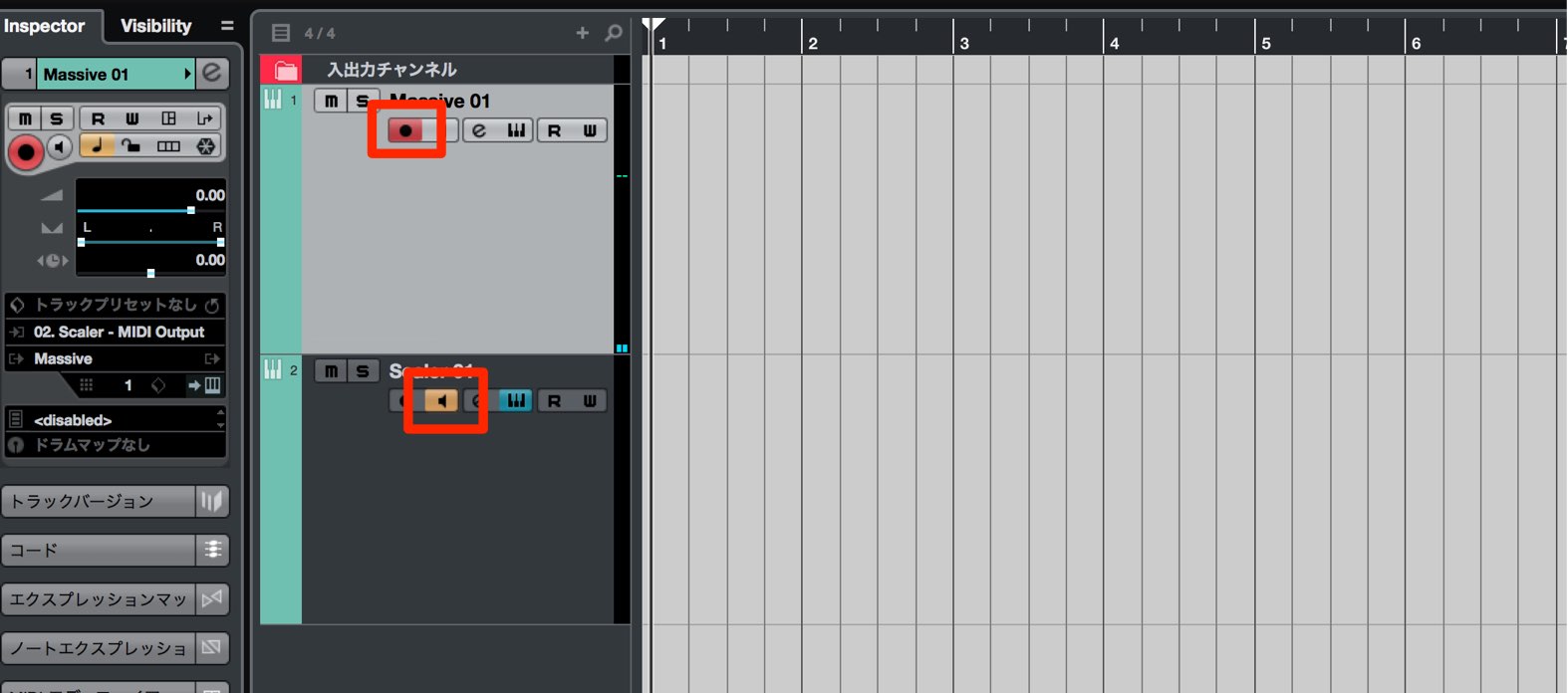
Enable recording on the instrument track and enable monitoring on the Scaler track.
Setup is complete.
Using Scaler
With the setup above, notes and chords played in Scaler trigger your instrument.
Scaler also has a built-in piano, so its sound may play alongside your chosen instrument.
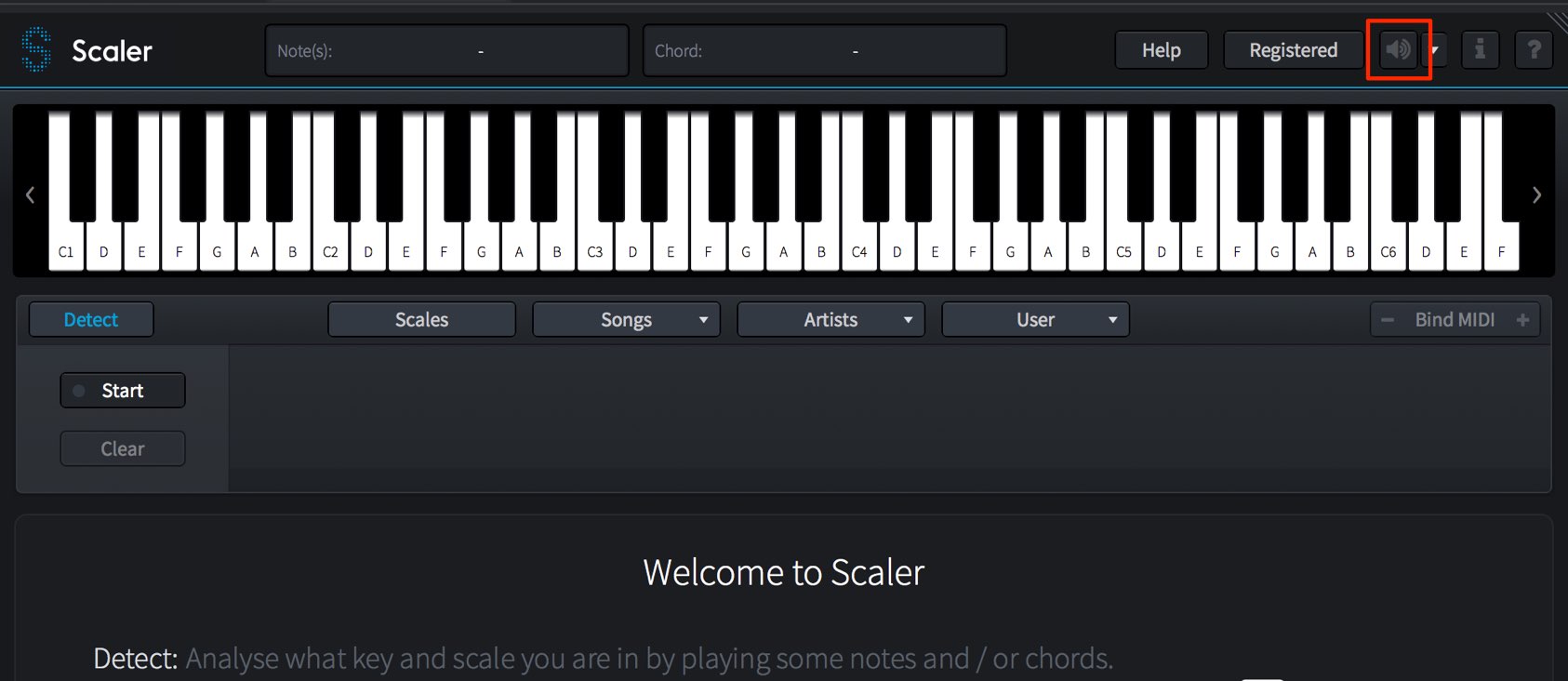
Turn off the speaker icon at the upper right to mute Scaler’s own sound.
Using Scales
Choose a key and scale to see the notes available for a song.
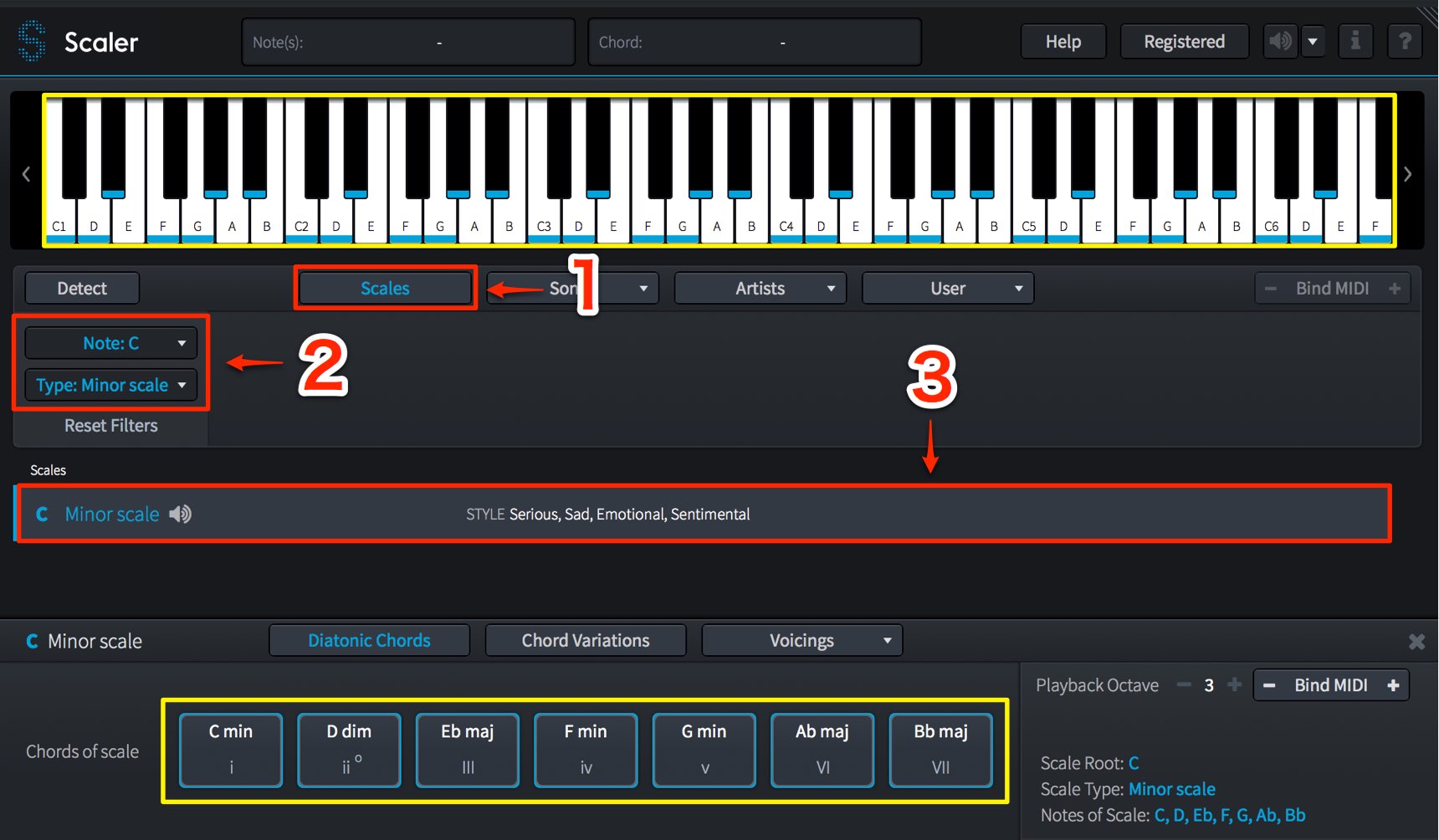
- 1. Select Scales.
- 2. Choose the song’s key from the upper menu and the desired scale from the lower menu.
- 3. Click a matching scale to load it.
Once loaded, blue markers show the scale notes on the keyboard, and chords built from the scale appear below.
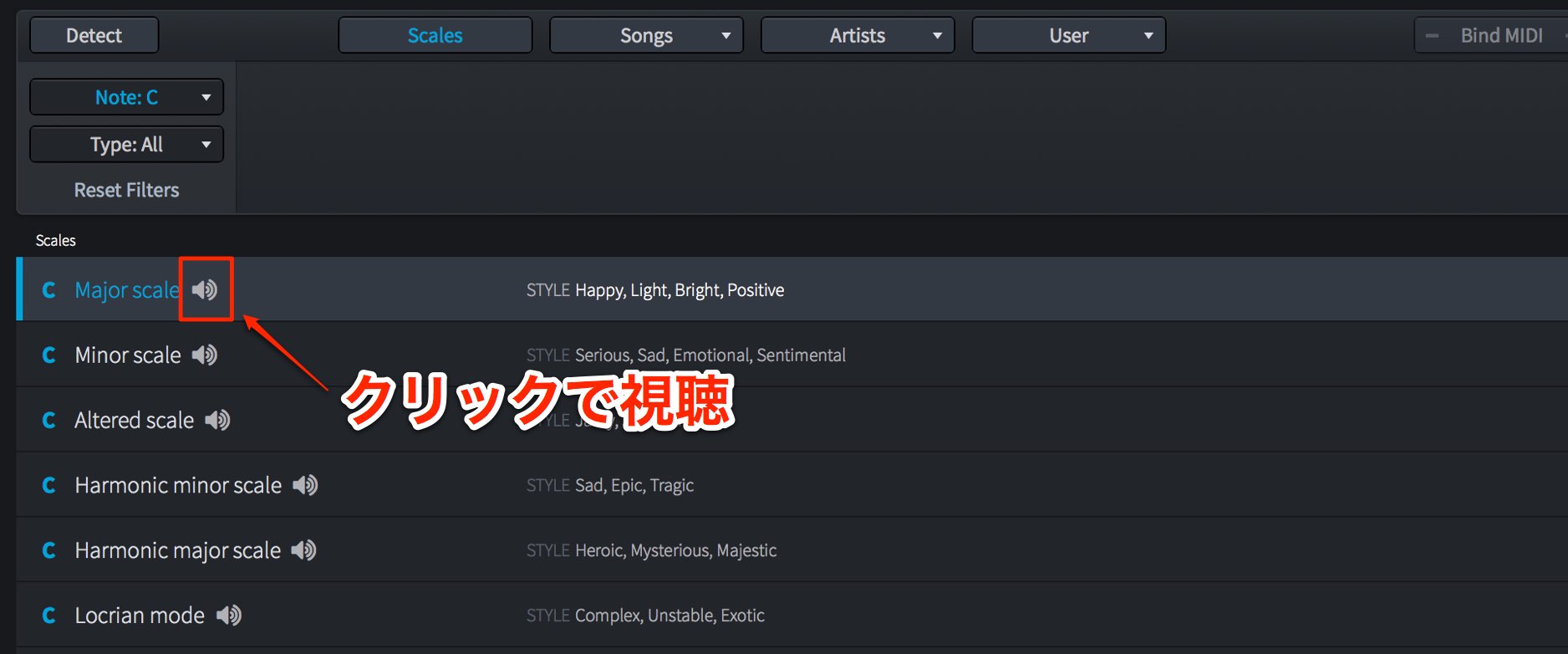
Click the speaker icon beside a matching scale to audition its notes.
Using Chords
You can load chord-progression presets by genre or artist type.
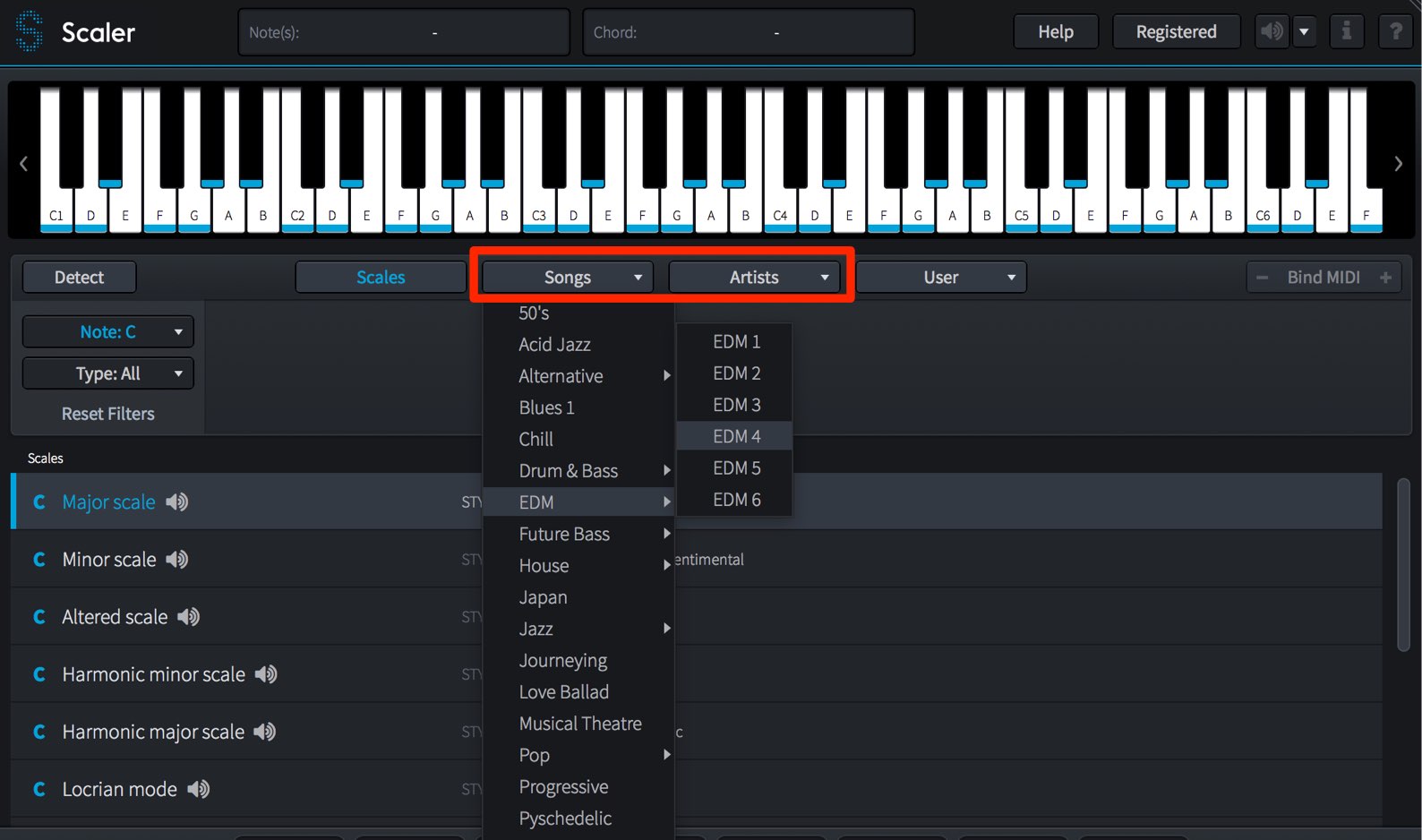
Choose the desired chord type from these two tabs.
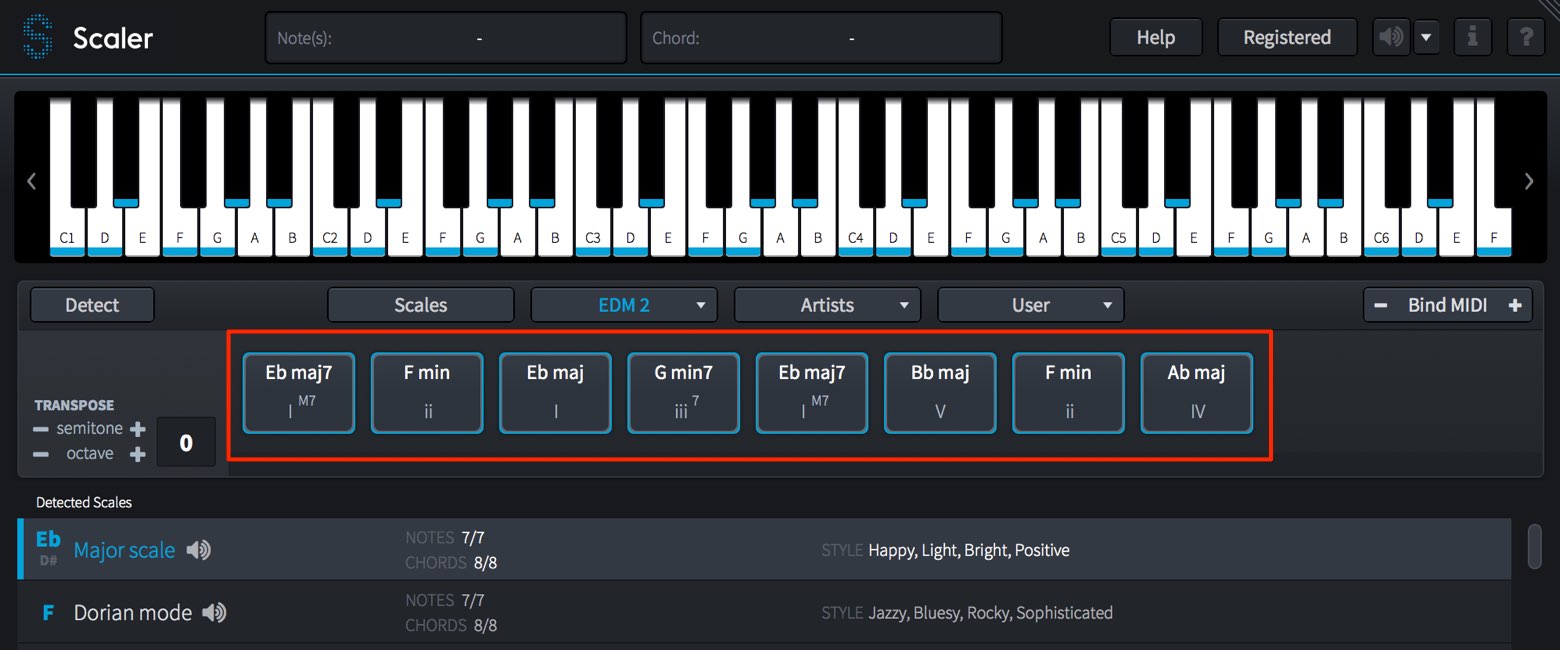
The chord set loads as shown.
Click each chord pad to audition it.
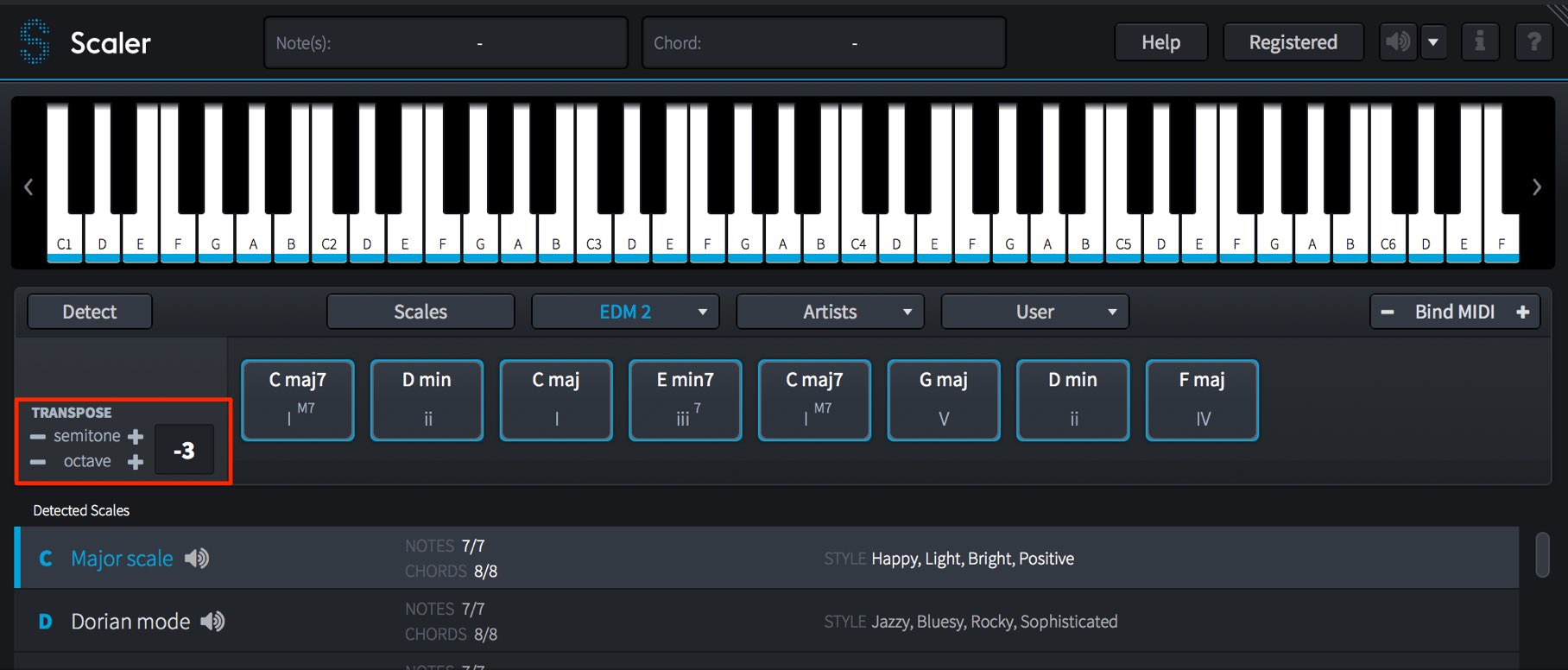
A loaded chord set may not match your song’s key.
Use the semitone −/+ controls on the left to change the key.
The octave control below changes the octave.
You can also assign these chord pads to a MIDI keyboard and record in real time.
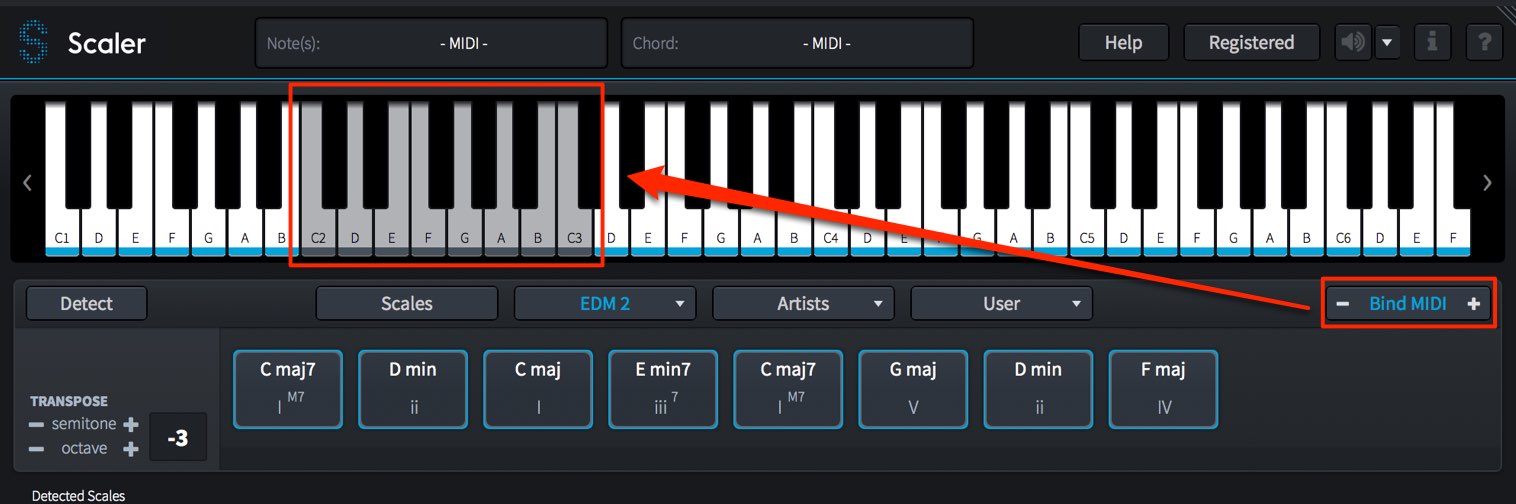
Click “Bind MIDI” to assign each pad to a white key on your MIDI keyboard.
The keys assigned to chord pads appear in light gray.
Use the −/+ controls on either side of Bind MIDI to choose the octave for the pads.
Placing them in an octave that does not interfere with single-note playing is useful.
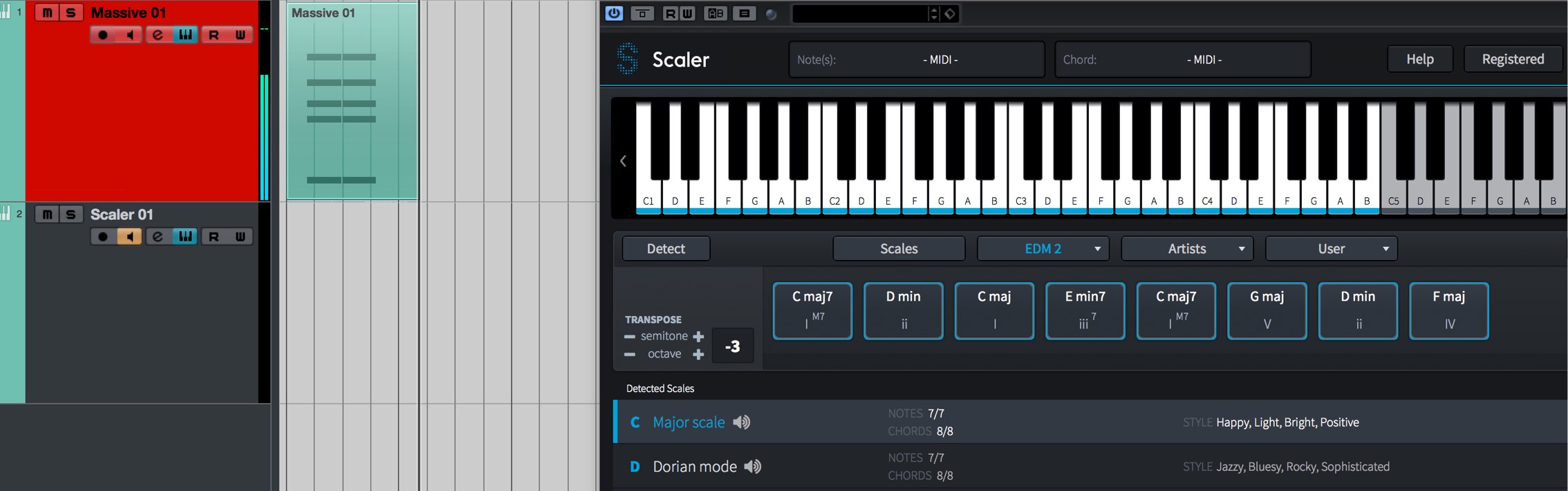
Then enable recording on the instrument, start recording, and play the assigned keys on your MIDI keyboard.
Customizing Chords
The steps above use chord presets, but you may also want to find or customize your own chords.
The chord pads in the middle section make this possible.
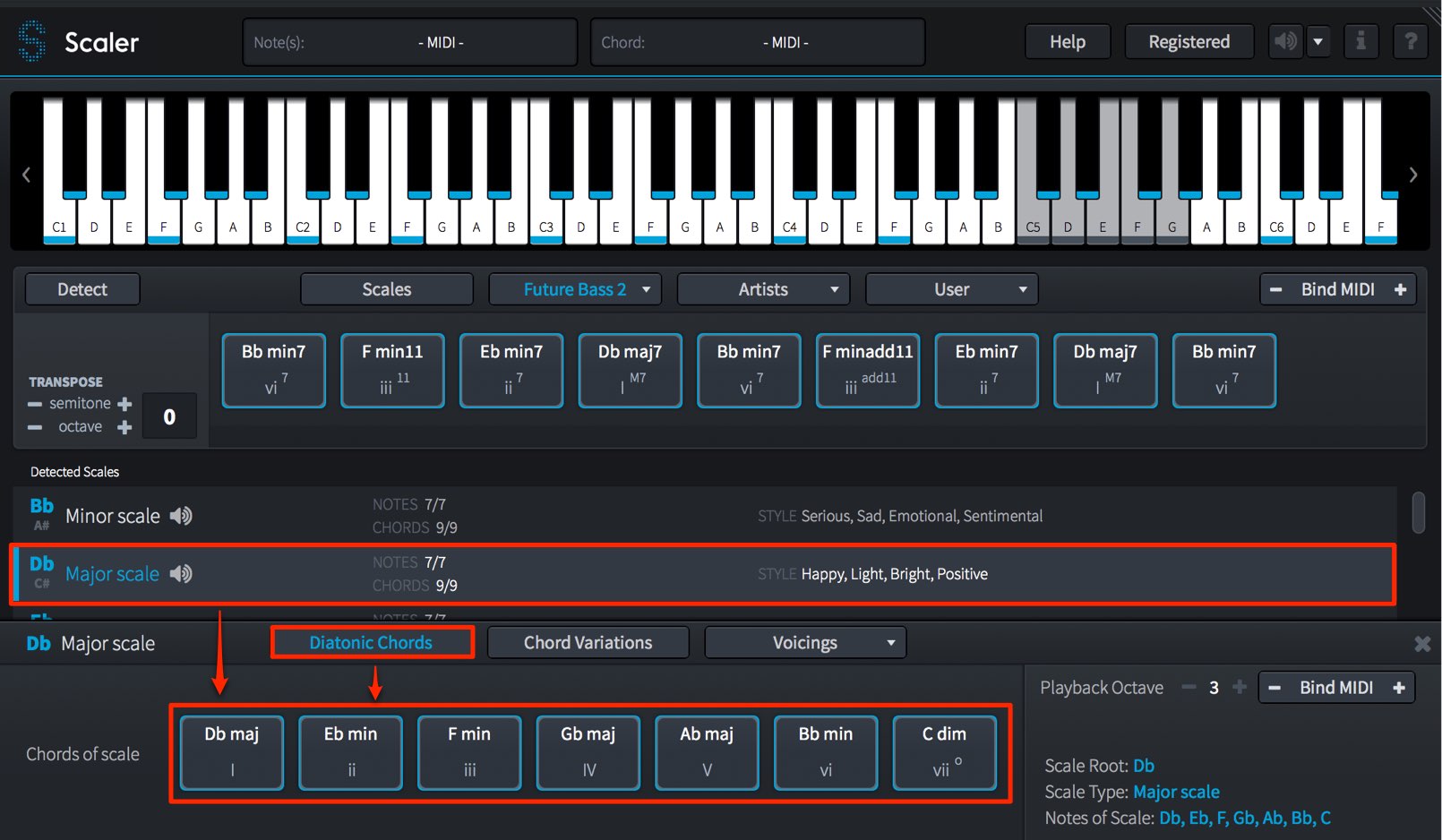
“Diatonic Chords” generates diatonic chords from the selected scale.
These provide conventional, simple chords.
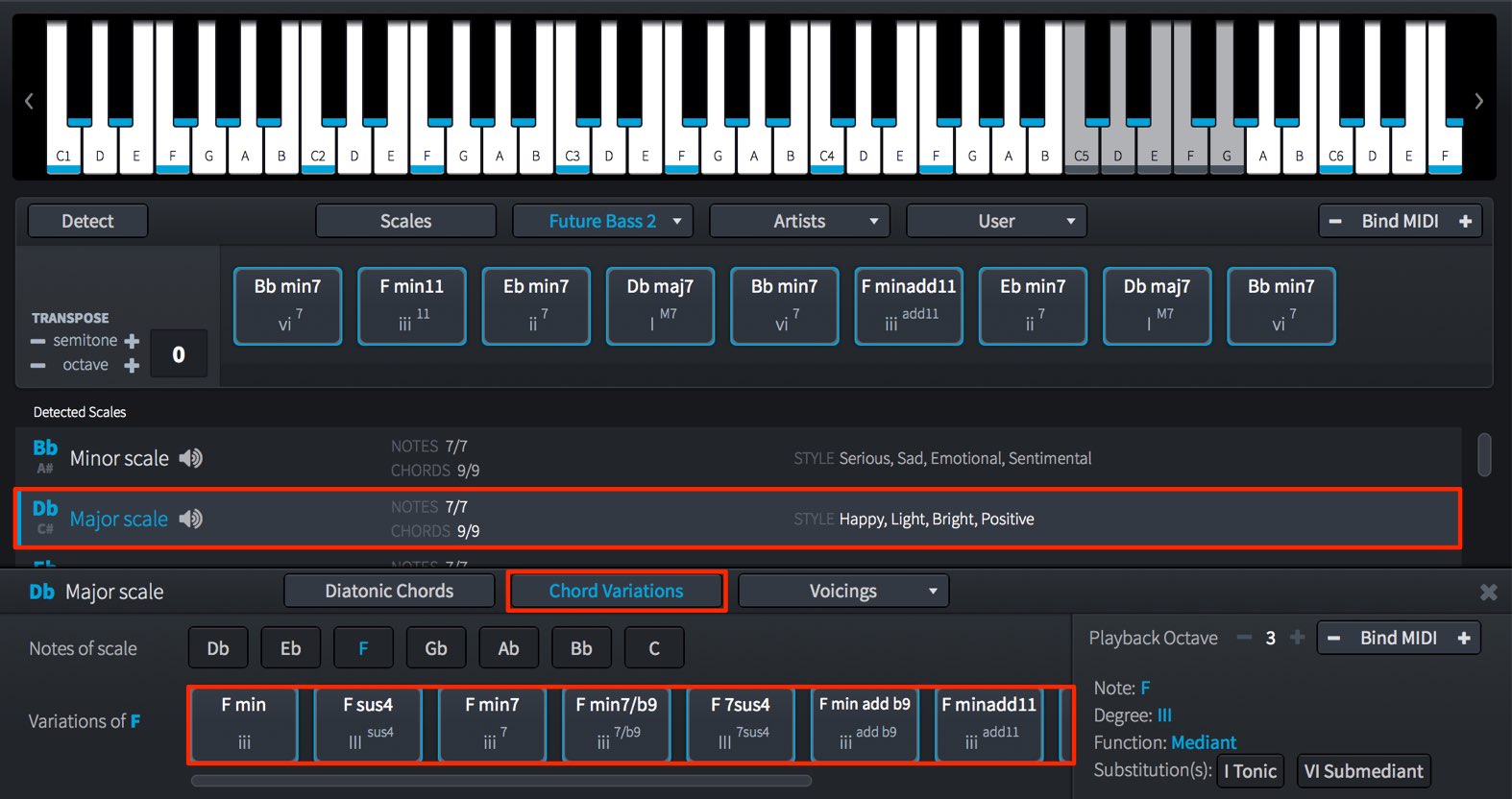
“Chord Variations” lets you choose a note from the selected scale and generate chords rooted on it.
This is useful when you want a different mood or a little more color.
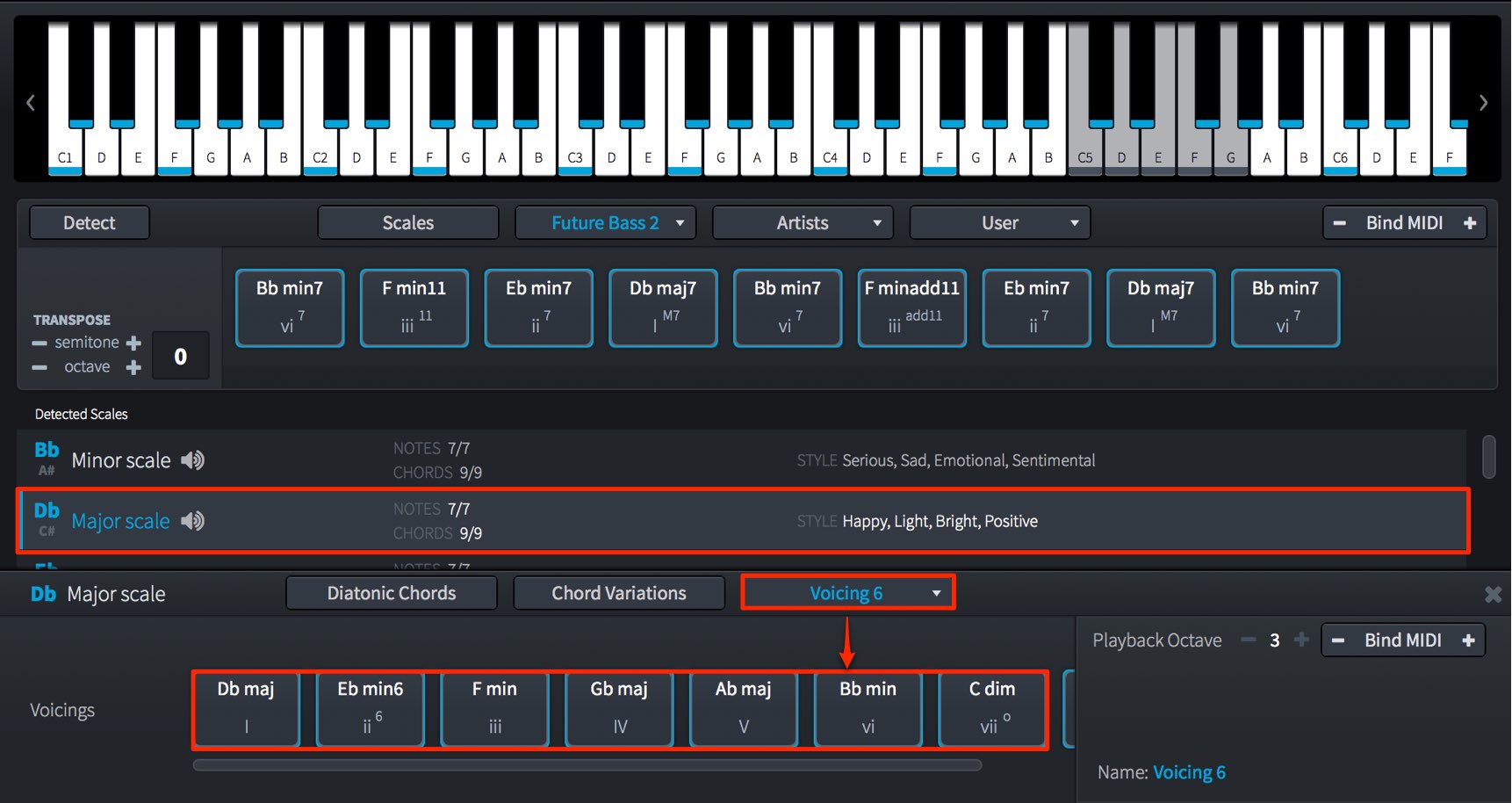
“Voicing” lets you change the notes in chords generated from the selected scale or create variations such as sixths and sevenths.
Tailoring chords to your song can produce a more natural progression that fits your vision.
Combine Chords on Your Own Pads
Drag and drop any chords you have chosen or created onto the bottom row of chord pads.
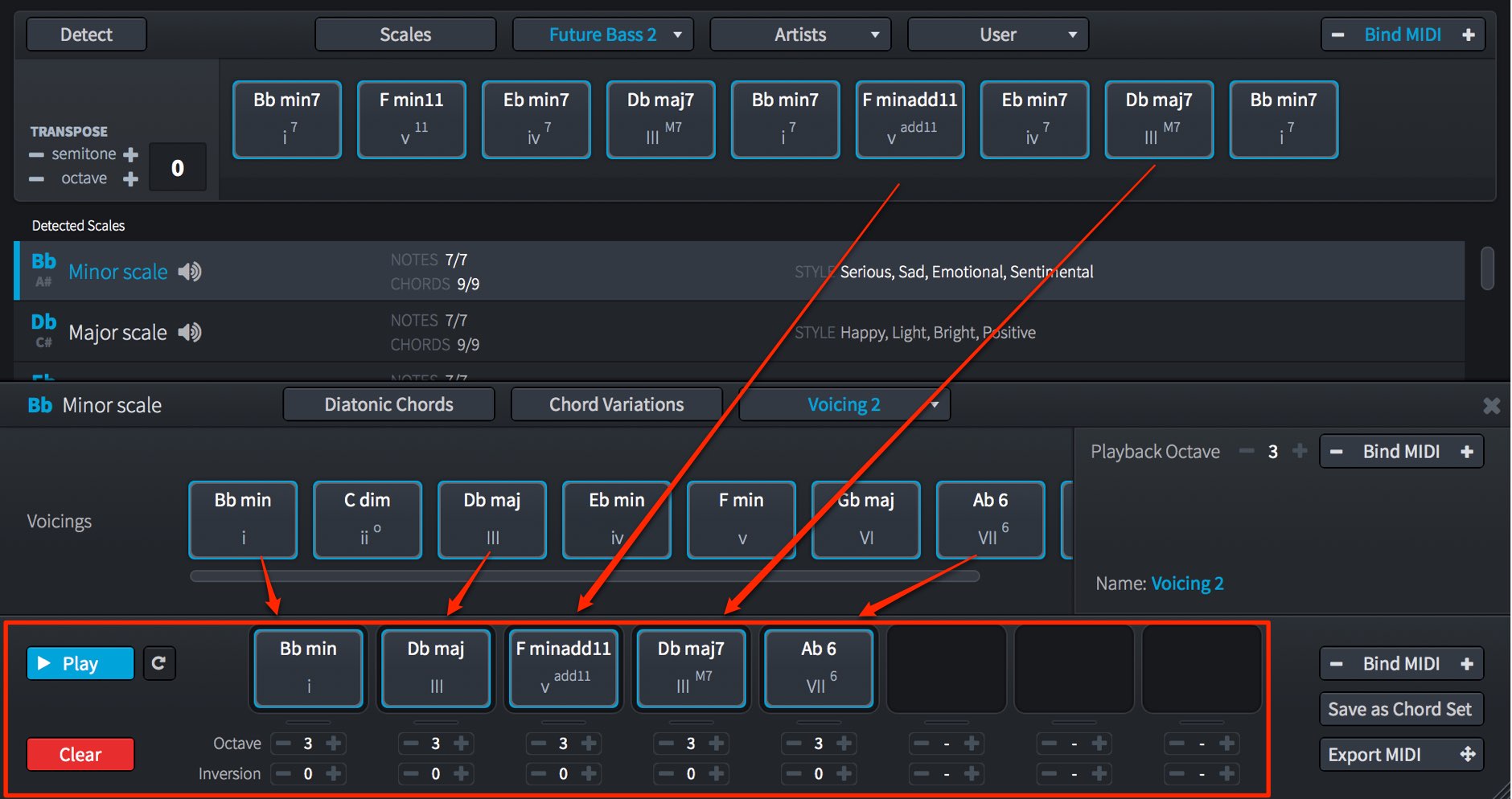
Simply drag each desired chord to the pad where you want to register it.
You can also change semitone and octave beneath each pad.
This greatly expands the possible chord combinations.
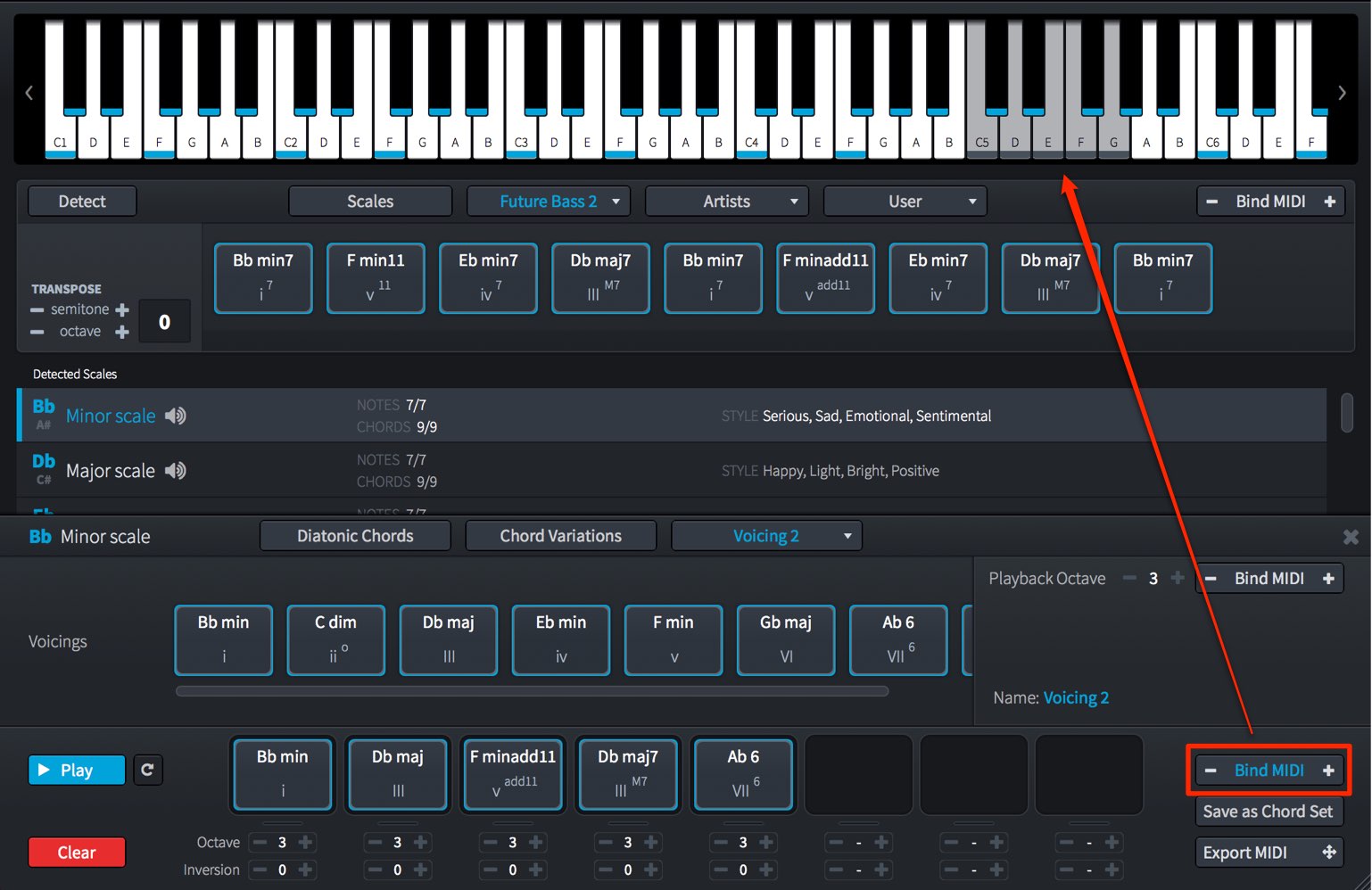
Use Bind MIDI to assign these pads to a MIDI keyboard as well.
Exporting Chord Pads as MIDI
You can export the notes of each chord pad to your DAW as a MIDI file.

Just drag and drop the desired chord pad onto the track and bar where you want it.
It is very convenient.
Scaler Helps You Find Chords for Your Music
What did you think?
Scaler is a distinctive product that can speed up your workflow and suggest unexpected chords.
If you struggle with chord progressions, give it a try.
Frequently Asked Questions
Q1. What is Plugin Boutique Scaler?
Scaler helps you find ready-to-use chord progressions by key and genre. Even without a strong theory background, you can select preset chords, change voicings and export MIDI files to streamline production.
Q2. How do I authorize Scaler?
Download your license file from your Plugin Boutique account, select “Register a licens file” when Scaler launches, and choose the downloaded file.
Q3. Is Scaler set up differently in Logic Pro X and VST hosts?
In Logic Pro, choose Audio Units → Plugin Boutique → Scaler from MIDI FX. In a VST host, launch Scaler as an instrument, select Scaler as the instrument track’s MIDI input, and enable monitoring.
Q4. How do I mute Scaler’s built-in piano?
Click the speaker icon at the upper right to turn it off. You can then hear only your separate instrument.
Q5. Does it support MIDI keyboards?
Yes. Clicking “Bind MIDI” assigns chord pads to the white keys of a MIDI keyboard for real-time recording. You can choose the octave so it does not interfere with single-note playing.
NEW ARTICLES
Latest English Articles





































































































































































































































































































































