
Cubase 8’s VCA faders let you control the levels of multiple tracks from one fader. Linking related tracks, such as a rhythm section and bass or lead and backing vocals, can make mixing and production more efficient. Link group settings can also be adjusted separately for other operations, and multiple VCA faders can be created and managed for flexible control.
Manage and edit multiple tracks efficiently

The second feature in our Cubase 8 series is the VCA fader.
You can easily link multiple tracks using this feature.
The linked group can coordinate volume and, depending on its settings, effects and automation controls.
Linking tracks such as a rhythm section and bass or lead and backing vocals
can greatly improve efficiency when mixing and producing.
Cubase 8 video tutorials
Moving smoothly to Cubase 8 from earlier versions
Cubase 8: Render in Place
Cubase 8: VCA Faders (this page)
Cubase 8: Direct Routing
Cubase 8: Chord Pads and Chord Track
Creating a VCA fader in Cubase 8
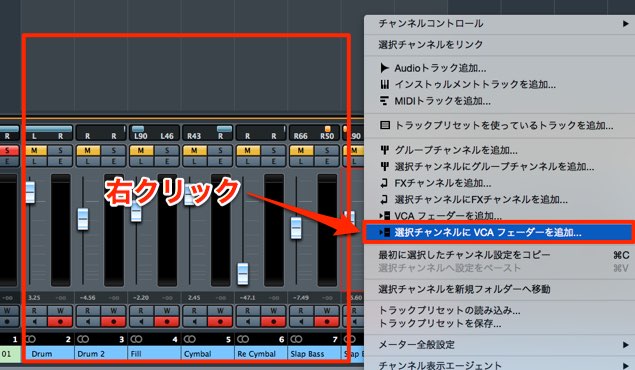
Open Devices → MixConsole from the top menu,
then select all the tracks you want to link.
Right-click and select “Add VCA Fader to Selected Channels.”
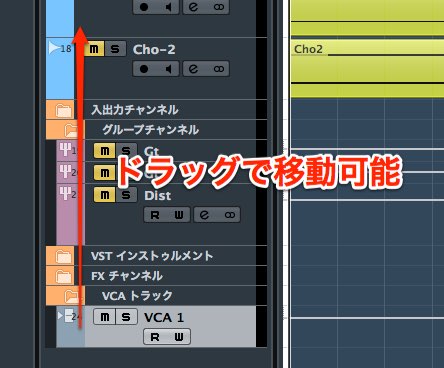
A VCA fader is created.
Like a regular track, it can be moved by dragging.
Move it somewhere convenient to control.
Using a VCA fader in Cubase 8
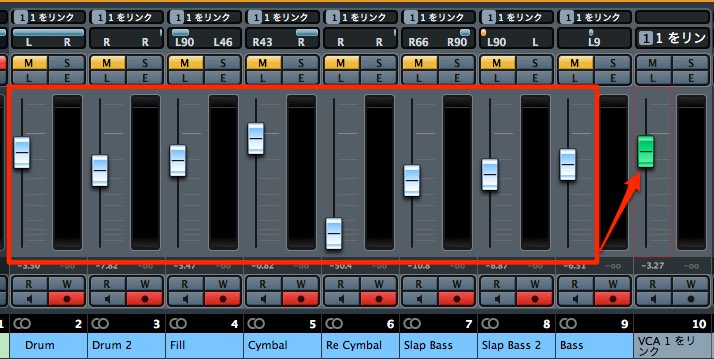
You can adjust the volume of all tracks assigned to the VCA fader together.
You can create multiple VCA faders.
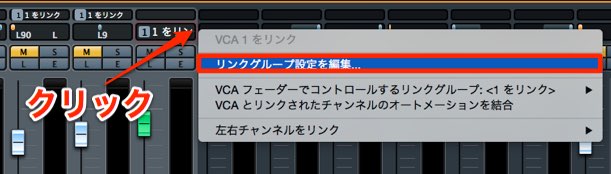
The original article describes most operations as linked by default;
you can disable individual items in the link settings.
Click the downward-pointing triangle to the right of the link name.
Select “Edit Link Group Settings.”
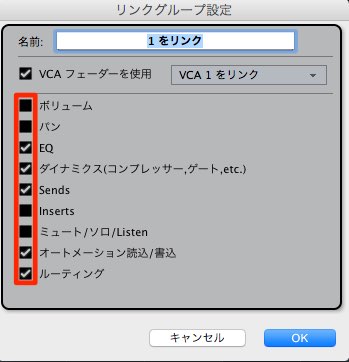
Unchecking an item disables group editing for that operation,
allowing you to adjust it separately.
Changing or removing a VCA fader assignment in Cubase 8
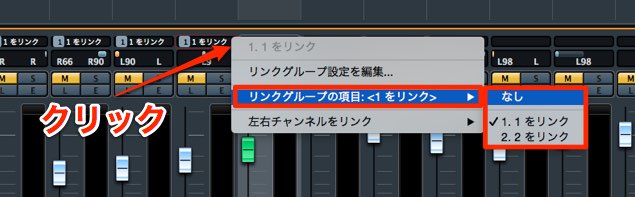
You can change or remove the VCA fader assigned to a track.
Click the downward-pointing triangle to the right of the link name on the track you want to unlink.
To remove the assignment, choose “None.”
To assign it to another VCA fader, select that fader’s name.
Frequently asked questions
Q1. What is the difference between a VCA fader and grouping in Cubase 8?
A VCA fader provides master level control over assigned channels. The associated link group can also link selected channel settings, such as effects or automation controls. Channel grouping links selected settings such as volume, pan, solo and mute; which operations are linked depends on the group settings.
Q2. Can I unlink individual VCA link settings?
Yes. Click the downward-pointing triangle to the right of the link name, choose “Edit Link Group Settings,” and uncheck the items you want to adjust individually.
Q3. Can I use multiple VCA faders at once?
Yes. You can create multiple VCA faders and assign them to different groups of tracks for more detailed level control and efficient mixing.
NEW ARTICLES
Latest English Articles

































































































































































































































































































































































































































































































































