
Cubase 8’s Render in Place converts MIDI parts or audio events into audio files. You can specify whether applied effects are included in the rendered audio, choosing from options such as Dry, Channel Settings, Complete Signal Path and Master FX. Multiple events or tracks can be rendered at once, helping streamline music production and save time.
Quickly render MIDI tracks to audio

The first feature in our Cubase 8 series is Render in Place.
The name may sound complicated, but it is a feature that
quickly converts events to audio files.
You can also specify whether to include the applied effects in the rendered audio.
The feature can also be used on audio tracks.
Cubase 8 video tutorials
Moving smoothly to Cubase 8 from earlier versions
Cubase 8: Render in Place (this page)
Cubase 8: VCA Faders
Cubase 8: Direct Routing
Cubase 8: Chord Pads and Chord Track
Selected questions and answers from the YouTube video

I am not sure how to set up multiple outputs. How can I do it? I use Cubase 10.

The following article explains multiple outputs. Please give it a try: https://sleepfreaks-dtm.com/for-advance-cubase/mix_parallelout-3/
How can I render just one MIDI track assigned to a multi-output instrument? When I do it normally, all the parts output by the instrument are rendered at the same time as multiple tracks.
We also checked overseas forums, and it appears this behavior occurs when one MIDI part is selected: silent audio tracks are created for the other channels. The suggested workaround at the time was to delete the silent tracks created alongside the rendered audio. We hope a future update improves this.
Render settings
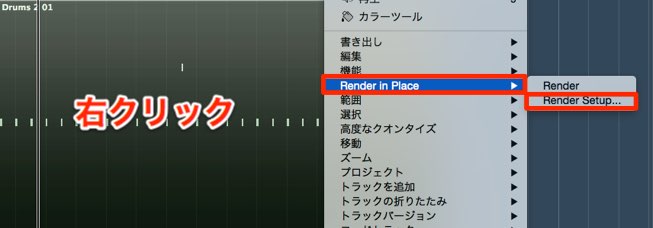
Right-click the event and, from the menu,
choose Render in Place → Render Setup.
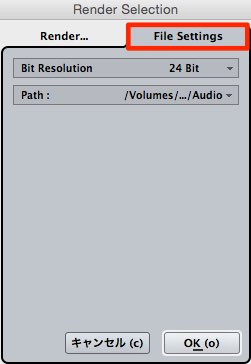
In the File Settings tab on the right, choose:
- Bit Resolution: the bit depth for the rendered file
- Path: the destination for the rendered file (normally left as is)
These settings determine the file output.
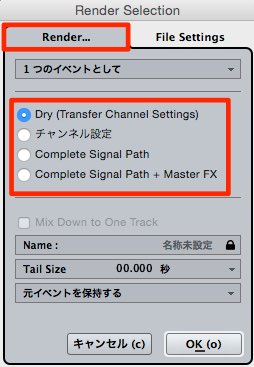
In the Render tab, you can choose what is included in the rendered audio:
- Dry: Applied effects are not included in the rendered audio.
- Channel Settings: Applied channel effects are included.
- Complete Signal Path: If tracks are routed through a group channel,
the group channel’s effects are included too. - + Master FX: In addition to the above,
effects applied to the stereo output are included.
Applying Render in Place
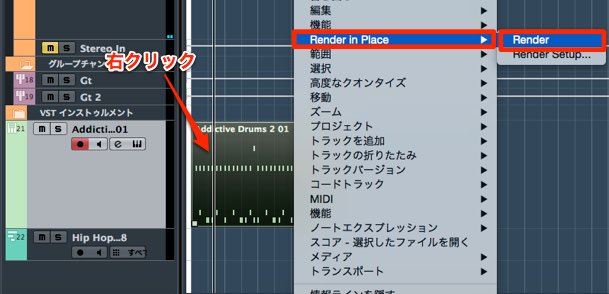
Right-click the event you want to convert to audio.
Under Render in Place, select Render.
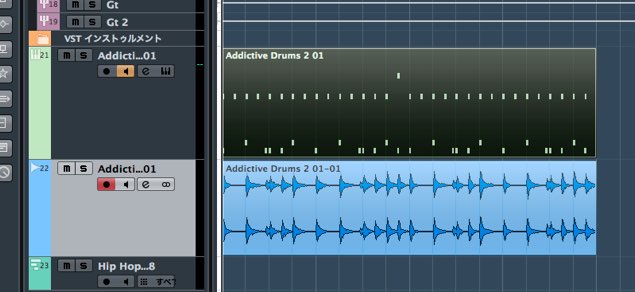
It is quickly converted to an audio file,
making the workflow more efficient than before.
You can also render multiple events or tracks at the same time.
Frequently asked questions
Q1. What is Render in Place?
It converts MIDI or audio events into audio files. You can choose whether to include applied effects in the rendered audio.
Q2. How do I include effects when rendering?
In the Render tab of Render Setup, choose an option such as Channel Settings, Complete Signal Path or + Master FX to include effects at different points in the signal path.
Q3. Can I render multiple tracks at once?
Yes. You can render multiple events or tracks together in one operation.
Q4. Where do I set the bit depth?
In Render Setup, select Bit Resolution on the File Settings tab to choose the bit depth of the rendered file.
NEW ARTICLES
Latest English Articles

































































































































































































































































































































































































































































































































