
This article explains practical techniques for choosing a drum kit and creating rhythm patterns for electronic music with Groove Agent SE 4, included with Cubase Pro. Learn how to select kicks, snares, and hi-hats by considering frequency content, stereo placement, and decay. Techniques such as strengthening the attack and combining stereo and mono samples can help you significantly improve the quality of your tracks.

In this series, we will explain how to create contemporary electronic music using only the instruments and effects included with Cubase Pro 9.5, making the most of their capabilities.
Here is the track we will be working through in this series.
In this first installment, we will focus on the rhythm track at the heart of electronic music.
We will explain how to choose the drum sounds and create a rhythm pattern that interacts with the other musical parts.
The choice of drum sounds has a particularly strong effect on a track's character and quality, so it is important to have a clear reason for each choice.
Choosing Drum Sounds — Video Tutorial
Selected Questions and Answers from the YouTube Video

I learned so much from this. I cannot believe it is available for free! You did not discuss panning the drum tracks. Is it fine to leave the hi-hat, bass drum, snare drum, and tambourine all in the center?

We generally place the kick and snare in the center. Hi-hats and toms are often panned left or right according to taste. We also provide the project in the article, so you can check the drum panning there. Please feel free to use it. https://sleepfreaks-dtm.com/produce-recipe/electro-music-create-1/
I am new to music production and always find your tutorials helpful. When designing the kick, you separated the click and sub into different samples. How can I trigger them with a single MIDI note when programming the part?
Here, the kick is split into click and sub layers, so we enter MIDI notes for both C1 and C♯1. In Groove Agent: https://app.box.com/s/coshmmkvgng12ys9azdz2xl39zkmrpst In the piano roll: https://app.box.com/s/ozpoeuodugo06s2gajzoj5qwzv51m6lw The following link takes you to the programming section of the second video: https://youtu.be/8y-tGATnGjk?t=98 If entering notes in two places is inconvenient, you could look for a suitable kick sample instead of using this technique. If your budget allows, a dedicated kick instrument such as Sonic Academy Kick 2 is another option. https://youtu.be/AKMYp6KzsUE We hope this helps.
Frequency does not respond when I audition sounds in MediaBay. What should I do?
Make sure Frequency is inserted on the master channel, Stereo Out. If it is already there, try turning off Control Room as shown in the image and checking again. https://app.box.com/s/gx46xvdx19y6nitd3iqi3nvhv4b3kpwk
I am considering buying Cubase Pro. Are the samples selected in MediaBay in this video included with Cubase as well?
Yes. All the sounds, synthesizers, and effects used in this tutorial video are included with Cubase Pro.
Where do you explain how to make the pluck sound?
We received many requests, so we added a section about the pluck sound at the end of the following article. https://sleepfreaks-dtm.com/produce-recipe/electro-music-create-5/
I am using High Sierra, but my microphone does not respond, and I cannot make sense of the information on Steinberg's website. It said a compatible version would be released in mid-November. Is this it?
The compatible version mentioned for mid-November is not what this video covers. We do not know the details, but version 9.5.41 had recently been released at the time of this reply, so please check that update. https://japan.steinberg.net/jp/support/downloads/cubase_pro_artist_95.html
Building a Rhythm Pattern — Video Tutorial
Download the Cubase Song Project Here!
If the sampler tracks in the project do not play:
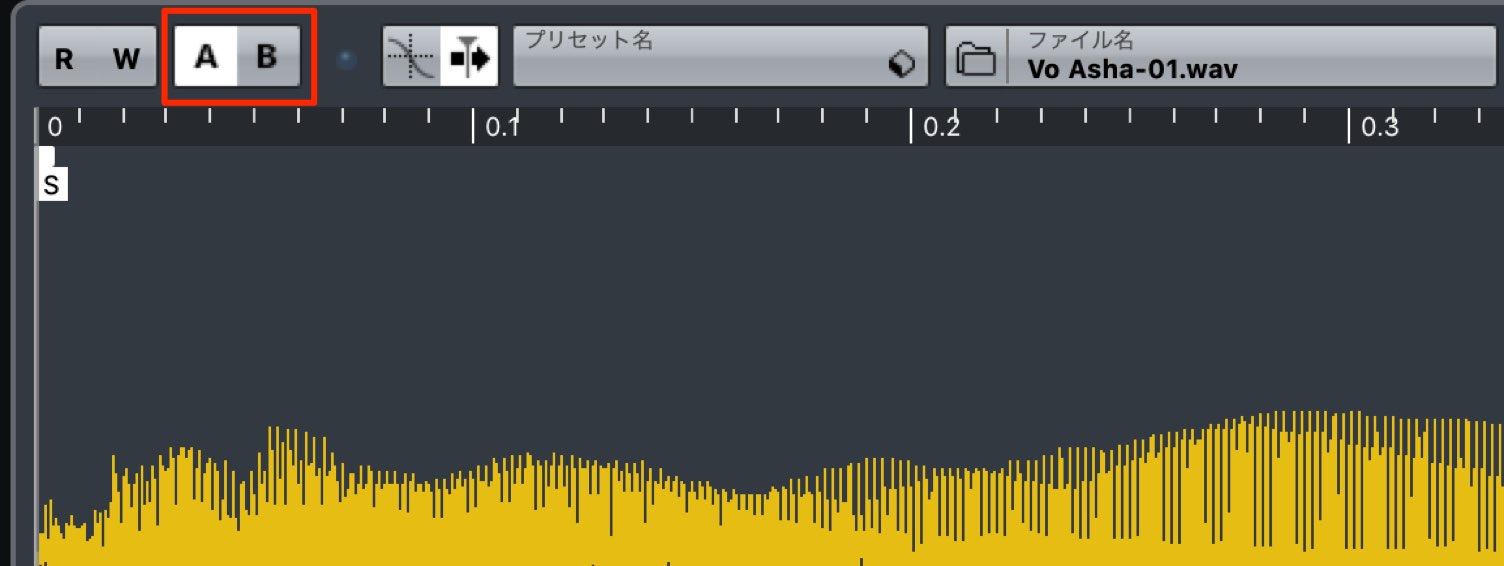
Switch the sampler track's A/B comparison button, then try playback again.
- 1Choosing Drum Sounds and Creating Patterns
- 2Piano Chord Progressions
- 3Bass Sound Design and Phrase Creation
- 4Using a Harmonizer with Vocal Samples
- 5Adding Weight and Impact to the Chorus with Backing Synths
- 6Creating Sound-Effect Tracks to Build Excitement
- 7Applying Effects to the Master Channel
Programming the Rhythm Pattern
We will program the basic pattern for the chorus section.
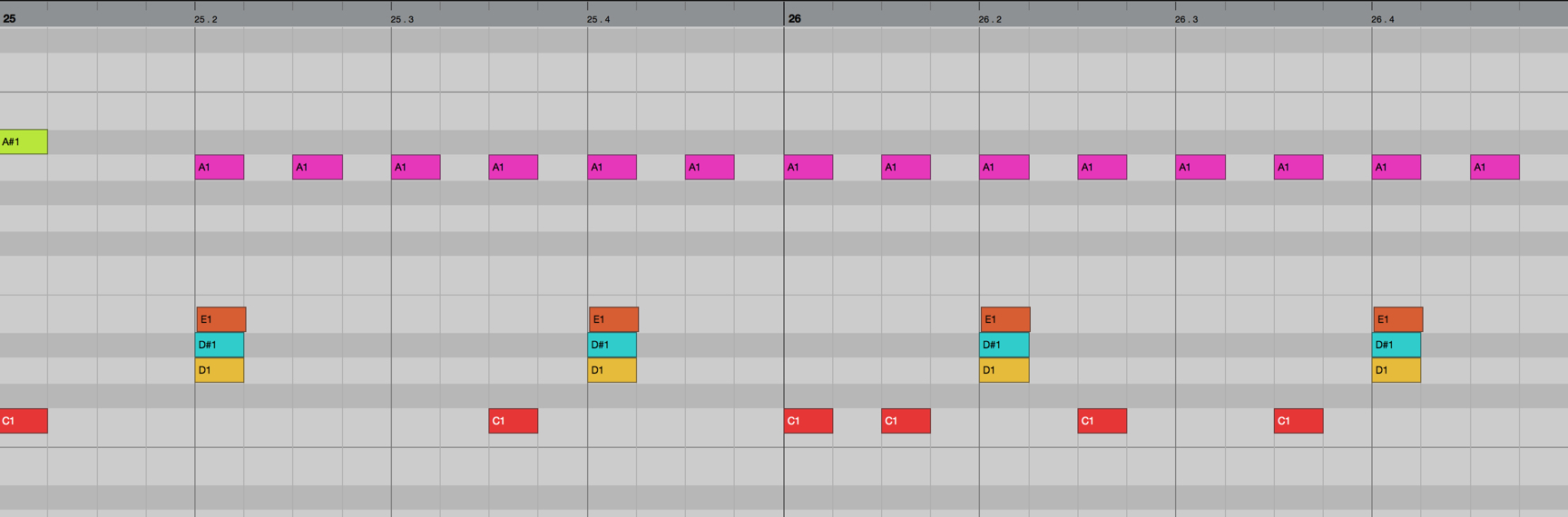
We will place samples, synths, and other musical parts in the gaps in the rhythm so that they alternate with the drums.
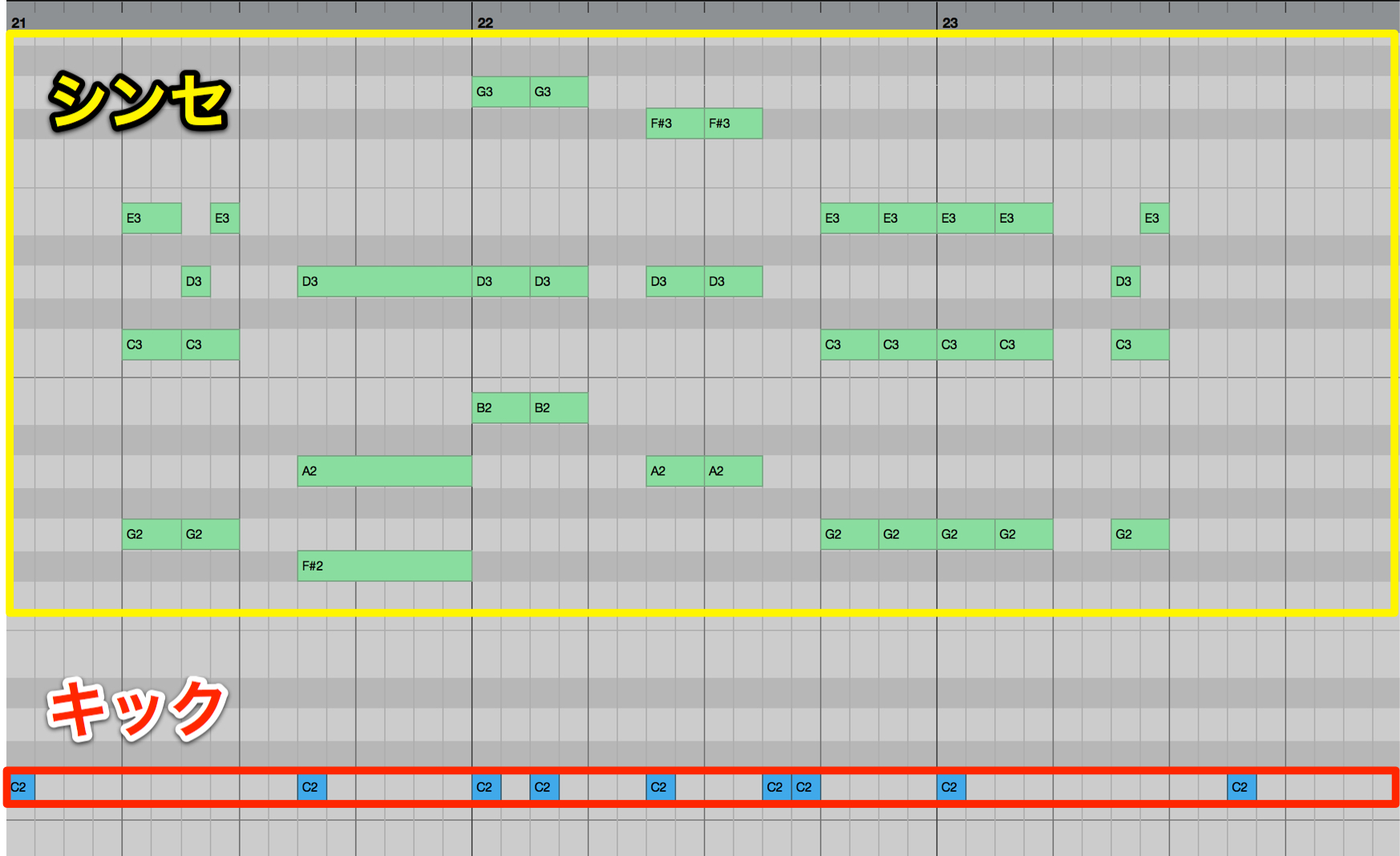
For this approach, the key is to leave space in the rhythm rather than adding too many kick hits.
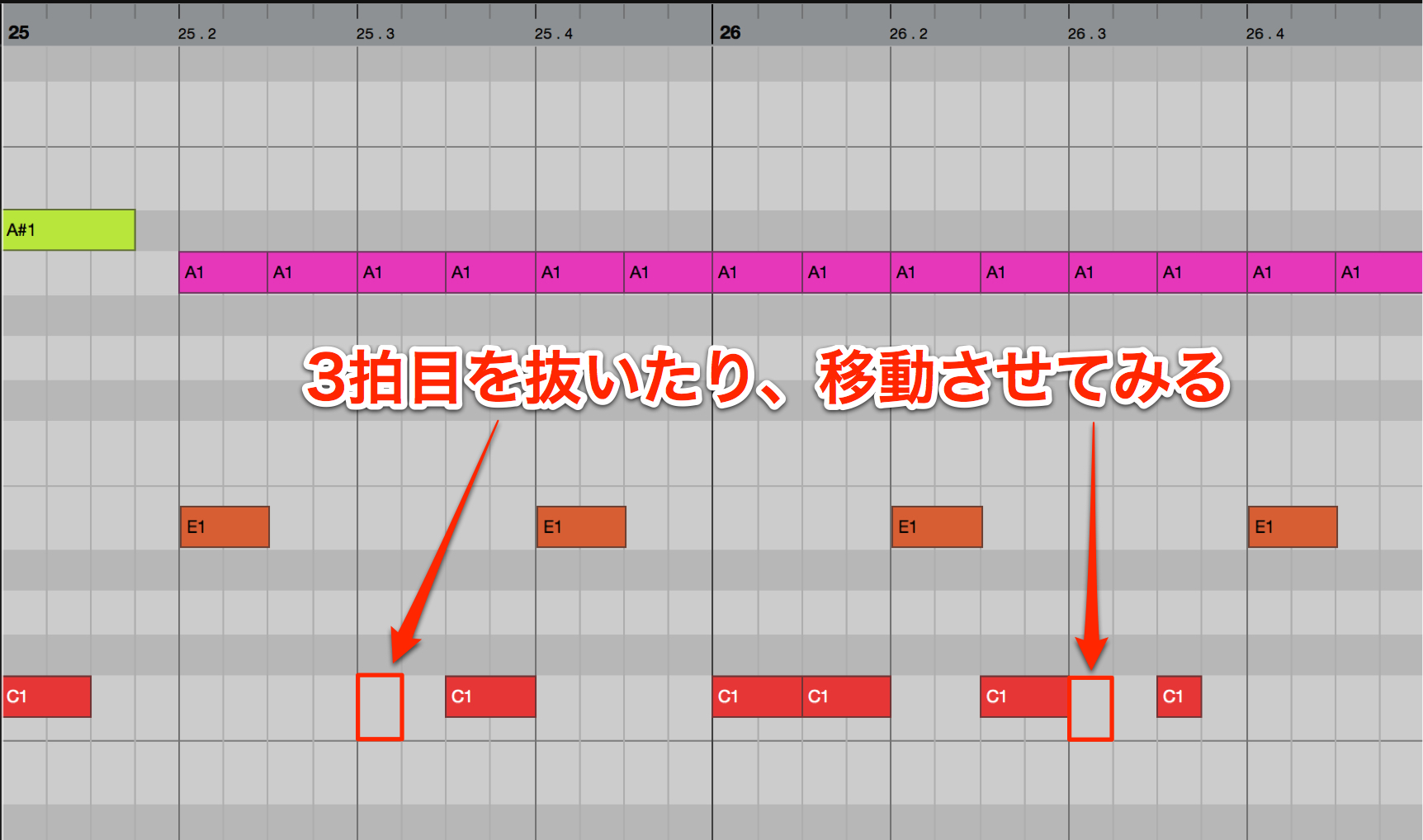
As a general tendency across genres, placing a kick on the downbeat of beat 3 can make a pattern feel heavier.
If your pattern feels too heavy or lacks a polished feel, try removing or shifting that hit and listen to the result.
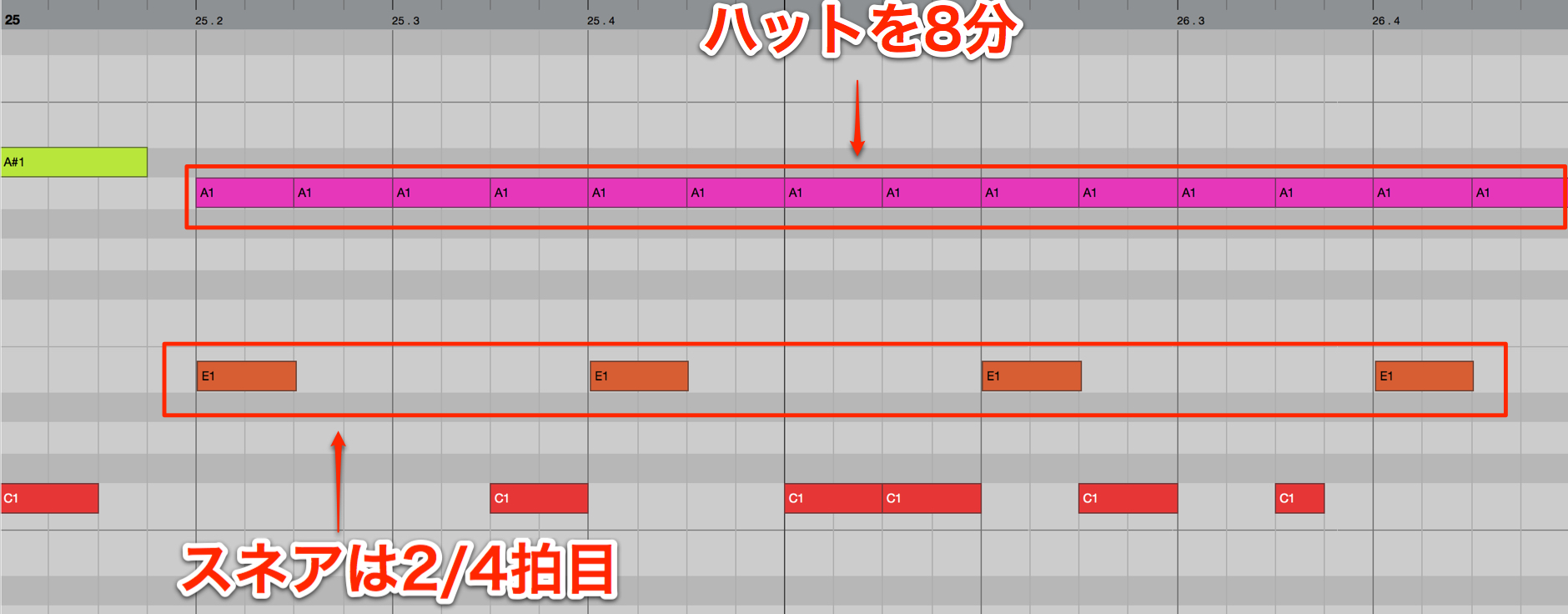
The snare falls on beats 2 and 4, as it does in many patterns.
The hi-hat also uses a simple eighth-note pattern.
Choosing the Drum Sounds
We will use Groove Agent SE 4 as our drum instrument.
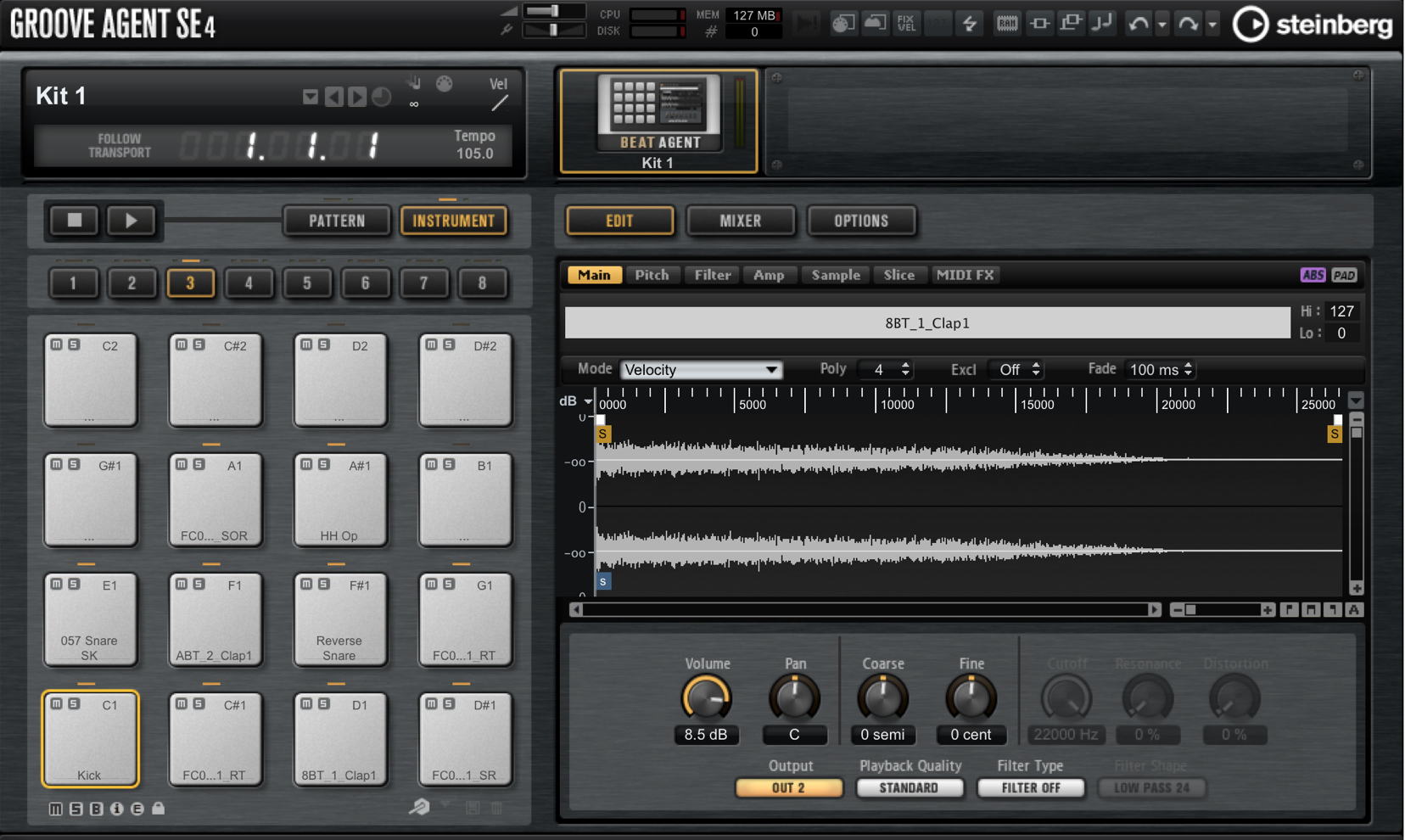
Alongside its many presets, it lets you combine individual samples into a custom kit with the sounds you want.
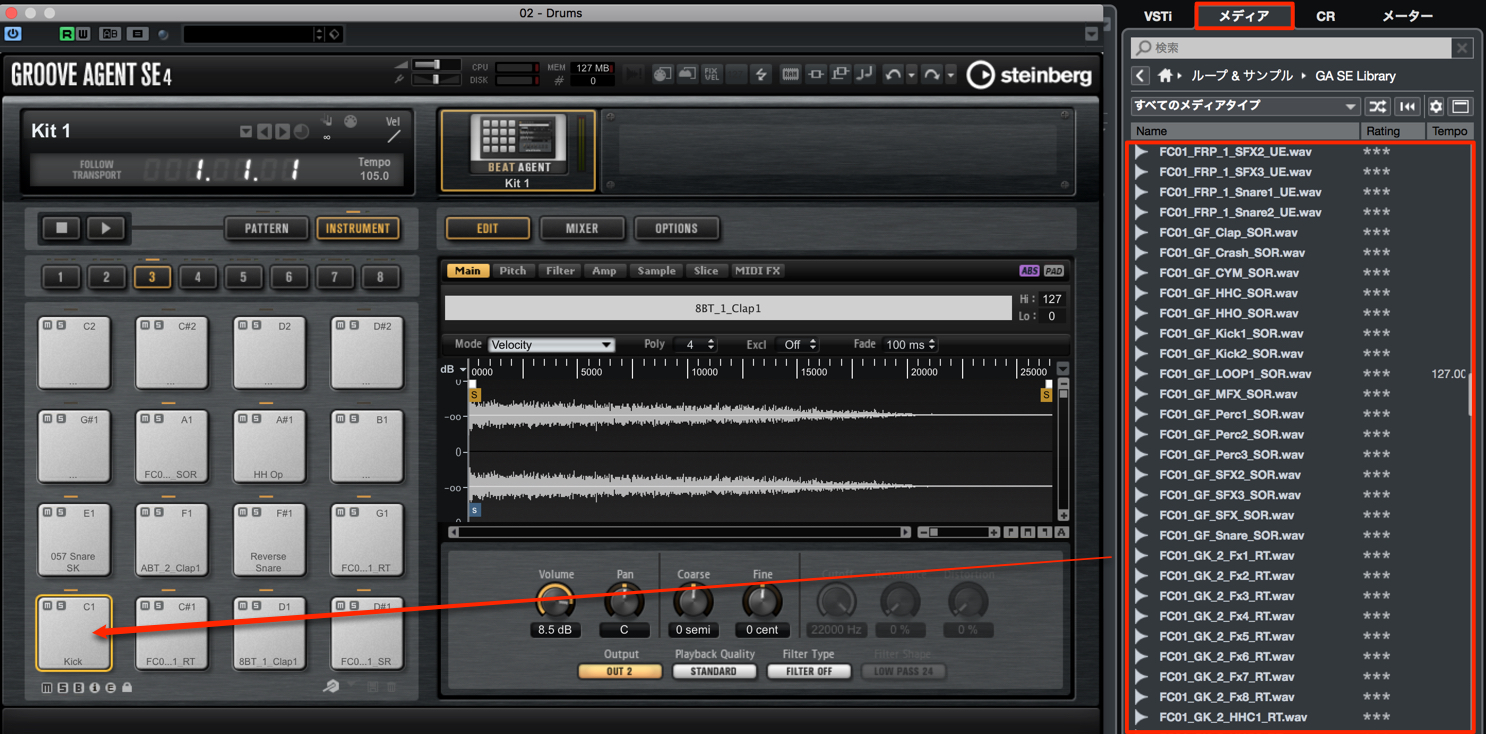
As shown here, you can audition sounds in the media library, then drag and drop samples onto the pads.
What to Look for in a Kick
For electronic music, it is important to choose a sample with a full low end and a clear attack that cuts through the mix.
Keep these points in mind when choosing a kick:
- Consider the frequency content
- Add an attack layer
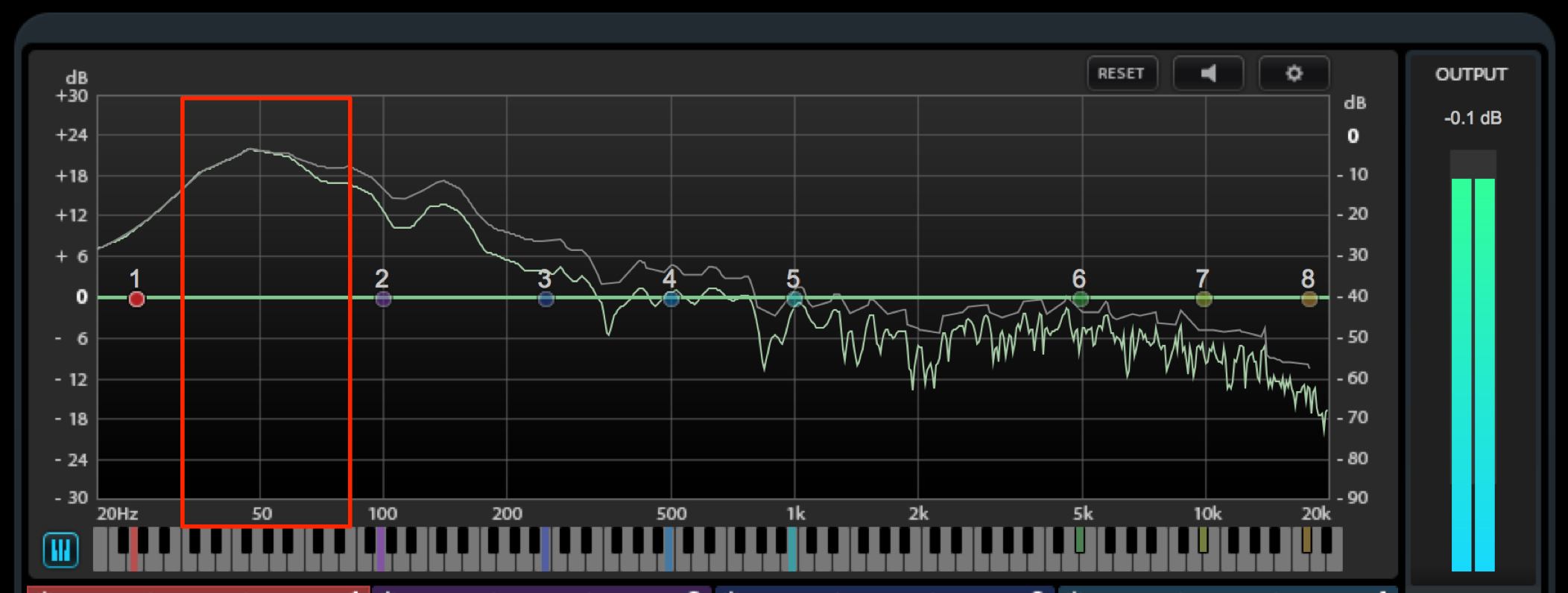
Insert Frequency on the master channel so you can check the frequency distribution while auditioning samples.
Look for a sample with a peak in the 50–80 Hz range.
One way to strengthen the kick's attack is to layer a sample containing only the initial transient.
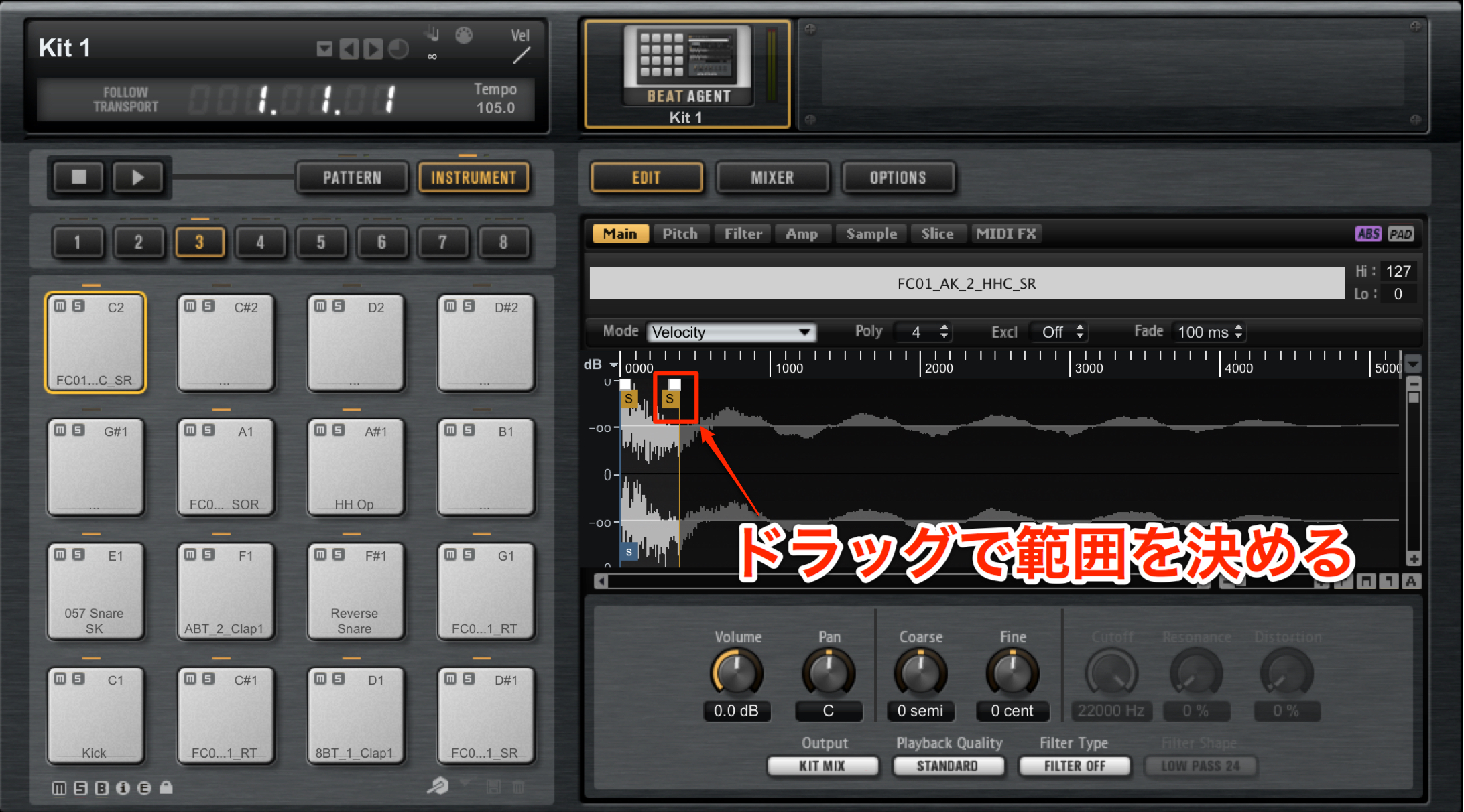
Choose a hi-hat or another kick sample, then adjust it so that only the very beginning plays.
Playing this at the same time as the main kick makes it easy to add an attack that cuts through the track.
What to Look for in a Snare
Keep these points in mind when choosing a snare or clap:
- Consider its stereo width
- Control the length of its decay
Stereo width refers to how far the sample spreads to the left and right.
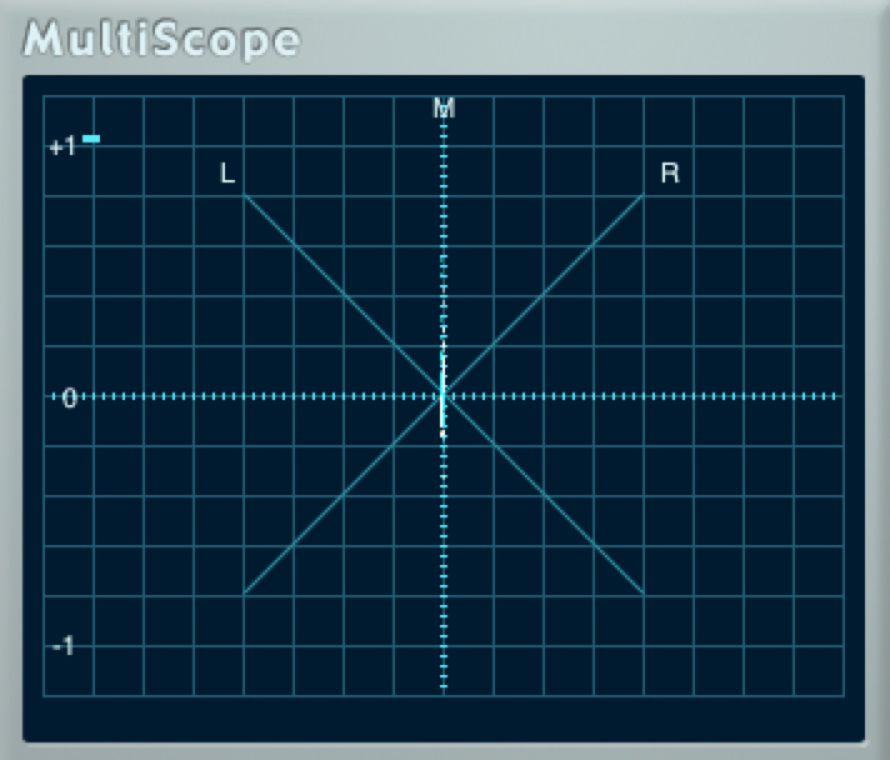
By combining a mono snare or clap like this with

a stereo snare or clap, you can create a wide variety of sounds.
Another effective approach is to program only the mono sound in the verse, then add the stereo layer in the chorus for greater width.
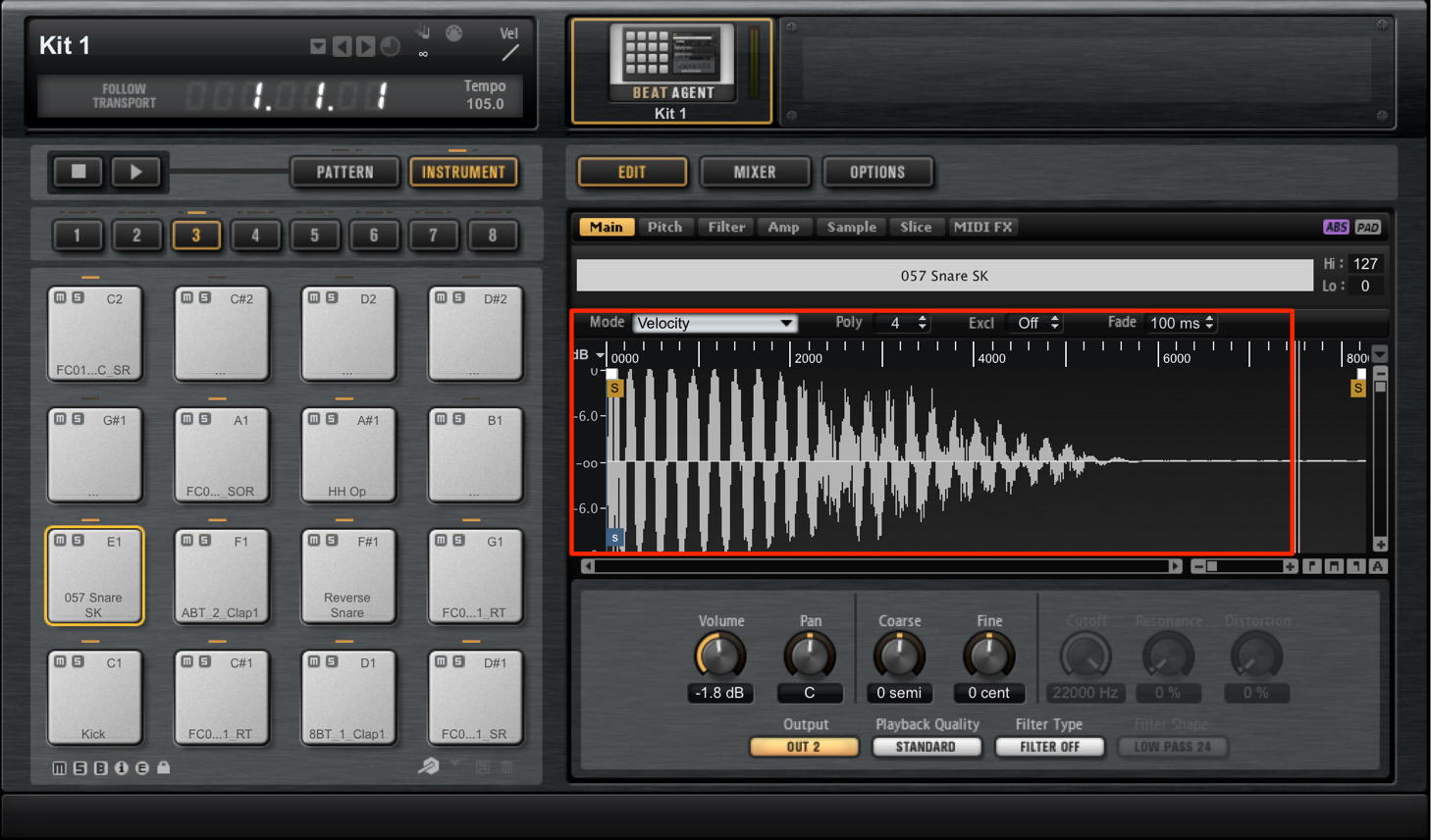
The length of the snare's decay also affects the groove.
Take the song's tempo into account, audition the sample while the track plays, and listen to how the sound changes.
What to Look for in a Hi-Hat
Keep these points in mind when choosing a hi-hat sample:
- Consider how it cuts through the mix
- Consider the length of the sound
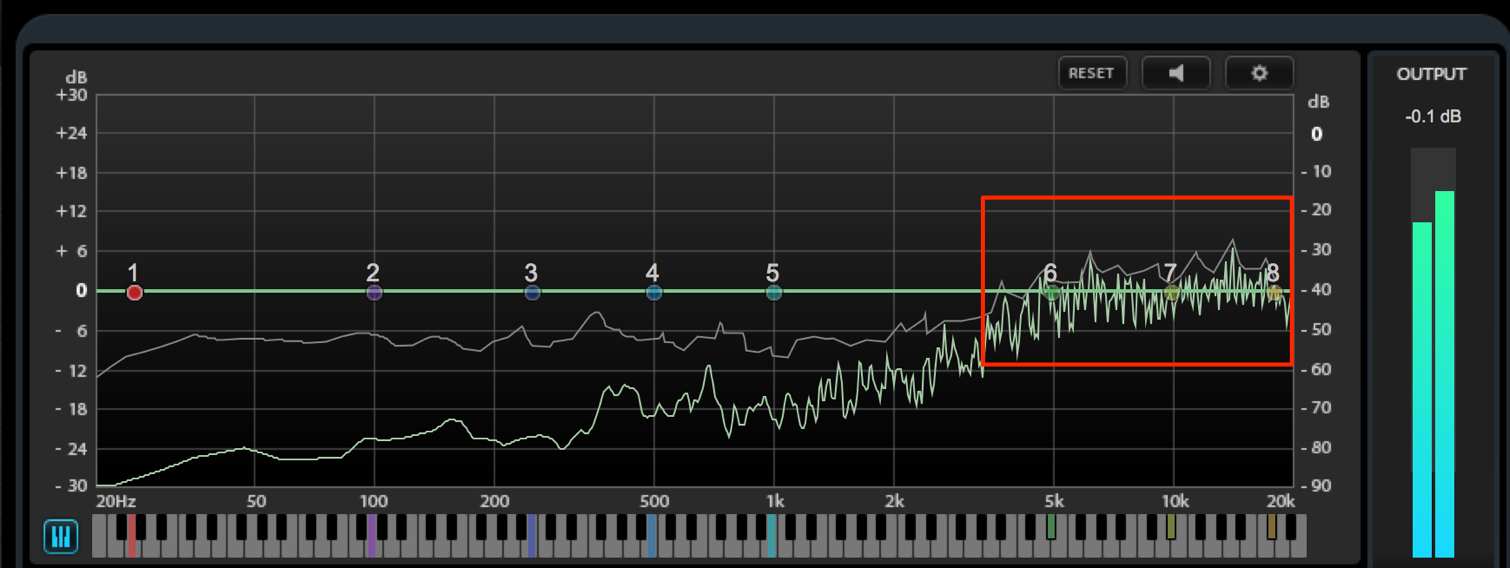
For a bright sound that cuts through clearly, choose a sample with a pronounced peak in the high frequencies.
Next, consider the sample's length.
For this track, we are aiming for an eighth-note pattern.
Because the pattern itself is understated, we use a hi-hat with a long release to give it presence and fill the spaces between hits.
- Shorter Sample

- Longer Sample

Simply keeping these points in mind as you audition and choose your kit can greatly improve the quality of your track.
Steinberg Distributor — Resources from Yamaha Music Japan Co., Ltd.
- Yamaha Music Japan MPP (YouTube) https://www.youtube.com/user/SteinbergJapan
- MPP (Twitter) https://twitter.com/SteinbergJP
- Sound Roster Music Production Show (Fresh!) https://freshlive.tv/ymjsoundroster

Product Page: https://japan.steinberg.net/jp/products/cubase/start
Frequently Asked Questions
Q1. What matters most when choosing a kick sound for electronic music?
Choose a sample with a strong low-frequency peak around 50–80 Hz and a clear attack. We recommend inserting Frequency on the master channel and checking the frequency distribution as you audition samples.
Q2. How can I strengthen a kick's attack?
An effective technique is to play a sample containing only its initial attack, such as the beginning of a hi-hat or another kick, at the same time as the main kick. This can make the kick cut through the track much more clearly.
Q3. Why combine stereo and mono snares?
Build the basic rhythm with a mono snare, then layer a stereo snare in the chorus to add width. This creates a range of different sounds across the sections of your track.
NEW ARTICLES
Latest English Articles

























































































































































































































































































