
When importing audio into Cubase, a newly imported file with the same name may not replace the existing file. This article explains the issue using a re-recorded vocal as an example and shows two possible solutions: changing the filename or removing the old file from the Pool. These approaches can help prevent file-management problems during audio editing.
An existing audio file may be used instead of a new file with the same name
Importing audio files is a frequent part of music production.
You can easily import WAV or MP3 files into a Cubase project
by dragging them in.
This is convenient, but there is one thing to watch for:
“A file with the same name is replaced by the existing audio file.”
Keep this in mind.
What to watch for when importing audio into Cubase
Solutions for importing audio in Cubase
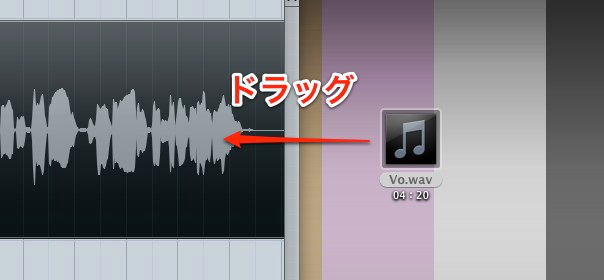
↑ Suppose you import a file named “Vo.wav”
into Cubase.
Later, you notice a passage you want to improve
and record it again.
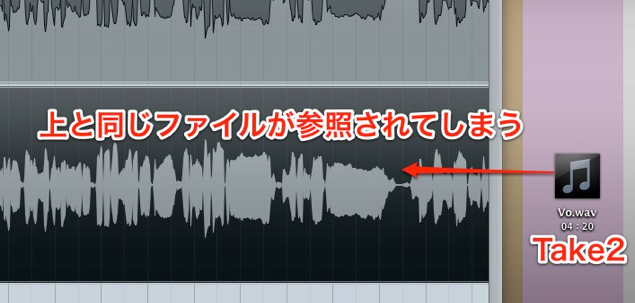
↑ If the new file has the same name, “Vo.wav,”
when you import it into the project,
the earlier file may be used instead of the new one.
Solution: Rename the file
A very simple solution is
to rename the source file before importing it.
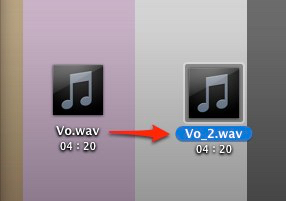
↑ Cubase will then import it into the project as a new file.
Solution: Remove the file from the Pool
From the top menu, choose Media → Open Pool.
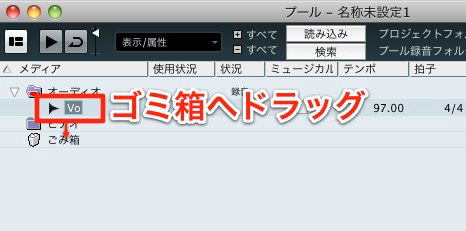
↑ Drag the existing file to the Trash,
then right-click and select “Empty Trash.” If you choose Erase in the confirmation dialog, the files are permanently deleted from disk and may affect other projects. Check the dialog carefully and keep any files you need.
The new audio file can now be imported.
If the earlier file opens when you import a new one,
try these steps; they will resolve the issue in most cases.
Frequently Asked Questions
Q1. Why does my newly recorded vocal file not appear in Cubase?
When an audio file with the same name is imported, Cubase may use the existing file, so the new file does not appear. Rename the new file before importing it, or remove the existing file from the Pool.
Q2. Where do I open the Pool?
Choose Media → Open Pool from the top menu. Drag the unwanted file to the Trash in the Pool and use “Empty Trash” to remove it, then import the new file.
Q3. When should I change the filename?
The simplest approach is to rename the newly recorded audio file before importing it into Cubase. For example, change “Vo.wav” to “Vo_take2.wav” and then import it.
NEW ARTICLES
Latest English Articles





























































































































































































































































































































































































































































































































































































































































