Impact, the drum instrument included with Studio One, offers straightforward operation, a wide range of presets and flexible editing. This article walks through the basics, from choosing a preset kit and loading individual drum sounds to placing multiple sounds on a pad and switching between them with Velocity, Round Robin or Random modes. These techniques can help you program drums more efficiently and improve your productions.
Impact: A Powerful Drum Instrument
Studio One includes the drum instrument Impact.
It lives up to its name with
easy operation, a wealth of presets and flexible editing.
Learn to make the most of it
and bring your productions to a new level!
The video also explains the basics of programming in Studio One.
Impact Video Tutorials
- 1Impact Basics and Loading Kits *This article
- 2Designing Kit Sounds
- 3Real-Time Recording
- 4Multiple Outputs
Questions and Answers from the YouTube Video

Excuse me, I’m missing presets such as those beginning with “TM” from my Impact files. There are clearly fewer than expected. Can I fix this by downloading from the PreSonus website? I have already completed all the installations. I look forward to your reply.

As you suspected, the installation may not have completed correctly. We recommend reinstalling the sound sets first, and reinstalling everything if that does not resolve the problem. You can also reinstall Impact alone from the menu at the top of Studio One.
When I use Cubase, Studio One’s Impact disappears. I realize that may not be enough information, but please let me know if you know how to bring it back.
Because we cannot determine the cause, please try reinstalling Impact and let us know what happens.
I want to download Impact, but I can’t. For a start, the website is in English and I don’t understand…
You can download it using the following method without visiting the website: https://sleepfreaks-dtm.com/dtm-trouble/download-content/ Please give it a try.
Video Notes: Loading a Preset
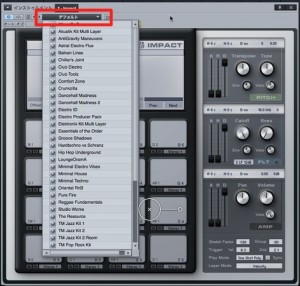
Click the area outlined in red and select the kit you want.
Using the loop function while choosing sounds and programming can make the process much more efficient.
https://sleepfreaks-dtm.com/for-beginner-studioone/loop-play/
Video Notes: Using Individual Sounds
You can load individual drum sounds into Impact.
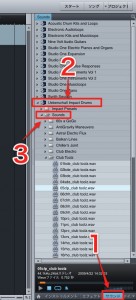
Under “Sound” → “Ueberschall Impact Drums” → “Sounds,” select an individual sound.
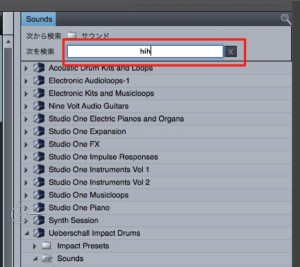
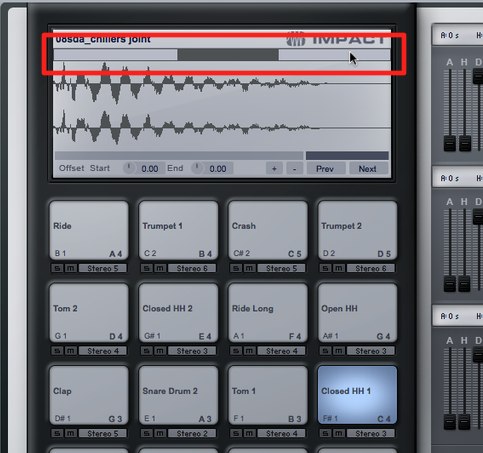
You can also quickly search for the sound you want using the area outlined in red.
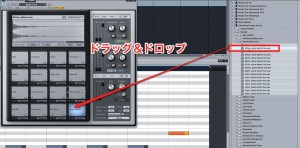
Once you find a sound you like,
drag and drop it into Impact to load it.
Video Notes: Using Multiple Individual Sounds
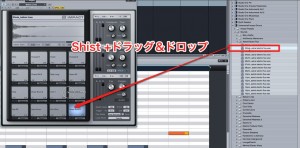
When loading individual sounds as shown above,
hold Shift while dragging and dropping them.
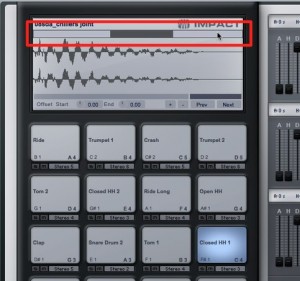
This lets you place multiple sounds on one pad.
Video Notes: Switching Between Multiple Sounds
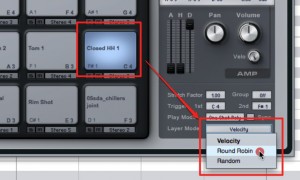
If you have assigned multiple sounds to one pad,
you can decide when the sound switches.
- Velocity: Switches sounds according to how hard you play.
- Round Robin: Cycles through sounds in order with each hit.
- Random: Selects a sound at random with each hit.
For example, put multiple hi-hat sounds on one pad
and use Random mode to vary them for a more human feel.

Frequently Asked Questions
Q1. How do I load a preset kit in Impact?
Click the area outlined in red and choose the kit you want. Combining this with the loop function can make sound selection and programming more efficient.
Q2. Can I assign multiple different drum sounds to one pad?
Yes. Hold Shift while dragging and dropping individual sounds onto a pad to place multiple sounds there.
Q3. How do I switch between multiple sounds on a pad?
Choose Velocity to switch according to velocity, Round Robin to cycle through them with each hit, or Random to select randomly. This can make a drum performance feel more human.
Q4. How do I find individual drum sounds in Impact?
Select them under “Sound” → “Ueberschall Impact Drums” → “Sounds.” Use the search area outlined in red to find the sound you want quickly.
NEW ARTICLES
Latest English Articles