
When entering tuplets such as quintuplets or septuplets in Logic X, the standard Piano Roll grid does not offer corresponding options, so MIDI note lengths must be calculated and set manually. This article explains how to divide the 960 ticks in a quarter note to obtain 192 ticks for a quintuplet or approximately 137 ticks for a septuplet, and how to enter the length in the Event List. Use this method for phrases such as instrumental solos and ascending string runs.
Entering Quintuplets and Septuplets in Logic
Quintuplets and septuplets are often used in instrumental solos and ascending string runs.
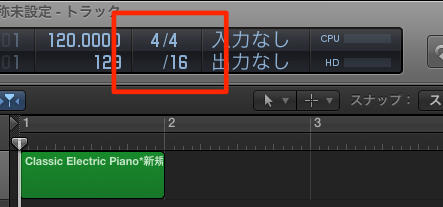
You can adjust the Piano Roll grid here,
but the menu does not include quintuplets or septuplets. If this control is not visible, see here for instructions.
Here we will explain how to enter these tuplets.
You could also make changes in the Score Editor, but we will use a more straightforward editing method.
The Solution
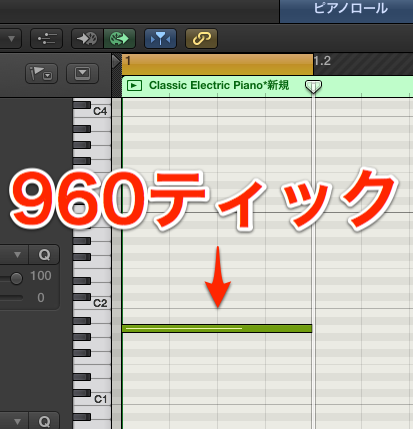
MIDI note length is measured in units called ticks.
In Logic, one quarter note equals 960 ticks.
In this example, quintuplets and septuplets divide a quarter note into five or seven equal parts.
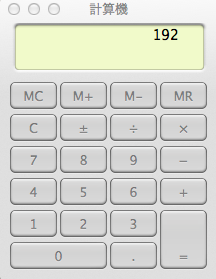
To enter a quintuplet, calculate 960 divided by 5.
The result is 192.
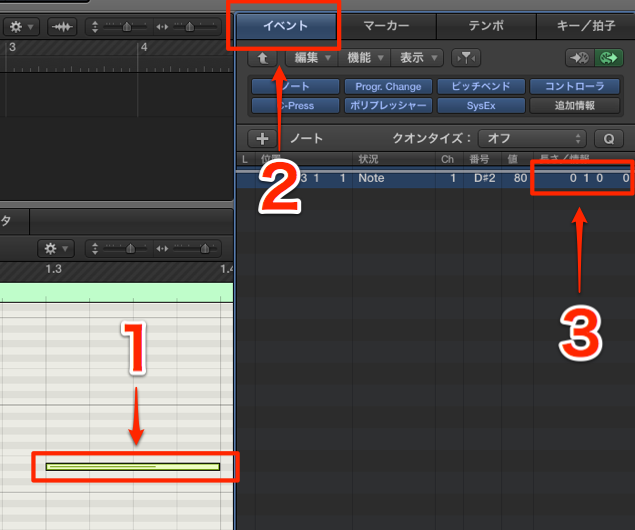
- 1. Select the note.
- 2. Open the Event List.
- 3. Double-click the length and enter 192.

The note now has the length of one quintuplet division.
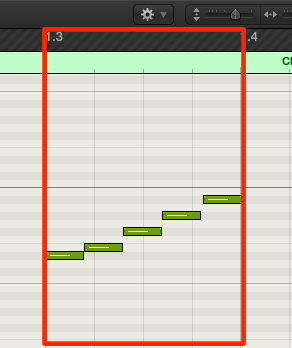
Enter notes consecutively at this length
and you can create a quintuplet passage like this.
This Video Is Also Recommended

Frequently Asked Questions
Q1. Why can’t I enter quintuplets in Logic X?
The Piano Roll note division menu does not provide quintuplet or septuplet options. You can instead enter the MIDI note length numerically in the Event List. Divide a quarter note by the number of divisions to calculate the length.
Q2. What tick value should I enter for a quintuplet?
In Logic X, a quarter note is 960 ticks, so 960 ÷ 5 = 192 ticks. Double-click the note length in the Event List and enter 192.
Q3. Is the calculation the same for a septuplet?
Yes. For a septuplet, 960 ÷ 7 is approximately 137 ticks. Editing in the Event List is a clear and efficient alternative to the Score Editor. Since 960 is not evenly divisible by seven, 137 ticks is an approximation.
NEW ARTICLES
Latest English Articles
































































































































































































































































































































































































































































































































































