
Once the basic cleanup is complete, polishing a home-recorded vocal means shaping its sound while helping it sit naturally in the song. In this 2020 tutorial, we use EQ for tonal color, a harmonic enhancer for clarity, level riding for consistency, and reverb for sheen and space. The examples feature API-550B, Vitamin, Vocal Rider, Abbey Road Reverb Plates, and H-Reverb. Understanding what each processor contributes can help you make a more polished vocal mix, even when the recording environment is limited.
Polishing a Cleaned-Up Vocal

In Part 2 of our basic home-recorded vocal mixing workflow, we move beyond the initial cleanup to polish the vocal and blend it into the song.
This article builds on Part 1, so please start there.

Here is the workflow for Part 2:
- 1Add Color with EQ (API-550B)
- 2Improve Clarity with a Harmonic Enhancer (Vitamin)
- 3Create Consistent Levels with Vocal Riding (Vocal Rider)
- 4Add Sheen and Blend with Reverb (Abbey Road Reverb Plates and H-Reverb)
Those are the four stages we will cover.
Once the basic processing is in place, let’s turn the vocal into a performance that draws the listener in.
Mixing Home-Recorded Vocals, Part 2: Polishing the Sound
- 1Mixing Home-Recorded Vocals, Part 1: Basic Processing
- 2Mixing Home-Recorded Vocals, Part 2: Polishing the Sound
Add Color with EQ (API-550B)
First, we will use EQ to add tonal color.
We are using API-550B here, but you can choose an EQ that suits your taste and the source.
One advantage of analog-modeled EQs is that they encourage you to focus on listening. Their broad, stepped settings can also make it easier to commit to a choice.
The API series is particularly dependable, with frequency choices and responses designed to work musically.
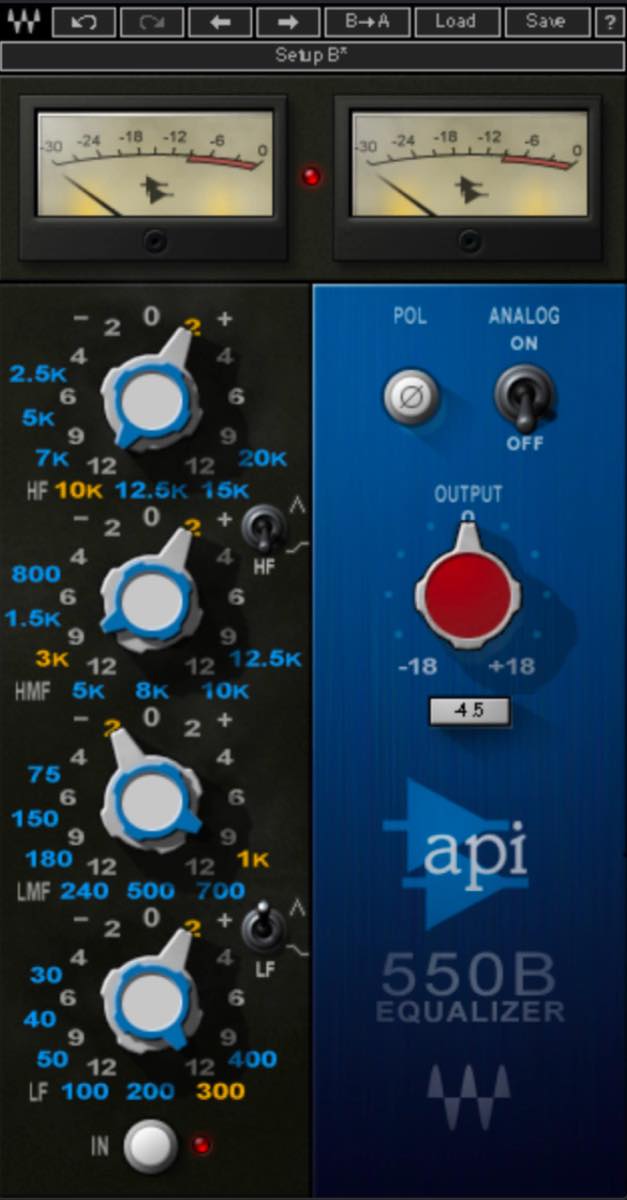
One area to consider boosting is the high-frequency region from around 5 kHz upward.
A boost here can bring the vocal forward and make it seem closer to the listener. Be careful, though: too much can sound fizzy or harsh.
The upper midrange strongly affects the character of the harmonics. Try boosts or cuts of around 2 dB while moving between nearby frequencies.
The 200–400 Hz region affects the vocal’s body, perceived pitch, and warmth; its relationship to the fundamental depends on the singer and note. Again, try adjustments of around 2 dB at nearby frequencies.
You might wonder whether this undoes cuts made by the EQ before the compressor. EQ before and after compression serves different purposes. At this stage, listen for what the finished sound needs and adjust accordingly.
Improve Clarity with a Harmonic Enhancer (Vitamin)
Unlike EQ, which boosts or cuts existing frequency content, a harmonic enhancer generates additional harmonics. This can give the sound a clearer outline and greater definition. It is useful when EQ alone does not provide enough clarity, or when you want more presence without simply turning the vocal up. Match the output level when comparing, since enhancement can also change perceived loudness.
Here, we will use Vitamin to add harmonics, focusing mainly on the high frequencies.
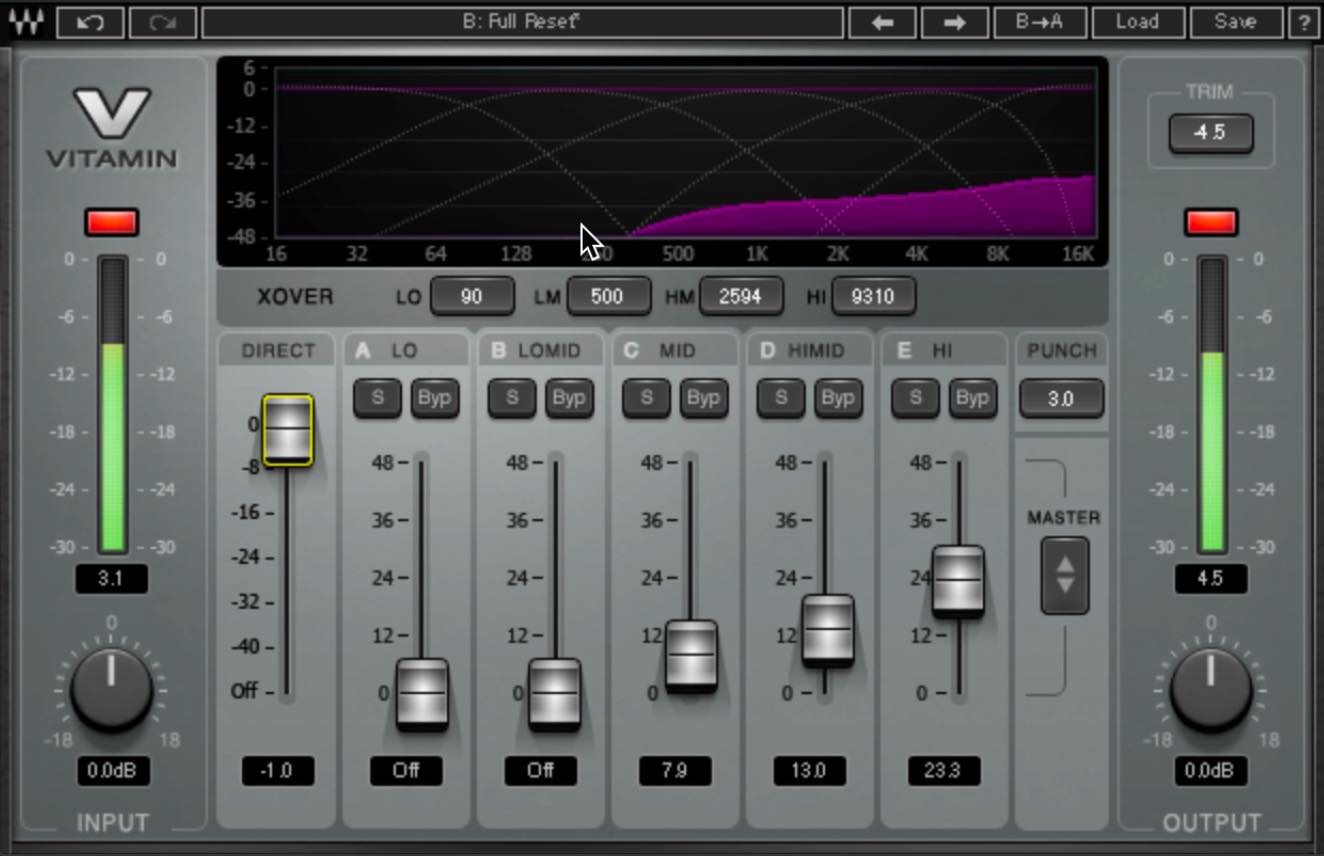
Start with the highest band. Once it gives you the clarity you want, adjust the neighboring bands to balance the result. In this example, the faders form a gentle slope that falls toward the lower-frequency bands on the left. I often find this produces a relatively natural result.
Finally, try reducing DIRECT slightly. This can make the added harmonics stand out and give the vocal a cleaner outline.
Create Consistent Levels with Vocal Riding (Vocal Rider)
Next comes level automation.
Recording fader movements lets you control consistency and musical expression in ways that compression alone may not achieve.
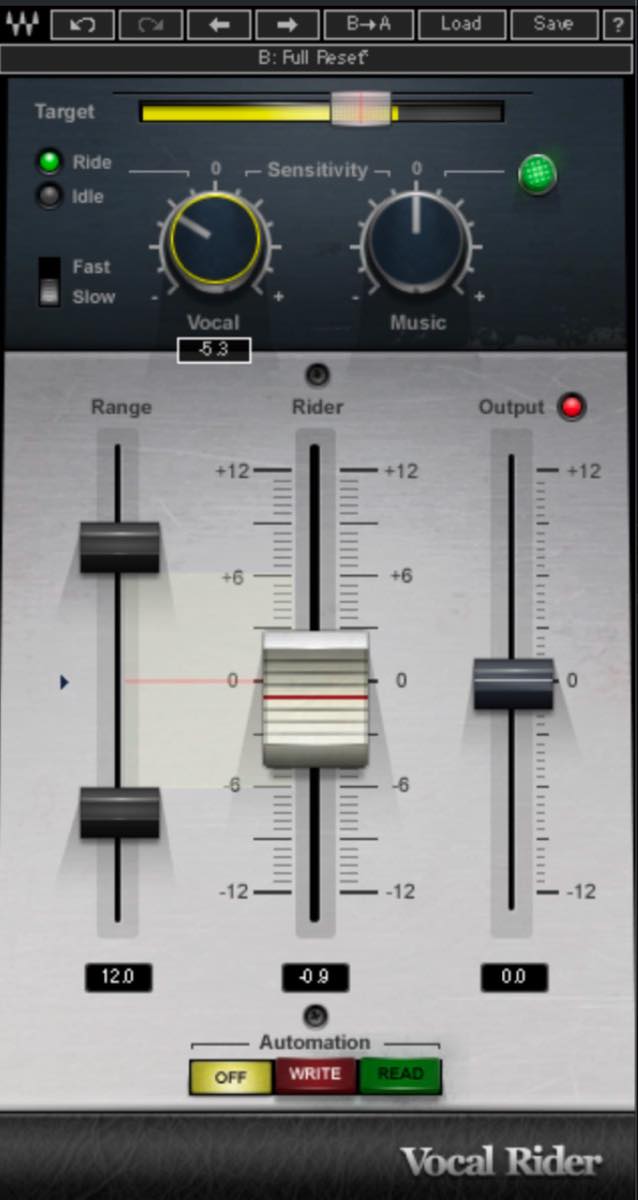
You would normally write those movements using your DAW’s automation. Here, we will use Vocal Rider to make the level adjustments automatically.
We have covered Vocal Rider several times before. For detailed explanations of its parameters, see these articles.

First, set Target to suit the incoming vocal level. Aim for a setting where the meter sometimes crosses the target and sometimes falls below it.
Next, adjust Sensitivity. In this example, the instrumental backing feeds the sidechain, so we will adjust Music as well as Vocal.
Large movements can make Vocal Rider sound unnatural. A range of roughly ±2–3 dB is a sensible starting point for this example.
In the video, the zero settings tended to make it raise the vocal too much, so we reduced both Vocal and Music. Compression has already brought the vocal’s own dynamics under control to some extent, so these settings focus more on its balance against the backing.
Add Sheen and Blend with Reverb (Abbey Road Reverb Plates and H-Reverb)
We will finish with reverb.
There are many options, but plate reverb is a popular choice for vocals.
Here, we will use a send to Abbey Road Reverb Plates.
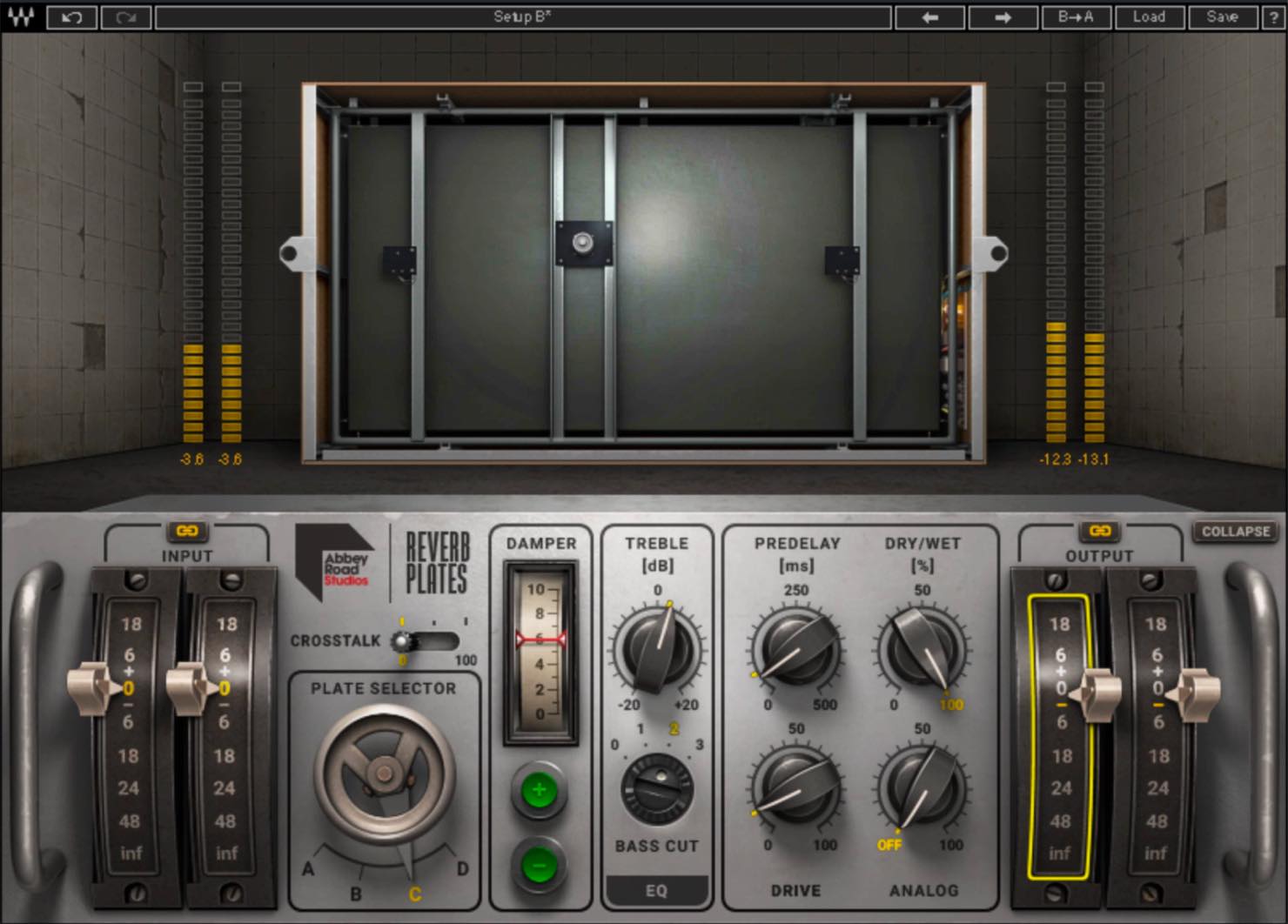
We have also covered this plug-in in detail before. See that article for more on its parameters.

First, choose a plate and adjust the damper.
In the video, we chose Plate C for its relatively restrained character and set the damper to 6. This is a damper position, not six seconds. The decay varies considerably between plates, so choose settings that suit the one you are using.
Next, set EQ, PREDELAY, DRIVE, and the other controls.
We used a fairly substantial BASS CUT to reduce heaviness and raised TREBLE for a clearer, more transparent reverb.
A little PREDELAY keeps the onset clear, while a small increase in DRIVE adds density. DRIVE also raises the level slightly, so we lowered OUTPUT to compensate.
While listening with the backing, start with the send level fairly high, then lower it gradually to find the right balance. The key is to keep the reverb from becoming too prominent.
As discussed previously, inserting a stereo imager after the reverb and narrowing its width slightly can sometimes help it sit better in the mix.
If you add a second reverb to the vocal, try sharing the one used by the other instruments. Even with a stereo backing mix, as in this example, you can send small amounts of both the backing and vocal to the same hall or room reverb.
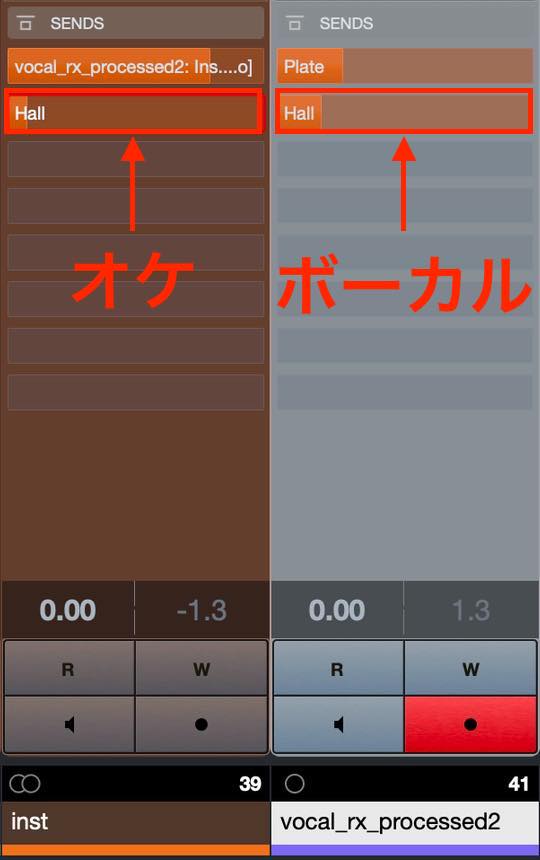
This can help the vocal and backing feel more cohesive, while adding some midrange warmth to the vocal reverb.
Here, we used a slightly adjusted version of H-Reverb’s Medium Hall preset. This is another flexible reverb; see our earlier articles for detailed explanations of its parameters.
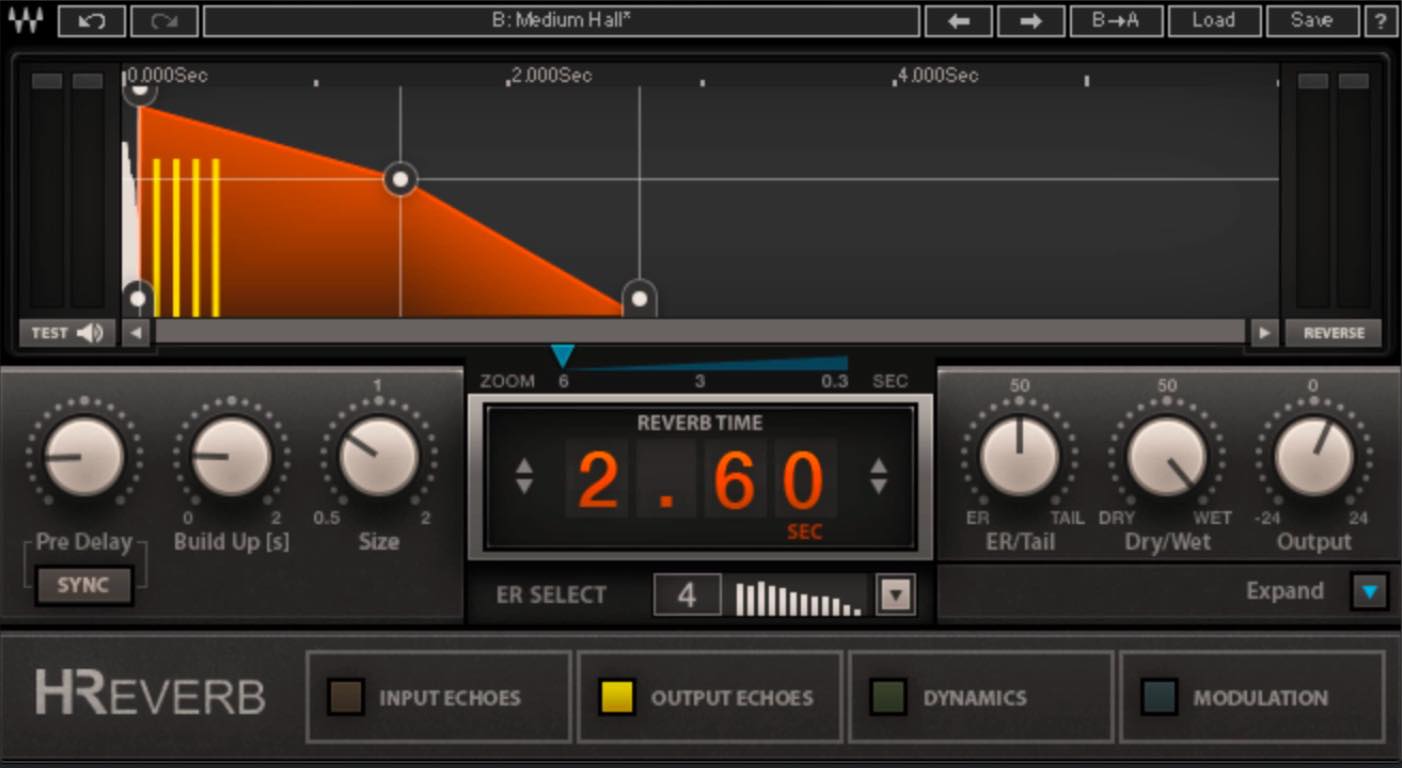
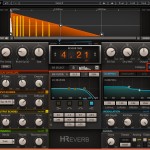
That completes our two-part basic workflow for mixing home-recorded vocals.
I have tried to include the main tools you need in a structure that is easy to adapt. This is not a chain that must be followed in every situation: add or remove plug-ins, or change their order, as the material requires.
Understand the purpose of each stage, then adapt the process to your own sound.
Product links (the following include affiliate and promotional links)
Waves API-550: https://bit.ly/3dkugkj
Waves Vitamin: https://bit.ly/2SObY1u
Waves Vocal Rider: https://bit.ly/36XZqwM
Waves Abbey Road Reverb Plates: https://bit.ly/33NVAED
Waves H-Reverb: https://bit.ly/3iLe6li
You May Also Like
Improving Vocal Recording Quality with a Reflection Filter
Vocal recording quality has a major effect on the finished track. This article looks at capturing a good sound at the recording stage rather than relying only on EQ and compression afterward…

A Practical Guide to Vocal Recording
A detailed look at home vocal recording points that beginners should learn and experienced users may want to revisit.
A Practical Guide to Vocal Recording, Part 2: Taking the Next Step
A guide to equipment choices and techniques for taking home vocal recording further, including external microphone preamps and the character of tube microphones…
Five Microphone Setup Tips for Vocal Recording
Microphone setup has a major effect on home-recorded vocals. This article covers microphone height, distance, pop filters, and reflection filters…
Mixing Home-Recorded Vocals, Part 2: Polishing the Sound
This time, we show how to polish a vocal recording and blend it into the song.
With the basic processing in place, let’s create a vocal that draws the listener in!Read more: https://t.co/Ig2KKgr8fl #DTM #Composition pic.twitter.com/yot6l6nY04
— SLEEP FREAKS (@SLEEPFREAKS_DTM) October 23, 2020
Frequently Asked Questions
Q1. How does a harmonic enhancer differ from EQ?
EQ boosts or cuts existing frequency content, while a harmonic enhancer generates additional harmonics. This can make the vocal clearer and more defined when EQ alone is not enough. For a fair comparison, match output levels: enhancement does not guarantee unchanged loudness.
Q2. How much movement should I allow in Vocal Rider?
Roughly ±2–3 dB is the starting point used here. Excessively large movements can sound unnatural, so fine-tune the range while listening to the vocal against the backing.
Q3. What type of reverb works well on vocals?
Plate reverb is a popular starting point. It can add sheen and space while blending the vocal into the song, provided it is not too prominent. Choose the type and settings by listening in context rather than treating one reverb as best for every vocal.
Q4. How high should the reverb send level be?
Start with the send fairly high, then gradually lower it until the reverb feels present without dominating. Aim for a level that supports the vocal’s natural sound.
NEW ARTICLES
Latest English Articles
















































































































































































