
Unlike a DAW's digital peak meters, a VU meter has a needle response of about 300 ms, providing a useful indication of average level and changes in perceived volume when mixing. Using the compact, affordably priced FORENO STEREO VU METER featured in the original demonstration, this article covers connecting it to an audio interface, calibrating a reference level, setting the balance of foundational tracks such as kick and bass, mixing against a reference track, and using the meter when applying effects and maximizing loudness. These practical techniques can help you work toward more consistent mixes and a natural-sounding balance.
Adding a Hardware VU Meter to Your Mixing Setup
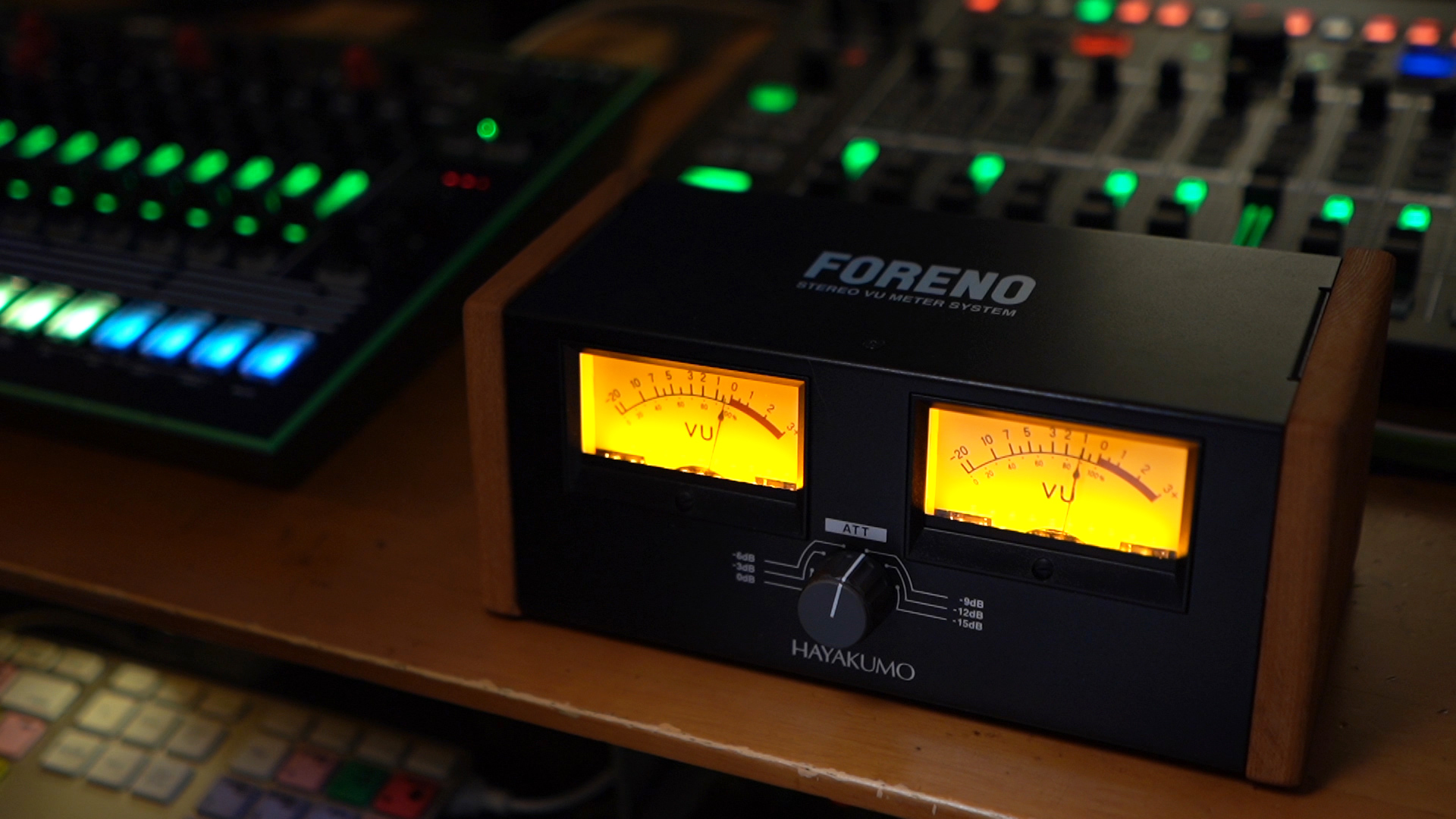
You have probably seen VU meters on large mixing consoles or in plug-in interfaces.
In this livestream demonstration, we explored how to use the HAYAKUMO FORENO in music production. Its manageable size and price made it a practical choice for the demonstration.
Practical Ways to Use a VU Meter in Music Production
Archived Giveaway: One Survey Respondent Could Win a FORENO (Ended)
As part of the original 2020 campaign, one randomly selected survey respondent was to receive the FORENO STEREO VU METER used in this broadcast. This giveaway has ended.
- Entry deadline: June 14, 2020, at 11:59 p.m. (Japan time; ended)
- Winner notification was scheduled by email on June 20, 2020, between 8:00 and 9:00 p.m. (Japan time).
The link below leads to the original Japanese survey and campaign details, retained for reference.
The Product Used in This Demonstration
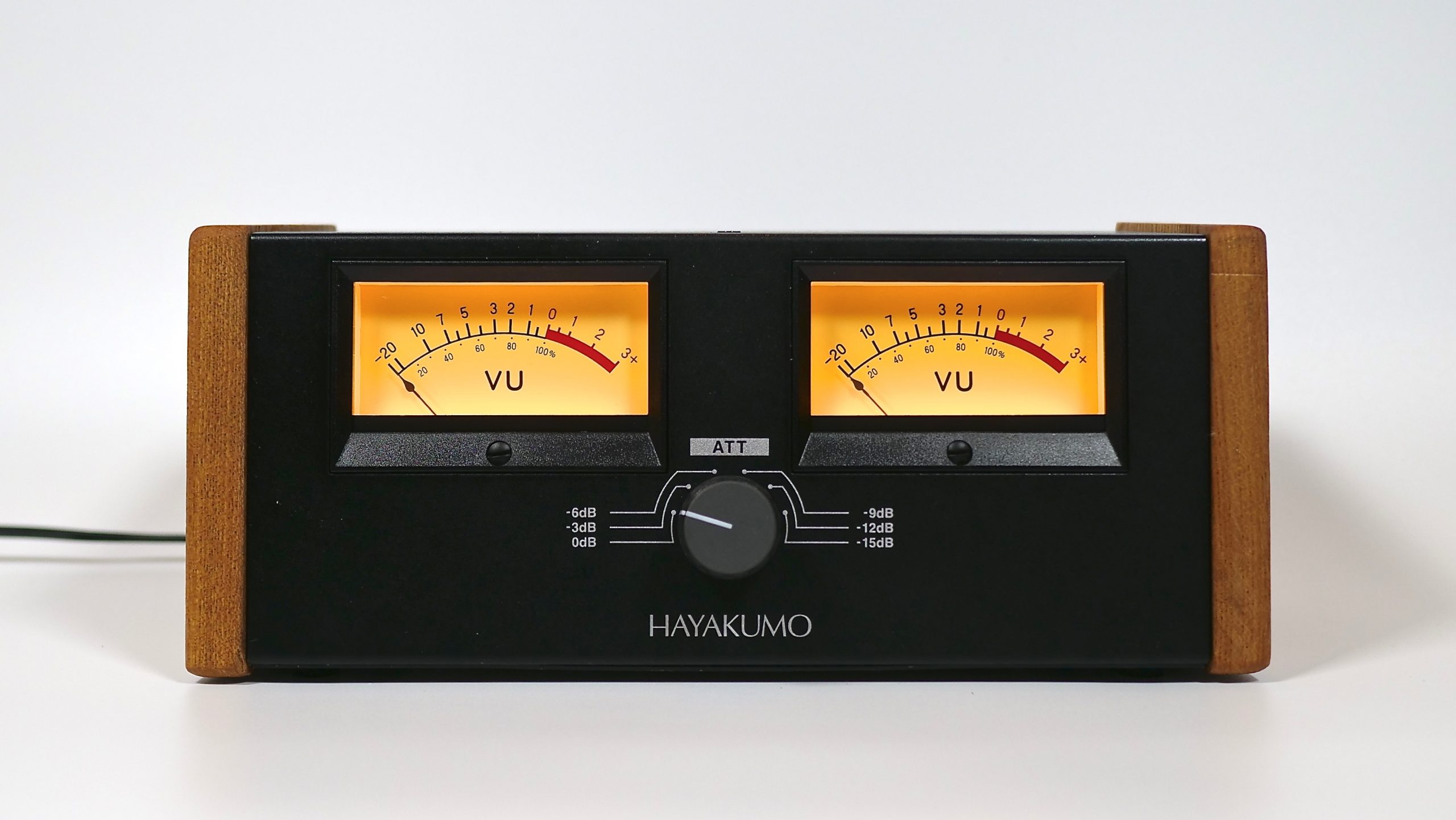
FORENO STEREO VU METER | HAYAKUMO
https://hayakumo.thebase.in/items/25694593
What Is a VU Meter?
VU meters have a long history in audio production. Their main characteristics include the following:
- A needle response of about 300 ms (0.3 seconds), giving an indication of average signal level
- Unsuitable for measuring brief peaks, but useful for relating signal level to perceived volume
- Needle movement that makes changes in level and dynamics easy to follow
Although digital meters are now commonplace in DAWs and elsewhere, the distinctive movement of a VU meter makes it easy to follow both average level and changes in dynamics. That is why hardware and plug-in VU meters remain popular today.
Setting Up a VU Meter
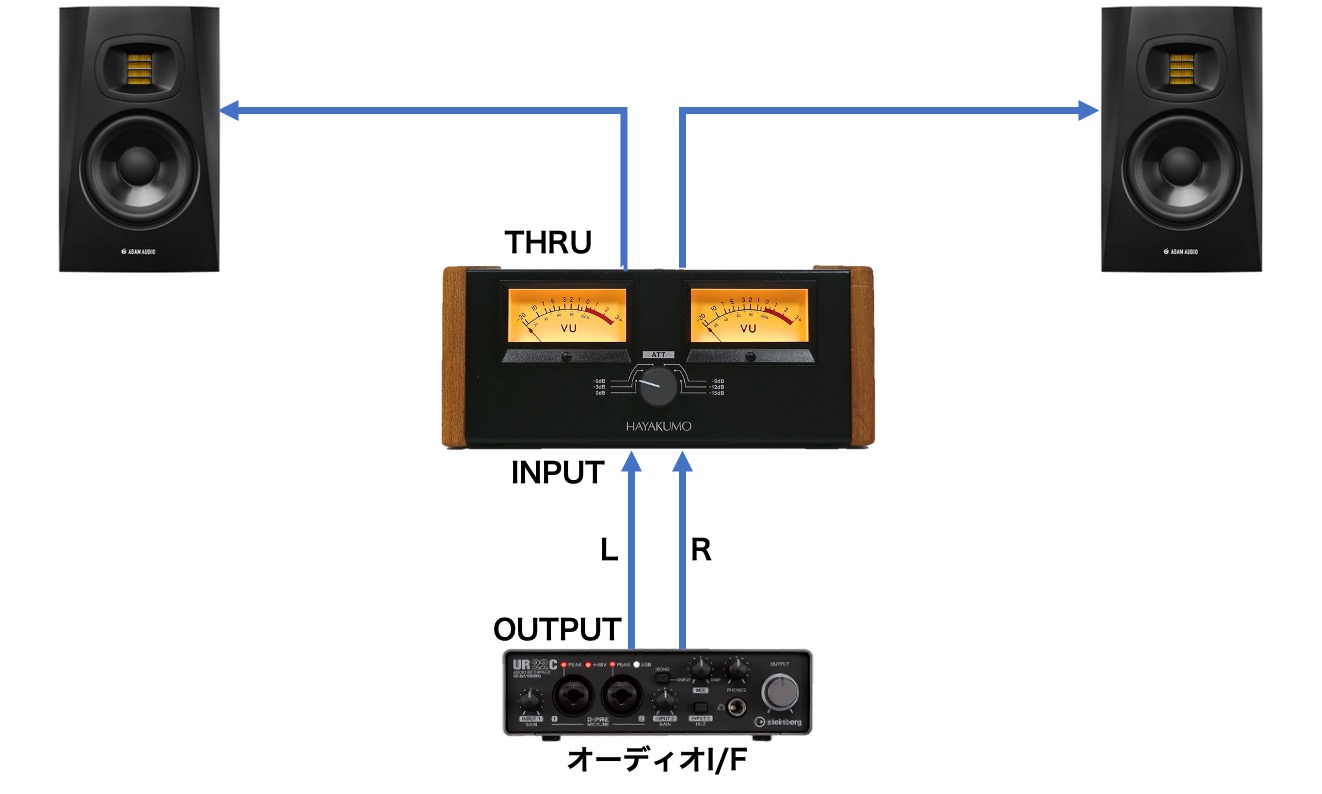
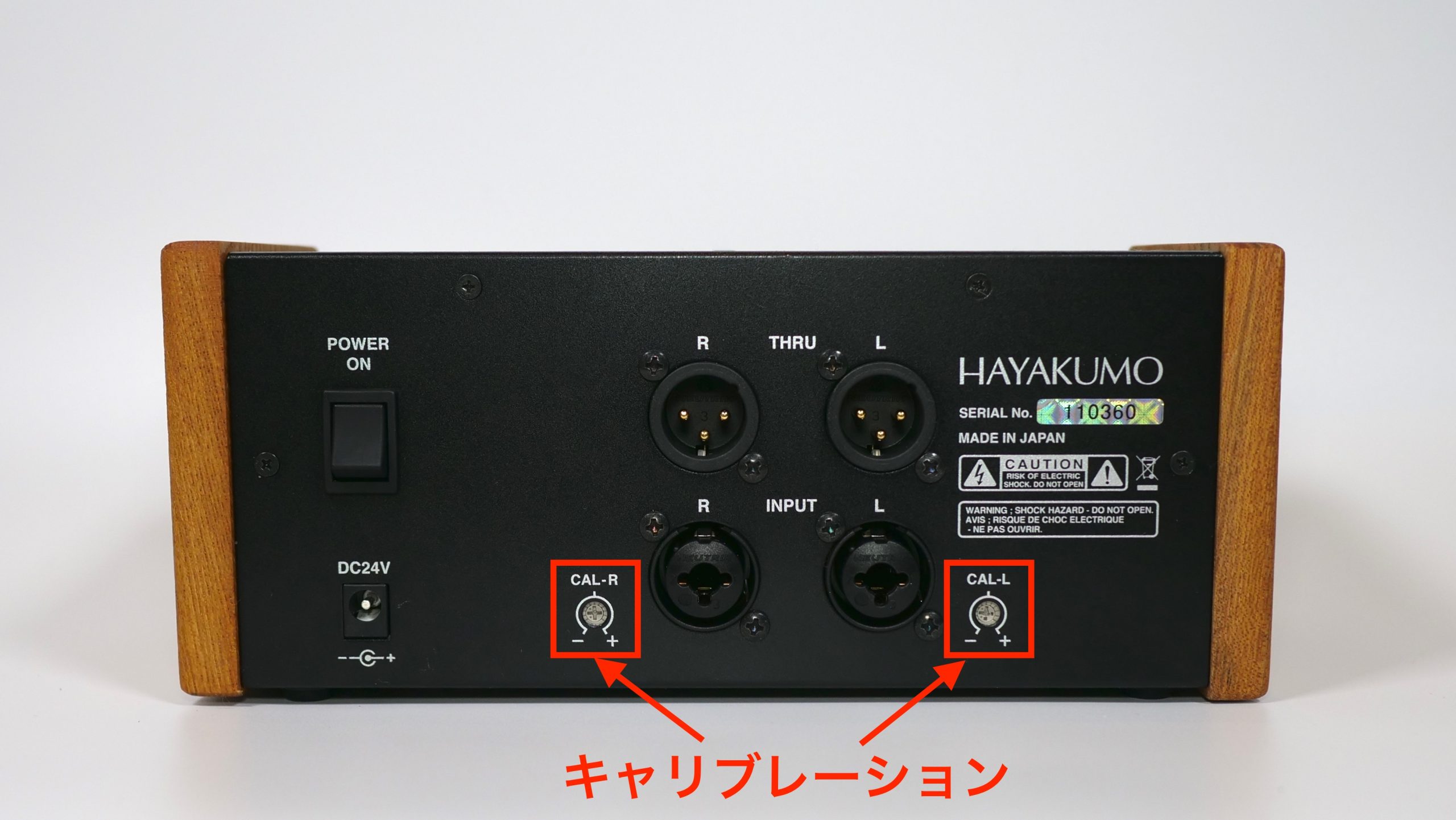
Connect the audio interface's OUTPUT to the VU meter's INPUT, then connect the meter's THRU output to your monitor speakers or other monitoring equipment.
Next, set the reference level.
A VU meter shows level relative to a calibrated reference, rather than directly displaying a digital full-scale value.
Unlike the 0 dBFS point on a DAW's digital meter, 0 VU does not automatically mean 0 dBFS. Choose the digital level that will correspond to 0 VU to suit your workflow.
Depending on the genre and your setup, calibrating 0 VU to roughly -12 to -18 dBFS can make the needle easy to read while allowing suitable headroom during mixing.
Use a test generator, also called a test oscillator, to make this adjustment.
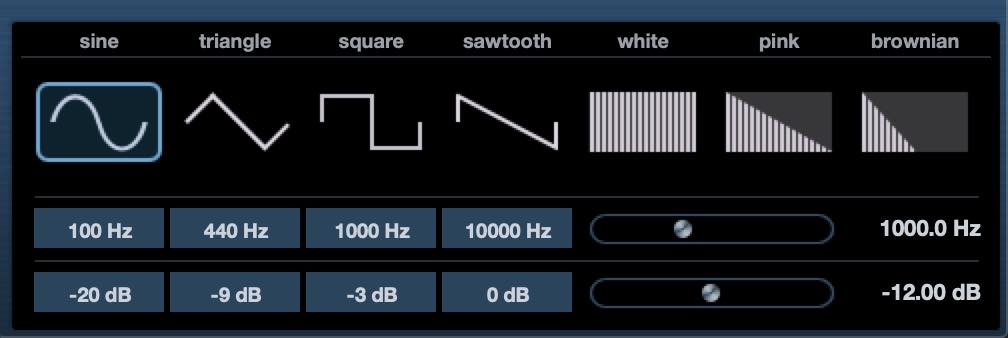
Generate a 1 kHz sine wave at your chosen reference level: -12 dBFS in this example.
With the tone playing, adjust the audio interface's output volume or the calibration controls on the back of the FORENO until the needle reads 0 VU.
Establishing a Level Reference with the Foundational Tracks
Once the setup is ready, let's use the VU meter to help build a mix.
Start by establishing a level reference with the tracks that form the foundation of the song.
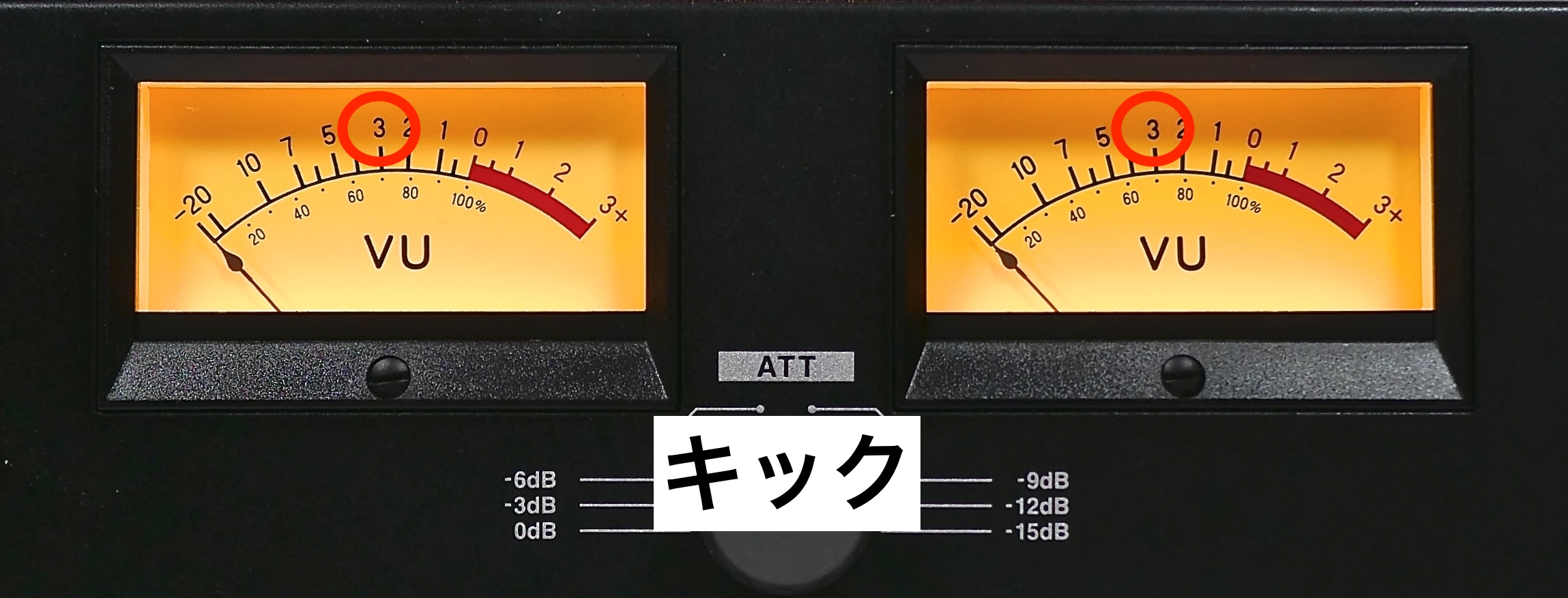
In this example, the low-frequency energy of the kick produces a useful, relatively consistent VU indication, making it a suitable starting point.
The appropriate level depends on the genre, but for dance music like the example here, a soloed kick reaching around -3 VU is often a useful starting point.
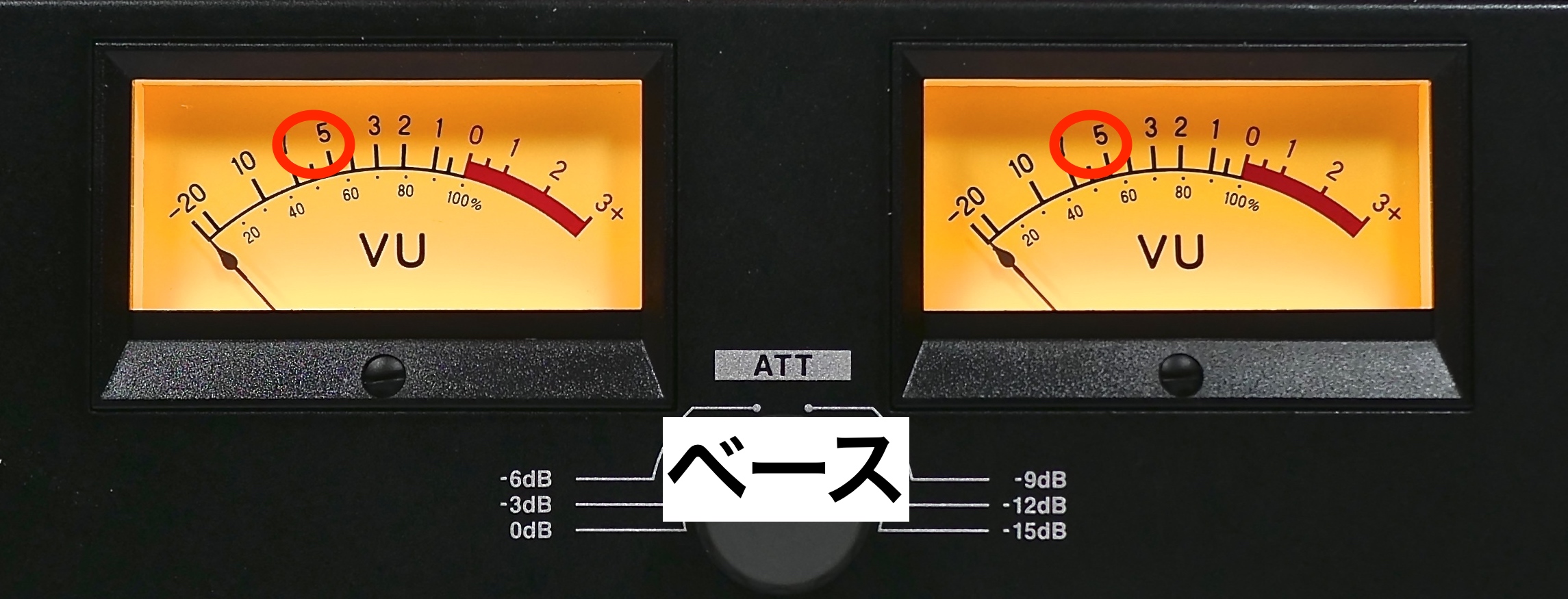
Next, set the level of the bass, the other main low-frequency element.
In this example, the bass is kept below the kick in level, with the needle moving around -6 to -5 VU.
When the kick and bass are soloed together, the reading is approximately -2 to -1 VU.
Using a Reference Track
Preparing the Reference Track
Now, bring in a reference track.
Since reference tracks are usually already mastered, they will generally sound louder than the mix you are working on.
First, play the reference track and lower its fader until the VU meter reads around 0 VU.
Then use the meter to observe its dynamics.
With heavily maximized material, changes in dynamics can be difficult to follow visually on peak or RMS displays.
This is another advantage of a VU meter: the needle can provide an intuitive visual guide to changes that you hear in the music.
Mixing the Other Tracks Against the Reference
In this example, the reference track's needle moves roughly between -3 and 0 VU.
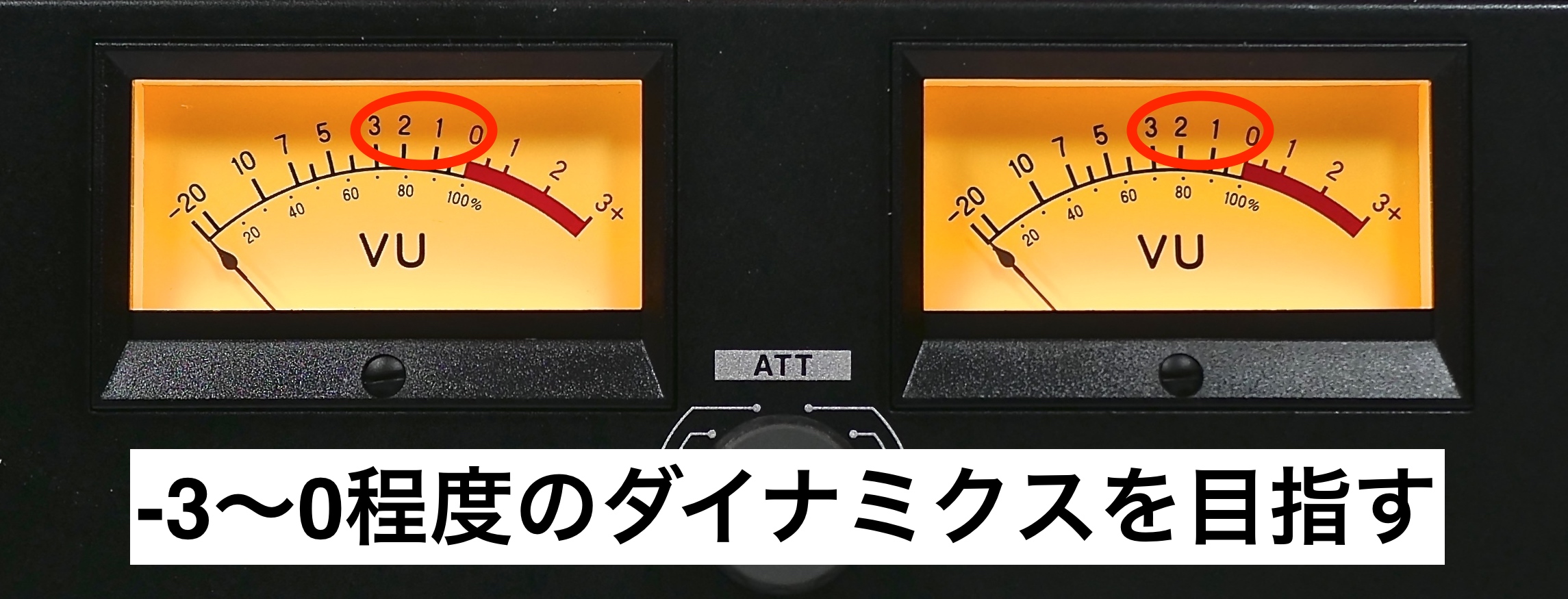
Use that as a guide while adding the remaining instruments to the kick and bass whose levels you have already set.
Adding instruments from lower to higher registers can make it easier to build a cohesive balance.
For this song, we added the kick, bass, chord instruments, and lead instruments in that order. It is fine for the meter to be approaching 0 VU at this stage.
One limitation of using a VU meter this way is that parts dominated by high-register sounds may produce a relatively small reading, particularly when they contain short transients.
Adjust high arpeggios, snare, hi-hats, and cymbals by listening, so they remain audible within the tracks mixed so far.
These decisions depend on your ears, but establishing a level reference for the foundation beforehand should make them easier.
Using a VU Meter When Applying Effects
Compared with the reference, the kick sounded a little loose, so we applied a multiband envelope shaper.
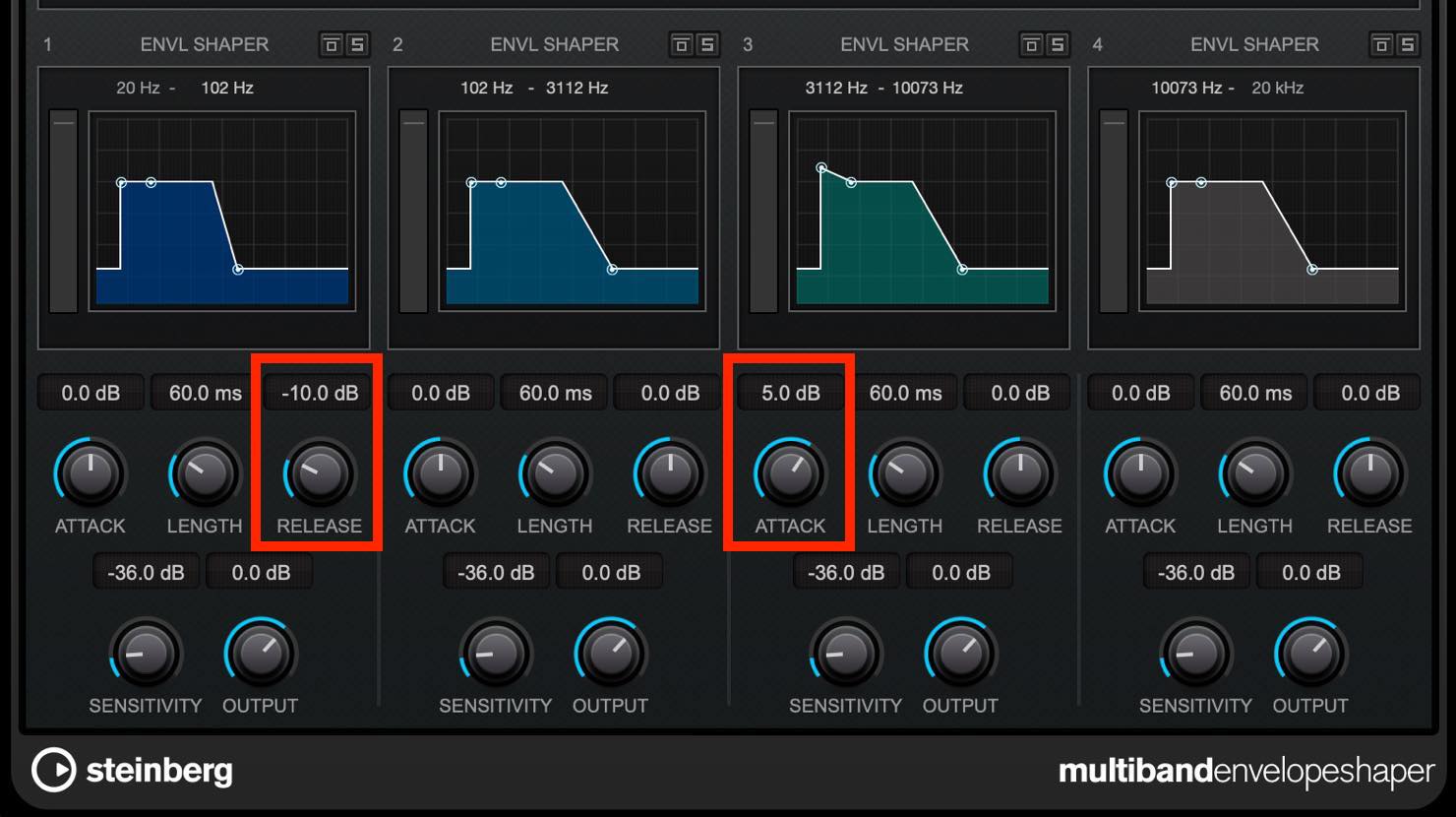
We increased the high-frequency attack and reduced the low-frequency release.
If you solo the kick at this point, you will see that the needle now falls short of -3 VU.
Because a VU meter responds relatively slowly, sustained sounds produce a stronger indication than very brief peaks. This helps explain why its readings can be useful alongside judgments of perceived volume.
To restore the sense of low-end weight, adjust the kick's level again so that it reaches -3 VU.
Using a VU Meter When Maximizing Loudness
For loudness maximization, this demonstration uses Slate Digital's original FG-X.
First, enable CONSTANT GAIN MONITORING so you can assess the processing without the added gain making the result simply sound louder.

In this particular example, raising GAIN to 8 dB gives a maximum monitored peak of -8 dBFS with gain compensation active. We can now compare it with the level-adjusted reference. These figures describe this demonstration, rather than a general rule for every mix.
However, the VU meter now reads lower than before, when the needle was reaching close to 0 VU.
You can also hear that the kick has lost its attack and sounds squashed.
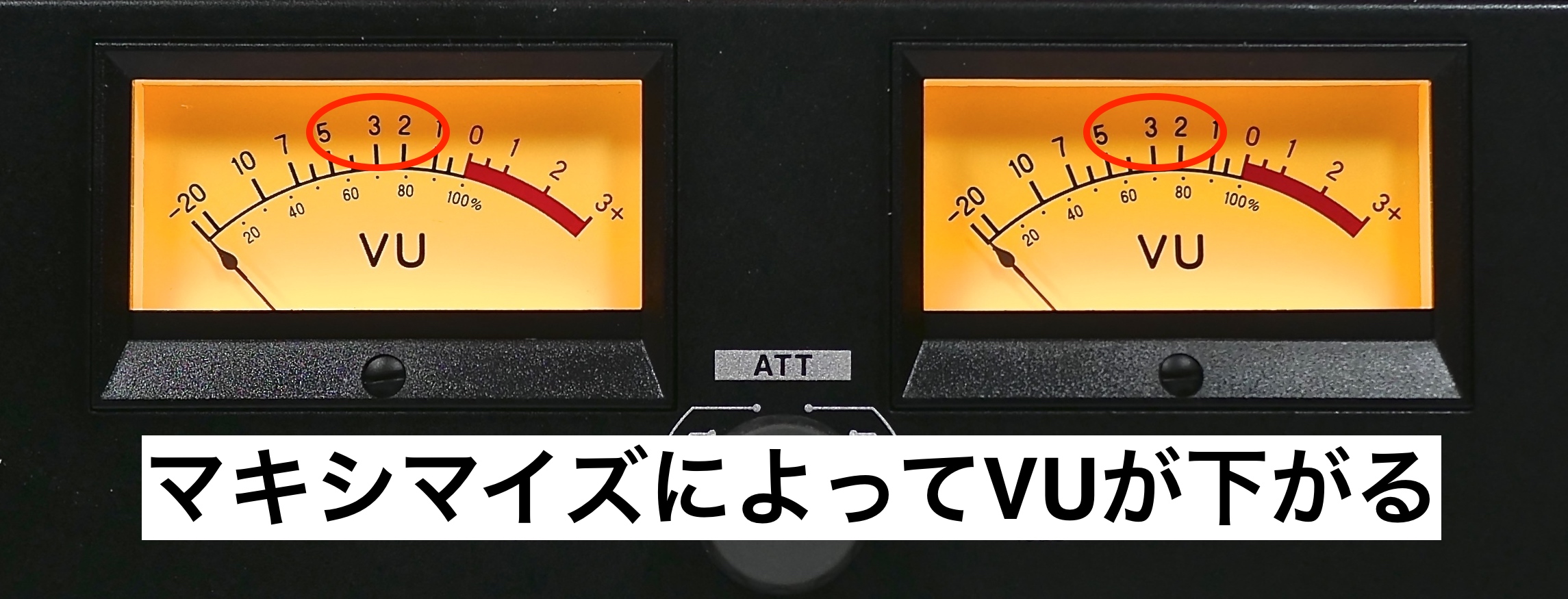
This is the result of driving the processor too hard, beyond the point normally suitable for this mix. FG-X includes a dynamics-related control called DYNAMIC PERCEPTION, so let's try using it to improve the perceived movement.

Raise this control until the VU needle moves toward 0 again. At about +4 on the control in this example, the kick's sense of attack returns, and the needle moves roughly between -3 and 0 VU.
Fine-tune the other controls, including DETAIL for high-frequency punch and ITP for the transient saturation character. In this song, the lead and chord instruments also sounded rather prominent after maximization, so their levels were reduced. When doing this, compare carefully with the maximizer bypassed and with the reference track.
Finally, lower your monitor volume before disengaging CONSTANT GAIN MONITORING to check the actual increase in playback level. To compare with the reference at its original level, return the reference track's fader to 0 dB as well. Editorial clarification: the Japanese text names DYNAMIC PERCEPTION here, but CONSTANT GAIN MONITORING is the level-compensation control described in the original FG-X user guide.
At this point, the VU needle may go off the scale if you leave the meter's setting unchanged.
This is where the FORENO's ATT (attenuator) control is useful. Turning it clockwise attenuates the signal presented to the meter in 3 dB steps, making the reading easier to follow.
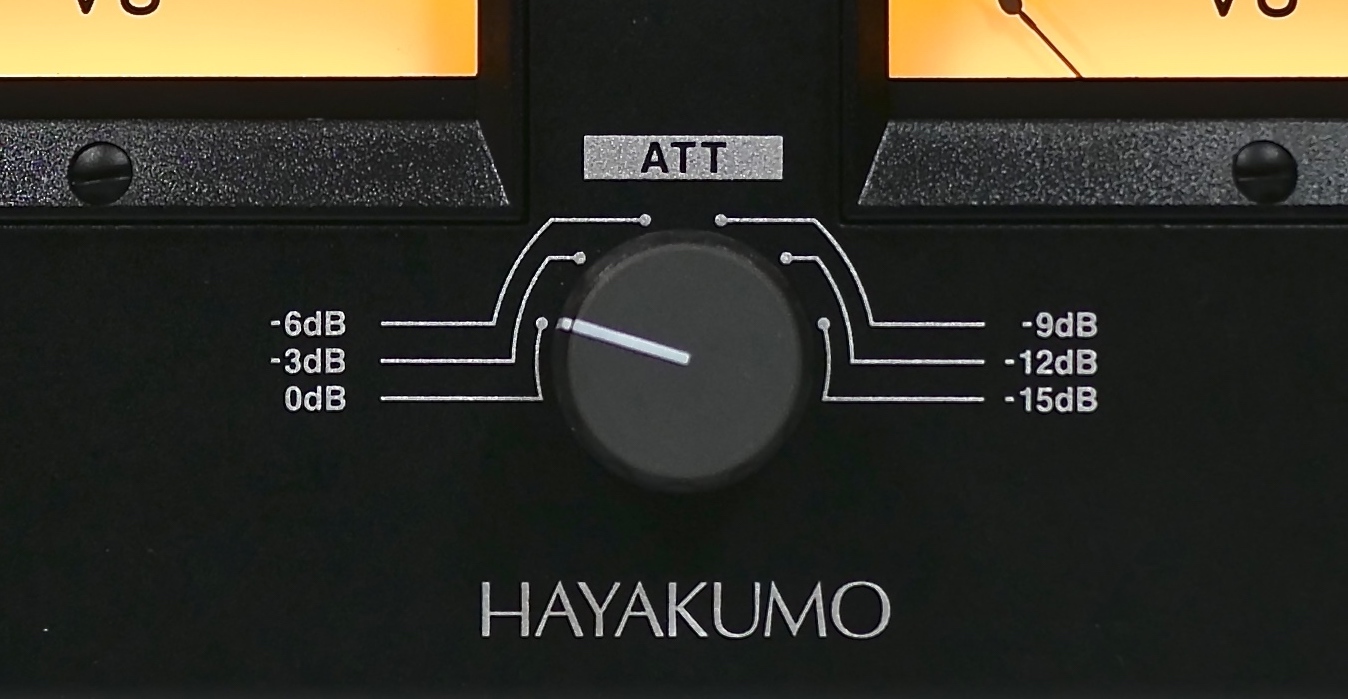
In this example, setting ATT to -6 dB brings the needle to roughly 0 to +3 VU, making changes in dynamics easier to observe.
How did you find this approach?
A VU meter has a distinctive role alongside peak and RMS meters. Trying one in practice makes its usefulness easier to appreciate.
The FORENO introduced here combines a compact design suitable for a music production setup with precise, reliable meter components.
Personally, I found that the hardware's appeal was not only its readability, but also the ability to keep it permanently in view.
It can be a helpful companion when you want to make mixing decisions with greater confidence.
Archived Giveaway: One Survey Respondent Could Win a FORENO (Ended)
As part of the original 2020 campaign, one randomly selected survey respondent was to receive the FORENO STEREO VU METER used in this broadcast. This giveaway has ended.
- Entry deadline: June 14, 2020, at 11:59 p.m. (Japan time; ended)
- Winner notification was scheduled by email on June 20, 2020, between 8:00 and 9:00 p.m. (Japan time).
The link below leads to the original Japanese survey and campaign details, retained for reference.
Product Purchase Links from the Original Article
◆ FORENO STEREO VU METER | HAYAKUMO
https://hayakumo.thebase.in/items/25694593
◆ FORENO STEREO VU METER | HAYAKUMO — Crossgrade Version (Original Japanese Listing)
https://hayakumo.thebase.in/items/25699941
The original article offered a bonus for entering BQJX5VCF in the coupon field on the product purchase page:
a curated collection of links to our videos about volume and loudness in mixing and mastering. This is a historical offer; current availability and crossgrade eligibility are not confirmed here.
Frequently Asked Questions
Q1. How does a VU meter differ from a peak meter?
A VU meter's approximately 300 ms needle response makes average signal level and changes in dynamics easier to follow. A peak meter responds to brief maximum signal levels; in a DAW, these are normally shown relative to digital full scale in dBFS. The two serve different purposes. Neither reading on its own is a measurement of acoustic sound-pressure level.
Q2. Is a VU meter useful for beginners in music production?
Yes. A VU meter can help establish a consistent level reference and make comparisons with reference tracks easier, helping beginners develop a more reliable sense of mix balance.
Q3. Why use -12 dBFS as the reference for 0 VU?
Calibrating 0 VU to roughly -12 to -18 dBFS can make needle movement easy to read while encouraging suitable headroom before mastering. It provides room for later level processing; the exact reference depends on your setup and workflow.
Q4. What VU reading should I aim for when setting a dance music kick?
With the calibration used in this demonstration, a soloed kick reaching around -3 VU is a useful balance guide. Set the bass and other instruments relative to that foundation. It is a starting point for this example, rather than a fixed target for every track.
NEW ARTICLES
Latest English Articles



































































































































































































