
Gain staging is a way to manage levels before mixing: adjusting the output of audio files and software instruments to an appropriate level before plug-in processing. Unlike fader balancing, input gain directly affects how plug-ins respond. This can make mixing more efficient and help plug-ins work as intended. With analog-modeling plug-ins in particular, using the manufacturer's reference level—the -18 dBFS reference discussed here—can provide a starting point for their intended clean character. In the comparison in this article, the author found improvements in low-end presence, vocal clarity, midrange separation, and overall dynamics.
Taking Your Mix Further with Gain Staging
“I've learned all sorts of mixing techniques and collected a full set of powerful plug-ins, but I still can't get the sound I have in mind…”
Does that sound familiar?
For anyone struggling with this, we will explore gain staging, a topic that was attracting attention in mixing circles when this article was written.
As well as explaining the process, we tested its effects, so please use the results as a reference.
It could help you break through a problem in your mixes.
Gain Staging: Video Tutorial
Selected Questions and Answers from the YouTube Video

So this means adjusting the level of each track before applying EQ or compression, right? Is that separate from using a VU meter to set the balance between instruments by moving their track faders during mastering?

Yes: gain staging refers to adjusting levels before effects such as EQ and compression. It is a separate step from balancing the tracks.
Is there a video showing the mix after gain staging?
There is no direct follow-up video, but we have published many other videos about mixing. Take a look at our Tips for Better Mixes playlist: https://youtube.com/playlist?list=PLqgAPdFDdaLinnCGnibFKKFI1ax47gINX&si=OuZpB-MieMZo1N8s
When gain staging a drum bus or a bus for guitars panned left and right, where should I adjust the level?
Insert a plug-in with a gain or output control in the first insert slot on the bus track, and use that to adjust the level.
What Is Gain Staging?
Put simply, gain staging means managing levels before you start mixing.
That may sound obvious, but we are not talking about the familiar process of balancing track faders.
We mean the level at the very beginning of the signal path: the output from an audio file or a software synth. Here, we call this level gain.
DAWs provide functions for adjusting gain, and you can also use plug-ins to do it.
You may be wondering how gain adjustment differs from fader adjustment. Here is a summary.
- Gain: The level before processing such as plug-ins—in other words, the input. Changing it affects the plug-ins on that track.
- Fader: The level after plug-in processing—in other words, the output. Changing it does not affect the plug-ins earlier in that track's signal path.

Gain staging sets this gain to an appropriate value using a reference level. We will explain how to adjust it in detail later.
The Benefits of Gain Staging
What benefits can gain staging bring?
There are two main points.
- 1. Faster Mixing
- 2. Better Results from Your Plug-ins
Gain staging reduces differences in track input levels from song to song, so you do not have to make huge changes to settings such as compressor thresholds every time. You can anticipate a useful starting point for vocals, bass, and other instruments.
This also makes presets easier to use and speeds up mixing. That is the first benefit.
The second—and arguably the biggest benefit—is a change in the sound.
As we will explain, this happens because the signal reaches the plug-ins at a suitable input level.
Rather than just taking our word for it, compare these two audio examples.
▶ Without gain staging
Without gain staging
▶ With gain staging
With gain staging
What do you think?
Everyone will have their own impression, but the author heard a clear difference and preferred the second example for its low-end presence, vocal clarity, midrange separation, and overall dynamics or punch.
We mixed these two versions carefully to avoid differences other than gain staging, matching the compressor gain reduction and the final track levels.
Another important point is that we used many analog-modeled plug-ins, including products from UAD and Waves.
This brings us to another reason why gain staging can change the sound.
The Sweet Spot in Analog-Modeled Plug-ins
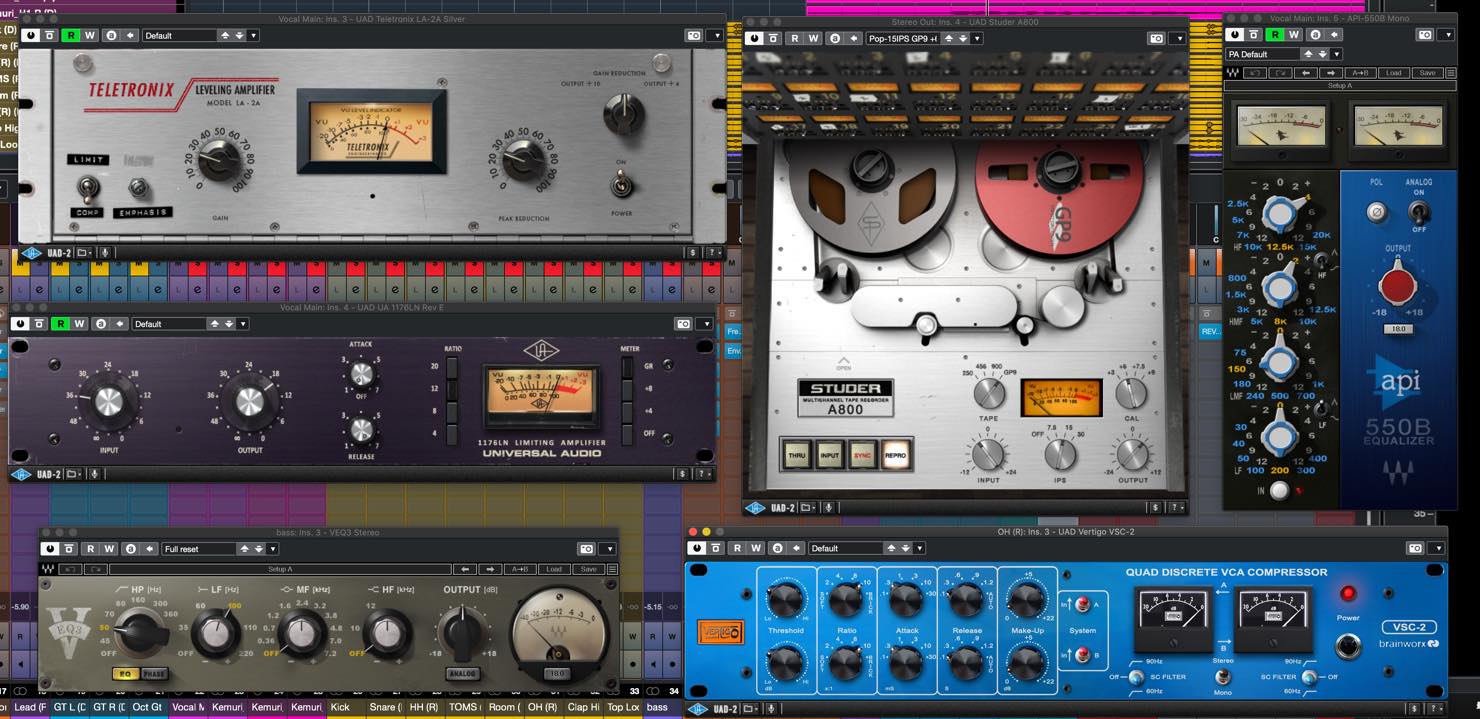
Every piece of analog equipment has its own characteristics. Simply passing audio through it can change the sound, as can adjusting its input and output controls. These changes range from subtle added harmonics to aggressive distortion.
That behavior is part of what makes analog gear appealing, and using it effectively is one reason to choose it. There is no single correct sound; you can choose the settings you enjoy.
However, this equipment also has a reference input level at which it produces its intended clean sound.
In traditional analog recording and mixing, this is 0 VU on a VU meter: effectively, the manufacturer's reference operating level.
You do not have to follow that reference to get a good sound, but it is useful to know what the reference sound is.
As in many other fields, beginners will often get better results by starting with the basics rather than making completely arbitrary choices.
From there, deliberately deciding how to depart from that starting point is a creative approach to shaping sound.
Many analog-modeled plug-ins reproduce this behavior too. For example, the article uses 0 VU corresponding to -18 dBFS as a reference and notes that many UAD and Waves products specify this calibration in their manuals.
When Should You Do Gain Staging?
When is the right time to do gain staging?
The simple answer is before you start mixing.
We will explain the method next, but ideally you would do it before inserting any plug-ins, with the faders at unity gain and the pan controls centered.
If you change input gain after starting a mix, the response of compressors and other processors changes, which can upset the mix.
That said, it is common to mix while arranging in modern music production, so we will also explain how to deal with that situation later.
A Basic Gain-Staging Method
For now, we will assume you have not started mixing yet.
1. Insert a VU Meter Plug-in on the Master Track
Many manufacturers offer VU meter plug-ins, including free options.
Their basic display and setup are similar. For the procedure here, set the reference level to -18 dBFS.
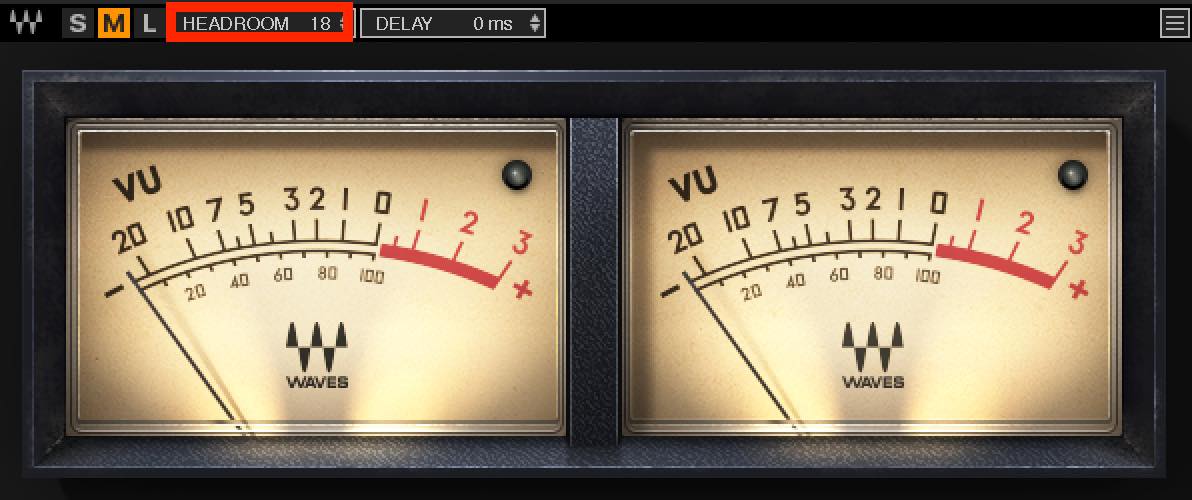
Insert the meter on the master track with this setting.
2. Solo Each Track and Adjust Its Gain
Solo the track you want to gain-stage and adjust its gain while watching the VU meter.
If its level varies, loop one of the louder sections while making the adjustment.
A good way to adjust gain is with the audio event's Volume setting in Cubase or the region's Gain setting in Logic Pro. These functions also change the displayed waveform size, giving you a visual check.
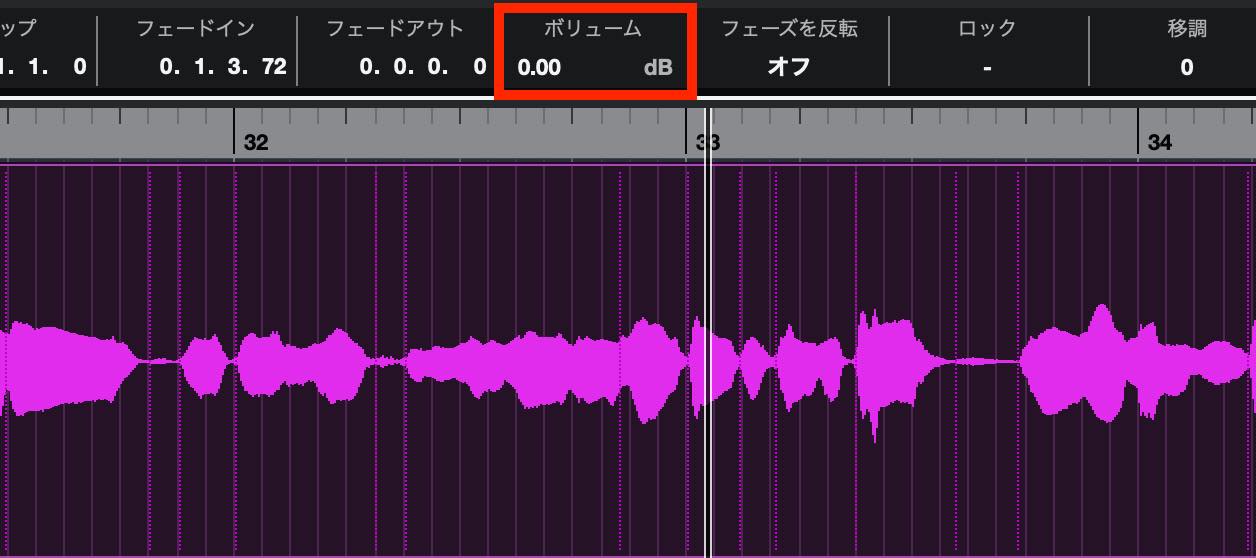
Most major DAWs offer a similar function. If yours does not, insert a plug-in with a level control, such as an EQ, into the first insert slot and adjust it there.
As mentioned above, the target for this gain adjustment is 0 VU.
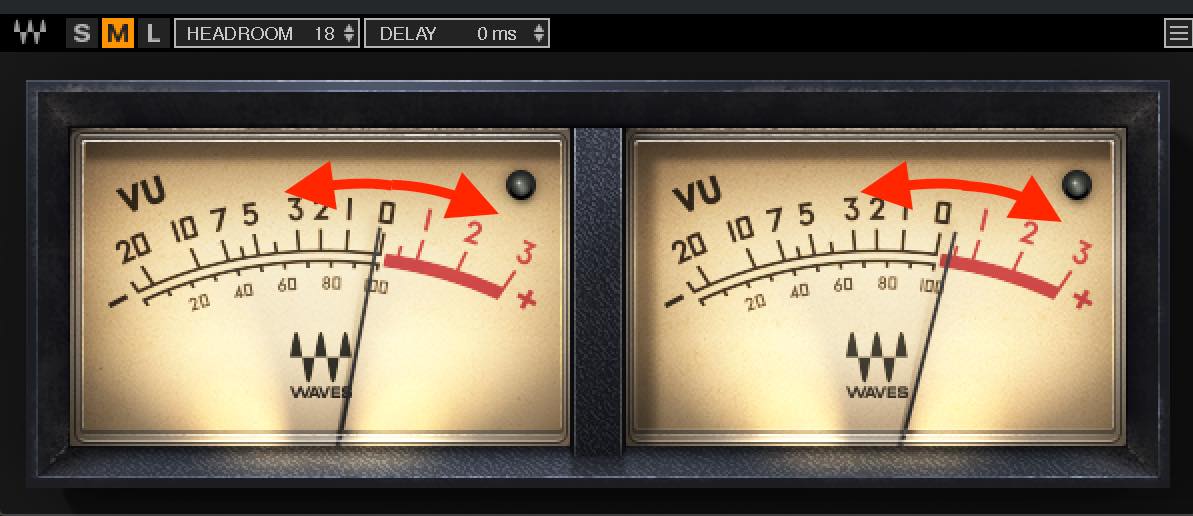
Of course, the needle will not stay exactly at 0 VU. Aim for it to move around zero on average. Going above zero on a VU meter does not itself mean digital clipping, so a little movement above zero is fine as long as the needle is not pinned at the far right.
Adapting Gain Staging to Different Tracks
In general, apply the previous procedure to each track, but some cases need a different approach.
Tracks with Large Note-to-Note Dynamics
For a track with strong level changes, such as a rhythmic piano accompaniment, the meter may swing so much that it is hard to decide where an average of 0 VU should be.
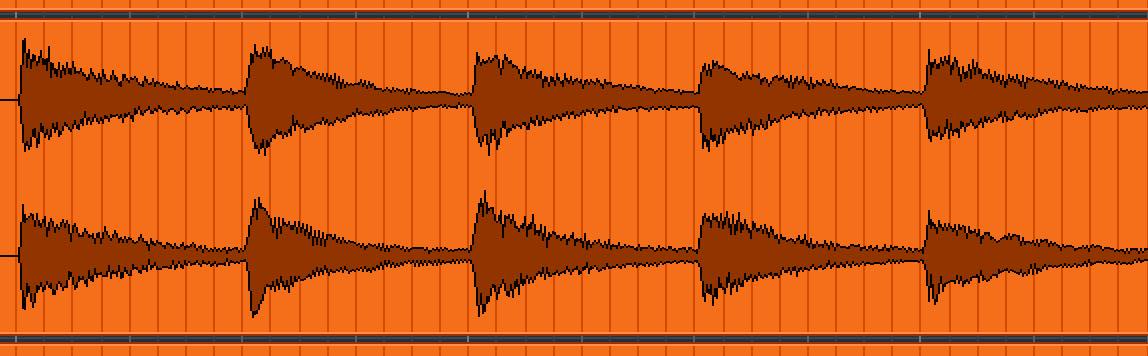
In this case, adjust the gain so that the VU meter's highest readings reach 0 VU.
Tracks with Sharp Transients, Such as Drums
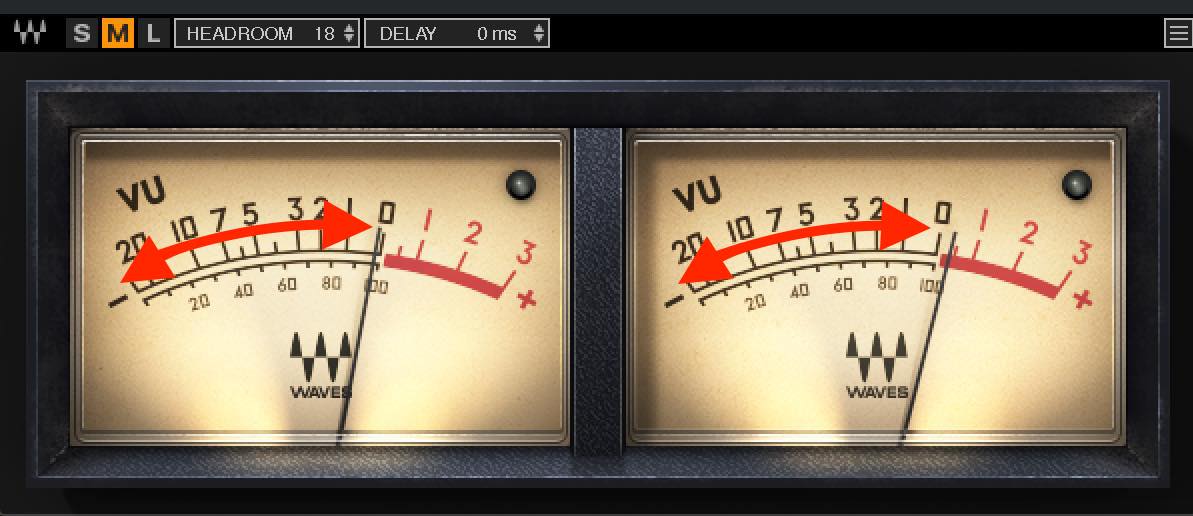
Drums and percussion have prominent, brief attack peaks, so their average level reads relatively low on a VU meter. Trying to make the VU needle reach 0 as in the previous example can make them far too loud and cause frequent digital clipping.
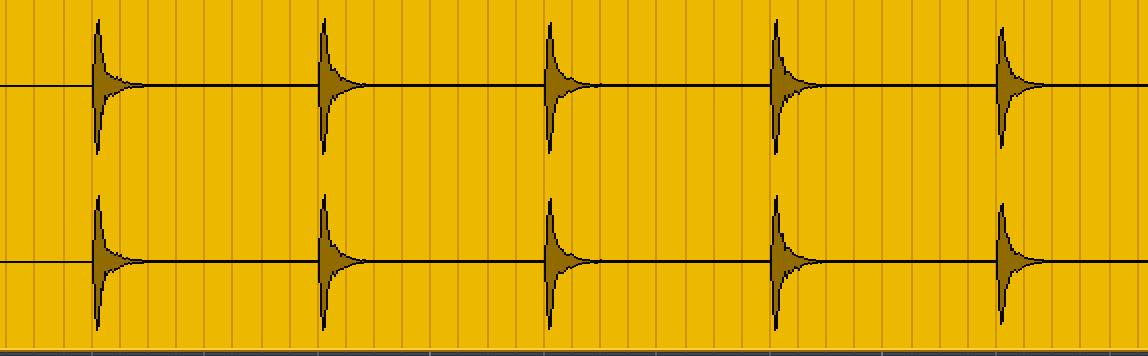
A VU meter is less useful for managing these levels, so we use a different method.
That method is normalization.
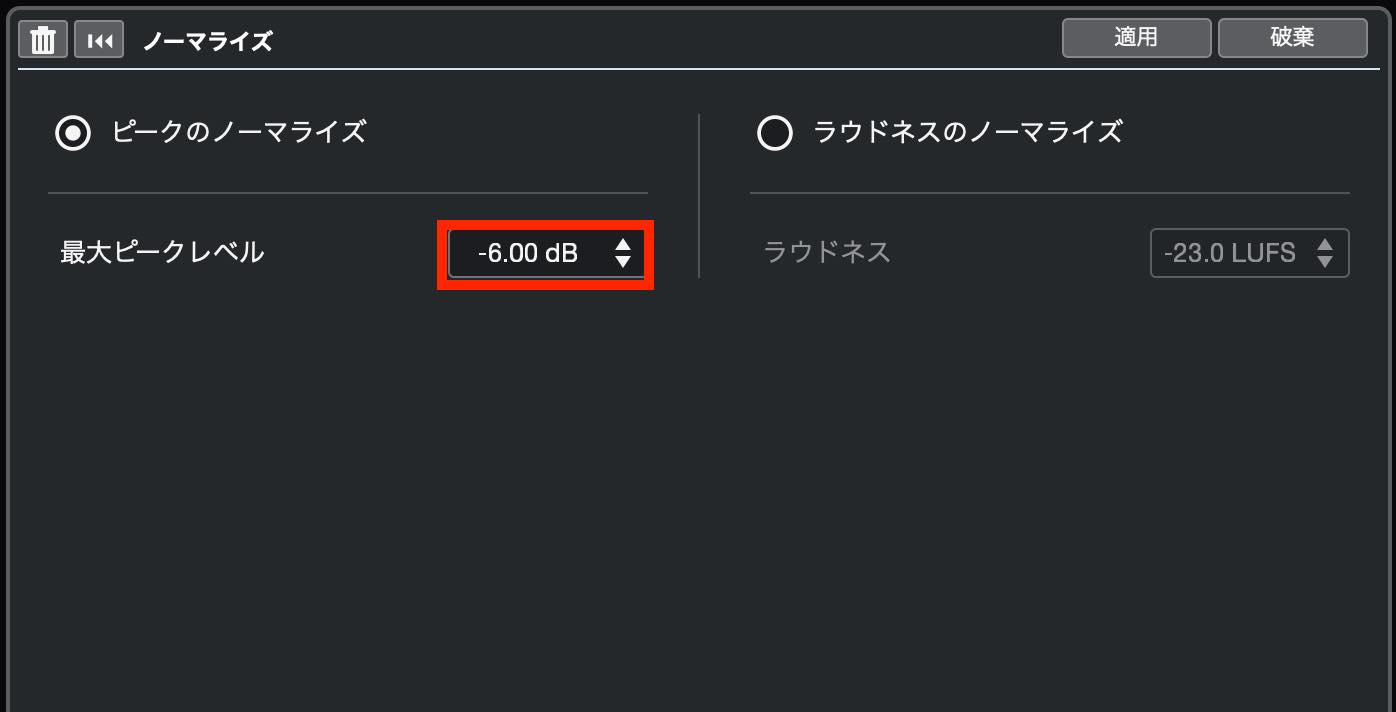
Normalization changes the overall gain so that the highest peak in an audio event or region reaches a specified level. Here, set the peak to -6 dBFS.
This leaves a reasonable amount of headroom while feeding the plug-ins an appropriate level for this example.
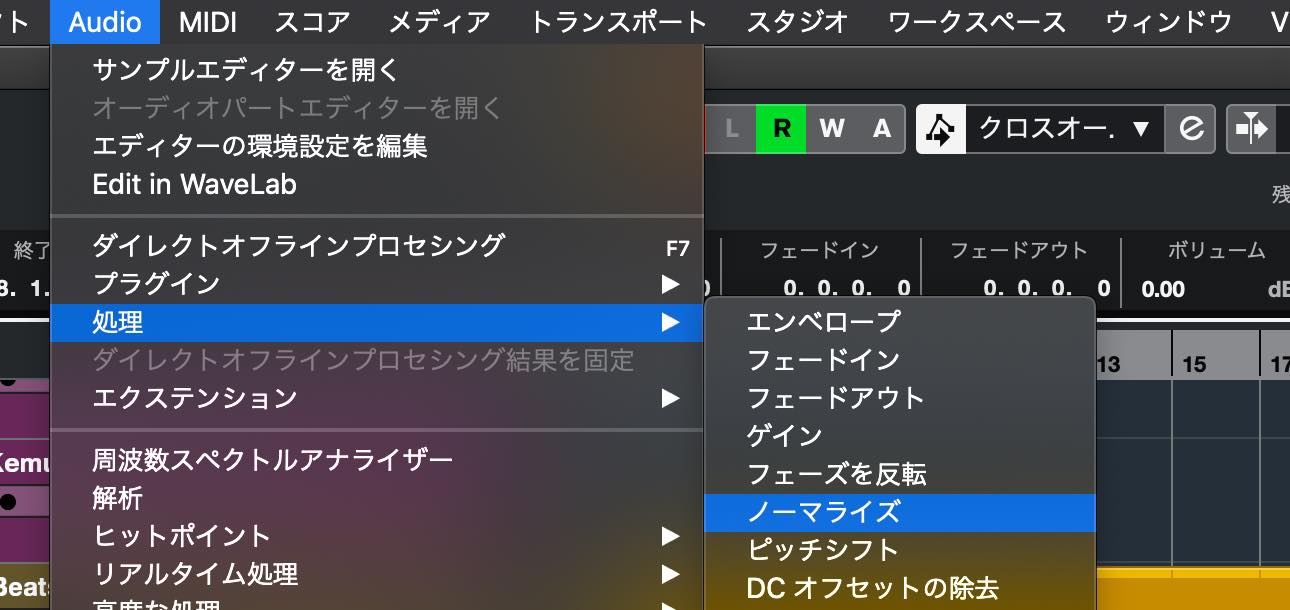
The normalization procedure varies between DAWs. In Cubase, for example, select the audio event and choose Process > Normalize from the Audio menu.
Set the maximum level to -6 dB and apply the process.
When Using an Amp Simulator
If you are using an amp simulator on a guitar or bass, the level of the dry recording and the level after the simulator will naturally differ.
Adjusting the gain before the simulator changes the level driving the amp, which also changes its distortion and other aspects of the sound.
In this situation, gain-stage by adjusting the amp simulator's master output level.
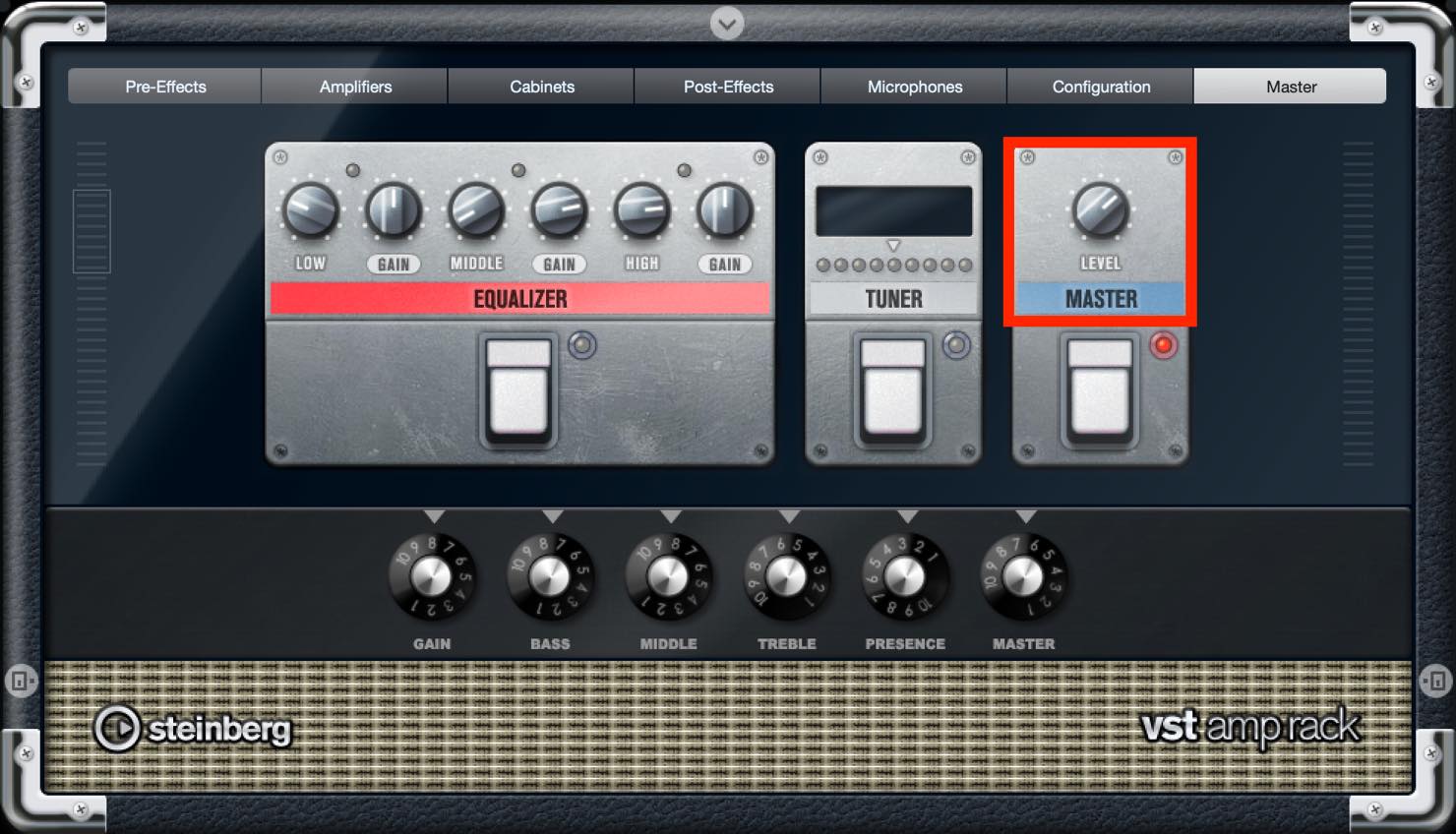
The same approach applies: aim for an average of 0 VU, or for the highest VU readings to reach 0 VU if the performance is very dynamic.
Gain Staging Instrument Tracks
It is also worth gain-staging the main instrument tracks that have a substantial effect on the song.
Watch the VU meter and adjust the software instrument's master output or use a gain-control plug-in.
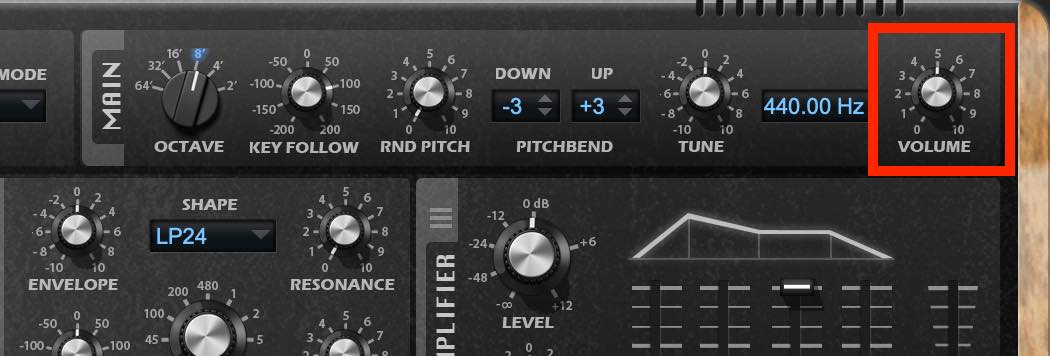
For drums and percussion, render them to audio and normalize them.
Gain Staging Partway Through a Mix
We said earlier that gain staging is best done before mixing, but in current production workflows there is often no clear boundary between arranging and mixing. Adjusting faders, panning, and inserting plug-ins during the arrangement is common.
Thinking about gain staging from the outset makes it easier to adjust input levels before those processes.
Even so, you may want to gain-stage an important track later.
To gain-stage during a mix, insert a VU meter at the start of the track's insert chain—or after the amp simulator if you are using one—and adjust the gain.
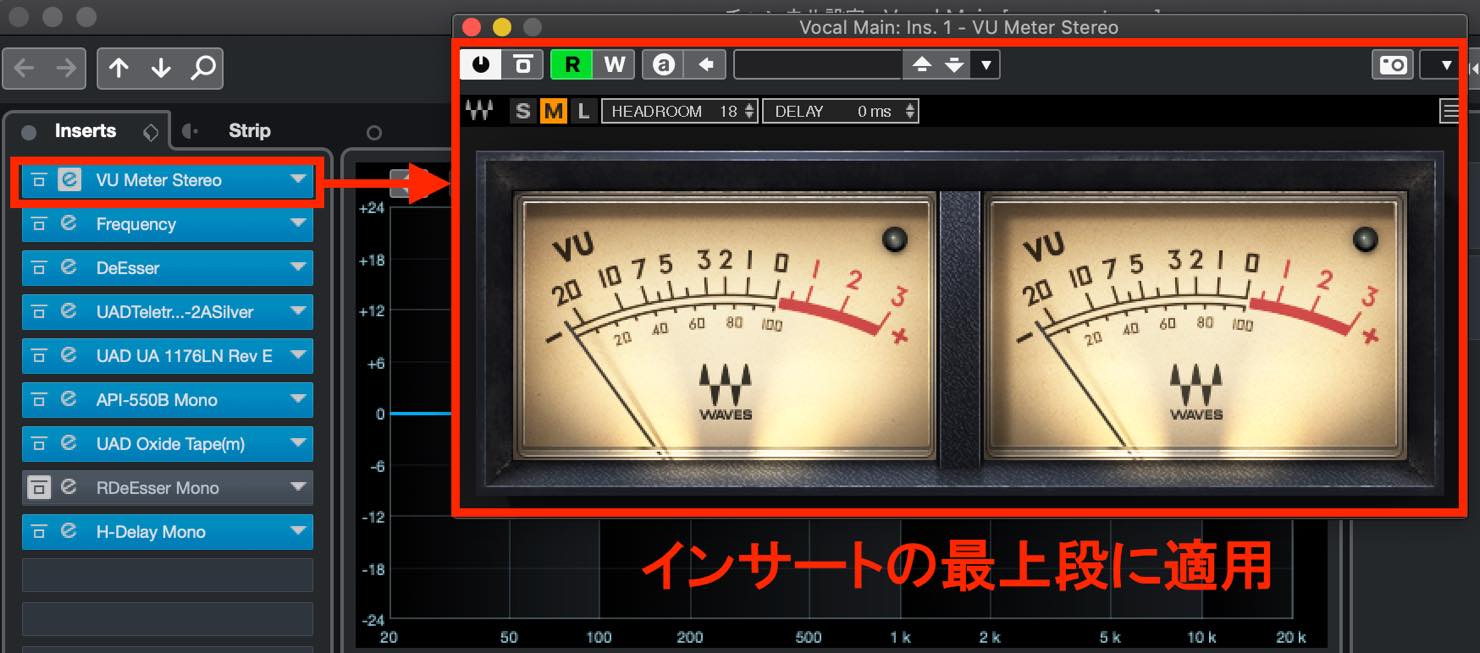
Gain staging mainly affects dynamics processors such as compressors, so revisit their settings.
For example, changing input gain changes a compressor's gain reduction. Adjust its input or threshold to restore a response similar to the one you had before.
Then adjust the track fader so that the output level is also similar to its previous level.
Do You Need to Gain-Stage Every Track?
You do not have to gain-stage absolutely every track in every situation.
As discussed above, gain staging has the greatest effect on plug-ins, especially analog-modeled ones. Prioritize tracks that use plenty of these. Conversely, if a track uses no plug-ins at all, you may not need this step.
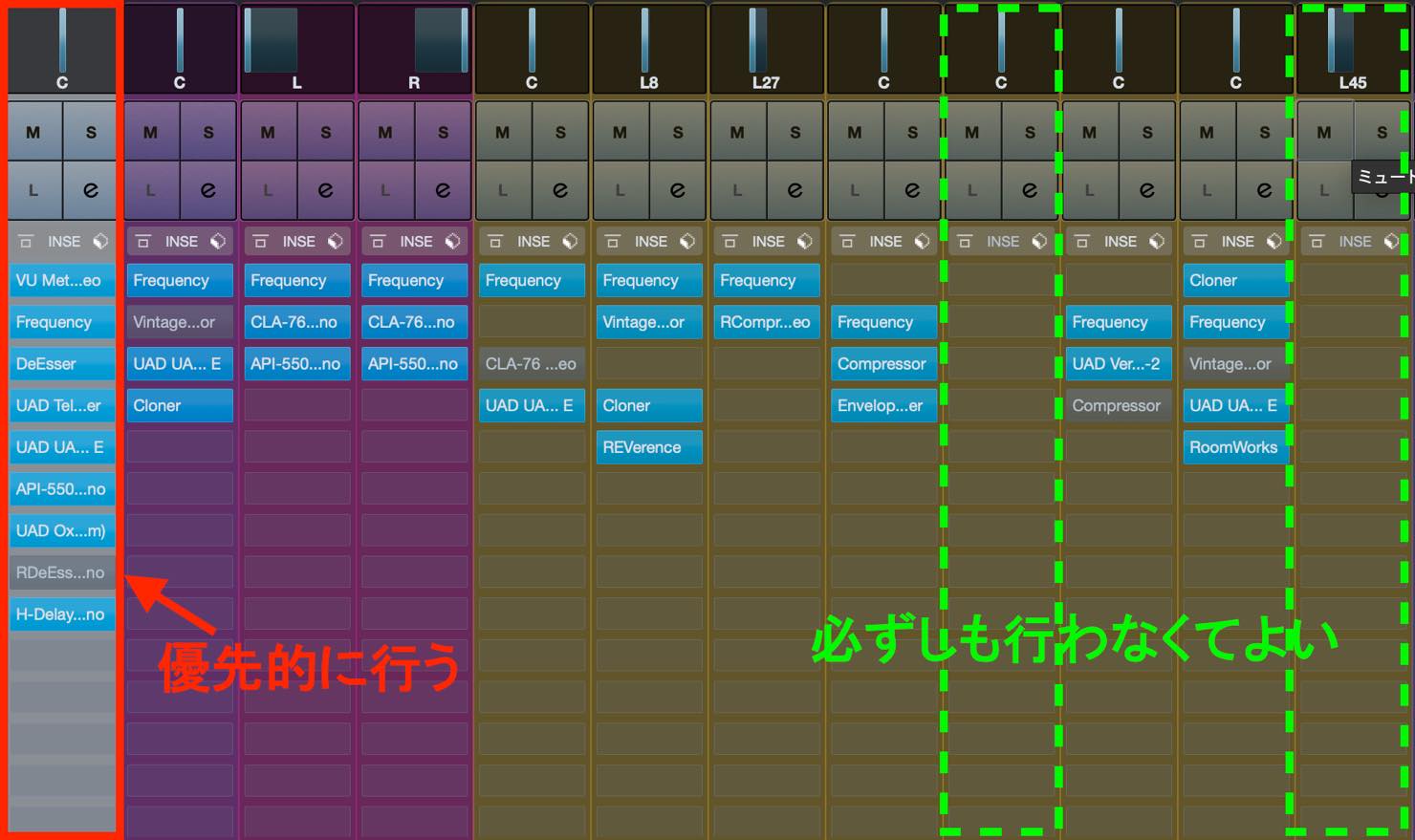
You can also leave out background sounds with little impact on the song, or sound effects that play only briefly.
That concludes our explanation of gain staging as another way to improve a mix.
We were interested in its effects and carried out a careful comparison, in which we heard a clear difference.
If you have tried many things but still cannot get the sound you want, try this approach in your own mixes.
An Essential Mixing Step? What Is Gain Staging?
“I've learned all sorts of mixing techniques and collected a full set of powerful plug-ins, but I still can't get the sound I have in mind…”
This could be a breakthrough for anyone who feels that way.
Details: https://t.co/BtXwPPNHo0 pic.twitter.com/BT7kkYk5ez— SLEEP FREAKS (@SLEEPFREAKS_DTM) October 9, 2021
Frequently Asked Questions
Q1. How does gain staging differ from adjusting faders?
Gain is the input level before plug-in processing, so changing it affects how the plug-ins respond. The fader controls the output level after those inserts; changing it does not alter the response of plug-ins earlier in that track's signal path.
Q2. When is the best time to do gain staging?
Ideally, before starting a mix, when you have not inserted any plug-ins yet. If you have already begun mixing, changing gain can affect compressors and other processors and upset the mix.
Q3. What reference level is used for analog-modeled plug-ins?
The reference discussed here is 0 VU corresponding to -18 dBFS, which the article identifies as a calibration used by many UAD and Waves products. Using the specified reference gives a starting point for the manufacturer's intended clean sound.
NEW ARTICLES
Latest English Articles









































































































































