
This practical guide explains how to create a sparkling bell sound commonly used in pop music production. It focuses on using a ring modulator to add a metallic character: set up a sine-wave oscillator, shape the volume with ADSR (attack, decay, sustain and release), and adjust the ring modulation amount and pitch to create complex tones. Learn to create bell sounds that work as accents in a chorus and expand your expressive options in pop production.
Perfect for Accenting a Chorus
In this tutorial, we will create
a sparkling bell sound often used in pop music.
The key to its metallic character is the ring modulator.
How to Create the Bell Sound
Use a Sine Wave
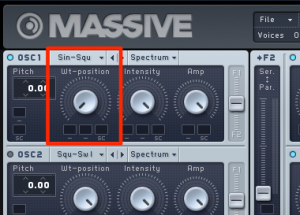
Set the oscillator to a sine wave.
Adjust the Volume
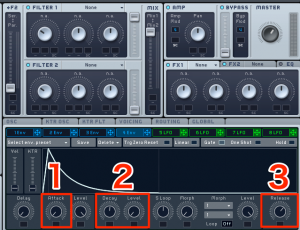
- 1. Attack: Set it to the fastest setting so the sound starts immediately.
- 2. Decay/Level: Set Level to 0, then use Decay to adjust how quickly the volume falls.
- 3. Release: Set it relatively high so the sound continues to trail off.
Ring Modulator
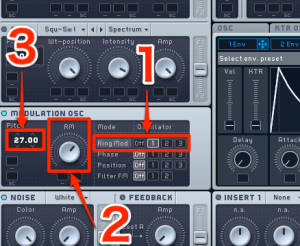
- 1. Apply it to OSC1.
- 2. Set the amount of ring modulation.
- 3. Deliberately changing the pitch can create a complex tone.
Frequently Asked Questions
Q1. What plug-in can I use to create a sparkling bell sound in music production?
This article uses an effect called a ring modulator. Ring modulators are often found in instruments such as Kontakt and are included in plug-in bundles such as NI KOMPLETE.
Q2. What is a ring modulator?
A ring modulator is an effect that produces metallic, complex tones. Adjusting its amount relative to the original sound can create a sparkling, bell-like texture.
Q3. What matters when setting Attack and Release for a bell sound?
Set Attack to its fastest setting so the sound starts immediately, and set Release relatively high to leave a lingering tail. This contrast produces a natural, bell-like decay.
NEW ARTICLES
Latest English Articles






























































































































































































































































































































































































































































































































































































































