
When arranging piano in a DAW, adjusting velocity—the intensity and resulting volume of notes—is essential to recreating the nuance of a live performance. This article explains the 128 velocity levels from 0 to 127 and how programmed notes can all end up at the same value, unlike a human performance. Choosing an appropriate velocity, around 80 as a guideline, and varying the dynamics of the melody can give the music a more expressive, singing quality. This technique applies to all instruments, not just piano.
Create realistic phrases with dynamics

In this article, we will look at velocity, which controls performance nuance and volume.
Velocity is specified in 128 steps from 0 to 127.
When a person plays an acoustic piano,
it is impossible to play every note with exactly the same force.
When programming notes, however, they can all end up with the same value,
creating an unnatural sound.
We can edit velocity to reproduce the nuances of a live performance.
Watch the video
- 11. Piano Arrangement: Programming the Melody
- 22. Piano Arrangement: Appropriate Velocity
- 33. Piano Arrangement: Adding Chords
- 44. Piano Arrangement: Note Length and Velocity in Practice
- 55. Piano Arrangement: Approaches to Arranging the Left Hand over Chords
- 66. Piano Arrangement: Left-Hand Approaches 2 and Right-Hand Arrangement
Adjusting velocity
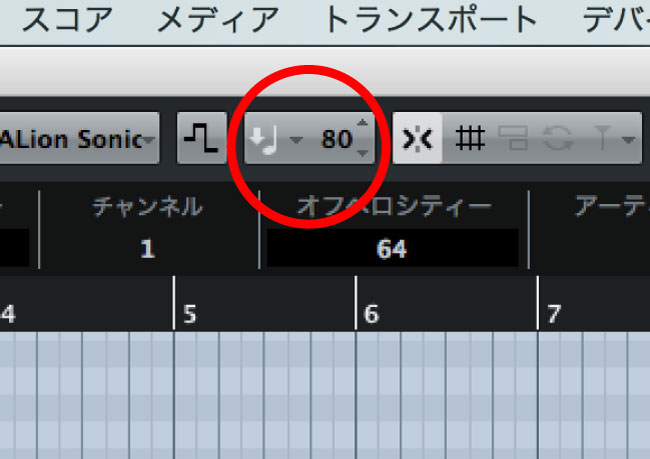
When entering notes with the pencil tool, it is easy to forget to edit their velocity.
If the default velocity for inserted notes is set to a value such as 100,
it is as though you are always striking the keys quite hard.
To find an appropriate velocity range for piano,
try playing a MIDI keyboard both hard and softly and checking the values.
(For reference, I consider around 80 to be appropriate.)
How to set velocity in each DAW

 Logic
Logic GarageBand
 Cubase
 Ableton Live
 Studio One
When a melody has dynamic variation and expression, we say that it “sings.”
When producing music in a DAW, you may find that making a melody sing is difficult.
If you feel that something is missing from your music,
keep velocity editing in mind: it is useful for more than just piano parts.
Frequently Asked Questions
Q1. What is the correct velocity value?
There is no single correct value, but this article suggests around 80 as a guideline. Play a MIDI keyboard with varying force and find the velocity values that suit your music.
Q2. Is velocity adjustment necessary only for piano?
No. Velocity editing applies not only to piano but also to drums and all other instruments. Adding dynamic variation to each instrument makes the overall performance more expressive.
Q3. Why do programmed notes sound unnatural?
If the default insertion velocity is fixed at a value such as 100 when using the pencil tool, every note has the same intensity, which can make the performance sound less human. Varying velocity helps create a more natural feel.
NEW ARTICLES
Latest English Articles




































































































































































































































































































































































































































































































