
Cubase 8’s Direct Routing lets you configure and switch individual track outputs in real time, even during playback. Combined with automation, it can switch between destinations such as different master channels or effects during a song. You can set up to eight routing destinations, making it easier to manage more complex mixing tasks and apply processing to selected sections.
Change track outputs in real time

This installment of our Cubase 8 new-features series covers Direct Routing.
You can switch each track’s output independently with this feature.
Destinations can be changed in real time during playback, and the switches can be automated.
- Apply an effect to selected parts of a song
- Manage different master tracks
Direct Routing is useful for situations like these.
Cubase 8 video tutorials
Moving smoothly to Cubase 8 from earlier versions
Cubase 8: Render in Place
Cubase 8: VCA Faders
Cubase 8: Direct Routing (this page)
Cubase 8: Chord Pads and Chord Track
Setting up Direct Routing in Cubase 8
First, create the routing destination.
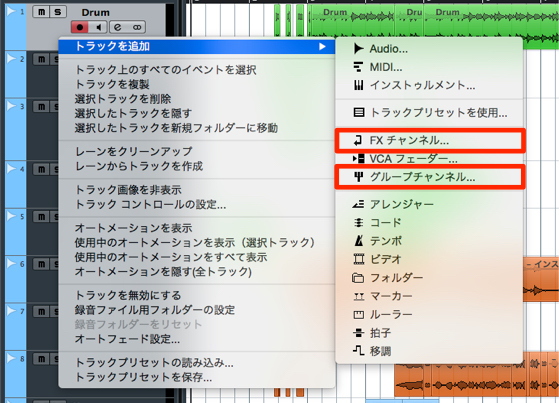
Create an FX channel for effects or a Group channel.
For this example, we will use a Group channel.
About FX channels
https://sleepfreaks-dtm.com/for-advance-cubase/lesson5-5/
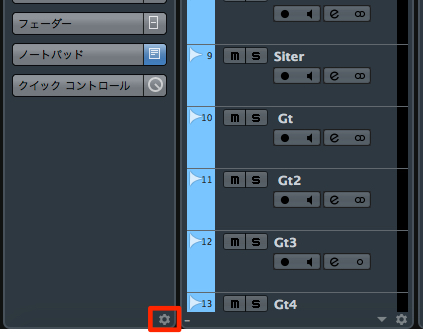
Click the Inspector setup control.

Select Direct Routing to add it.

It will appear as shown.

You can also display it in the MixConsole.

You can configure up to eight Direct Routing destinations.
Click an empty slot and select the Group channel.

The routing is now set up as shown.
Click the slot to send the track output to the selected channel.
Note: in the routing setup shown here, only one output destination is selected at a time.

You can write automation like this to switch outputs.
This lets you change the track’s destination instantly during the song.
About automation

Frequently asked questions
Q1. What is Direct Routing in Cubase 8?
It lets you configure and switch a track’s output destination. You can switch during playback and set up to eight destinations, such as different master or effects channels.
Q2. Can Direct Routing be automated?
Yes. You can automate destination changes so the track switches outputs at the required points in the song.
Q3. What should I keep in mind when setting up Direct Routing?
In the setup shown in this tutorial, one output destination is selected at a time. Plan your routing accordingly.
Q4. Should I use an FX channel or a Group channel?
Choose based on your goal: an FX channel is useful for effects processing, while a Group channel is suited to managing and adjusting the level of multiple tracks together.
NEW ARTICLES
Latest English Articles






























































































































































































































































































































































































































































































































