This article explains how to show and read the RMS meter in Cubase 7’s MixConsole and use a maximizer to adjust level. It compares peak and RMS readings and presents the original article’s example of an average RMS level around −10 dBFS and a maximum RMS reading around −8 dBFS. These are examples, not universal CD targets: suitable levels depend on the material and delivery requirements. A maximizer can increase level while limiting peaks, but avoiding distortion and intersample overs requires careful listening and appropriate peak monitoring.
Measuring level with the RMS meter in Cubase 7
This is the final installment of our series on the MixConsole.
We will focus on the new
RMS meter, which provides a level reference,
and the Maximizer effect used to adjust level.
Knowing the current level helps you make adjustments suited to the situation.
Let’s get started!
Cubase 7 MixConsole: Loudness and RMS metering
Harmony Voice
Chord Assistant
MixConsole: Setup
MixConsole: Reverb and pan techniques
MixConsole: Inserts and Channel Strip
MixConsole: Vocal processing and routing
Loudness and RMS metering (this page)
CurveEQ
Video focus: Showing the meter
The RMS meter used here is hidden by default.
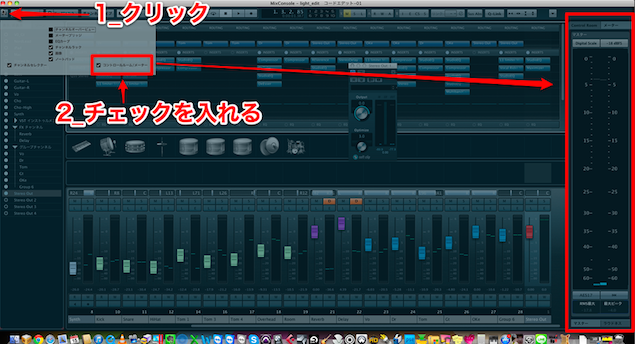
Click the button at the upper left,
then check Control Room/Meter to display it.
Video focus: Two types of meter
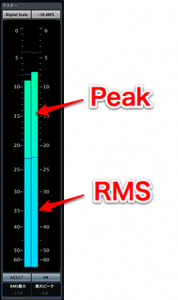
The meter shows two different measures of level.
- Peak: Displays the signal’s instantaneous peak level.
- RMS: Shows an average signal level over time; it can give a useful indication of level, but it is not a direct measurement of perceived loudness.
RMS is often used as a reference when assessing level.
About peak, RMS, and loudness
Video focus: RMS meter readings
The RMS meter displays negative values;
readings closer to 0 dBFS indicate a higher RMS level.
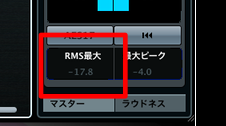
This readout shows the highest RMS value detected.
The original tutorial suggests an average RMS reading around −10 dBFS and a maximum around −8 dBFS as one example for a loud CD-style master. These figures are not a universal target, and results depend on the music and how the meter is configured.
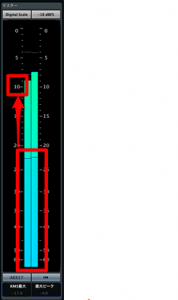
During Cubase playback, the RMS meter shows the current level in real time.
However,
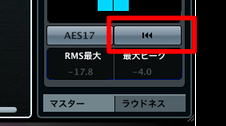
the maximum reading is not reset automatically.
Press the reset button outlined in red to clear the displayed value.
Video focus: Maximizer
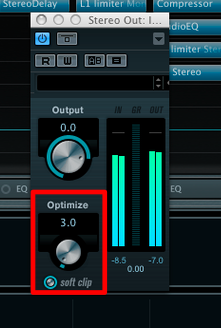
A
maximizer raises perceived level while limiting peaks.
It is normally placed last on the master output, Stereo Out.
Watch the RMS meter while
increasing Optimize to adjust the level. Listen for distortion and check peak and true-peak levels: limiting sample peaks does not guarantee freedom from intersample overs or other distortion.
Frequently asked questions
Q1. How do I display the RMS meter in Cubase 7?
Click the button at the upper left of the MixConsole and check Control Room/Meter. The meter is hidden by default, so it must first be enabled.
Q2. What is the difference between peak and RMS meters?
Peak measures the highest instantaneous signal level, while RMS measures level over a period of time. RMS can help indicate average level, but it does not directly measure perceived loudness; LUFS metering uses a different loudness model.
Q3. What levels can I use as a starting point for a CD-style sound?
The original tutorial gives −10 dBFS average RMS and −8 dBFS maximum RMS as an example while adjusting Optimize. These are not universal targets: choose levels for the music and intended delivery, and listen for distortion.
Q4. Where should I insert the Maximizer?
The tutorial places it at the end of the Stereo Out master channel. It can raise level while limiting peaks, but the settings and downstream processing matter; check for distortion and intersample peaks.
Q5. How do I reset the maximum RMS reading?
Press the reset button outlined in red to clear the displayed maximum before measuring again.
NEW ARTICLES
Latest English Articles