
Cubase's StepFilter effect changes filter settings over time, making it possible to create rhythmic filter sounds often heard in electronica. Draw cutoff and resonance patterns, choose a filter type, synchronize the steps to the tempo and adjust the mix to shape the sound. The video demonstrates an older Cubase version, so the interface and effect location may differ in current releases.
Change Filter Frequency over Time
Using Cubase's included effect StepFilter, you can create
filter sounds commonly heard in genres such as electronica.
First, listen to the examples.
Before processing
After processing
The result has a noticeably different character.
Tutorial Video
Using StepFilter in Cubase
Insert StepFilter on the track you want to process.
In the version shown: Inserts → EQ → StepFilter.
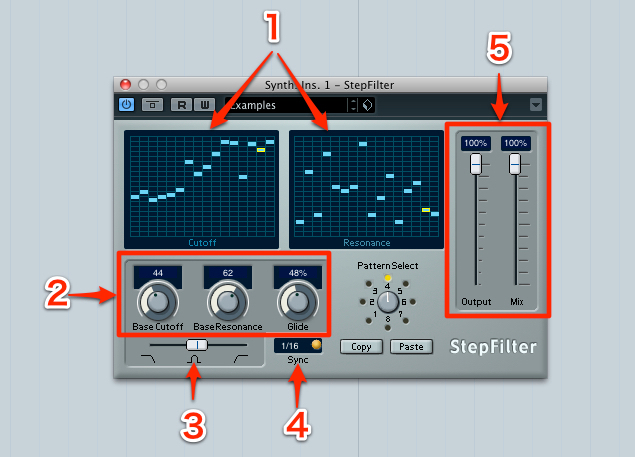
- 1. Set how cutoff and resonance change across the sequence.
When playback runs, the pattern progresses from left to right. - 2. Set the base cutoff and resonance.
These settings also strongly affect the sound produced by the patterns in section 1.
Glide smooths the filter's changes in tone. - 3. Choose a filter type.
From left to right: low-pass attenuates high frequencies, band-pass attenuates frequencies above and below the passband, and high-pass attenuates low frequencies. - 4. Sync sets the note length for each step of the pattern in section 1.
In the example, the pattern advances in sixteenth notes to match the phrase. - 5. Output controls the level.
Mix adjusts the balance between the dry, unfiltered sound and the processed sound.
Experimenting with the controls can produce interesting changes in tone quite quickly.
Frequently Asked Questions
Q1. Where do I find StepFilter in Cubase?
In the version shown, open the target track's Inserts menu, choose EQ, then select StepFilter. The location and availability can vary by Cubase version and edition.
Q2. What does StepFilter's Sync parameter control?
Sync determines the note length of each step in the pattern. Select a value such as a sixteenth or eighth note to match the tempo and phrase.
Q3. Can I retain some of the original sound?
Yes. Use Mix to blend the dry signal with the filtered signal.
Q4. Which filter type can I use for an electronica-style sound?
A moving low-pass filter is one way to create a wobbling effect while attenuating high frequencies. Experiment with the filter pattern, resonance and other filter types to suit the sound you want.
NEW ARTICLES
Latest English Articles


















































































































































































































































































































































































































































































































































































































































































