
This tutorial explains how to create a changing, rhythmically interrupted pad sound with a synthesizer. Combine three steps: apply an LFO to the amplifier for tremolo, use an envelope to change the filter cutoff, and add reverb for depth. This practical recipe introduces basic synth modulation techniques for beginners and intermediate producers.
Add Rhythm with a Pad
This recipe creates a pad that changes as it pulses in and out.
An LFO applied to the amp and the filter cutoff
combine to create a striking sound.
How to Create the Sound
Questions and Answers from the YouTube Video

Is there a synth that can create a similar effect with a rhythm of my choosing instead of continuous sixteenth notes?

You can create that effect using Massive’s Performer. By default it is labeled “Perf,” immediately to the right of “6_LFO.” For an easy way to make this kind of effect, we also recommend Nexus 2. See “reFX NEXUS2 Tutorial 5: Trancegate.” Thank you for watching.
I always learn a lot from your tutorials. I only have the instruments built into Logic X. How can I make a similar sound with a built-in synth?
We recommend ES2. In the central Router section, try setting the envelope and LFO as shown in the video.
I tried it, but applying the LFO to AMP does not change the volume at all. Do the sample song’s tempo or note lengths affect it?
Make sure to use Sync to synchronize the LFO to the song tempo. The note value in Sync determines the rhythmic subdivision; the video uses sixteenth notes. Please check your settings.
Applying the LFO
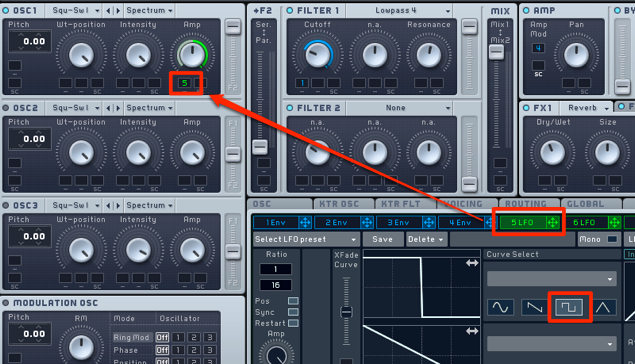
Apply the LFO to the oscillator’s AMP.
This creates a tremolo effect that repeatedly interrupts the sound.
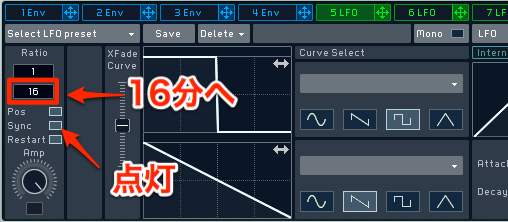
Adjust the LFO rate.
Enable Sync and change the value to 16.
The tremolo cycle is now set to sixteenth notes.
Applying the Filter
Apply a filter to make the sound change.
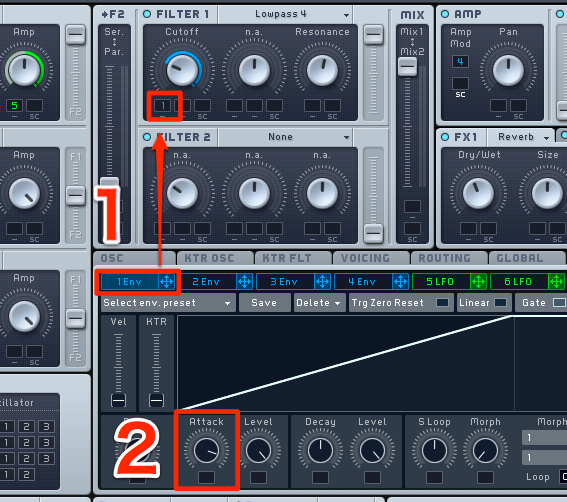
Apply ENV to Cutoff,
then adjust the speed of the change using Attack.
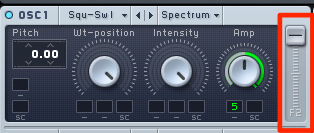
Turn the OSC filter balance
all the way toward the filter you are using.
Adding Reverb
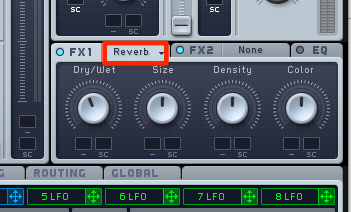
Apply reverb to give the sound depth.
The sound is now complete.
Frequently Asked Questions
Q1. Why apply an LFO to AMP when creating a pad?
An LFO applied to the amplifier creates tremolo by periodically changing the volume. This adds movement to a static pad, making the sound more expressive and musical.
Q2. What does setting Sync to 16 do?
Enabling Sync and choosing sixteenth notes synchronizes the tremolo cycle to the song tempo, interrupting the sound in a sixteenth-note rhythm. This creates a cohesive groove that fits the track.
Q3. What does a filter envelope do?
An envelope controls the filter cutoff frequency so the tone changes over time. Adjust Attack to control the speed of that change and give the pad a dynamic timbre.
NEW ARTICLES
Latest English Articles
































































































































































































































































































































































































































































































































































































