
Cubase Quick Controls is a powerful feature that lets you assign up to eight software instrument or effect controls and operate them from one panel, including via an external MIDI device. Right-click a knob to assign it, or use Device Setup to learn controls from an external MIDI device. This brings multiple parameters together and also allows automation recording, making real-time sound adjustments and performance recording more intuitive.
Control Your Favorite Parameters from One Panel with Cubase Quick Controls
By assigning knobs or faders to Quick Controls,
you can operate up to eight controls from a single panel.
You can also assign parameters from software synthesizers and effects, making the feature highly versatile.
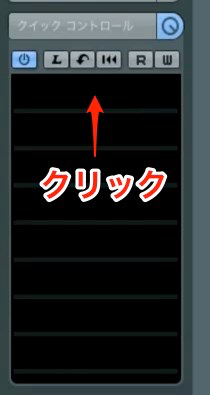
↑ Click a slot and select the parameter you want to assign.
You can make up to eight assignments.
Video Tip: Assigning Insert Effects
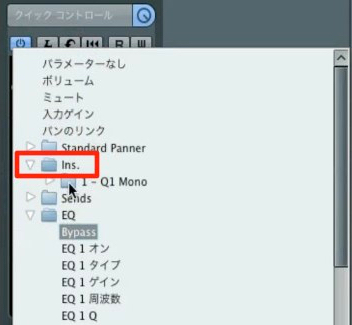
↑ To assign an insert effect applied to a track, select the desired plug-in under
“Ins”.
Video Tip: Assigning Software Synthesizers
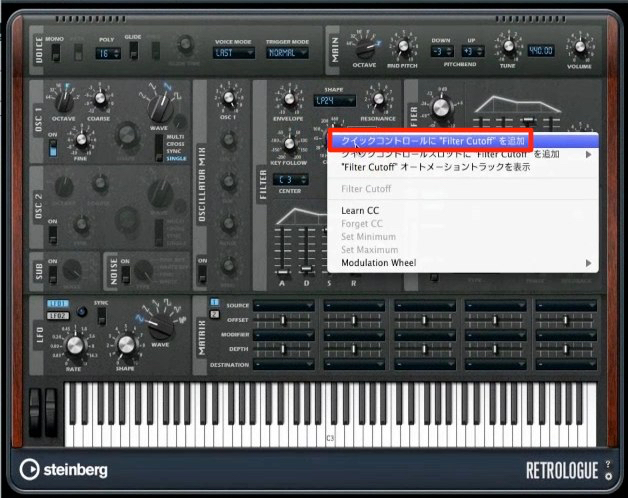
↑ For Cubase’s built-in software synthesizers,
right-click the knob you want to assign to register it.
Video Tip: Assigning an External MIDI Device
You can assign an external MIDI device to Quick Controls.
From the top menu, open Devices → Device Setup.
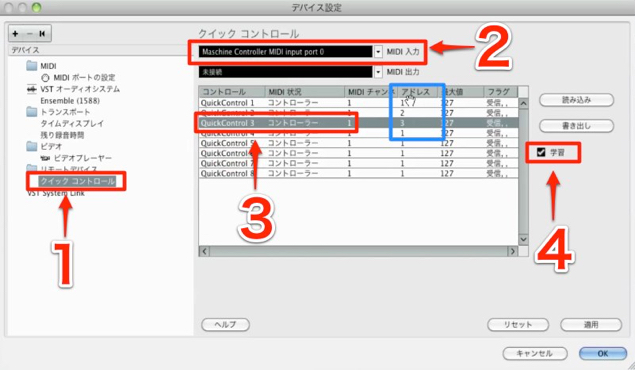
- 1. Select Quick Controls.
- 2. Select the MIDI device.
- 3. Select the Quick Control (1–8) you want to assign.
- 4. Check “Learn” and move a knob on the MIDI device.
The address changes as shown in the blue box.
The MIDI device knob is now linked to the Quick Control.
Video Tip: Recording Automation
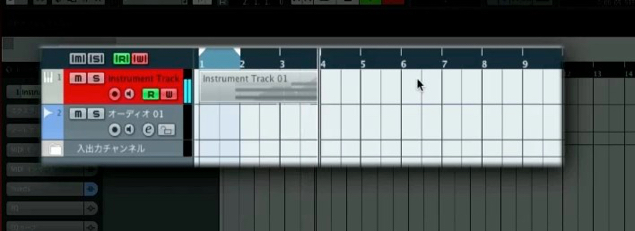
↑ You can also write automation by moving the MIDI device control.
This is very convenient.
Frequently Asked Questions
Q1. How many controls can be assigned to Cubase Quick Controls?
You can assign up to eight knobs or faders to Quick Controls. They support a wide range of targets, from software synthesizer parameters and insert effects to external MIDI devices.
Q2. How do I assign an external MIDI device to Quick Controls?
In the Device Setup menu, select the MIDI device, enable Learn mode, and move a physical knob to assign its address automatically. It is then linked to a Quick Control (1–8).
Q3. Can Quick Controls record automation?
Yes. Use Cubase’s automation feature while moving a knob on an external MIDI device to record parameter changes and create expressive, complex changes in sound.
NEW ARTICLES
Latest English Articles





































































































































































































































































































































































































































































































































































































































































