
Time stretching is a useful tool for changing the length of audio and MIDI material in a music production. This article looks at quickly adjusting the timing of a favorite sound effect and efficiently trying different drum patterns by halving or doubling their length. It also links to time-stretching methods for major DAWs, including Pro Tools, Logic, Cubase, Ableton Live, Studio One and FL Studio. These techniques can speed up experimentation and make arrangements more flexible and creative.
Fit Your Material to the Song
In this article, we will introduce an arrangement technique using time stretching.
As we briefly mentioned in the previous article on fill arrangements,
you can freely change the length of audio and MIDI material with this feature.
For example, you can use it to adjust the timing of sound effects or change drum patterns.
Sound example
Creating the Sound
Adjusting the Length
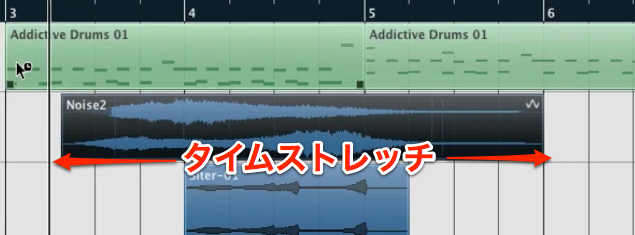
Have you found a sound effect you like, only to find that its timing does not fit?
In that case, use time stretching to adjust its timing.
Time Stretching in Different DAWs

 Logic
 Cubase
 Ableton Live
 Studio One
 FL Studio
Changing a Drum Pattern

By halving or doubling the length of a drum pattern, you can quickly try out a variety of patterns.
Frequently Asked Questions
Q1. What is time stretching?
Time stretching is a way to lengthen or shorten audio or MIDI material along the timeline. It can adjust playback speed without changing pitch and can be used to correct sound-effect timing or change drum patterns.
Q2. What are the benefits of time stretching?
It makes it easy to adjust the timing of sound effects and quickly try multiple drum patterns by halving or doubling their length, saving time during production and experimentation.
Q3. Does time stretching work the same way in every DAW?
The basic idea is shared, but the controls differ by DAW. The settings and steps depend on the software, such as Pro Tools, Logic, Cubase, Ableton Live, Studio One or FL Studio.
Q4. What can I do if a sound effect is out of time?
Use time stretching to adjust the length of the sound effect by double-clicking it, so that it fits the song’s tempo or timing.
NEW ARTICLES
Latest English Articles






















































































































































































































































































































































































































































































































































































