
A complete guide to creating a trance lead. This technique is ideal for producers who want a bold, prominent sound for a synth melody. Learn the settings step by step, from the thickness created by unison and detuning to smooth pitch transitions with glide and spatial effects using reverb and delay, and create your own professional trance lead sounds.
Ideal for a Featured Synth Melody
This recipe explains how to make a trance lead.
This bold, prominent sound is often used for melody tracks that need to stand out.
The keys to the sound are unison and detuning.
Creating the Sound
Questions and Answers from the YouTube Video

Sorry to bother you again! Do you create and save the original sample sound separately, then use it to change the tone here? If so, could you explain how to make and save it? Sorry, I am a beginner…

We save a separate Cubase project under a different name for each recipe. We do not have to recreate or resave the sounds each time: everything is recorded in its respective Cubase project.
How do you create the sample sounds?
The sample sounds are made by combining sounds from the following “Synth Recipes” page: https://sleepfreaks-dtm.com/synth-recipe/ We hope you find it useful. Thank you for your continued support.
OSC Settings
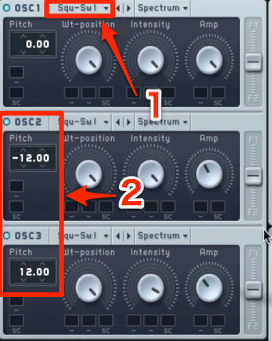
- 1. Change the oscillator type to SAW.
- 2. For more thickness and presence, layer another oscillator an octave apart.
Applying Unison
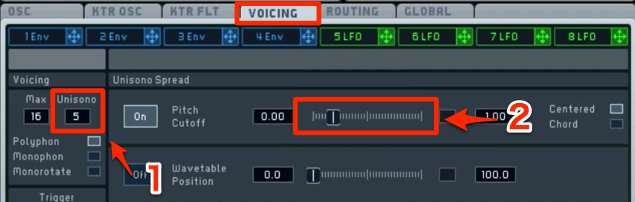
Select the VOICING tab.
- 1. Increase the number of unison voices to add thickness.
- 2. Apply detuning.
At this stage, the sound takes on a much stronger trance character.
Glide for Smooth Pitch Transitions
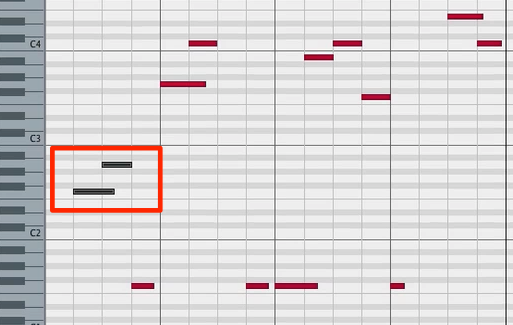
Next, apply glide, which creates a smooth pitch transition when notes overlap.
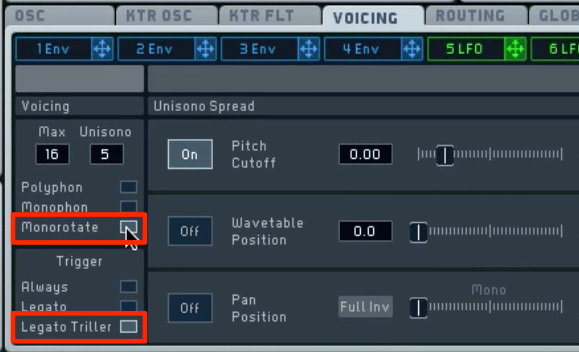
Return to the VOICING tab.
Switch the modes to “Monorotate” and “Legato Triller”.
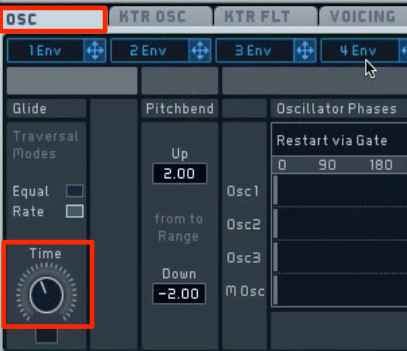
Adjust the length of the pitch transition with “Time” on the OSC tab.
Adding Space
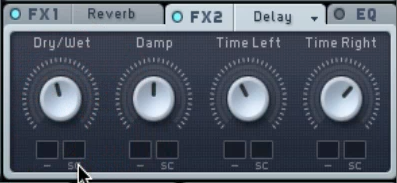
Use reverb and delay to add depth and width to the sound.
Your trance lead is now complete.
Frequently Asked Questions
Q1. What gives a trance lead its distinctive sound?
Unison and detuning are central to a trance lead. Layering multiple oscillators in unison while detuning their frequencies creates a thick, spacious, dimensional and assertive tone.
Q2. What are some tips for setting glide?
After switching the modes to “Monorotate” and “Legato Triller” on the VOICING tab, adjust the pitch transition time using the Time parameter on the OSC tab. Longer times produce smoother, more graceful transitions.
Q3. How can I add a sense of space to a trance lead?
Using reverb and delay adds depth and width. These spatial effects give the trance lead a more polished impression.
NEW ARTICLES
Latest English Articles







































































































































































































































































































































































































































































































































































































