This article explains how to create and process an orchestral hit using Sample One, Studio One's built-in sampler. Learn practical techniques step by step, including importing audio files, combining multiple tracks, adjusting pitch, and setting ADSR envelopes to create your own sounds. With a video tutorial, the guide helps music producers from beginners to intermediate users develop their skills.
Processing an orchestral hit in Sample One
Studio One includes the sampler Sample One.
In the previous article, we covered the preparation for creating an orchestral hit.
This time, we'll move on to recording the orchestral part and processing it in Sample One.
You can process the imported material
and refine it into your own original sound.
You can also download the orchestral hit sample used here from the link below.
https://sleepfreaks-dtm.com/music/orchestral-hit-a.zip
Sample One video tutorials
- 1Basic concepts and loading samples
- 2Monophonic mode and glide
- 3Creating an orchestral hit, part 1
- 4Creating an orchestral hit, part 2 (this article)
Video point: Converting material to audio
To load material into Sample One,
it must be an audio file.
Converting multiple tracks to one audio file
Exporting a song
https://sleepfreaks-dtm.com/for-beginner-studioone/export_audio/
When converting a single track to audio
Converting a MIDI track to audio
https://sleepfreaks-dtm.com/for-advance-studioone/midi-to-audio-2/
Video point: Importing the material
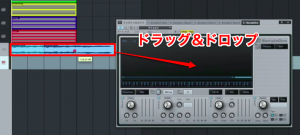
Drag and drop the audio file into Sample One.
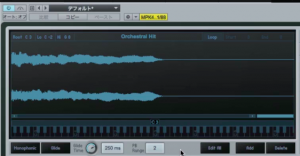
The imported material appears.
At this point the sample is mapped across the keyboard.
Video point: Adjusting pitch
Sample One lets you change a sample's pitch.
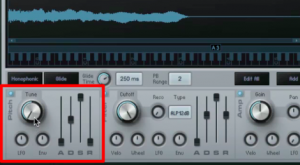
Here we encounter the familiar ADSR envelope.
- Env: From the center position, turning right raises the envelope's pitch target and turning left lowers it.
- A (Attack): Sets how long it takes to move from the original pitch to the Env target.
- D (Decay): Sets how long it takes to move from the Env target to the sustain level.
- S (Sustain): Sets the pitch-envelope level held after the attack and decay stages while the key is held.
- R (Release): Sets how long it takes for the pitch to return after the key is released.
If the Amp envelope's release is too short, you may not hear this effect.
Adjusting Filter and Amp
is covered in the following article:
https://sleepfreaks-dtm.com/softsynth/mojito_ampfilter/

Frequently asked questions
Q1. What do I need before importing orchestral material into Sample One?
The material must be in audio-file form. If you are using multiple MIDI tracks, first render them to audio using song export or the MIDI-to-audio conversion function.
Q2. How do I adjust pitch in Sample One?
Use the ADSR (Attack, Decay, Sustain, Release) pitch envelope. Turn Env right from the center to raise the target pitch, or left to lower it. The controls shape the amount and timing of the pitch movement.
Q3. Where can I get the orchestral hit sample?
You can obtain the sample used in this article from the download link above. You can also drag your own recorded material into Sample One for processing.
NEW ARTICLES
Latest English Articles