
Cubase’s Arranger Track helps you manage and experiment with song structure. Create and name arranger events with the Pencil tool, then reorder them by dragging to audition different arrangements. Once you have chosen an order, you can flatten the arrangement to apply it to the timeline.
Compare Song Structures with the Arranger Track
Song structure is an important part of music production.
You want an arrangement that flows smoothly and communicates your concept.
While exploring different ideas, many producers want to hear the options
before deciding which works best.
Cubase has a feature that makes trying different orders much easier:
the Arranger Track.
Using the Arranger Track
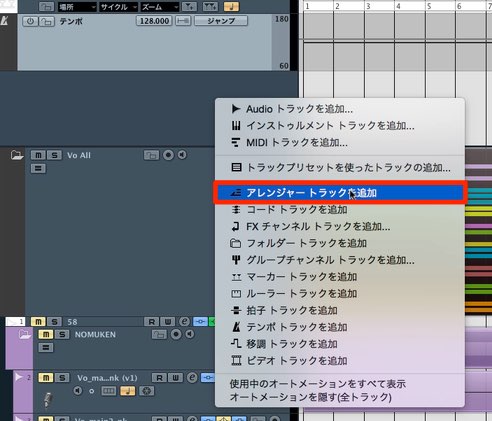
First, add an Arranger Track.
Add it in the same way as a regular track.
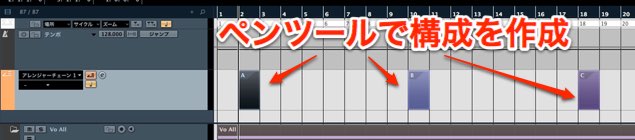
Click or draw on the Arranger Track timeline with the Pencil tool
to create an event.
Place events over the sections of your song.
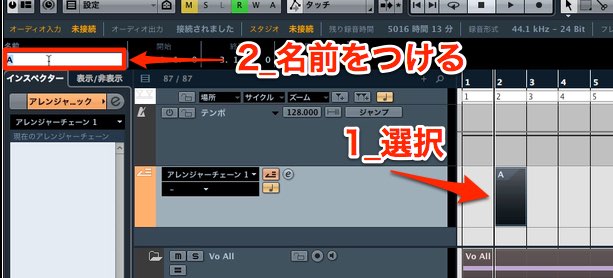
Naming the events makes them easier to identify.
Select an event and rename it using the area outlined in red.

The example above shows the events after their lengths have been adjusted and they have been renamed.
The initial setup is complete.
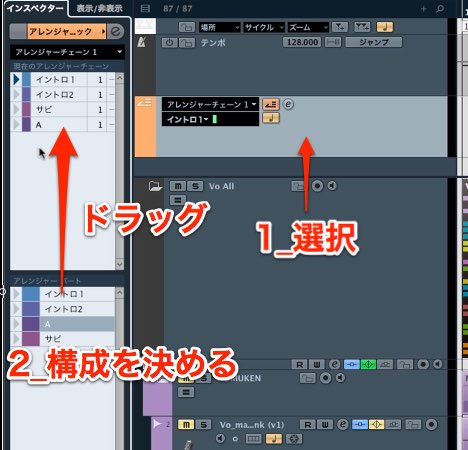
Select the Arranger Track and look at the Inspector.
The configured sections appear there.
Drag them into the order you want to try.
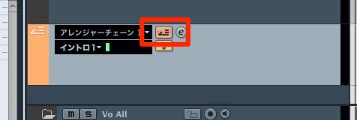
Activate the Arranger Track and start playback
to hear the sections in the specified order.
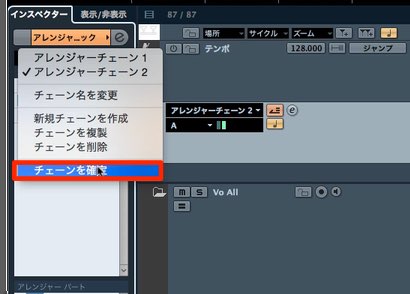
Once you have an arrangement you like, flatten it
to apply that order to the timeline.
Frequently Asked Questions
Q1. When is Cubase’s Arranger Track useful?
It is useful when you want to audition several possible structures. Rearrange sections such as the intro, verse, and chorus, then listen to compare the orders. It is especially helpful while exploring ideas.
Q2. How do I create Arranger Track events?
Add an Arranger Track, then use the Pencil tool on its timeline to create events. Rename them for each section to make them easier to manage.
Q3. How do I apply an arrangement to the actual song?
Activate the Arranger Track and play the sequence. Once you like the order, use the flatten function to apply it to the timeline.
NEW ARTICLES
Latest English Articles








































































































































































































































































































































































































































































































































