
Logic Pro X uses a different menu from earlier versions when adding MIDI tracks that share a multi-timbral instrument. This guide shows how to create a track assigned to the next MIDI channel and discusses separate audio outputs. The MIDI parts can be edited separately, but independent audio processing requires suitable multi-output routing.
Multi-Timbral Setup in Logic Pro X
You can use one instrument and program its parts on multiple MIDI tracks.
This is useful for setups such as multi-output instruments, but Logic Pro X places the relevant setting in a different location from earlier versions.
That can make it confusing to add another track using the same instrument.
Here is how to do it.
Using a Multi-Timbral Instrument in Logic Pro X: Video
Questions and Answers from the YouTube Video

I tried the same method, but the original and the other MIDI channel stay linked. If I mute one, both are muted, and pan and volume move together too.

Route the instrument’s audio to separate outputs, then apply mute, solo, and automation to the corresponding output channels. https://sleepfreaks-dtm.com/for-advance-logic/mix_parallelout-2/
Can I, for example, apply an arpeggiator only to the piano part? With the multi-timbral setup, the channel strip is shared, so MIDI FX on one MIDI channel also affect the others. I am also having trouble routing each incoming MIDI channel to a different output on the multi-timbral instrument.
The Environment may help with the MIDI routing. https://sleepfreaks-dtm.com/for-advance-logic/arp2-logic/ In that article, click the Logic 8/9 tab. A similar setup is possible in Logic X. For separate audio outputs, see also: https://sleepfreaks-dtm.com/for-advance-logic/mix_parallelout-2/
Add a Multi-Timbral Track
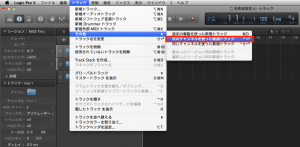
Select the instrument track you want to use,
then choose Track → Other → New Track with Next MIDI Channel from the top menu.
That’s all.
You can now use a different MIDI channel for the selected instrument.
Frequently Asked Questions
Q1. How can I use the same instrument on multiple tracks in Logic Pro X?
Select the instrument track and choose Track → Other → New Track with Next MIDI Channel. This creates another track assigned to the same multi-timbral instrument on the next MIDI channel.
Q2. When is a multi-timbral setup useful?
It is useful when managing several instrument parts with one sound generator or working with multiple audio outputs. MIDI parts can be edited separately; for independent audio effects and mixing, use a compatible multi-output instrument and route its outputs to separate channels.
Q3. Why are the menus different from earlier versions of Logic?
Logic Pro X reorganized parts of the interface and moved some settings. Familiarizing yourself with the new menu layout can make the workflow easier.
NEW ARTICLES
Latest English Articles




























































































































































































































































































































































































































































































































































































































