
When processing audio in Cubase, changes made to one event may also affect copies that share the same audio clip. This article explains the cause and how to avoid it. Choosing New Version in the processing dialog lets you edit the selected event independently; choosing Continue changes the other copies as well. It also shows how to enable the options dialog in Preferences if it does not appear.
Audio Processing Also Changes Other Events in Cubase
Audio processing allows bold edits that are not possible with MIDI.
However, it can be a little more complicated to manage.
One common problem is shown below.
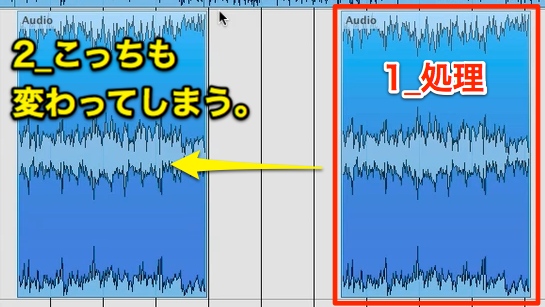
When you edit one event, its copies change too.
Here is how to resolve that problem.
Cubase Troubleshooting: Audio Processing
Questions and Answers from the YouTube Video

What should I do in Logic? (I’m doomed!)

Try converting the audio from the project. https://app.box.com/s/d3ptozbwu0a7ty0limjwu59cl8fkbhkw
The Solution
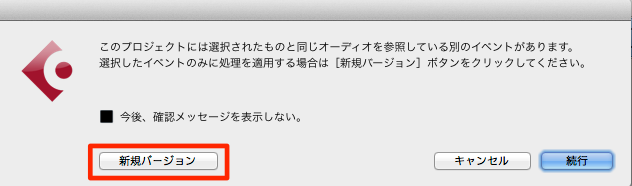
In the dialog that appears when you process the audio, choose New Version.
By contrast, choosing Continue changes all the copied events.
If the confirmation dialog does not appear,
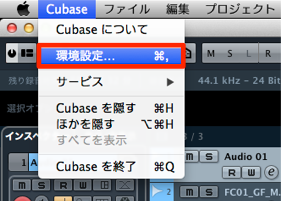
choose Cubase → Preferences from the menu.
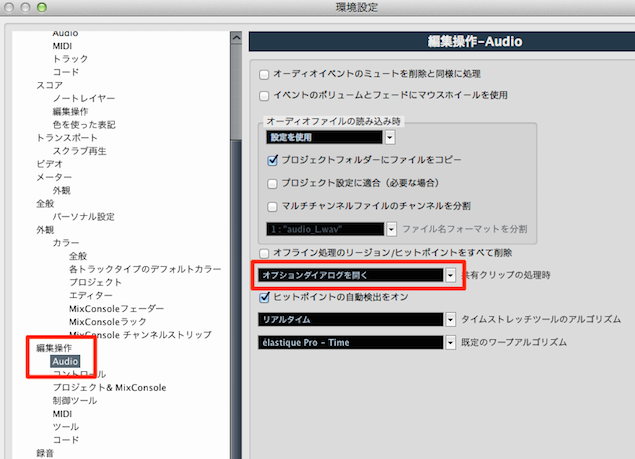
Under Editing, select Audio.
For the setting highlighted in red, choose Open Options Dialog.
Frequently Asked Questions
Q1. How can I prevent edits from affecting copied audio events in Cubase?
Choose New Version in the dialog displayed when processing audio. This lets you edit the selected event independently without applying that edit to its copies.
Q2. What is the difference between New Version and Continue?
New Version applies the processing only to the current event. Continue applies the change to all the copied events that share the clip.
Q3. What if the audio processing dialog does not appear?
Open Preferences from the Cubase menu. In the Audio section under Editing, select Open Options Dialog to make the dialog appear.
NEW ARTICLES
Latest English Articles



































































































































































































































































































































































































































































































































































