
This practical guide explains how to make a rising, siren-like sound in music production. The basic technique is to assign an envelope to an oscillator's pitch and use its attack time to control the rate of the rise. Add touches such as volume shaping, detuning and reverb to create a polished siren sound for pop and trance. Beginners can follow the steps to make their own effect for building excitement in a track.
Effective for Building Excitement in a Track
Let's create a siren sound used in pop and trance.
The rising pitch is the key.
How to Create the Sound
Excerpts from Questions and Answers on the YouTube Video

How can I achieve this in HALion Sonic?

Thank you for using our content. HALion is primarily a sample-based synthesizer, so if you want to create a sound like this using an instrument included with Cubase, Retrologue is a good choice. We also have synthesizer tutorials using Retrologue; please see the URL below. https://sleepfreaks-dtm.com/category/synth-basic/
I've turned the attack all the way to the right, but I want to make the siren longer. How can I do that?
Thank you for your question. We suggest using a macro control and operating it at the timing you want. Here is a link about macro controls: https://sleepfreaks-dtm.com/softsynth/massive_macro-control/ Thank you for your continued support.
How can I reproduce this in Studio One?
If you use MASSIVE, you can follow the same steps in Studio One. With another synth, such as the included Mai Tai, you can also make a similar sound by assigning an envelope (ENV) to the oscillator's (OSC) pitch. We recommend MASSIVE for its flexibility.
Can the moment when the envelope attack reaches its peak be matched to the tempo?
Thank you for your question. We don't think the Attack knob alone can align the envelope precisely to the tempo. For precise timing, we recommend assigning a macro control to pitch and recording automation. Thank you for your continued support.
Thank you as always. I have a question: why don't you use a more complex waveform? The sound is too simple and feels like 8-bit audio, even though there are so many features! Sorry, this is just one foreigner's opinion.
There are two reasons we use a simple waveform. First, many viewers use other synthesizers, so we want them to be able to adapt the ideas in this video. Second, we want viewers to understand clearly how ENV and LFO work, which is easier with a simple waveform. Thank you as always for watching and for your continued support!
Apply an Envelope to Pitch
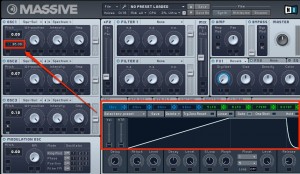
Assign an envelope to the oscillator's pitch.

Set the amount of the rise. Here it is 36 semitones (three octaves).
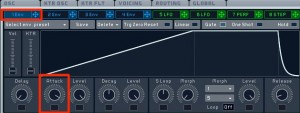
Use Attack to set how quickly the pitch rises.
Adjust the Volume
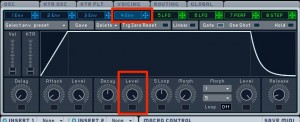
To keep the volume at its maximum,
set the Sustain Level of Env 4 (volume) to MAX.
Add Layers and Reverb
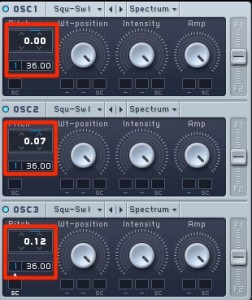
Use detuning to shift pitches slightly,
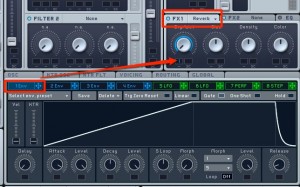
and set the reverb to become gradually deeper for a finishing touch.
Frequently Asked Questions
Q1. What is the most important setting when making a siren sound?
The most important steps are assigning an envelope to the oscillator's pitch and adjusting the attack time. Attack determines the speed of the pitch rise, while the amount determines its range (36 semitones, or three octaves, in this article). Together these settings greatly affect the character of the siren.
Q2. How can I make the siren sound more natural?
Try detuning to shift pitches slightly, or use an envelope to make the reverb gradually deeper. These effects can give the sound a more polished character.
Q3. What genres can use this technique?
The article mentions pop and trance, but the technique can also be used across dance music genres, such as for EDM builds and buildups. It is useful wherever a track needs a lift.
NEW ARTICLES
Latest English Articles































































































































































































































































































































































































































































































































































































































