
Wobble bass is a popular sound effect in EDM and dubstep. In this article, a Sleepfreaks instructor explains how to create it in detail. Download presets for synthesizers included with KOMPLETE and learn how to load them in Logic X, Cubase and FM8. Because preset locations differ, the illustrated step-by-step guides help beginners bring a professional wobble bass sound into their production setup.
Popular Wobble Bass Presets and Tutorial Video
The popular and much-requested wobble bass is explained by
Sleepfreaks instructor Mizutani.
Creating the Sound
Questions and Answers from the YouTube Video

Hello. I am new to Massive and this is my first comment. I assigned Macro Control 1 to Rate as shown around 1:00, but the wobbling sound does not change. What might be causing this? Sorry for the basic question, and thank you for your help.

After assigning the macro control to Rate, you may not have specified the LFO modulation range by dragging the number below the knob up or down. Alternatively, the assigned macro control knob may be turned all the way down.
Loading the Preset
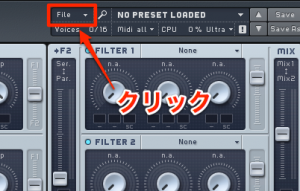
Click File.
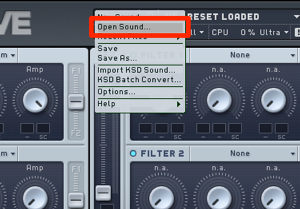
Select “Open”.
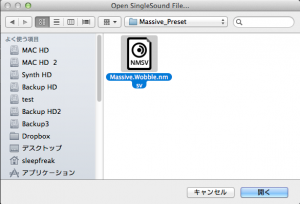
Select the preset and click “Open”.
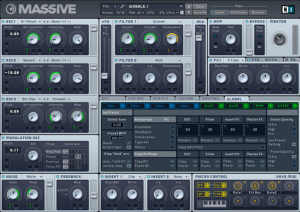
The preset is loaded as shown.
Alternatively, use the method below.
URL: https://sleepfreaks-dtm.com/softsynth/massive-preset/
FM8
Loading the Preset
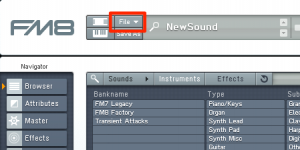
Click File.
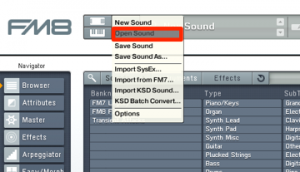
Select “Open Sound”.
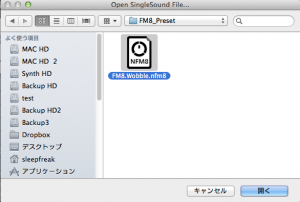
Select the preset and click “Open”.
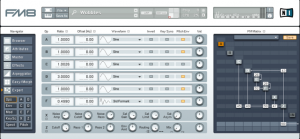
The preset is loaded as shown.
Logic X
Preset Location
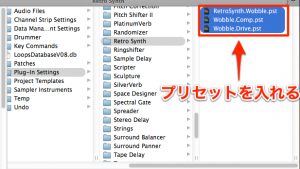
Place the preset in:
Main HDD → Users → username → Music → Audio Music Apps →
Plug-In Settings → Retro Synth.
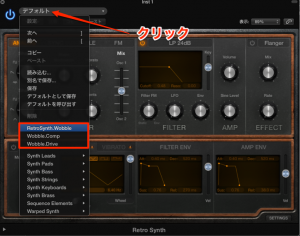
Launch Retro Synth and click “Default”;
the preset will appear.
Cubase
Mac: Preset Location
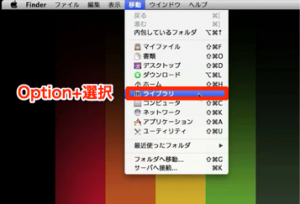
Select “Go” from the menu bar,
then hold the Option key and select “Library” when it appears.
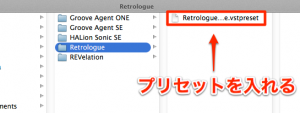
Go to Audio → Presets → Steinberg Media Technologies → Retrologue
and place the preset there.
Windows: Preset Location
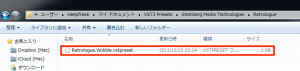
Go to C drive → Users → username → My Documents → VST3 Presets
→ Steinberg Media Technologies → Retrologue and place the preset in that folder.
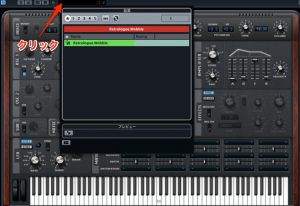
It will appear among the Retrologue presets as shown.
Frequently Asked Questions
Q1. What does a wobble bass sound like?
Wobble bass is a low-frequency sound whose frequency moves up and down, often used as an effect in EDM and dubstep. An LFO or filter in a synthesizer creates its characteristic periodic movement.
Q2. Where should I save the preset for Logic X?
Save it in Main HDD → Users → username → Music → Audio Music Apps → Plug-In Settings → Retro Synth. Launch Retro Synth afterwards and it will recognize the preset automatically.
Q3. How do I install the preset in Cubase on Windows?
Place the preset file in C drive → Users → username → My Documents → VST3 Presets → Steinberg Media Technologies → Retrologue.
Q4. Are there other synthesizer sound design tutorials?
Yes. Related articles cover a variety of synthesis techniques, including ADSR controls, SuperSAW and oscillator sync.
NEW ARTICLES
Latest English Articles






































































































































































































































































































































































































































































































































































































