
In part 3 of our NI REPLIKA XT guide, the advanced section offers detailed controls for tailoring delay to a track. Use DUCKING to balance the dry signal and delay, PANNING to set their positions, and PATTERN to adjust rhythm and groove. Though these controls may initially seem complex, they become useful with practice. OPTIONS lets you change effects routing. Together, these features make delay a tool for sound design as well as spatial effects.
Fine-tune the parameters to suit your track

This is the final installment in our REPLIKA XT guide.
Here we will adjust the pan and volume of the delay signal,
with the aim of matching it to the track’s mood and arrangement.
REPLIKA XT is designed with detailed controls for just this kind of work.
Some parts may seem a little complex at first, but as you use them,
we think you will find their convenience hard to give up.
Let’s get started.
REPLIKA XT tutorial videos
1. Main parameters and controls
2. Delay and effects sections
3. Advanced section — this article
Advanced section controls
A range of parameters lets you fine-tune the delay signal.
DUCKING
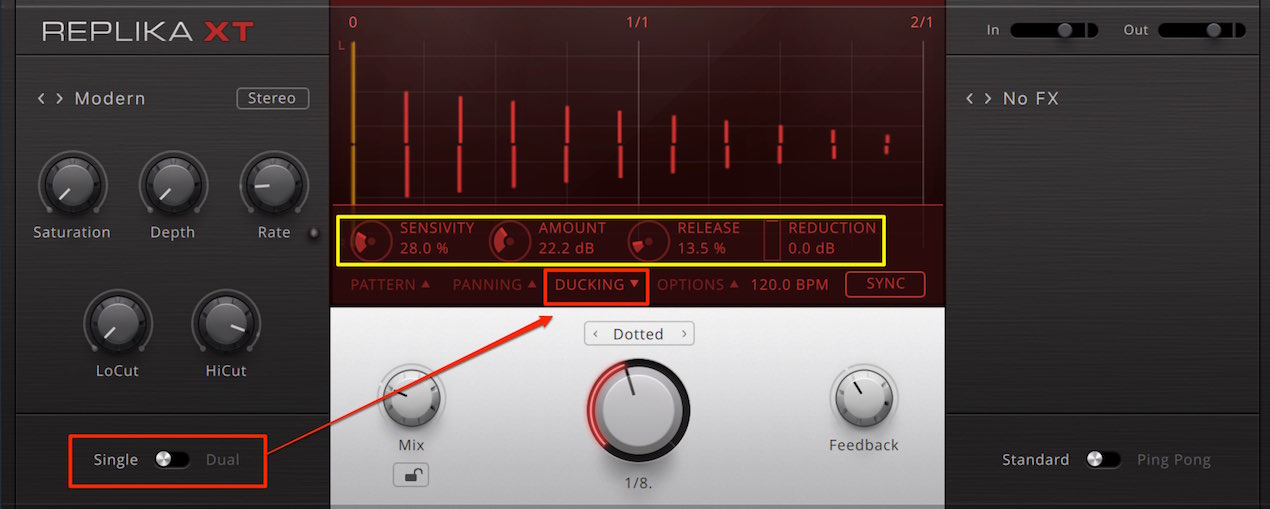
Available only in Single mode,
this adjusts the volume so the delay does not get in the way of the dry sound.
It uses the timing of the dry signal to reduce the delay volume when the dry sound plays.
The effect is similar to sidechain compression.

- SENSITIVITY: Sets the threshold level at which ducking is triggered.
- AMOUNT: Sets how much the delay volume is reduced, in decibels.
- RELEASE: Sets how long it takes for the reduced volume to return to its original level.
- REDUCTION: The meter shows the amount of volume reduction being applied.
PANNING
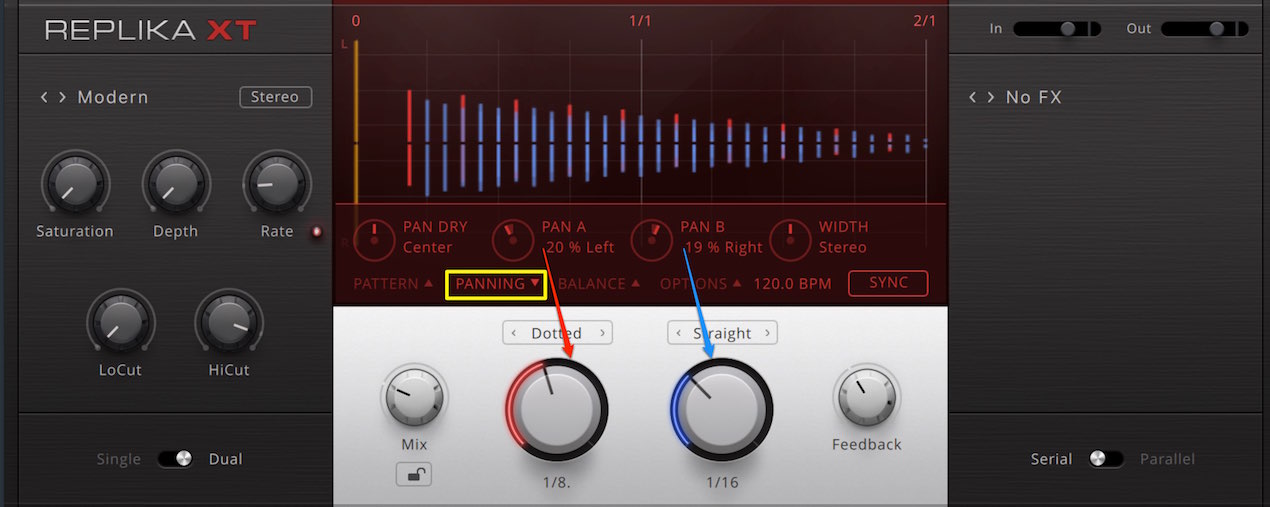
PANNING lets you position the sound in the stereo field.
The image shows Dual mode with two delay times set.
Here, A represents the left delay and B the right delay.
- PAN DRY: Sets the position of the dry sound.
For example, you can deliberately place the dry sound and delay at different positions. - PAN A/B: Sets the position of each delay.
- WIDTH: Widens or narrows the sounds placed left and right.
The center is the default; turning left narrows the stereo position, reaching mono at the extreme,
while turning right emphasizes the width.
PATTERN
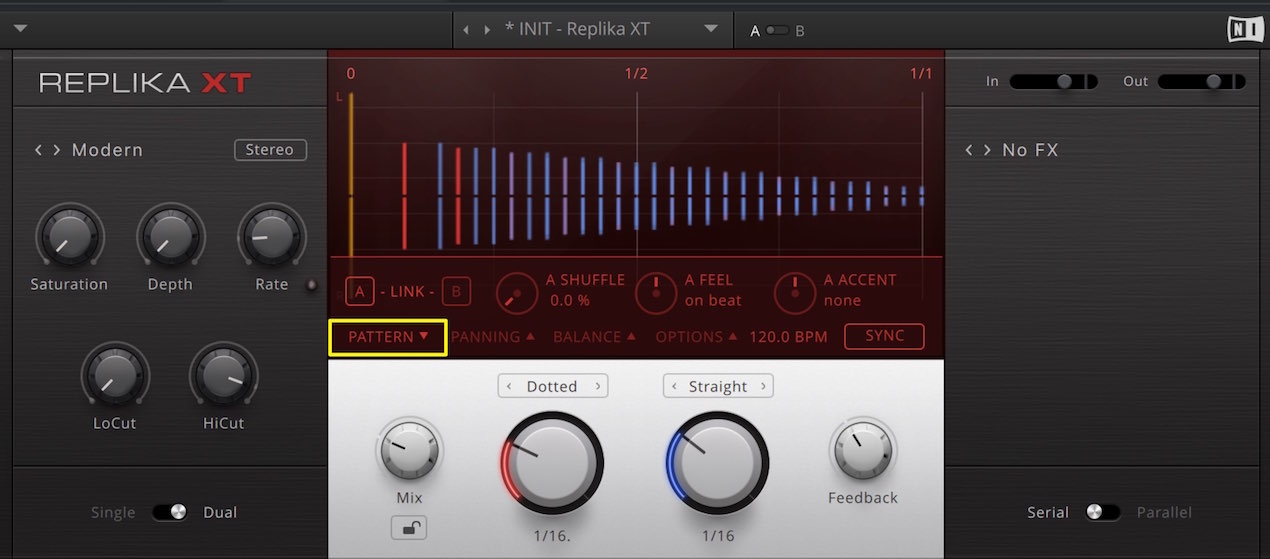
In PATTERN, you can adjust the rhythm and dynamics of the delay to create a groove.
Link A and B
and changes to each control will be coupled.
To set them independently, switch off the link and select either A or B.
- SHUFFLE: Adds a swung feel to the delay rhythm.
Matching the swing of the other instruments can produce good results. - FEEL: Moves the timing of the entire delay forward or backward to create a groove.
- ACCENT: Sets the dynamics of the feedback volume. The center is the default;
turning left emphasizes odd-numbered repeats, while turning right emphasizes even-numbered repeats.
Triplets and swing explained
OPTIONS
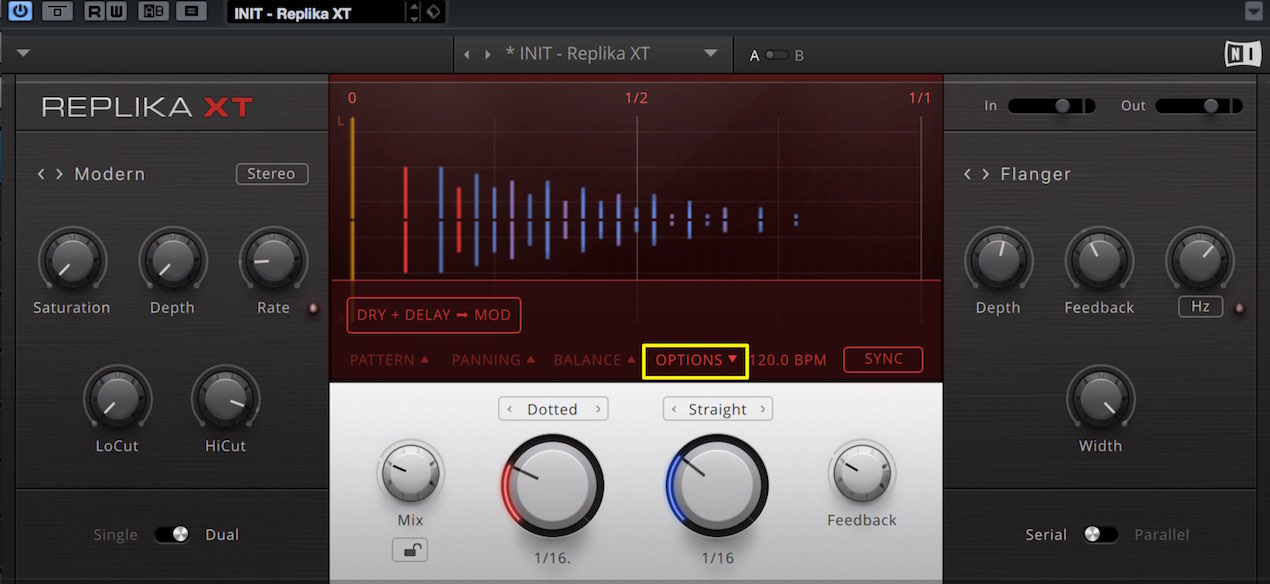
OPTIONS sets the routing of sound through the effect.
By default, the effect is applied only to the delay signal,
but selecting “DRY + DELAY → MOD”
applies the selected effect to the dry signal as well.
Frequently asked questions
Q1. How is REPLIKA XT’s DUCKING different from sidechain compression?
DUCKING uses the timing of the dry signal to trigger automatic delay-volume adjustment, producing an effect similar to sidechain compression. It is designed to keep the delay from masking the original signal and can be adjusted with SENSITIVITY, AMOUNT and RELEASE.
Q2. How should I use WIDTH in the PANNING section?
WIDTH adjusts the stereo spread. The center is the default; turning left narrows the image to mono at the extreme, while turning right widens it. Adjust it to suit the mood of the track and create a sense of depth.
Q3. How do SHUFFLE and FEEL differ in PATTERN?
SHUFFLE adds swing to the delay rhythm and can match the swing of other instruments. FEEL shifts the timing of the entire delay forward or backward, allowing more subtle groove adjustments.
NEW ARTICLES
Latest English Articles
















































































































































































































































































































































































































