
Slate Digital Trigger 2 automatically detects attacks in drum and rhythm audio, allowing you to layer or replace them with other sounds. This guide covers applying the plug-in, attack detection, blending sounds with the MIX control, and setting up custom samples. It can make drum reinforcement and audio-loop editing faster than doing the work manually, with practical sound-shaping options for beginners and experienced producers alike.
Replace or reinforce kit sounds in a rhythm track

Trigger 2 is a plug-in from Slate Digital.
It detects attacks in rhythm audio and layers another sound in time with them,
or even replaces the original sound with a sound of your choice.
- Reinforce live-recorded drums
- Edit audio loops
- Extract a rhythm track as MIDI
Tasks like these can take considerable manual effort, but the plug-in makes them easier.
In this first installment, we cover Trigger’s basic operation and key parameters.
Trigger 2 tutorial video
1. Overview and key parameters (this article)
2. Using advanced features
Questions and answers from the YouTube video

Can TRIGGER replace hi-hats? I hope it is not rude to comment on a video from two years ago, but I wanted to ask.

Depending on the hi-hat level, you can detect it using the low-cut parameter.
Thank you for the helpful content! I think Cubase also has attack-detection features. Should I think of a dedicated plug-in as a different kind of tool?
Trigger does more than detect attacks: it makes mixing or replacing those hits with different samples efficient and intuitive. Changing the workflow can also change your production methods and open up new possibilities.
Applying the plug-in
There are two main ways to use Trigger.
- Insert it directly on the track
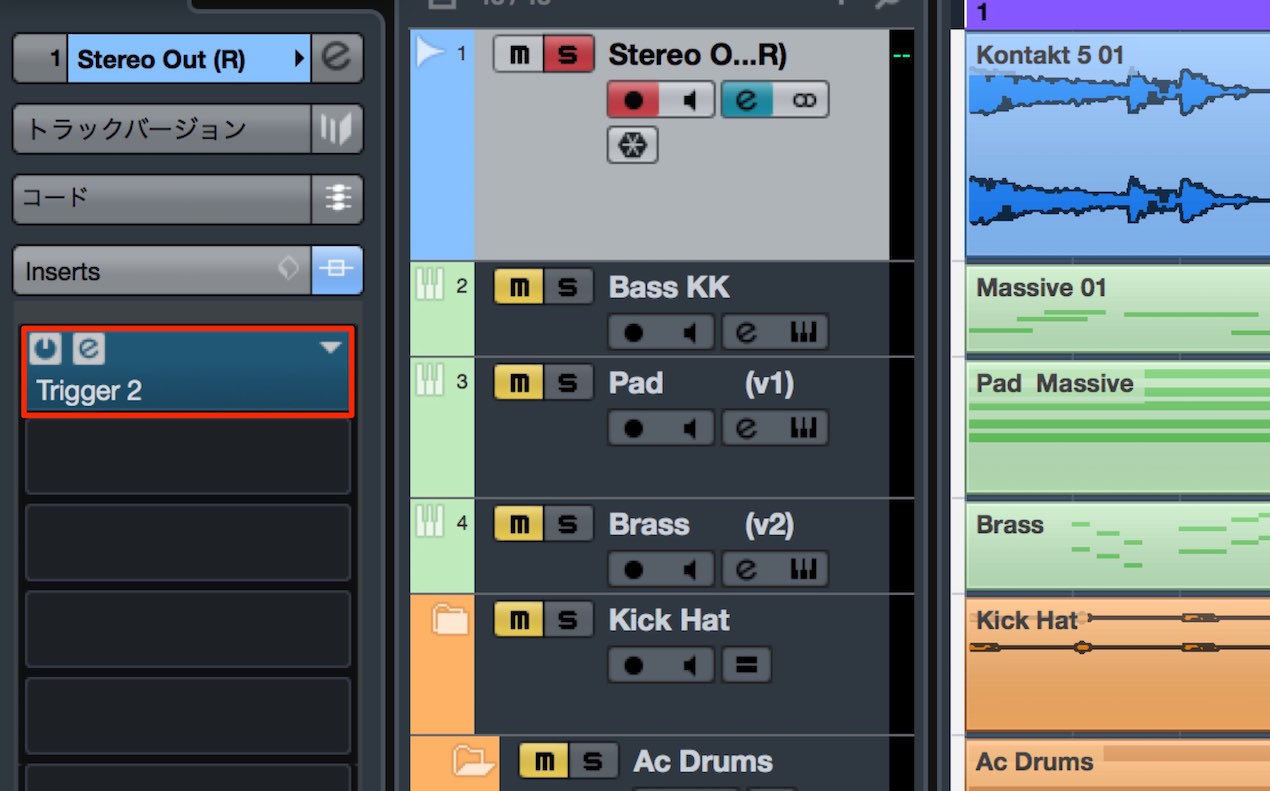
Use this when you want to replace the original kit with Trigger’s kit.
You can also blend the sounds with the MIX control explained below.
- Use a send and return
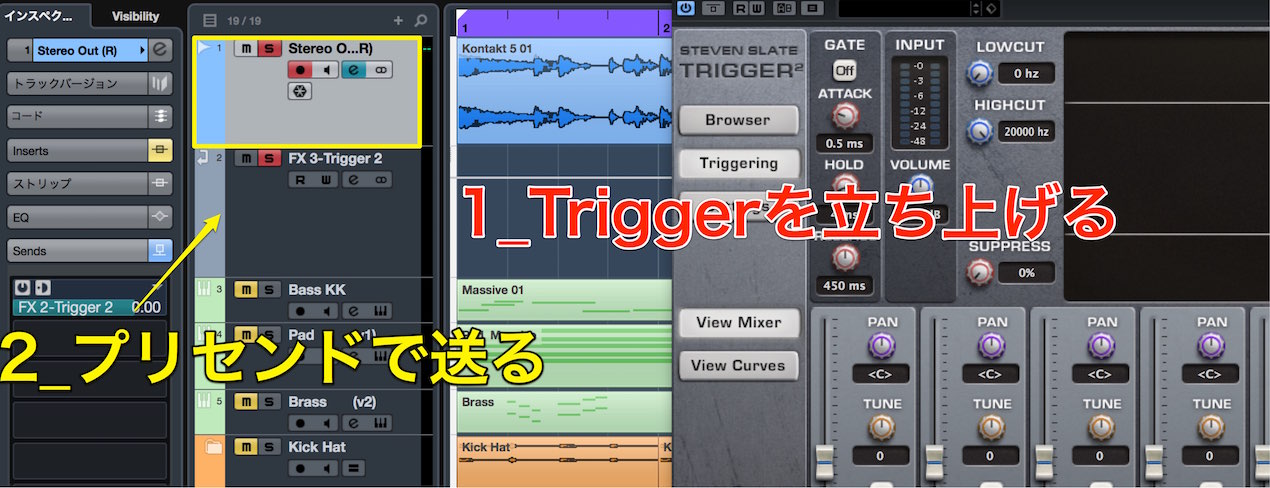
Use this to reinforce the original kit with Trigger’s sound.
This approach allows fine adjustments, such as applying effects separately to each sound.
Set the send from the original track to pre-fader.
Send-and-return guides for each DAW

 Logic
Logic Cubase
 Ableton Live
 Studio One
 FL Studio
Pre- and post-fader explained
Detecting attacks
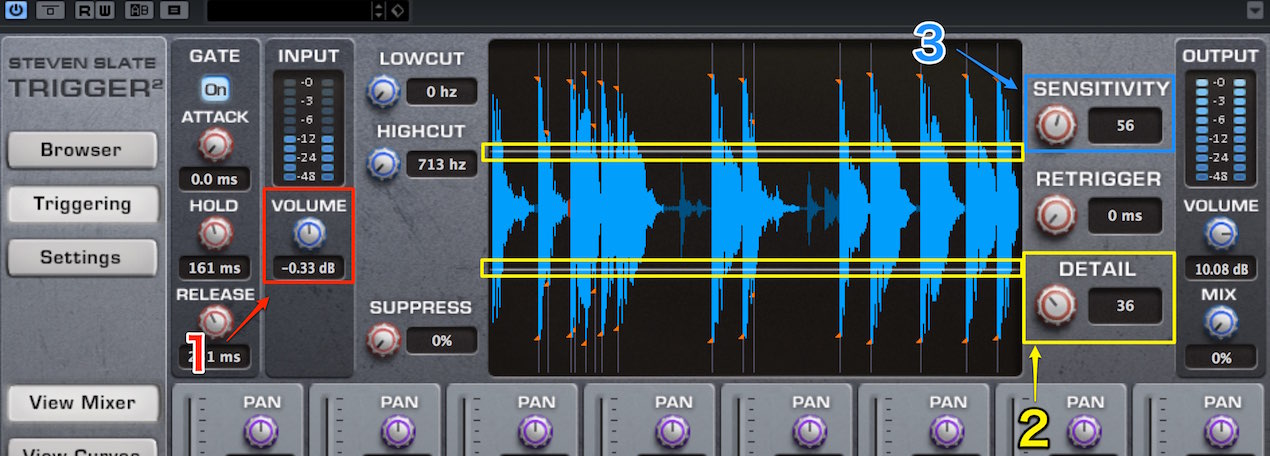
- 1. Use Volume to adjust the level of the source entering Trigger.
Set it high enough for the attacks to be detected reliably. - 2. Watch the display while finding a setting that detects the source attacks.
Detected attacks are marked with orange points; these are the trigger locations. - 3. For typical kick and snare hits, use 50 as a starting point. Increase sensitivity to detect more points when you want to capture subtleties such as ghost notes.
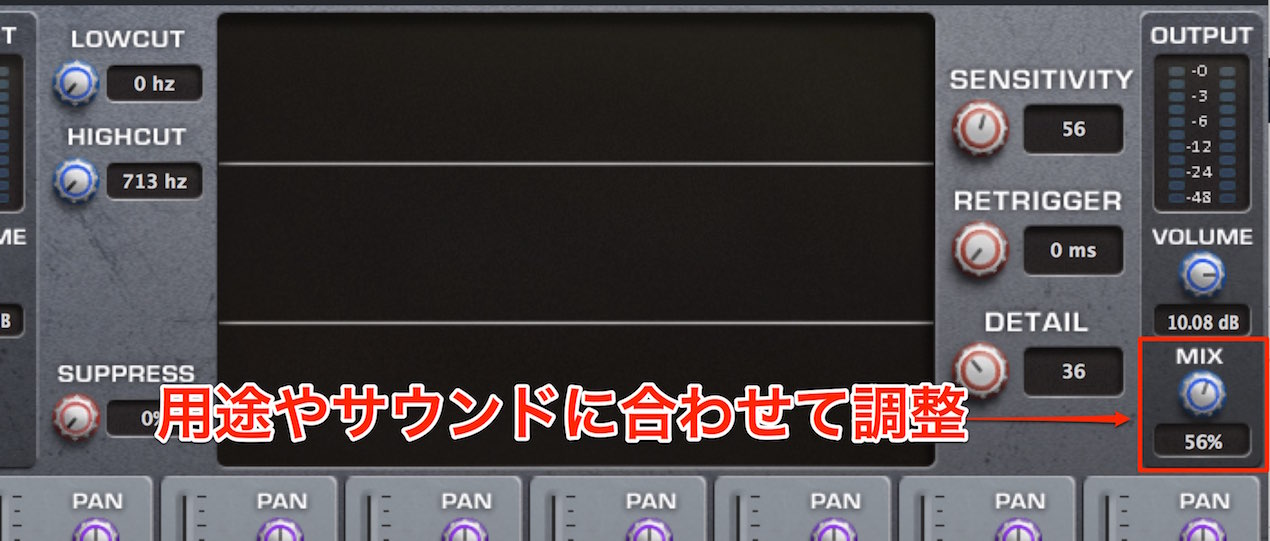
The MIX control sets the balance between the original material and the sample added or substituted by Trigger.
- At 0, Trigger’s effect is absent and only the original material plays.
- At 100, only the Trigger sample plays, fully replacing the original.
- Intermediate values blend the two sounds.
Adjust the balance to create the sound you want.
When using a send and return, set this value to MAX (100).
Preparing the sounds
Trigger 2 also lets you use your own samples.
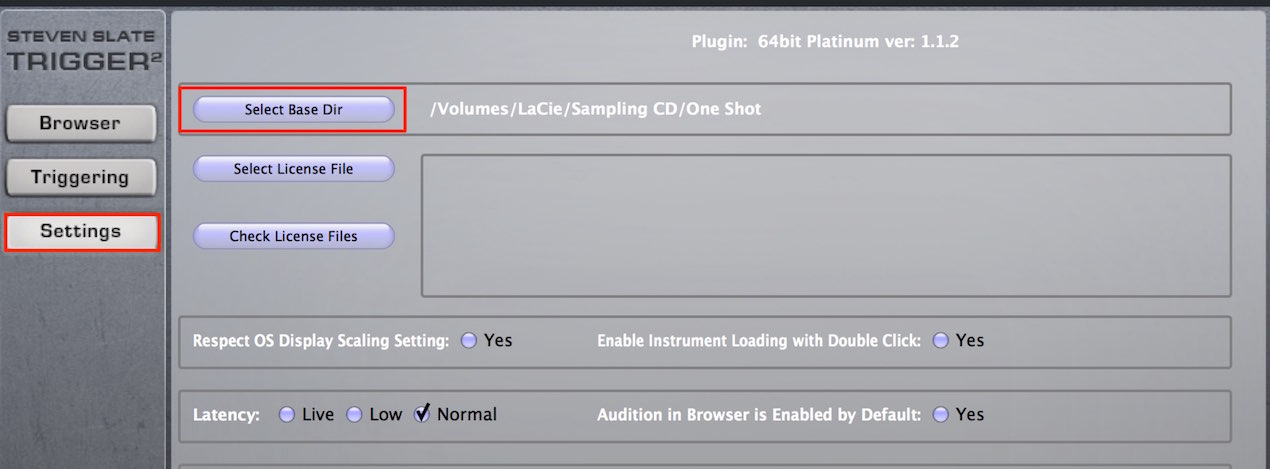
In Settings, click Select Base Dir,
and choose the folder containing the sounds you want to use.
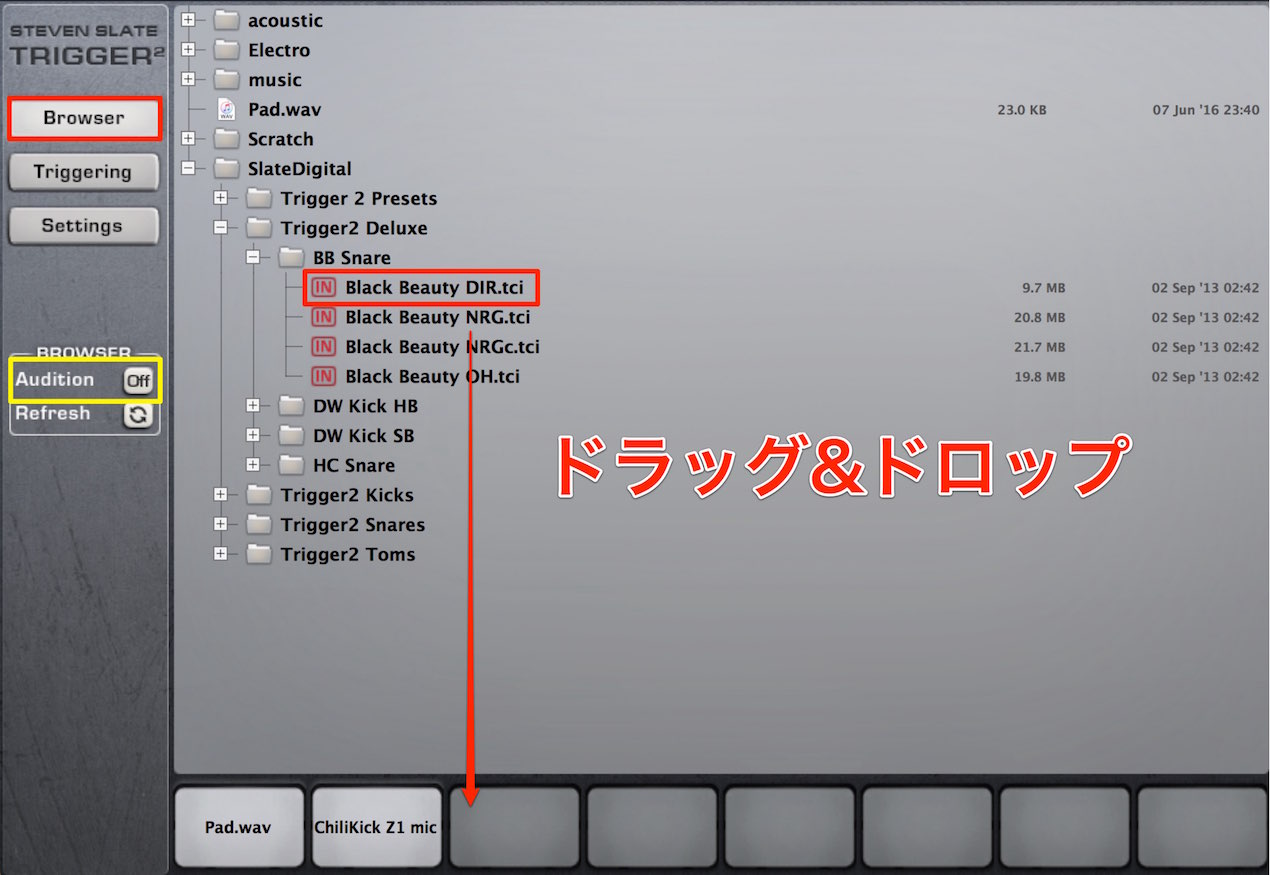
After selecting the folder, the sounds appear in the Browser.
Enable Audition to preview a sound when you click it.
Once you find a sound you like,
drag and drop the sound file onto a slot in the palette below.
You can combine up to eight sounds.
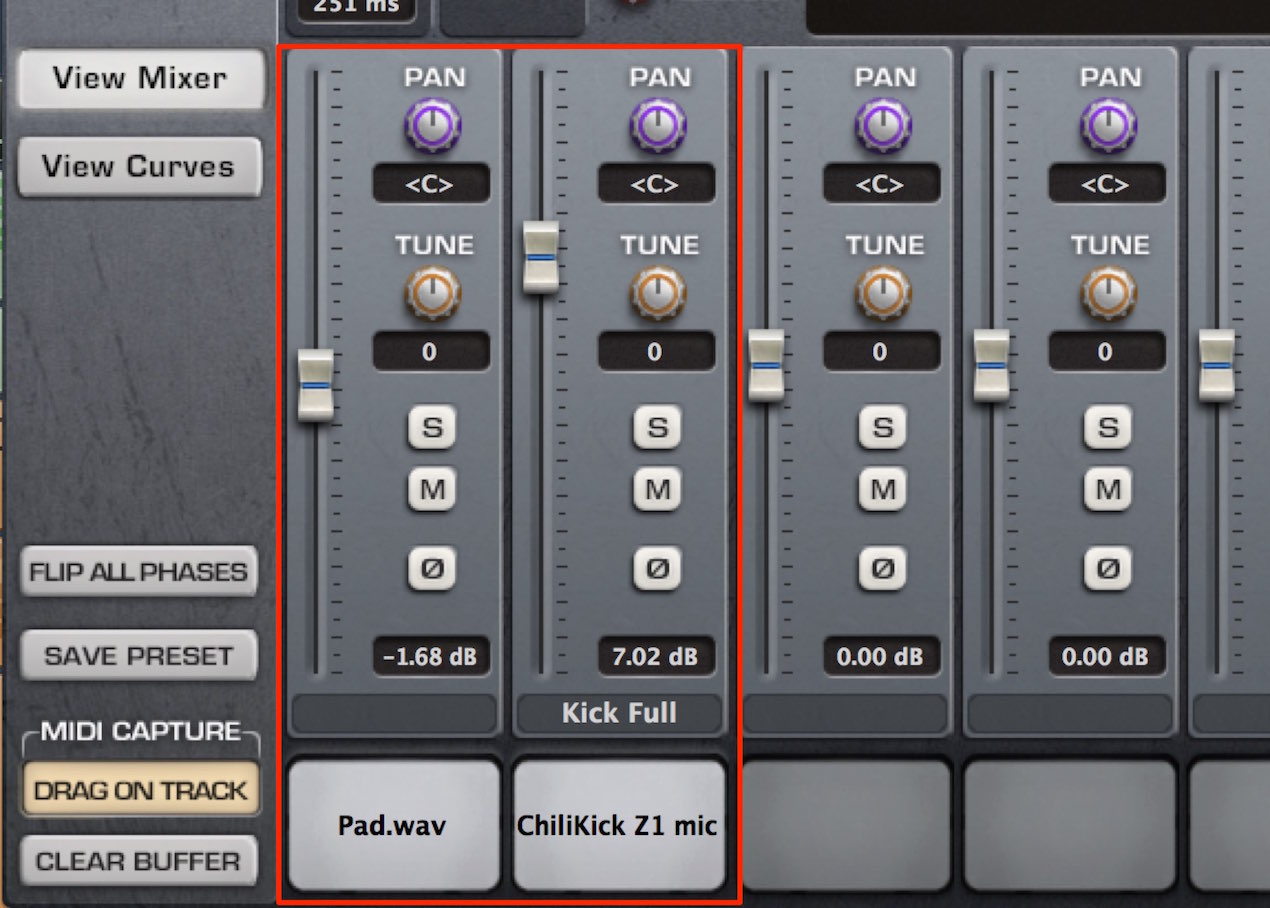
In the mixer, each slot has its own volume, pan, solo/mute, pitch and phase controls,
giving you considerable flexibility when shaping the sound.
That covers Trigger 2’s basic operation and main parameters.
The next installment explores other features and practical applications.
Frequently asked questions
Q1. What kind of plug-in is Trigger 2?
Trigger 2 automatically detects audio attacks and can replace or reinforce drum sounds in a rhythm track. It can be used to enhance live-recorded drums and edit loops.
Q2. How should I apply it to a track?
Use a direct insert to replace a sound, or a send and return to add reinforcement to the original. The latter allows detailed separate adjustments.
Q3. How should I adjust attack sensitivity?
Start around 50 for typical kicks and snares. Raise sensitivity to detect more hits if you want to capture details such as ghost notes.
Q4. How many sounds can Trigger 2 use at once?
You can combine up to eight sounds and adjust volume, pan, pitch and phase separately for each slot.
Q5. What do MIX values mean?
At 0 you hear only the source; at 100 you hear only the Trigger sample. Values in between blend them so you can choose your balance.
NEW ARTICLES
Latest English Articles





















































































































































































































































































































































































































