
A maximizer is an effect used in mastering to increase a track’s perceived loudness while controlling its peaks. In the example below, Output sets the ceiling and Optimize increases the amount of compression. In digital audio, 0 dBFS is the maximum sample level for fixed-point output; leaving headroom below it helps prevent clipping. An RMS meter can also help assess average level, alongside listening and peak monitoring.
Optimizing Loudness with a Maximizer
A maximizer can increase perceived loudness while limiting peaks to reduce clipping.
In this example, it is placed at the end of the master track.
This can help bring the track to the desired loudness.


The following example is louder than the one above. Please check your listening volume.
Product Information
The original article recommends a plug-in for raising loudness naturally; it does not include a product link in this section.
Understanding the Maximizer
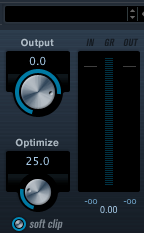
For fixed-point digital output, 0 dBFS is the maximum sample level.
Exceeding the available output range can cause clipping; the red indicator may signal an overload. Floating-point processing and intersample peaks require separate consideration.
- Output: Set the output ceiling for the overall sound.
The original example suggests 0 dB or −0.1 dB; a lower ceiling may be appropriate to leave headroom for intersample peaks and encoding. - Optimize: Set how much the sound is compressed to increase its density.
Increasing it raises perceived loudness, but too much can sound unnatural, so use care.
An RMS meter can make level adjustment easier when used alongside your ears and peak monitoring.
Frequently Asked Questions
Q1. What is the difference between a maximizer and a limiter?
The original article describes a maximizer as increasing loudness while controlling peaks. In practice, maximizers commonly use limiting, and many limiters can also increase perceived loudness through gain. Features and names vary by product; either may be used on a master bus when appropriate.
Q2. How high should I set Optimize?
Too much Optimize can compress the sound unnaturally and degrade its quality. Use an RMS meter and your ears to find a setting that increases perceived loudness without sounding uncomfortable. The original article suggests starting around a moderate setting; the right value depends on the signal and plug-in.
Q3. Can I use a maximizer on tracks other than the master?
This example places the maximizer at the end of the master chain. The original article cautions that using one on individual tracks can complicate a mix and suggests compressors for track-level control. In practice, limiters and maximizers can also be useful on individual tracks or buses when their effect serves the mix.
NEW ARTICLES
Latest English Articles














































































































































































































































































































































































































































































































































































