PreSonus Studio One has evolved into Fender Studio Pro. Its included Mustang Native and Rumble Native plug-ins model real Fender amps for guitar and bass sound design. AI and machine learning power Extract Drums and Extract Notes, converting audio to editable MIDI in one click. A redesigned interface introduces Channel Overview and Arrangement Overview to streamline work. Eligible existing users can upgrade for free; the modern interface and new features serve creators from beginners to professionals.
Studio One becomes Fender Studio Pro
Questions and answers from the YouTube video

Others have mentioned this too: when I send audio to a new Impact, the sounds are not assigned to individual pads. What should I do?

We checked: Studio One 7 behaves as shown in the video, but Studio One 8 appears to require an additional slicing step after Send to New Impact. In Studio One 8, right-click the waveform and choose Audio → Send to New Impact. Then right-click the pad containing the sample and choose Slice Sample; slice markers appear in the waveform above. If the positions look right, click Slice on the right to assign each slice to a pad.
I would like to use Melodyne, but only see Install Now and no downloads are available. Is it absent from the demo?
The Fender Studio Pro demo does not appear to include a Melodyne Essential license or download. To try Melodyne, install the trial separately from the official Celemony website.
Fender Studio Pro does not detect EZdrummer 3. I have tried resetting the blacklist and adding its files to the VST plug-in locations without success. Is there anything else I could try?
On Windows, check C:\Program Files\Common Files\VST3. On Mac, check Macintosh HD/Library/Audio/Plug-Ins/VST3/. See whether EZdrummer 3.vst3 is in the appropriate folder.
How do I set up my MIDI keyboard?
You can configure a MIDI keyboard under Studio One Preferences (Options) → External Devices → Add. The following article also explains the process: https://sleepfreaks-dtm.com/studioone7-fender/settings/
Fender Studio Pro is music production software built on the award-winning PreSonus Studio One platform.
It is effectively Studio One 8, retaining the established features and reliability while adding a modern interface and Fender amp and effects models.
With the move to the Fender brand, plug-ins modeled on real Fender amps are included as standard.
In addition, version updates and upgrades are also more affordable, and qualifying Studio One Pro 7 users can obtain Fender Studio Pro free of charge.
A redesigned user interface
Fender Studio Pro introduces the modern, streamlined interface design found in Fender products.

The redesigned toolbar and transport bar have a clean look and a subtle 3D style.
All stock plug-ins and many built-in effects have been updated with a more attractive, consistent design.

Impact and Sample One lead the new visual style for integrated virtual instruments.
The interfaces of Mojito, Mai Tai, and Presence have also been refreshed.

The track list and inspector icons are located at the lower left.
Channel Overview and Arrangement Overview
Two new overview features let you work while seeing the whole session.
Channel Overview
This new view displays each mixer channel at a larger size, giving quick access to the controls you need.

Its wide layout spans the arrangement view, much like an analog mixing console.
A consolidated view of one channel lets you directly adjust key insert-effect parameters.

You can intuitively reorder plug-ins and select channels. Dedicated displays are provided for built-in effects and third-party plug-ins.

For third-party plug-ins, use Setup Editing Parameters in the right-click menu to customize the parameters shown.

Click the icon in the transport bar to switch to or from Console view.
You can also double-click a channel to open Channel Overview.
Arrangement Overview

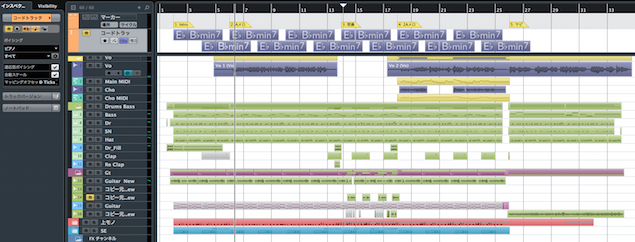
Even on a small display such as a laptop, you can now see every track and the full session length at once.
A rectangular highlight shows the portion currently visible in the arrangement below; use the mouse to zoom or change the displayed range.
Fender Mustang Native Guitar and Fender Rumble Native Bass
Fender Studio Pro adds Mustang Native and Rumble Native, Fender’s first native effects plug-ins.
Mustang Native

Based on Fender’s DSP-powered Mustang guitar amps, it includes 39 guitar amp models and 73 stompbox effects.

It also includes a tuner and more than 200 presets.
Rumble Native

Using the same design as Mustang, this plug-in is dedicated to bass sound design.
Based on Fender’s DSP-powered Rumble amps, it includes over 20 amp models, over 70 effects pedals, and over 100 presets.
It also has the same built-in tuner as the guitar model.

Both plug-ins let you freely reorder amps, cabinets, and effects. Bypass the amp section to use either as an effects-only pedalboard.
AI-based audio-to-note conversion

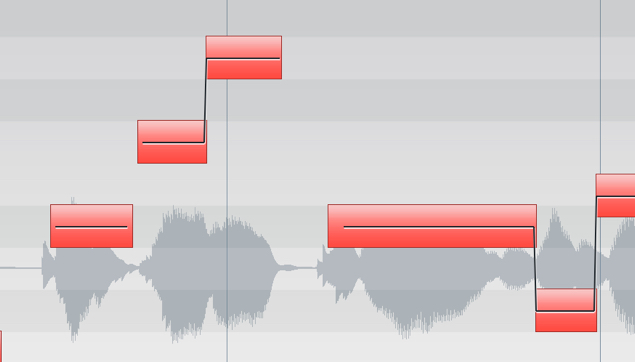
The new Extract Drums and Extract Notes options use AI and machine learning.
They convert audio material into editable MIDI notes with one click.
Each feature uses its own model to analyze audio and identify notes or rhythmic events.
Extract Notes supports monophonic and polyphonic instruments.
Extract Drums is trained specifically on acoustic drums and is useful for drum replacement.

Running Extract Notes or Extract Drums creates an instrument track with Mai Tai or Impact loaded and automatically places the extracted notes on it.
You can later replace the sound with a virtual instrument of your choice.

For example, extract notes from audio and open the resulting instrument part in the score editor to create a printable score or lead sheet.
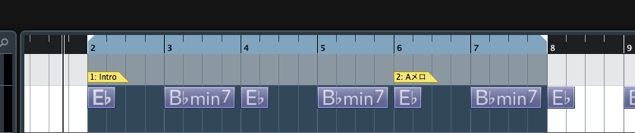
Chord Assistant

Chord Assistant makes the chord track easier to use in Fender Studio Pro.
It suggests chords that fit an existing progression.

Select the second or a later chord event and click Chord Assistant to see suggested chords.
Choose one to replace the chord with a suitable alternative.
Other new features
Fender Studio Pro includes many more new features and improvements.
Updated Sample One and Impact

These add sample fade-in and fade-out controls, tempo options, improved crossfades, and a slicing tool.
A new modulation matrix is also included for creative sound design.
Studio Verb plug-in

This new reverb can create everything from small rooms to expansive halls.
Its accessible interface and detailed controls provide a wide range of sounds.
A large display lets you adjust settings visually, while the distinctive Ping button opens up new reverb possibilities.
Drum Metronome

A rhythmic guide for keeping time during a performance or recording ideas before creating a drum part.
It can also replace the standard metronome click.

It includes 75 pattern presets covering various styles and genres, with matching drum samples.
Integration with Fender Studio

Capture ideas quickly in the free Fender Studio app and send them directly to Fender Studio Pro with all mixer and effects settings.
After capturing ideas on the go, you can transfer the session, including all mixer and effects settings, to Fender Studio Pro.

Account integration

Since PreSonus joined the Fender family in 2021, its accounts and services have been moving toward integration.
As of January 13, 2026, MyPreSonus accounts are automatically migrated to Fender accounts.

If you have both accounts, you can link them when signing in to MyPreSonus.
Downloads, license management, product registration, and knowledge sharing by community experts will be brought together in MyFender.
The original article states that the migration does not remove access to products or affect existing Studio One Pro+ service or payments.
No special procedure is required, according to the original article.
System requirements
Mac
• macOS 13 Ventura or later
• Intel Core i3 or Apple M1 processor or better
Windows
• Windows 10 22H2 or later (64-bit only)
• Intel Core i3, AMD A10, or Snapdragon X processor or better
Both platforms
• At least 8 GB RAM
• At least 40 GB free disk space
Pricing

The following Japanese retail prices were listed in the original article:
• Fender Studio Pro 8: ¥29,800
• Fender Studio Pro 8 upgrade: ¥14,800
• Fender Studio Pro 8 academic: ¥22,350
• Fender Studio Pro 8 crossgrade: ¥22,350
• Fender Studio Pro 8 multi-license: from ¥165,000
• Fender Studio Pro+ 12 MONTH: ¥26,800
• Fender Studio Pro+ MONTHLY: ¥2,900
• Fender Studio Pro+ 12 MONTH upgrade for six-month users: ¥22,350
Those who purchased Studio One Pro 7, whether new or as an update or upgrade, within one year of the Fender Studio Pro announcement can obtain Fender Studio Pro free of charge through their year of feature updates.
Prices are retailer prices in Japan, where products have open pricing, and are as of January 2026. Check the retailer for current pricing.
Conclusion

Fender Studio Pro retains Studio One’s ease of use while adding a modern interface and authentic Fender amp sounds.
With more affordable upgrade pricing, it is worth considering for Studio One users, guitarists and bassists seeking the Fender sound, those interested in AI-assisted production, and anyone looking for a new DAW.
Give it a try.
Frequently asked questions
Q1. How much does it cost to upgrade from Studio One to Fender Studio Pro?
The original article describes the pricing as affordable and says qualifying Studio One Pro 7 users can upgrade for free; other users can also purchase it for less than the previous price.
Q2. What audio does Extract Drums support?
Extract Drums uses a machine-learning model specialized for acoustic drums and optimized for analyzing drum audio. It converts audio to editable MIDI in one click.
Q3. How do Mustang Native and Rumble Native differ?
Mustang Native provides 39 amp models and 73 stompbox effects for guitar. Rumble Native provides over 20 amp models and over 70 effects for bass. Both include a tuner and numerous presets.
Q4. Is it easier to work on a small display?
Yes. Arrangement Overview lets you see the whole session and all tracks even on a small screen such as a laptop.
Q5. Can beginners use Chord Assistant?
Yes. It automatically suggests chords to fit an existing progression, so you can build a progression intuitively without knowing music theory.
NEW ARTICLES
Latest English Articles