
This article explains how to create a sharp, laser-like lead sound with a synthesizer. The main techniques are applying an LFO to oscillator pitch for rapid pitch movement and using glide for smooth transitions between notes. Add distortion with a hard clipper for thickness and reverb for space to complete the lead. These practical sound-design techniques are suitable for beginners and intermediate producers.
A Lead Sound Defined by Pitch Movement
This recipe creates a focused laser sound.
Pitch glide and trigger mode
are the two key elements.
How to Create the Sound
Oscillator Settings
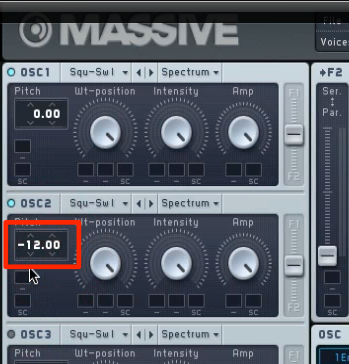
Shift one oscillator by one octave (12 semitones).

Apply an LFO to the oscillator's Pitch.
Keep the modulation amount very small.
Then set the LFO Rate to maximum.
The rapid pitch variation creates a distinctive texture.
Glide Settings
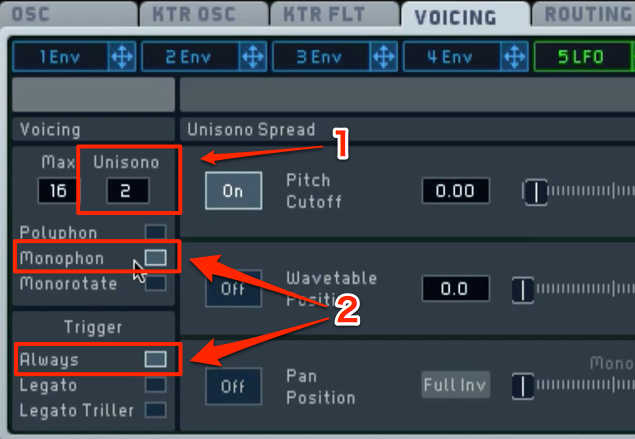
Adjust the following settings in the Voicing tab.
- 1. Increase the unison count to thicken the sound.
- 2. Give the most recent note priority when MIDI notes overlap.
The previous note is cut off, so the part plays monophonically. - 3. Select ‘Always’ to apply glide to all MIDI notes.
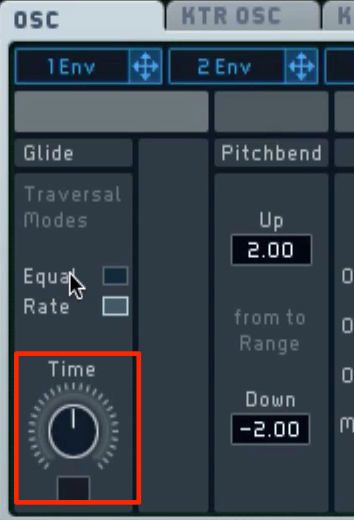
Use Time in the OSC tab to adjust the speed of the pitch transition.
Set it to taste to suit the song.
Applying Effects
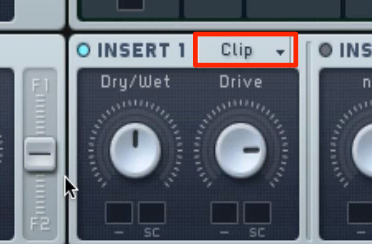
Use Hardclipper to distort the sound.
It can thicken the sound and add character to an overly clean texture.
- Dry/Wet: Set the effect blend.
- Drive: Adjust the amount of distortion.
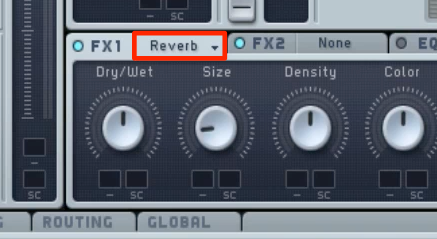
Finally, use Reverb to add space and complete the sound.
Frequently Asked Questions
Q1. What is glide?
Glide gradually moves the pitch from one MIDI note to another. In this recipe, the ‘Always’ setting applies glide to all notes, creating smooth transitions.
Q2. What should I keep in mind when applying an LFO to pitch?
Set the modulation amount very low, then raise the LFO Rate to its maximum. The rapid modulation creates the distinctive texture used in this laser sound.
Q3. Why use a hard clipper?
By distorting the signal, a hard clipper can thicken the sound and add character to a clean texture. Use Drive to control the amount of distortion.
NEW ARTICLES
Latest English Articles






























































































































































































































































































































































































































































































































































































