
This article explains how to route and stream DAW and system audio on a Mac. By combining the free virtual audio device Soundflower with the mixer application LadioCast, you can mix music and speech for live broadcasts such as Niconico Live or Ustream. Follow the steps from downloading the software through routing setup to learn practical audio control for music production, podcasts and streaming.
Useful for Niconico Live and Ustream broadcasts
You may want to send audio playing on your Mac into another application,
or stream it online more often than you might think.
You can set this up with two free applications, Soundflower and LadioCast,
working together.
They let you route audio within your Mac,
so you can record the output from a DAW
or combine speech and music for a live stream.
Let’s look at how to obtain and use the software.
Soundflower / LadioCast video tutorial
Questions and answers from the YouTube video

I use BlackHole instead of Soundflower. Are the LadioCast settings the same? 😭

We downloaded BlackHole and tested it. Its outputs were not independent as in Soundflower. Consequently, setting both LadioCast’s input and output to BlackHole created a feedback loop and howling. It could not be used in exactly the same way. We felt Soundflower offered more flexibility for this type of routing.
Does Soundflower work with OS version 10.15?
We confirmed that it worked on OS 10.15.
When I set the output to Soundflower 2ch in Sound settings, I see “The selected device has no output controls” and cannot hear the computer audio. How can I hear it while recording?
We have used the software on various Mac models and have not encountered that message. One online report says unplugging and reconnecting the headphones resolved it, so please give that a try.
Could you explain how you configured Sound in System Preferences?
We change the Sound settings in System Preferences at this point in the video: https://youtu.be/Tg_jIcC2OM0?t=360 Please take a look.
I cannot download Soundflower. What should I do?
Is the problem an installation error? On macOS Mojave (10.14), after downloading Soundflower-2.0b2.dmg, the installer may report that installation failed. In System Preferences → Security & Privacy → General, a message may say that system software from developer “MATT INGALLS” was blocked. Choose Allow and then install Soundflower again; this can make it usable on Mojave. Download, installation and configuration are undertaken at your own responsibility. We hope this helps.
How can I play YouTube music on TwitCasting?
Is the music you want to play copyright-free? If you have not already done so, please check TwitCasting’s guidance on streaming music: http://twitcasting.tv/indexhelptcms.php?title=HELP_MUSIC&nonv=1 Permission from the rights holder may be required for broadcasts or video and music from sites such as YouTube. We do not know what equipment you use, so please tell us whether you are using an iPhone, Android device, PC, Mac or Windows computer. Please understand that we may not always be able to provide a satisfactory answer.
How can I do something similar on Windows?
There are several free Windows programs, but we found some difficult to configure or unstable. An audio interface with a loopback function may be the quickest solution. Reference: http://sat1080.web.fc2.com/pg152.html
Download and install the software
First, download and install the software needed to set up audio routing.
Soundflower

Download: https://github.com/mattingalls/Soundflower/releases
After installation, the Mac restarts and the software becomes available.
You do not need to launch an application afterward.
You can select it as a virtual audio device.
If you use El Capitan, see the following article too.
LadioCast

Download: https://itunes.apple.com/jp/app/ladiocast/id411213048?mt=12
An Apple ID is required.
This article explains how to create an Apple account.
Routing setup
After installing both programs, open LadioCast.
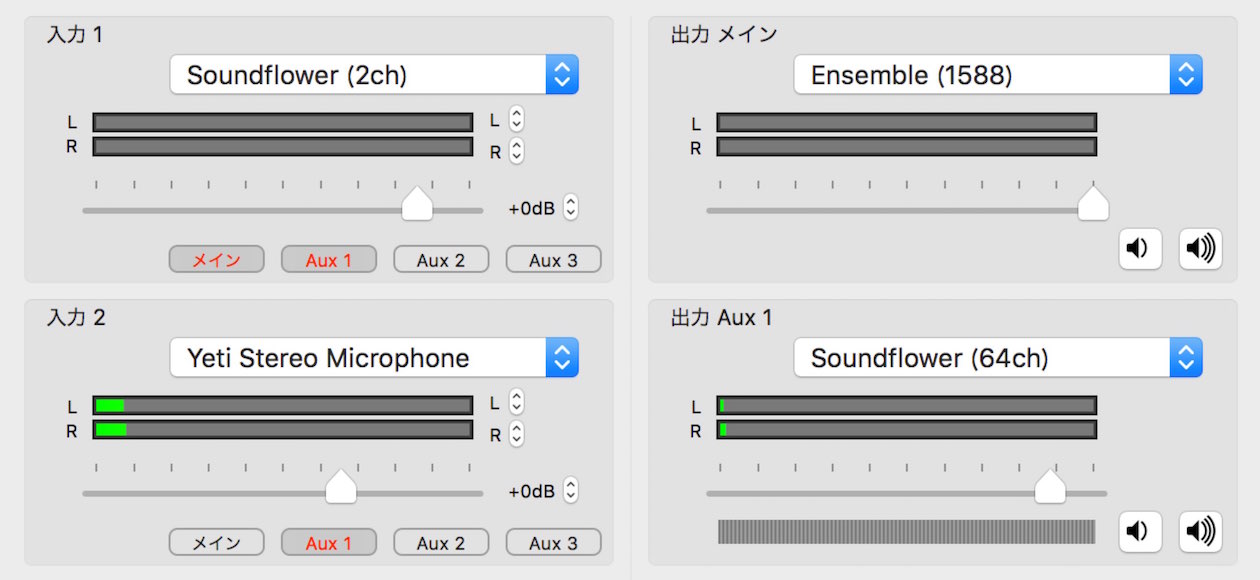
The following screen appears; configure it as described below.
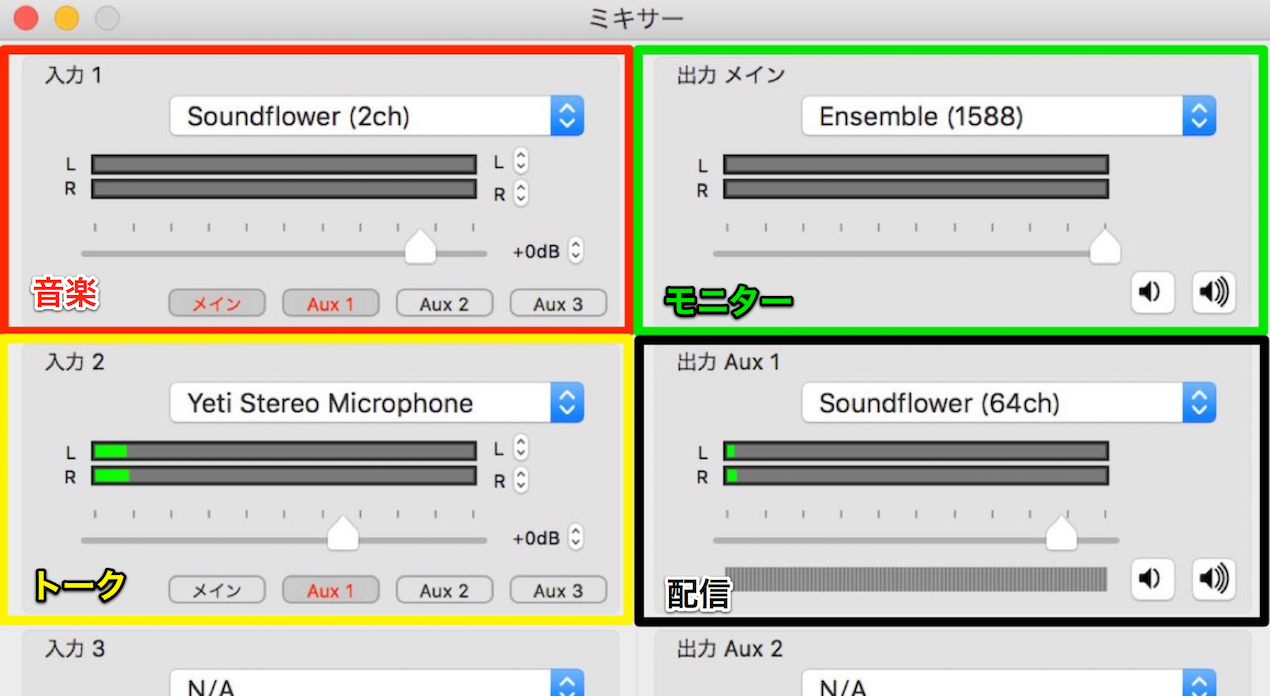
For this example, we will mix music and speech for a stream.
Input settings are on the left and output settings are on the right.
(The colored boxes and labels were added for illustration.)
- Input 1 (red): Select Soundflower (2ch),
and assign the output of your DAW or Mac system audio to Soundflower (2ch).
Enable Main and AUX1 below it to route the sound to your monitor and the stream. - Input 2 (yellow): Select the built-in microphone or a USB microphone to capture your voice.
If you do not need to monitor your own voice, routing it to Aux1 alone is sufficient. - Main output (green): Use this to monitor your voice and music.
Select the built-in output or your audio interface. - Aux1 output (black): Select Soundflower (64ch) for the audio sent to your audience.
That completes the setup.
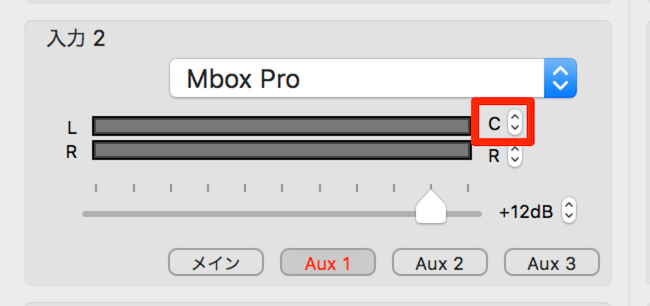
If the speech from Input 2 is heard only on the left or right,
click the up/down arrows to the right of “L” and “R” and change the setting to “C.”
Configure the streaming software
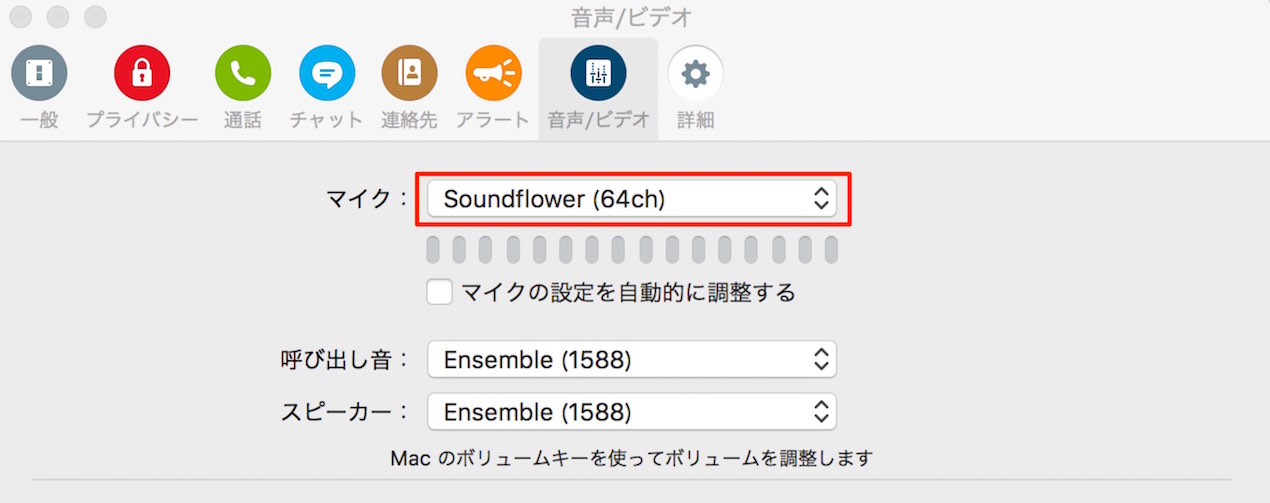
All audio is combined in Soundflower (64ch),
so set the input of your streaming software to Soundflower (64ch).
Having trouble streaming?
Open Applications → Utilities → Audio MIDI Setup.
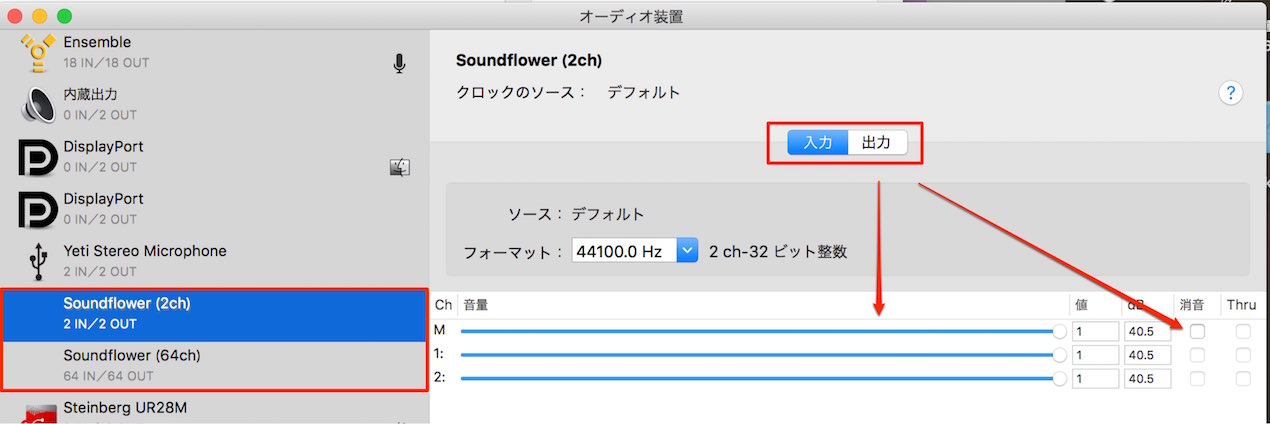
Check the input/output volume and mute settings for each Soundflower device.
Frequently asked questions
Q1. What is the difference between Soundflower and LadioCast?
Soundflower acts as a virtual audio device that routes audio within the Mac. LadioCast is mixer software that manages multiple audio inputs and controls their destinations. Together they provide an audio routing setup.
Q2. Soundflower is not recognized on Mac OS X El Capitan.
El Capitan’s security settings can prevent Soundflower from being recognized. See the linked article for a specific solution.
Q3. What if speech is heard on only one side?
In LadioCast’s Input 2 settings, click the up/down arrows next to “L” and “R” and change the setting to “C.” This places the sound in both stereo channels.
Q4. Which device should I select in the streaming software?
Set the streaming software’s audio input to Soundflower (64ch). All the audio is combined there, so the mixed audio will be streamed.
NEW ARTICLES
Latest English Articles















































































































































































































































































































































































































