
Steinberg's UR-C series combines USB Type-C connectivity and onboard DSP effects in a new generation of audio interfaces for music production. The lineup comprises the UR22C, UR44C, and UR816C—four packages including the Recording Pack—covering needs from beginners to professionals. Support for 32-bit integer recording, improved low-latency settings, and bus-powered options give you greater flexibility in your setup. Direct monitoring with dspMixFx makes recording comfortable, while the range offers strong value for high-resolution playback and professional use. The UR816C requires an external power supply, as detailed below.
A New Series of Popular Audio Interfaces
Steinberg is well known for its UR audio interfaces, and the new UR-C series has now joined the lineup.
To mark the launch, we interviewed Mr. Matsukuma, who handles Steinberg products in the Marketing Section of Yamaha Music Japan's LM Sales Department. He shared plenty of insights into what makes these products appealing.
The video also includes an announcement of the giveaway held at the time. That giveaway has now closed, as noted below.
Steinberg UR-C Series: Video Interview
Product page: https://www.steinberg.net/ja/audio-interfaces/ur-c-series/
Selected Questions and Answers from the YouTube Video

I bought a Steinberg UR22C because I want to record guitar into my Windows 10 PC and make music. My connections are as follows: the UR22C's USB Type-C port connects to a USB 3.0 port on the PC; the guitar connects to input 2 on the UR22C; and the UR22C's left and right main outputs connect to the inputs on my external Logitech Z623 speakers. I can get the guitar signal into the PC without noticeable delay, but I usually work late at night, so headphones or earphones are essential. I assume plugging headphones into the UR22C's front-panel PHONES jack would let me monitor everything. If possible, though, I would like to hear all the sound through wireless headphones or earphones, such as Bluetooth models. I tried pairing Bluetooth 5.0 earphones with the PC. I can monitor the PC's sound without noticeable delay, but the guitar still comes only from the speakers. Could changing the PC settings make this work, or is it impossible with my current setup? How can I hear both the PC and the guitar through Bluetooth 5.0 earphones? Should I use different equipment, and what else would I need?

I have tried various Bluetooth devices too, but the latency has still been too high for comfortable playing or recording. At this point, I think recording with wired headphones is the practical way to minimize that latency problem.
Is the DSP used only during recording, with equivalent CPU-based effects used when you apply them inside Cubase afterward, just as with the previous models? Also, how effective is the compressor? Is it a simplified knob-based design without controls such as ratio and threshold?
When you apply plug-ins inside Cubase, the effects are processed by the CPU. The compressor can be adjusted flexibly, from natural to heavy compression, and it does have ratio and threshold controls. We explain it in the video at the following link, so please take a look: https://sleepfreaks-dtm.com/mixing-plugin/ur-morphing-channel-strip-comp/
Does that mean it can run on bus power even with a Type-A connector, as long as the port is USB 3.0?
The requirements differ by model. The UR44C needs a Type-C-to-Type-C connection. The UR22C can run on bus power through a Type-C-to-Type-A connection, but the PC's port must support USB 3.0.
Sorry if this is a basic question! Can I use it with Studio One?
Yes, it also works with third-party software such as Studio One. Just keep in mind that Cubase is the DAW that provides the more closely integrated UR-C workflow shown in the video.
Purely in terms of sound, which is better: this or an Apollo? I felt that units such as the MR816 sounded a little muffled, which has left me with a poor impression of Yamaha interfaces.
A direct comparison is difficult, but we felt that the quality was excellent for an interface in this class. Sound preferences vary from person to person, so trying it at a music store is another option.
UR-C Series Overview
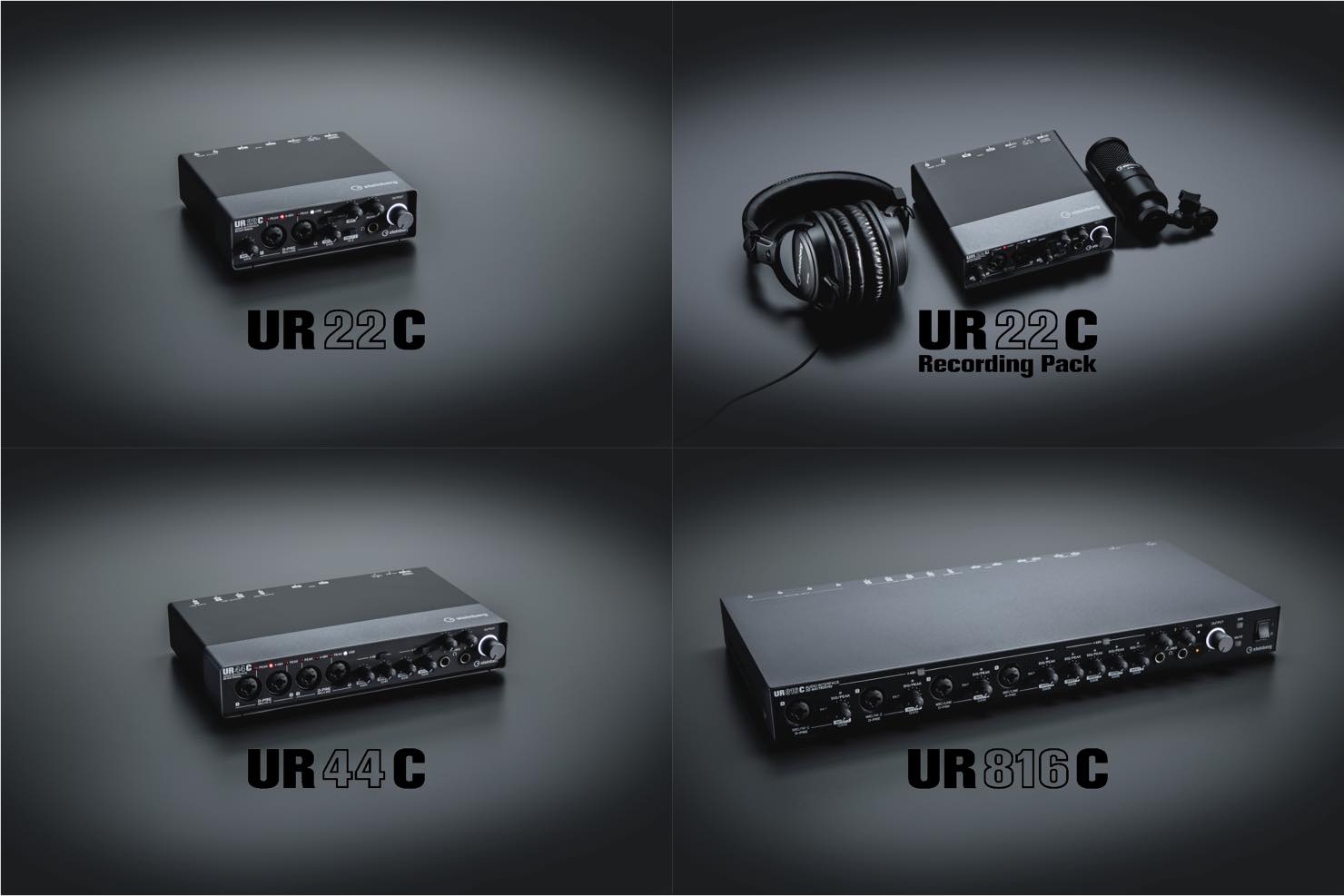
The Lineup
- UR22C (released October 3, 2019)
- UR22C Recording Pack (released October 3, 2019)
- UR44C (released October 3, 2019)
- UR816C (scheduled for release in November 2019)
• All models support USB Type-C connectivity.
• All models include DSP effects onboard.
• All models support 32-bit integer audio.
UR22C
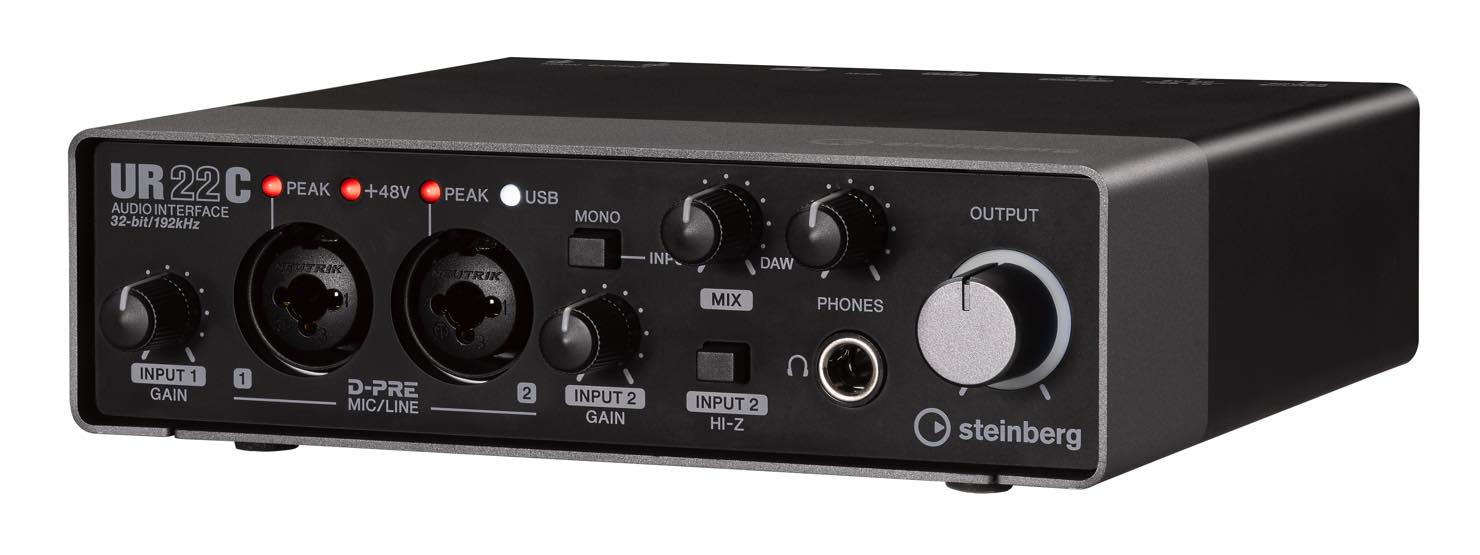
• Open pricing (estimated Japanese street price at launch: approximately ¥16,000)
• Analog I/O: 2 inputs / 2 outputs
• A MONO button lets you monitor inputs 1 and 2 either in the center or separately on the left and right.
This model is suitable for beginners as well as intermediate and advanced users. We were told that it is intended not only for music production but also for high-resolution playback. The AD/DA converter chips, shared across the range, support 32-bit integer audio, and our impression was that the sound had greater resolution than before.
Having DSP at this size and price is another welcome feature. DSP may bring high power consumption to mind, but USB 3.0 allows the unit to run reliably on bus power.
These features make it a product with excellent value and room to grow with your needs.
Note: If you connect it to a USB 2.0 port on your computer, you will need a separately sold USB power adapter or a portable battery.
UR22C Recording Pack
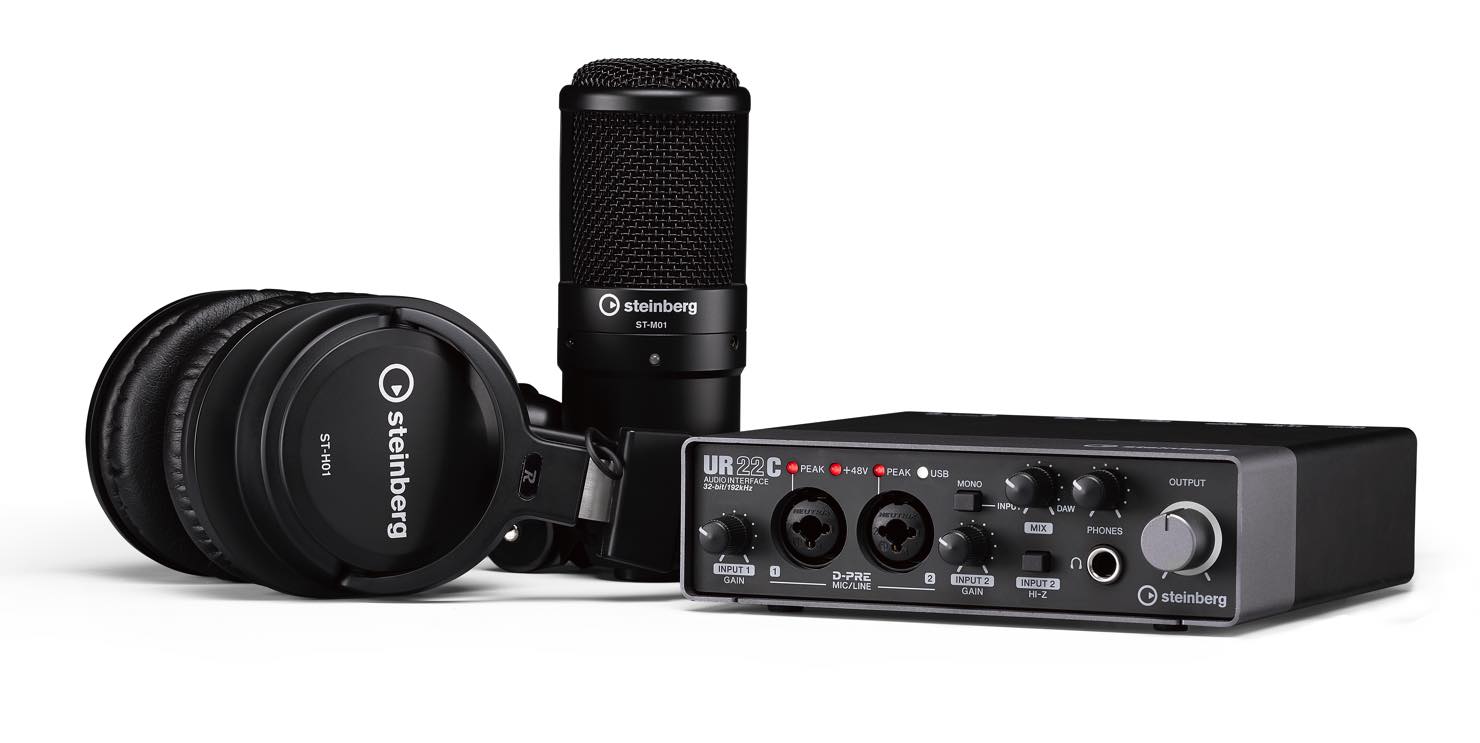
• Open pricing (estimated Japanese street price at launch: approximately ¥29,000)
This value-oriented package bundles the UR22C with a condenser microphone and headphones.
The UR22C also includes Cubase AI, so all you need in addition to the package is a computer to start making music easily.
For those who record, the DSP effects should help address latency problems, offering reassurance even if you are a little concerned about your computer's specifications.
It is an ideal package for someone just getting started with computer-based music production.
UR44C
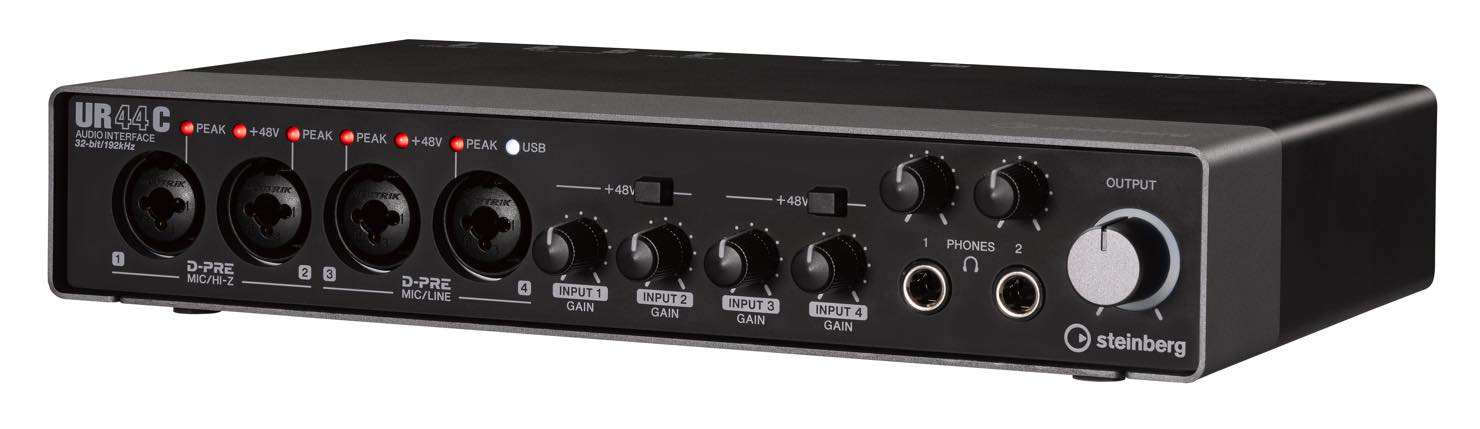
• Open pricing (estimated Japanese street price at launch: approximately ¥30,000)
• Analog I/O: 6 inputs / 4 outputs
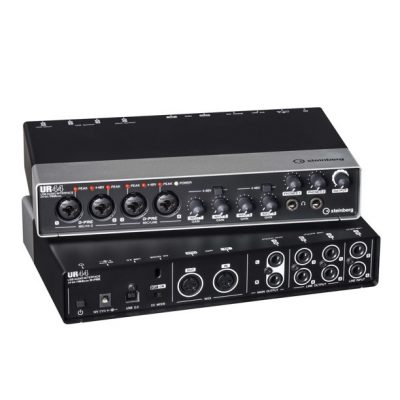
The additional inputs and outputs expand its uses to recording several performers at once or making a simple drum recording. It is also convenient if you want to keep multiple synthesizers and other devices connected.
Particularly noteworthy is bus-powered operation in a unit of this size. It requires a separately sold Type-C-to-Type-C cable, but being able to power the four preamps and DSP from the bus is a very welcome feature. You can, of course, also use the included Type-A-to-Type-C cable together with the AC adapter.
UR816C
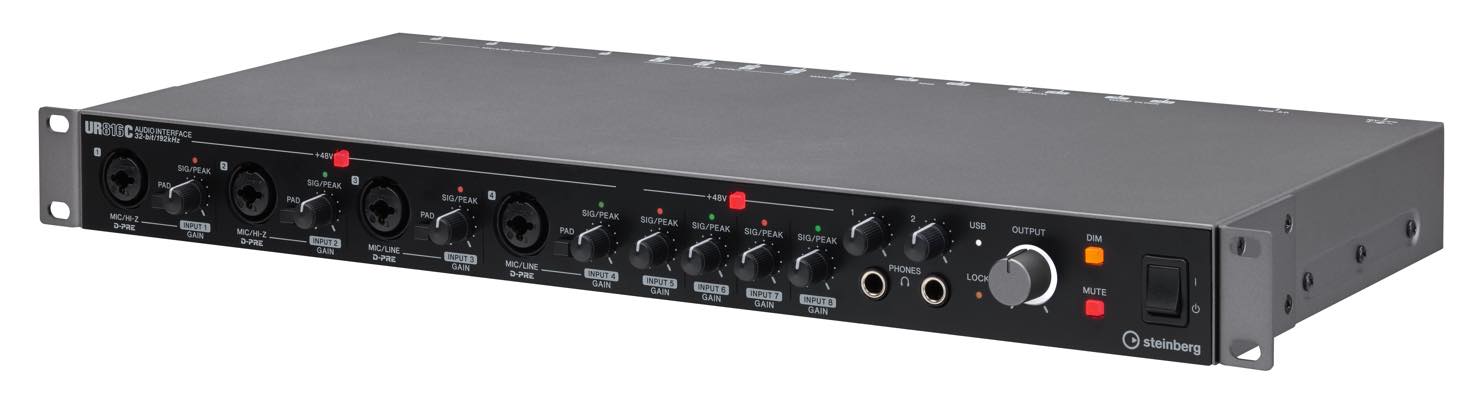
• Open pricing (estimated Japanese street price at launch: approximately ¥56,000)
• Analog I/O: 8 inputs / 8 outputs (16 inputs / 16 outputs including ADAT digital I/O)
• WORD CLOCK and OPTICAL inputs and outputs
This is the top model in the series, with the most extensive I/O. It can handle full drum recordings and recording a whole band live. ADAT offers substantial expansion possibilities, and HA mode also lets you use it as a preamp.
This model cannot run on bus power, but it is more compact than its predecessor while retaining a 1U form factor.
Offering specifications suitable for professional use at this price makes it another very good-value product.
Tips for Recording 32-Bit Integer Audio
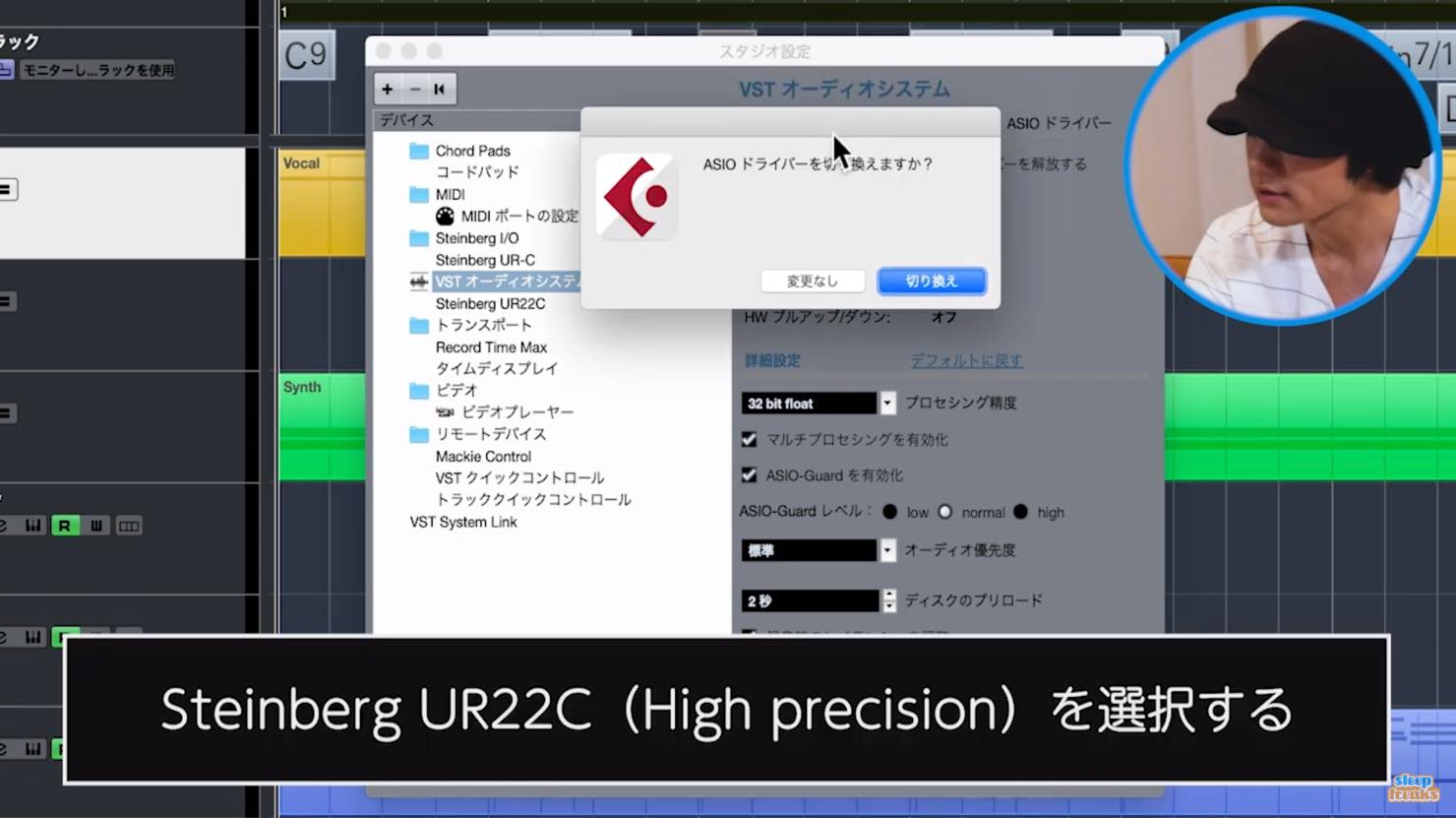
On a Mac, select the “High Precision” driver when recording 32-bit integer audio.
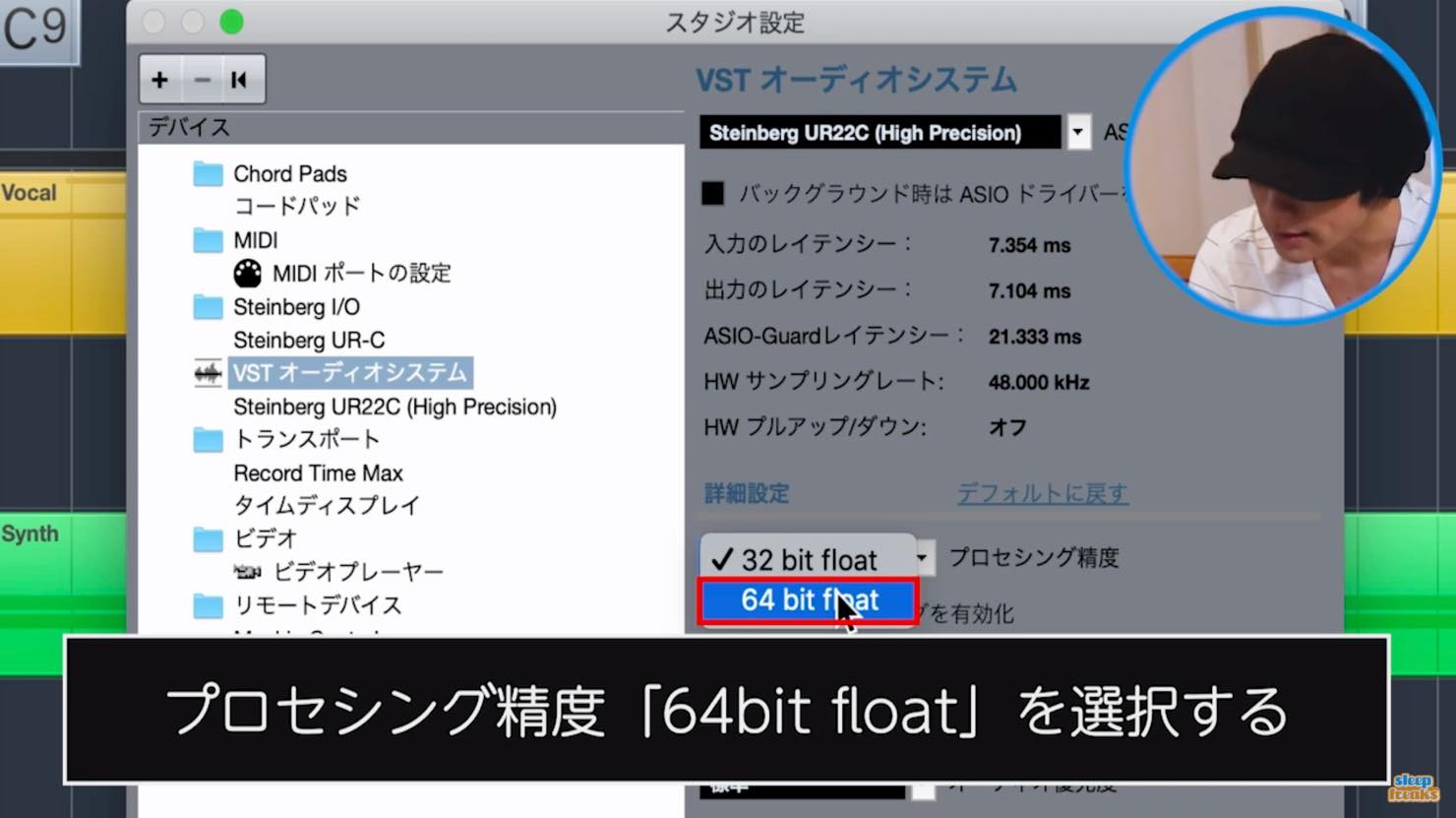
Also set the processing precision—the audio engine—to 64-bit float.
We explain 32-bit integer audio and the 64-bit float engine in more detail in the following article.
The Windows driver works slightly differently: you can select “Low Latency” in its control panel.
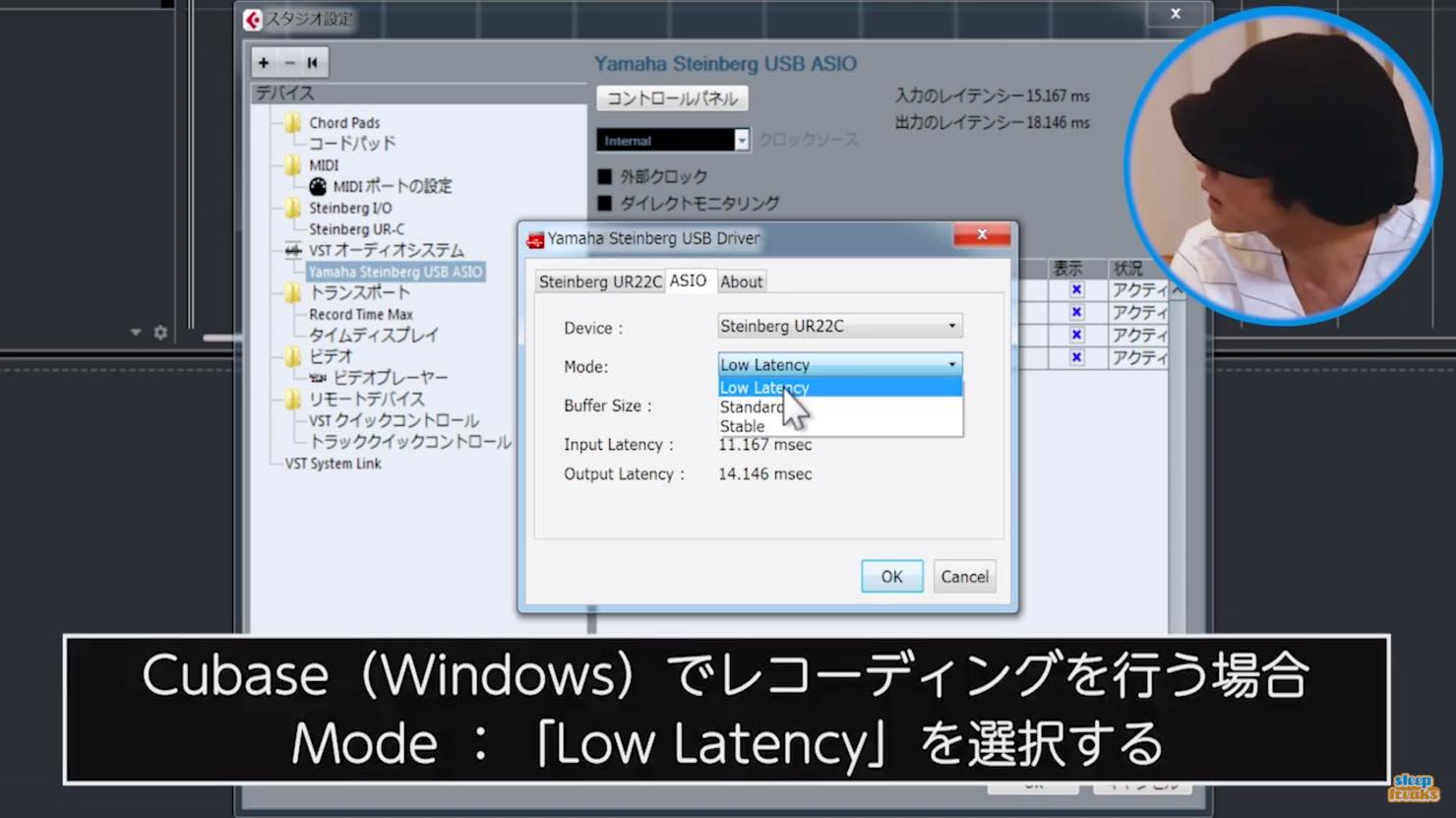
We were told that adjusting this setting in addition to the buffer size lets you reduce latency further, though it also increases CPU load.
As for the often-discussed effect of USB 3.0 on latency, we were told that USB 2.0 already provides sufficient transfer speed, so USB 3.0 itself does not reduce latency.
However, the UR-C series' new SSP3 chip and driver allow lower latency settings than the previous UR series.
Using DSP-based direct monitoring also lets you record without having to worry about monitoring latency.
dspMixFx and Remote Bridge
All UR-C models, including the UR22C, can use the onboard DSP effects through dspMixFx.
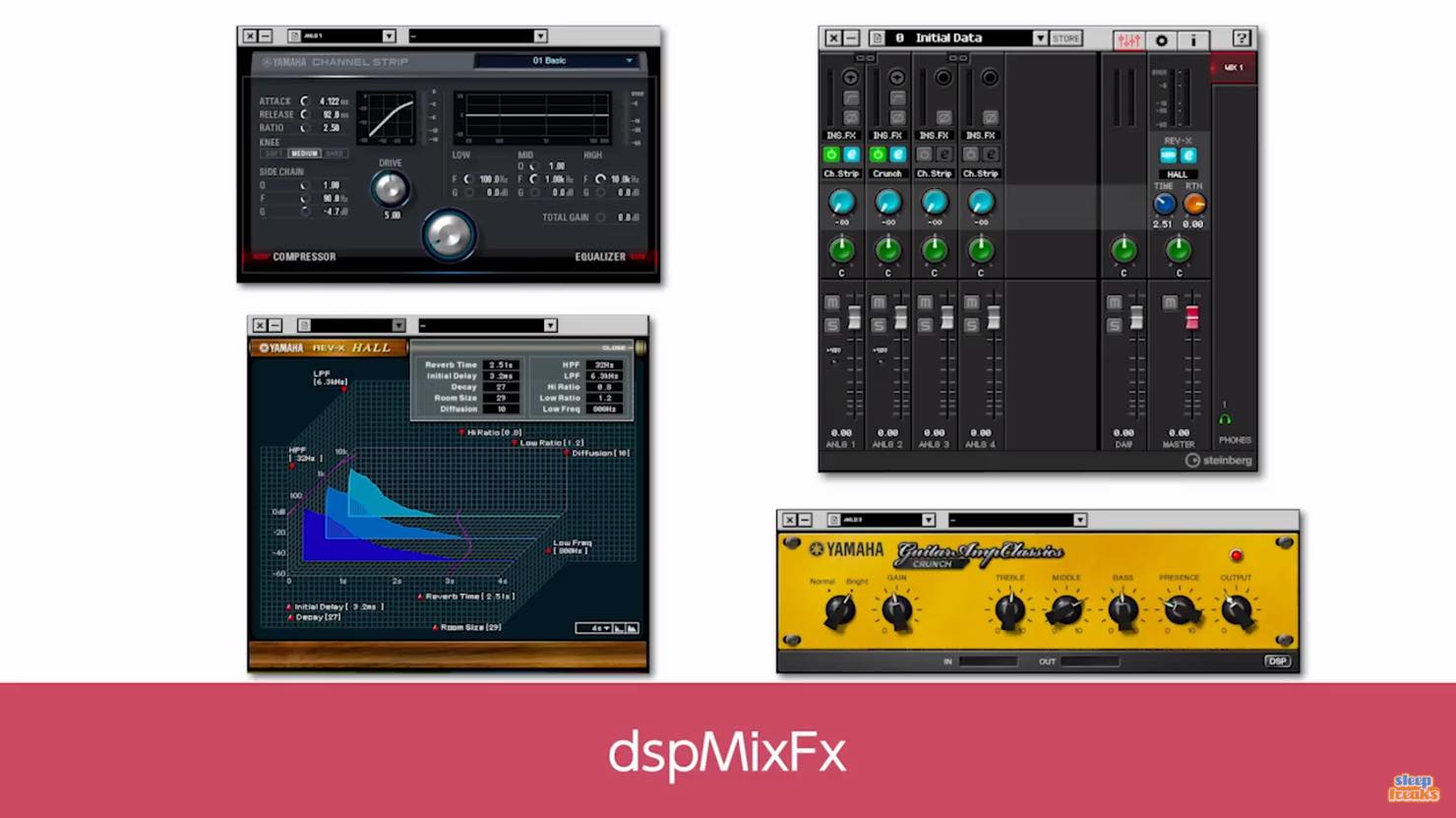
Another improvement is that dspMixFx can now be used while Cubase is running.
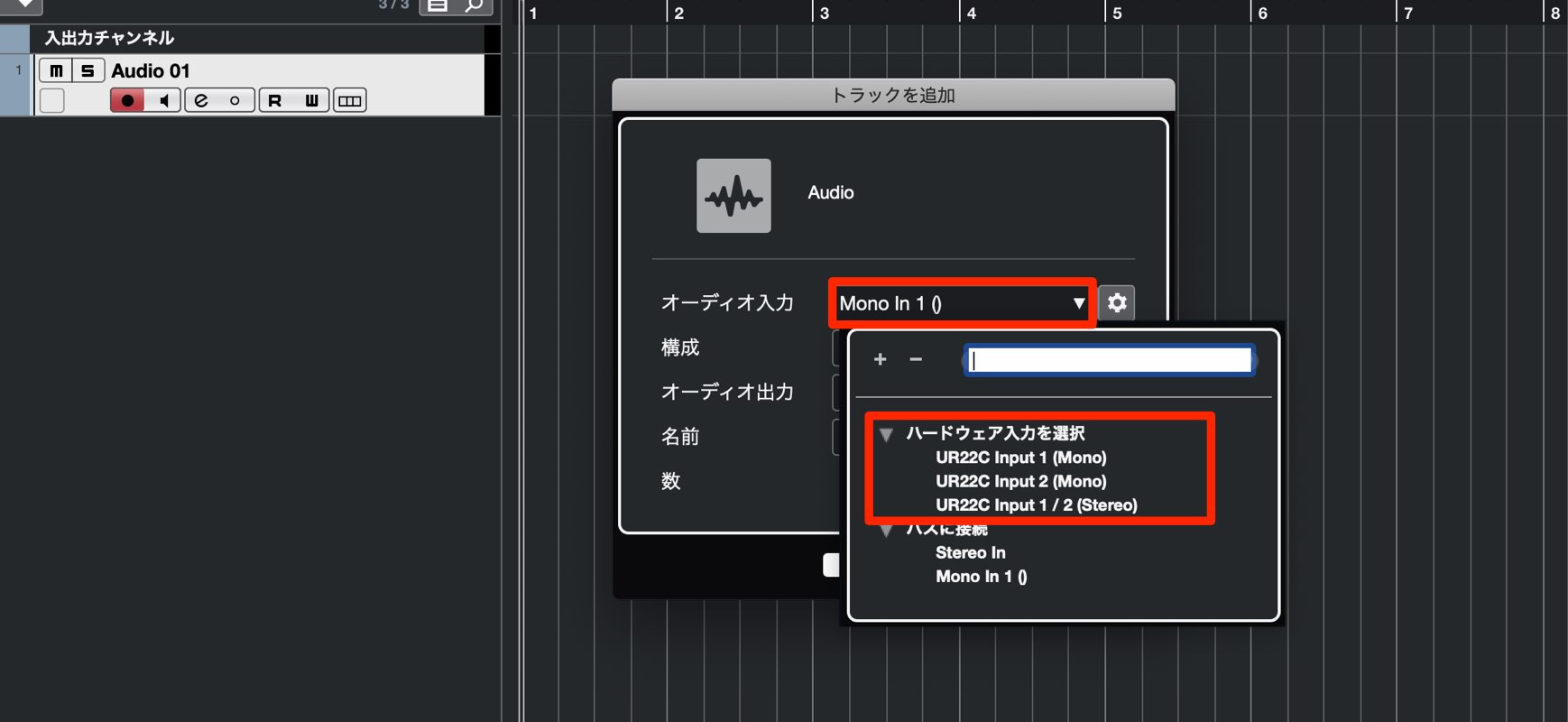
When creating an audio track, select a hardware input under “Audio Inputs.”
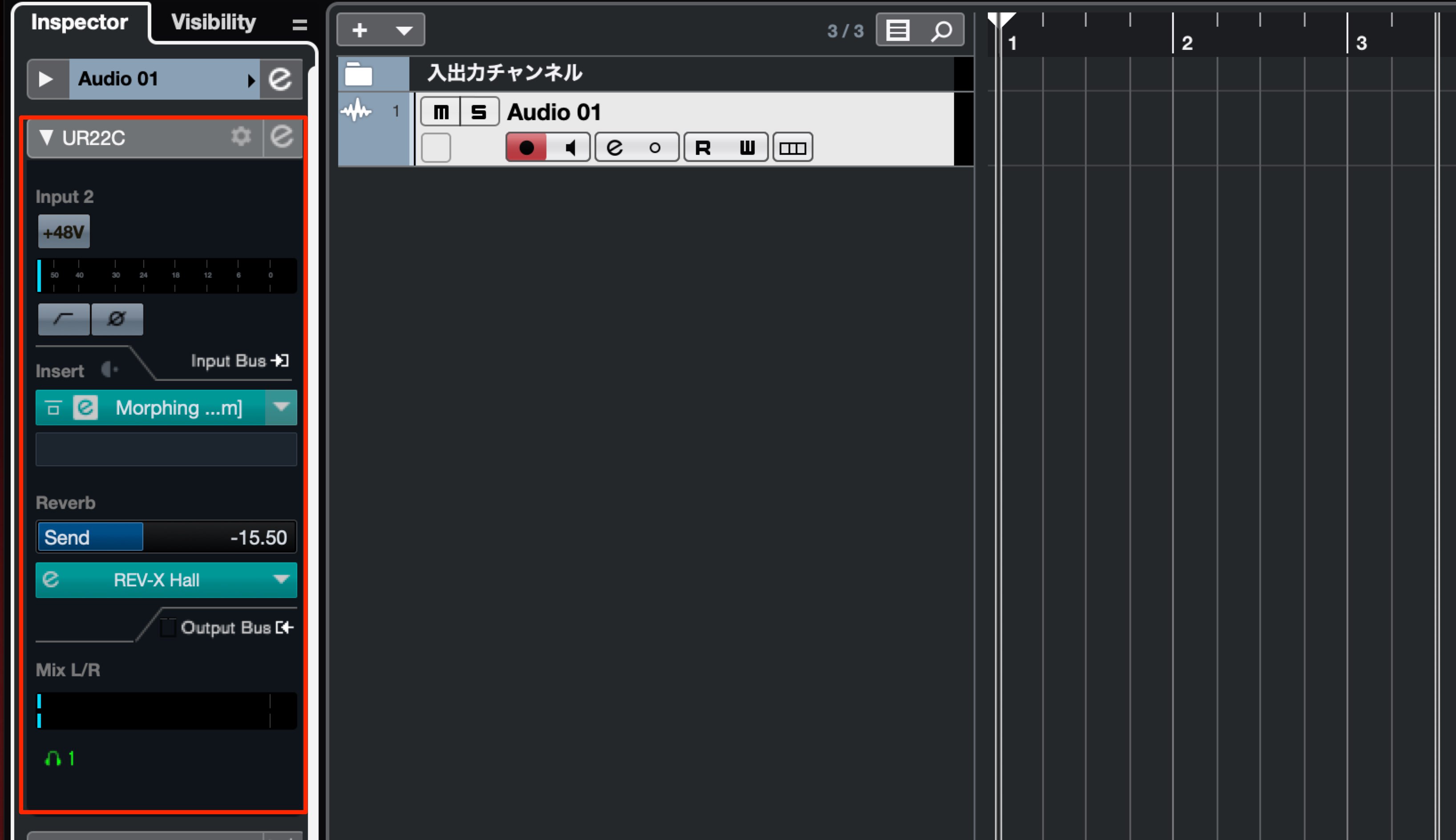
You can then control dspMixFx settings, including effects, from the audio track's Inspector.
We explain dspMixFx in more detail in the following article, which is worth reading alongside this one.
Remote Bridge lets you control dspMixFx remotely from an iOS device.
In the UR-C series, it is supported by the UR44C and UR816C.
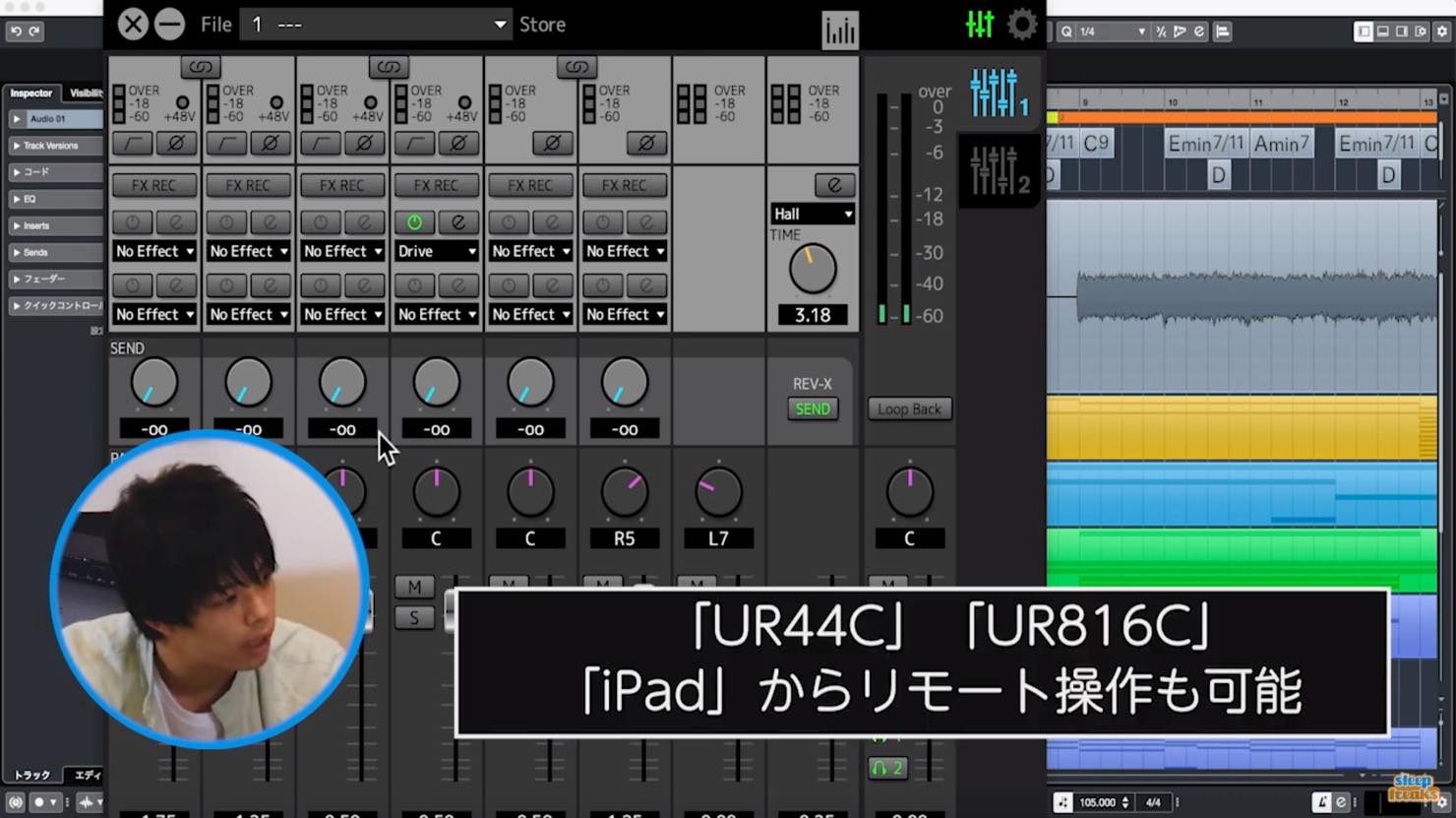
The iPad displays an interface almost identical to dspMixFx on the computer, allowing you to adjust faders, pan, sends, and parameters for each effect.
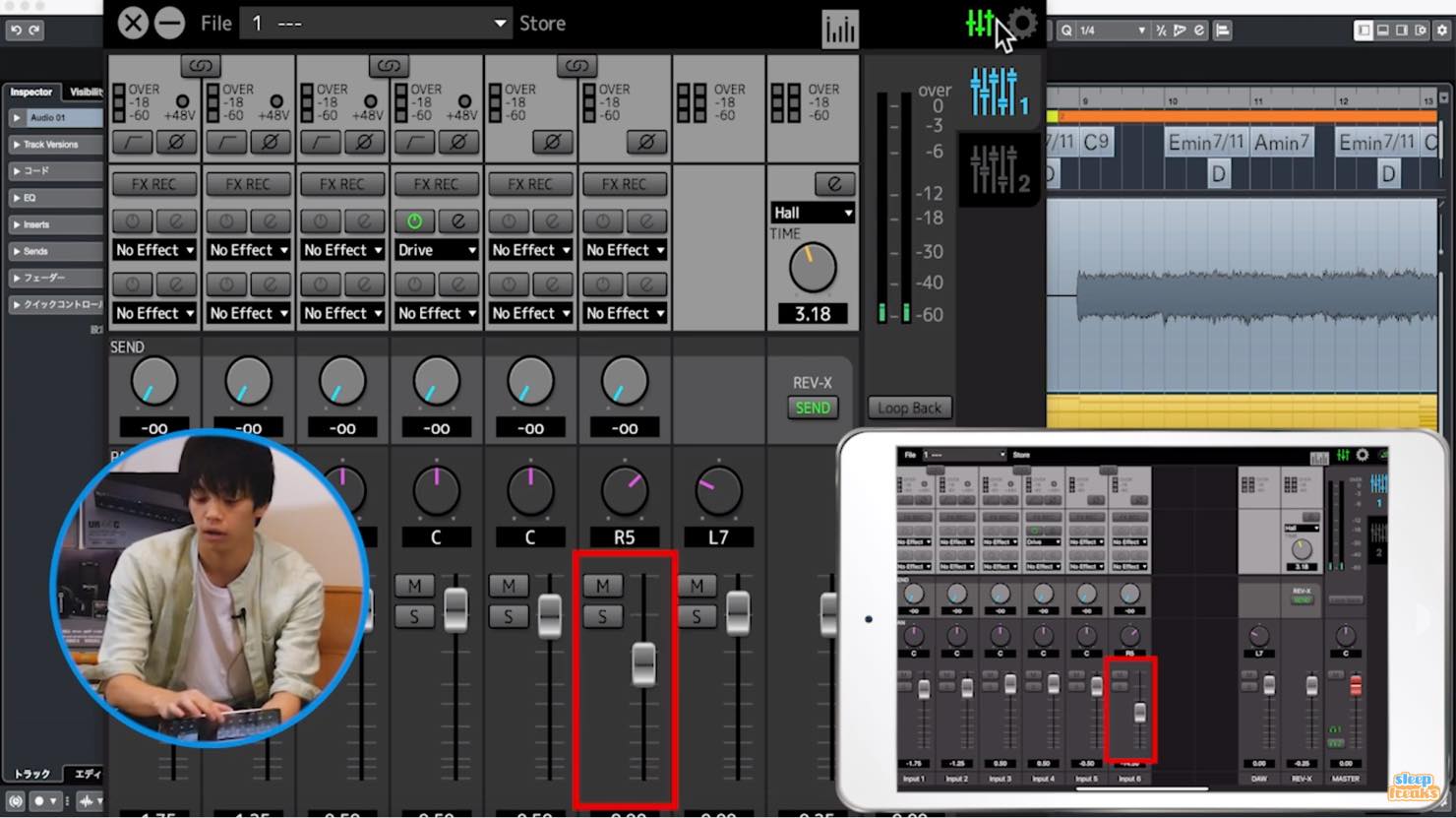
This saves you from moving back to the computer during a recording session and offers a more intuitive way to work than using a mouse.
Launch Giveaway (Closed)
At the time of the campaign, entrants followed Sleepfreaks' Twitter account (@SLEEPFREAKS_DTM).
One person selected at random from those who retweeted the designated tweet would receive a UR22C Recording Pack.
How to Enter at the Time
- 1Follow the SLEEP FREAKS Twitter account (@SLEEPFREAKS_DTM).
- 2Open the campaign tweet and retweet it.
- 3Your entry is complete.
Note: Only native retweets of the official tweet from @SLEEPFREAKS_DTM counted as entries.
Sharing this page did not count as an entry.
If your account was private, you needed to make it public to participate.
The Campaign Tweet
Celebrating the launch of Steinberg's UR-C series of audio interfaces!
An interview with Steinberg product representative Mr. Matsukuma🎥 YouTube ↓https://t.co/S5qfofSDlv
🎁 Launch giveaway 🎁
UR22C Recording Pack: one winnerHow to enter
① Follow @SLEEPFREAKS_DTM on Twitter.
② Retweet this tweet.
Deadline: October 7, 11:59 p.m.
Winner announcement: October 10 pic.twitter.com/N1fzNILH9A— SLEEP FREAKS (@SLEEPFREAKS_DTM) September 30, 2019
Entry Deadline
Entries are now closed.
Thank you very much to everyone who entered.
Winner Announcement
Scheduled for October 10, 2019.
The winner was to be notified by Twitter DM from @SLEEPFREAKS_DTM.
Campaign Terms at the Time
- Participation was limited to one entry per person.
- Entries using multiple accounts belonging to the same person would invalidate the right to receive the prize.
- Private Twitter accounts were ineligible; entrants needed to make their accounts public.
- The winner would be notified by Twitter DM. If no reply was received within seven days, the right to the prize would be forfeited and another draw held.
- The prize was valid only for the winner. It could not be transferred or exchanged for cash.
Frequently Asked Questions
Q1. What are the main differences between the UR-C series and the previous UR series?
The main improvements are USB Type-C connectivity, 32-bit integer recording, lower latency through the new SSP3 chip and driver, and DSP effects on every model. The range of models supporting bus power has also expanded.
Q2. Which model would you recommend for a beginner in music production?
We recommend the UR22C Recording Pack. It bundles a condenser microphone and headphones, and includes Cubase AI, so you can start making music as soon as you have a computer.
Q3. How do I set it up for 32-bit integer recording?
On Mac, select the “High Precision” driver; on Windows, select “Low Latency.” Set processing precision to 64-bit float for higher-quality recording.
Q4. Can the UR-C series run on bus power?
The UR22C and UR44C support bus power. The UR816C does not, but it can be used with its AC adapter.
Q5. What is dspMixFx?
It provides access to the UR-C series' onboard DSP effects, allowing you to record with effects while using direct monitoring without worrying about monitoring latency. The UR44C and UR816C can also be controlled remotely via an iPad.
NEW ARTICLES
Latest English Articles













































































































































































































































