
If the timeline in Logic X displays seconds, you can switch it to bars by selecting “Use Musical Grid” in Recording Settings. This article explains how to switch between bars and time, show both with the secondary ruler, and change the counter display. Understanding these settings can make your music production workflow more efficient.
Choosing the Timeline Units in Logic

The ruler and timeline are essential to your workflow.
However, you may find this important display showing seconds instead.
The Solution
Selected Questions and Answers from the YouTube Video

As of 2024, I can’t get the secondary ruler to appear. Has the option been removed? I want to see both time and bars, but I can’t find a way to do it.

The secondary ruler can still be displayed as of 2024. Logic Pro’s features may be limited. Open Logic Pro > Settings > Advanced in the top menu and check whether “Enable Complete Features” is turned on.
In the Recording tab, I see no options other than Count-in, and I haven’t found a solution online. Do you know what to do? I would also like to display the timeline ruler in time…
Try enabling all advanced features in Logic’s settings. https://app.box.com/s/teeagqo9mf1d6egj09kbx1bjb9wstqy2
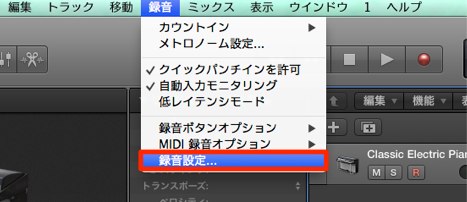
From the top menu, choose Record > Recording Settings.
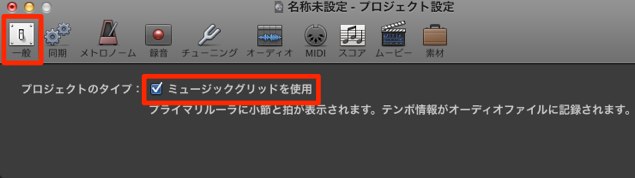
In the General tab, select “Use Musical Grid.”
- Checked: bars
- Unchecked: time
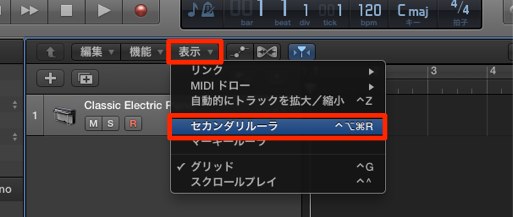
Choose Secondary Ruler from the View menu.
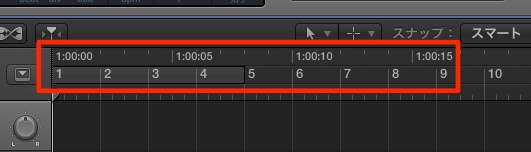
This lets you show both time and bars on the ruler at once.
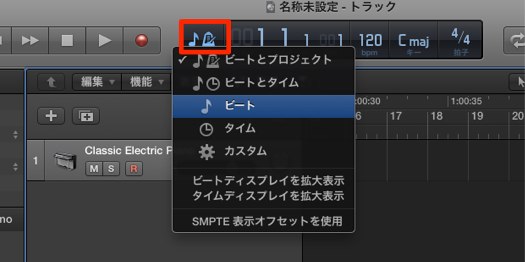
You can change the counter display in this area.
- Beats: bars
- Time: time
Frequently Asked Questions
Q1. What should I do if Logic X’s ruler shows seconds?
Choose Record > Recording Settings from the top menu, then select “Use Musical Grid” in the General tab. When checked, the ruler displays bars; when unchecked, it displays time.
Q2. Can Logic X display bars and time at the same time?
Yes. Choose Secondary Ruler from the View menu to display both bars and time on the ruler.
Q3. How do I change the Logic X counter from time to bars?
Select Beats in the counter area to show bars, or Time to show time. You can switch using the controls near the counter.
NEW ARTICLES
Latest English Articles








































































































































































































































































































































































































































































































































































