
This music production tutorial explores how to recreate the intro synth sound from Perfume's ‘Chocolate Disco’. It covers practical sound-design techniques step by step, from oscillator waveform selection and ADSR settings to filtering and effects. Follow along to recreate this distinctive sound in your own setup while learning synthesis techniques you can apply elsewhere.
The Intro Sound in ‘Chocolate Disco’
For our Valentine's Day special, we'll explore the main synth sound in
Perfume's ‘Chocolate Disco’.

We originally published one recipe a day over four consecutive days.
Reference Track
The first installment focuses on the intro synth sound.
This essential sound helps define the song's character
and is used through much of the track.
The key points are oscillator waveform selection and the amp's volume control.
How to Create the Sound
Applying the Filter
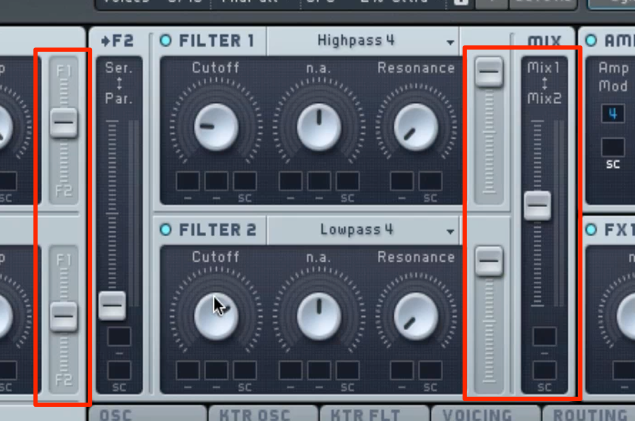
Use the filter to shape the sound.
- Highpass: Cut low frequencies to clean up the sound.
- Lowpass: Cut high frequencies to soften the sound.
Use the filter level and balance controls outlined in red to fine-tune the tone.
Applying Effects

Use Hardclipper to add distortion to the sound.
It can help the sound blend into the mix or make it thicker.
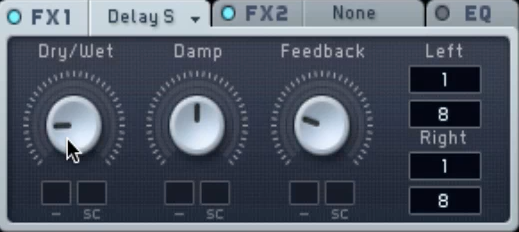
Add depth and width to the sound.
Use ‘Delay Sync’ to create repeats in time with the song's tempo.
The sound is now complete.
Frequently Asked Questions
Q1. What waveforms are used for the ‘Chocolate Disco’ intro synth?
Start with a saw wave, raise OSC 2 by one octave, and mix in a little square wave. This combination produces a powerful yet polished tone.
Q2. Which ADSR parameters are most important for this sound?
Attack, decay, and release are especially important. Set attack to its fastest setting and sustain to zero, use decay to adjust the note's length, and adjust release for a natural fade after the note ends.
Q3. What should beginners pay attention to when creating this sound?
Shape the frequency range with high-pass and low-pass filters, then apply Hardclipper and delay. Adjusting each element step by step is key to refining the sound.
Q4. Is a particular DAW or plug-in needed for this tutorial?
The article recommends Native Instruments' KOMPLETE and provides a sound preset to download.
NEW ARTICLES
Latest English Articles





























































































































































































































































































































































































































































































































































































