

An important role of mastering an album is to make its songs sound cohesive. In this article, engineer and producer Ryuichi Kojima demonstrates how to match a companion track to a reference song using tape simulation, EQ, compression, and multiband compression. The step-by-step parameter adjustments illustrate mastering techniques for matching levels, bringing the vocal forward, and adding weight to the low end.
Creating a Consistent Sound Across Songs Through Mastering
Hello, I’m engineer and producer Ryuichi Kojima.
In the previous installment, we mastered the main song, “BEACH SS SUNSET.”
This time, we will master the companion track, “Kind Of,” to match the sound of the mastered version of “BEACH SS SUNSET.”
Here is “Kind Of.”
Kind Of — Original
Why do we need to make the songs sound consistent?
Songs can differ not only in their instrumentation, track characteristics, and loudness, but also in genre and vocals.
Unless we bring their sonic character together, the album can feel disjointed.
For a standalone song, you can pursue whatever sound you prefer. An album containing several songs calls for a different approach.
We need to process the songs so that their individual worlds fit together within the album’s overall concept.
Let’s begin mastering.
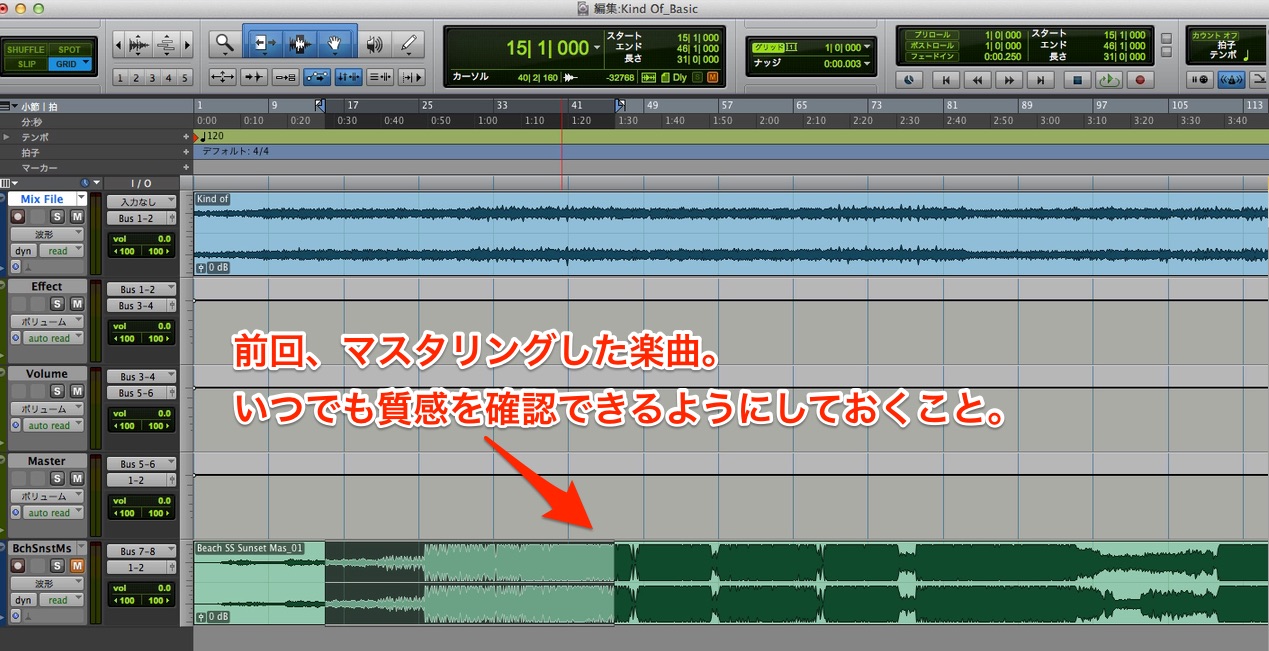
When mastering an album, place the already-mastered songs in the project so that you can check their sound at any time and assess the album’s overall consistency.
Adding Warmth with a Tape Simulator
As in the previous mastering session, we will start by adding warmth with a tape simulator.
Once again, we are using Slate Digital’s Virtual Tape Machines.
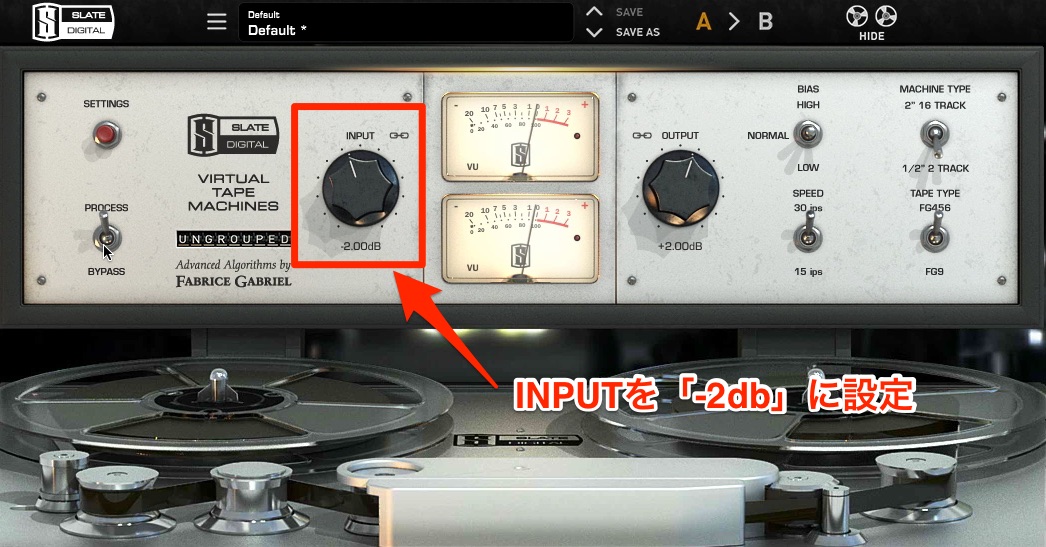
Adjust INPUT so that the VU meter reads around 0 VU.
Set INPUT to −2 dB.
Let’s listen to the result.
- After Processing
After Tape Simulation
You should now hear more of that analog character.
Adjusting the Level with a VU Meter
Next, raise the level with HOFA 4U Meter, Fader & MS-Pan until the meter reaches the −7 mark in the setup used here.
This is the same step as in the previous installment.
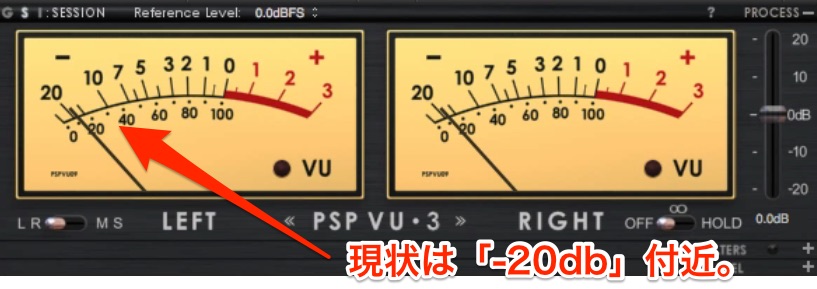
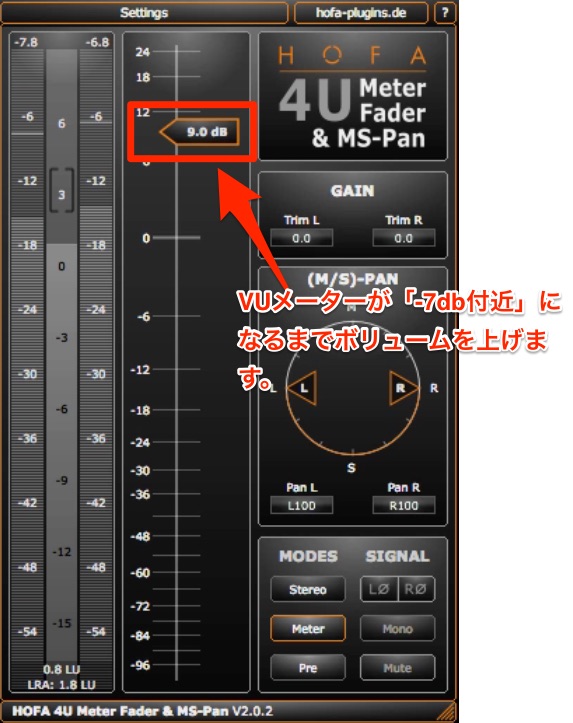
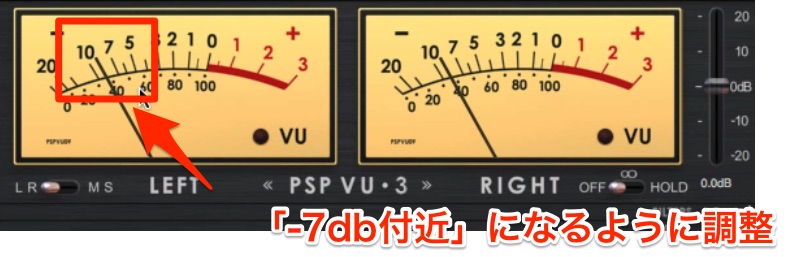
Adjust the level to stay around that −7 mark in this example.
Here is the sound after the level adjustment.
After Level Adjustment
Processing with EQ
I felt that this song lacked impact overall, so we will keep that in mind as we apply EQ.
Be sure to keep checking the previous song—our reference—as you work.
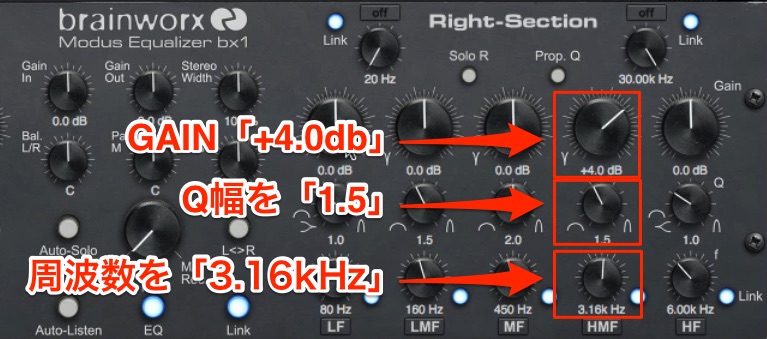
First, adjust the vocal’s frequency range.
For this female vocal, I targeted a higher frequency range than I would for a male vocal, setting frequency to 3.16 kHz, Q to 1.5, and GAIN to +4 dB.
This brings the vocal forward clearly.
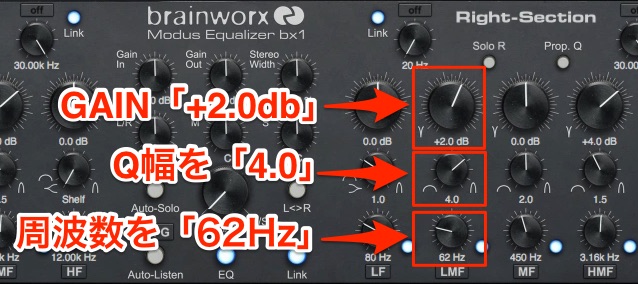
Next, process the low frequencies of the bass and kick.
I set frequency to 62 Hz, Q to 4.0, and GAIN to +2.0 dB.
This adds weight and impact to the song.
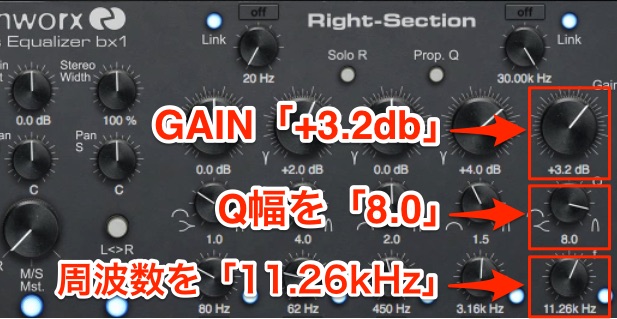
Finally, let’s process the high frequencies.
The screenshot shows frequency 11.26 kHz, Q 8.0, and GAIN +3.2 dB. Editorial note: the Japanese paragraph gives Q as 3.8; this English version follows the Q 8.0 setting shown in the screenshot.
Listen to the song after this EQ processing.
After EQ
When adjusting gain during mastering, even a difference of just 0.1 dB can affect the song’s impression.
Listen repeatedly and make each adjustment carefully.
Shaping the Sound with Compression
We will use Waves Renaissance Compressor to bring the sound closer to the reference song.
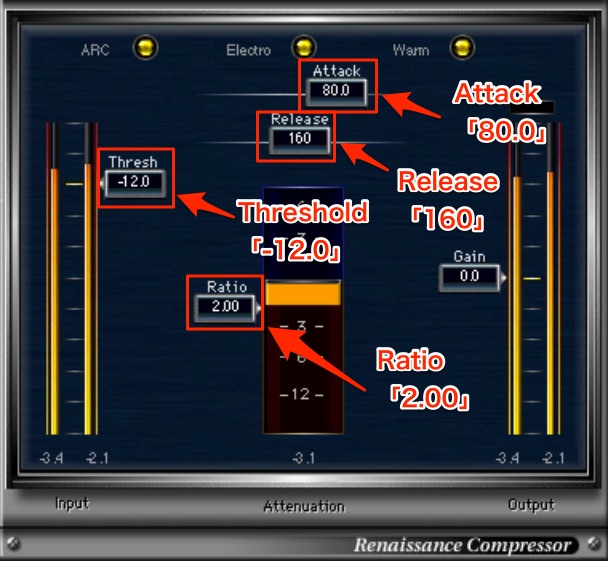
I chose Threshold −12.0 dB, Ratio 2.00:1, Attack 80.0 ms, and Release 160 ms with ARC enabled.
An important point when applying compression is to keep the perceived level consistent with the unprocessed signal.
Here, we are using compression to control peaks, so set it to avoid a drastic change in overall level.
After Compression
Fine-Tuning the EQ After Compression
Let’s use EQ to make finer adjustments to the sound shaped by the compressor.
The plug-in we will use here is PSP MasterQ2.
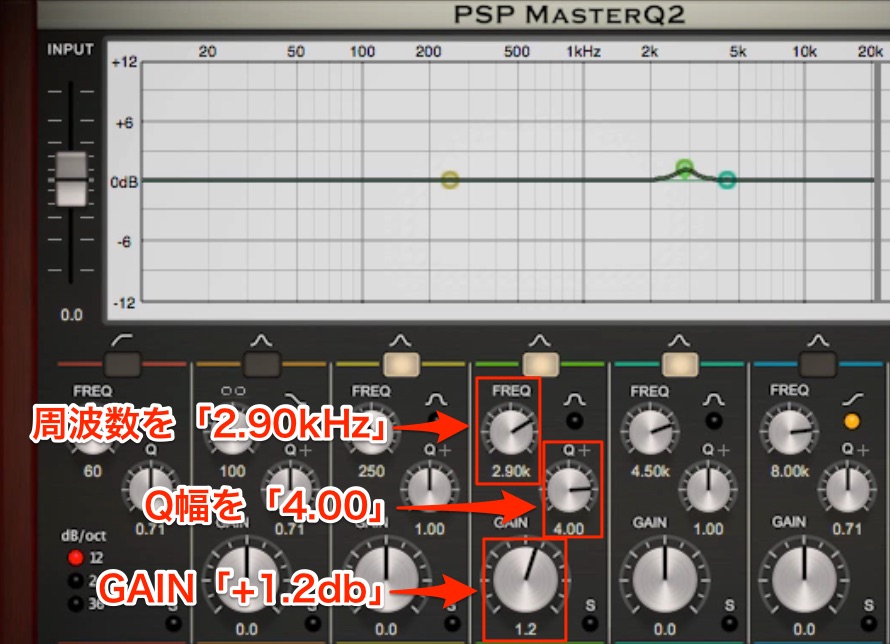
First, improve the vocal’s presence a little more.
I set frequency to 2.90 kHz, Q to 4.00, and GAIN to +1.2 dB.
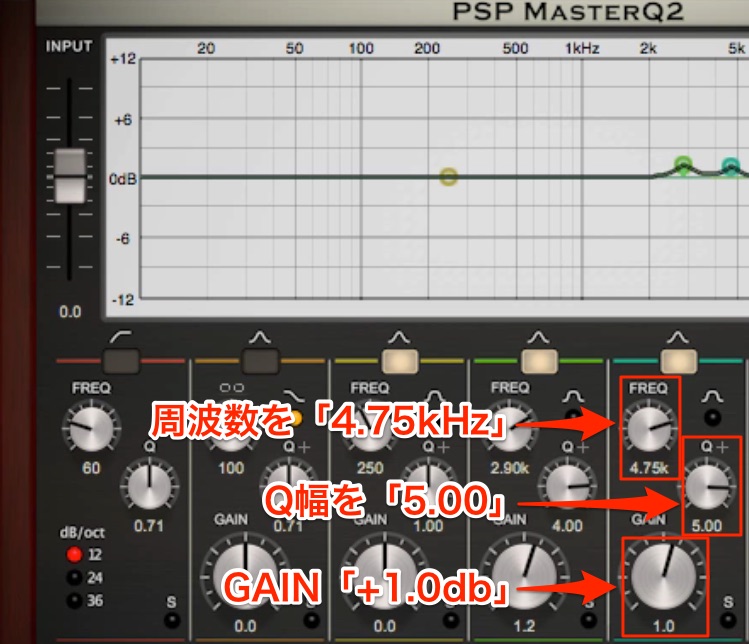
We will also raise the vocal’s higher frequencies.
I set frequency to 4.75 kHz, Q to 5.00, and GAIN to +1.0 dB.
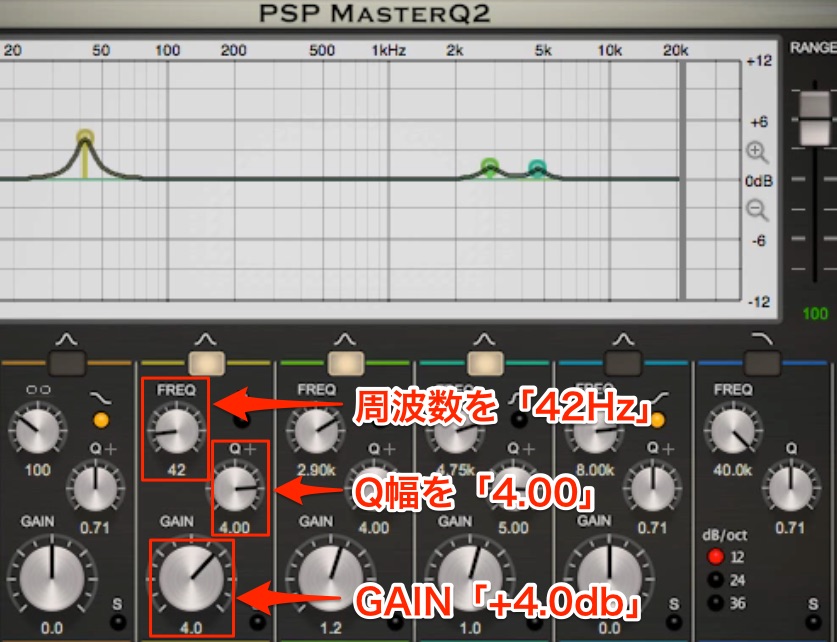
Finally, adjust the low end.
The low end is more restrained than in the reference, so we will address that here.
The screenshot shows a substantial low-end boost: frequency 42 Hz, Q 4.00, and GAIN +4.0 dB. Editorial note: the Japanese paragraph repeats the preceding high-band values (4.75 kHz, Q 5.00, +1.0 dB); the settings given here follow the low-band screenshot.
Can you hear how much more punch the song has now?
After Post-Compression EQ
A Subtle Touch of Multiband Compression
As in the previous song, we will use Waves Linear Phase Multiband as a subtle finishing touch to emphasize the low-end attack.
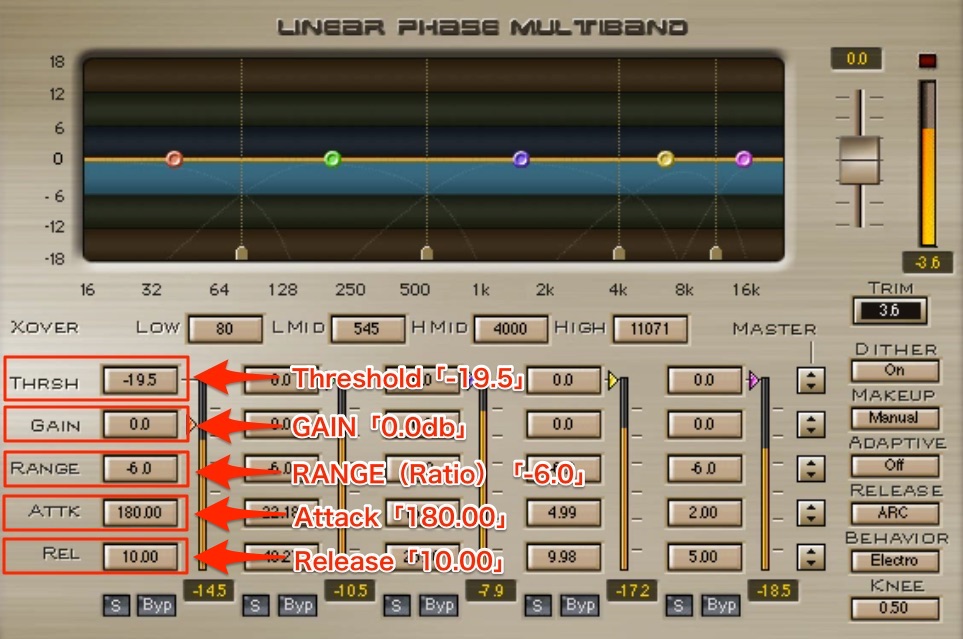
Set it to affect only the low frequencies.
I chose Threshold −19.5 dB, GAIN 0.0 dB, RANGE −6.00 dB, Attack 180.00 ms, and Release 10.00 ms. RANGE is the plug-in’s dynamic gain range control, rather than a conventional ratio setting.
Here is the result of that finishing touch.
After Multiband Compression
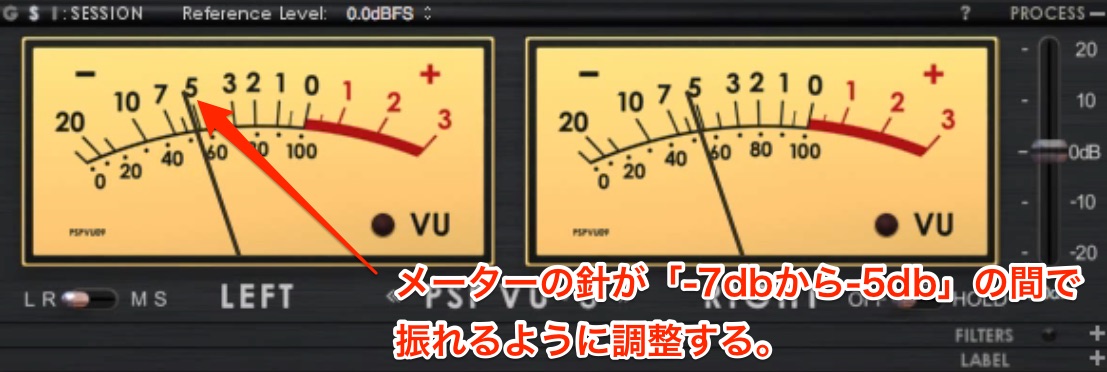
Finally, adjust the level so that the meter reads between the −7 and −5 marks in this setup. That completes the processing.
Let’s compare the sound before and after mastering.
- Before Mastering
Before Mastering
- After Mastering
After Mastering
Also compare it with the song we mastered last time to check whether their sonic character is consistent.
Reference: BEACH SS SUNSET
We have now finished mastering both songs.
I think they sound great!
In the next and final installment, we will use Steinberg’s WaveLab to export a DDP image.
We are just one step away from completing the mastering process for CD production. Stay tuned!
Frequently Asked Questions
Q1. Why should songs sound consistent when mastering an album?
An album can lose its overall cohesion when its songs differ in instrumentation, genre, or vocals. Bringing their sonic character together helps the album work as a single piece with a consistent concept.
Q2. What does a tape simulator do during mastering?
A tape simulator adds analog-style warmth, softening the perceived coldness of a digital recording in the approach described here. This can help create a polished sound that is pleasant to listen to.
Q3. What should I pay particular attention to when using EQ in mastering?
Even a 0.1 dB adjustment can affect the impression of a song, so work carefully. Compare repeatedly with the reference track as you fine-tune the parameters.
Q4. What is important when using a compressor for mastering?
Keep the perceived level consistent with the original. In this example, the compressor is used to control peaks, so avoid settings that drastically change the overall level.
Q5. What is the multiband compressor used for here?
It acts as a subtle finishing touch that emphasizes the low-end attack. By affecting only the low frequencies, it can add punch and bring the song closer to the reference.
NEW ARTICLES
Latest English Articles


















































































































































































































































































































