
To create a Beatles-style piano sound, the key is to set three important effects appropriately: EQ, compression and delay. Cut the lows and adjust the highs with EQ, control dynamics and increase perceived loudness with compression, and add space with a short delay to create a warm, vintage piano tone. Even a stock instrument bundled with your DAW can achieve a polished result with these effects.
Creating a Beatles-Style Piano Sound with a Stock Instrument
Here, we’ll use EQ, compression and delay
to create a Beatles-style piano sound.


Equalizer
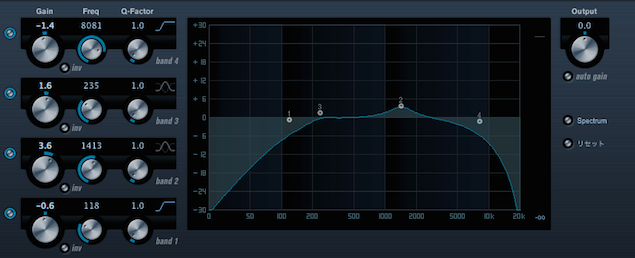
- 1. Cut the low frequencies aggressively.
- 2. Cut some of the overly pristine high frequencies.
- 3. Boost the midrange slightly to taste.
Compressor
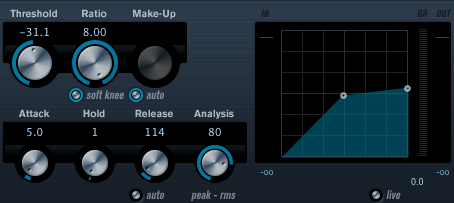
- 1. Lower the threshold substantially for stronger compression.
- 2. Set a relatively high ratio.
- 3. Preserve some of the initial attack.
- 4. Use a relatively short release to emphasize the sustain.
Delay
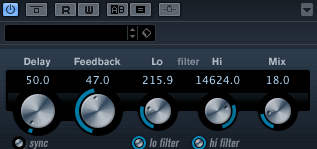
- 1. Set a short delay time.
- 2. Apply high-cut and low-cut filters.
Frequently Asked Questions
Q1. Which effect should I set first when creating a Beatles-style piano sound?
We recommend starting with EQ. Cutting the lows aggressively and adjusting overly pristine highs creates a vintage-sounding foundation. Then add compression and delay.
Q2. What happens when I lower the compressor threshold for stronger compression?
Lowering the threshold compresses the piano’s volume changes more, producing a more forceful sound with greater overall perceived loudness. This brings it closer to a thick, Beatles-style piano tone.
Q3. Why apply high-cut and low-cut filters to the delay?
Cutting the frequency extremes helps keep the repeats from muddying the original sound. This allows the short delay to add a natural sense of space while preserving the piano’s clarity.
NEW ARTICLES
Latest English Articles
















































































































































































































































































































































































































































































































































































