
This music production tutorial explains how to create a bleeping electronic sound effect with a synthesizer. Applying multiple LFOs to pitch produces a distinctive, high-impact sound. By combining random LFOs with different settings and adjusting their rates with a macro control, you can create variations for transitions and structural turning points in a track. Producers of all levels can experiment to develop their sound design skills.
For transitions and structural turning points
This recipe creates a bleeping sound effect.
The sound itself has a strong impact,
so it can be used as an occasional accent, such as a transition between sections of a track.
Changing the oscillator (OSC) lets you create a wide range of variations,
so be sure to experiment.
How to create the sound
Apply an LFO to pitch
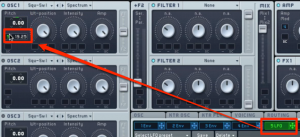
Apply an LFO to Pitch.
A wider pitch range will produce a stronger effect.
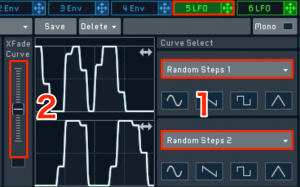
- 1. Change the LFO type to Random.
- 2. Adjust the balance between the LFOs.
Apply another LFO
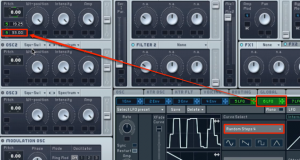
Apply another LFO to Pitch.
For this LFO, use a pitch modulation amount different from the one above.
Again, change the type to Random.
Change the LFO speed manually
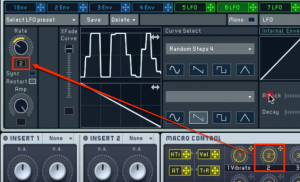
Apply Macro Control to Rate, which controls the LFO speed.
Adjust the speed range to taste, and the sound is complete.
Frequently Asked Questions
Q1. Why apply multiple LFOs when creating a bleeping sound effect?
Combining multiple LFOs with different settings creates more complex and varied changes in the sound. A single LFO can become monotonous, while multiple LFOs can produce a distinctive sound with a strong impact.
Q2. What is the difference between the LFO random setting and rate adjustment?
The random setting makes the pitch change pattern irregular, creating natural fluctuations. Rate adjustment controls the speed of those changes and can greatly alter the character of the sound.
Q3. Can this technique be used to create other sound effects?
Yes. The basic principles of pitch modulation can be applied to many effects, including sirens, Famicom-style sounds, and scratching sounds. Changing the parameters lets you create different sounds.
NEW ARTICLES
Latest English Articles











































































































































































































































































































































































































































































































































































































