When recording in real time in Cubase, the click settings can affect how comfortably you perform vocals, guitar or MIDI keyboard parts. In the metronome settings, you can adjust the pitch and volume of the first beat of the bar (Hi) and the other beats (Lo) separately. You can also use your own audio files as click sounds, such as a beep or cowbell, to create a rhythm guide that suits your preferences.
Make Recording More Comfortable
Real-time recording is a common part of music production,
whether you're recording vocals, guitar or a performance on a MIDI keyboard.
The click serves as a rhythm guide while you play.
As a rhythm guide,
its settings can change how easy it is to play and how you perform.
Try adjusting the click settings to make it easier to capture a good performance.
This related article provides more background.

Video Tutorial
Selected Questions and Answers from the YouTube Video

I'd like to play an MP3 backing track and hear the click from mixer output 1 and a signal with the click from output 2. How can I do that?

You can select the stereo outputs for the click in the section shown here: https://app.box.com/s/rzskdkb43nc8y9o5mpm8i02frzxbedny
Customizing the Click in Cubase
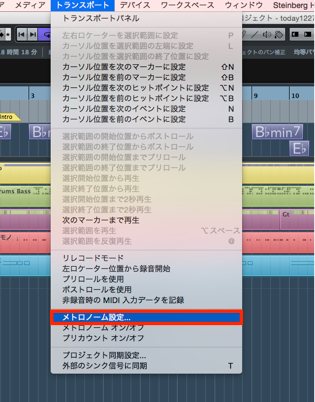
↑ From the top menu, choose Transport → Metronome Setup.
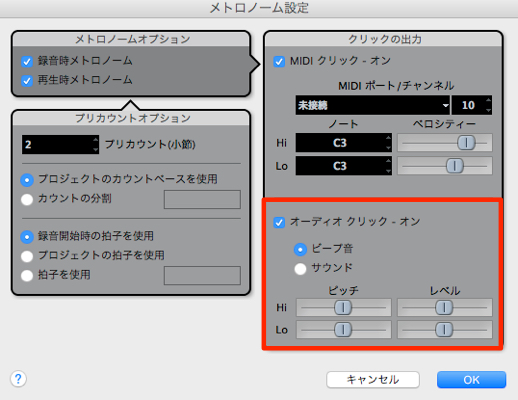
↑ Adjust the click in the area outlined in red in the window that opens.
Hi: the first beat of the bar
Lo: beats other than the first (beats 2, 3 and 4 in a four-beat bar)
Adjust the pitch and volume.
Making the Hi sound louder can make the downbeat easier to follow while playing.
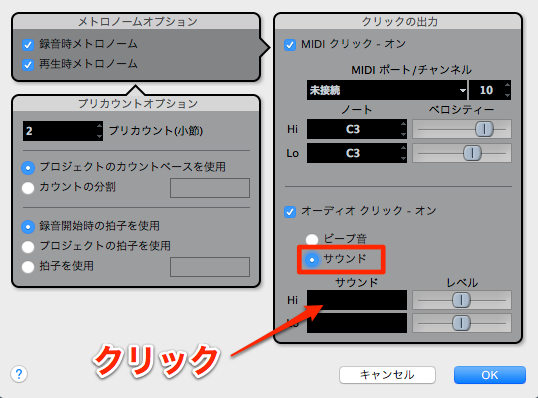
↑ Set the option to Sound
to use your own audio files for the click.
Click the black area and select the audio file you prepared.
You can use a beep, cowbell or another sound as the click.
Frequently Asked Questions
Q1. What is the difference between Hi and Lo in Cubase's click?
Hi marks the first beat of the bar; Lo marks the other beats, such as beats 2, 3 and 4 in a four-beat bar. Making Hi louder can make the downbeat easier to follow while playing.
Q2. Can I use my own audio files for the click?
Yes. In Metronome Setup, customize the sound setting to use audio files such as a beep or cowbell for the click.
Q3. Where do I find the click settings?
Choose Transport → Metronome Setup from the top menu to open the click customization window.
NEW ARTICLES
Latest English Articles