
Logic Pro’s EXS24 lets you switch the playing expression of a loaded instrument using articulations. Different playing techniques are built into each instrument, and combining keyboard octaves gives you access to more performance patterns. By using these features, you can bring programmed parts closer to the expression of live instruments and enhance the finished track.
Control playing techniques in EXS24

Logic’s included EXS24 has a feature that lets you
switch the playing expression of a loaded instrument.
Each instrument has its own distinctive playing techniques,
which you can incorporate into a song to create more realistic programmed parts.
Here we will focus on how to use this feature.
EXS24 video tutorial
Selected questions and answers from the YouTube video

Thank you for sharing these tutorials; I find them very helpful. 1. How can I add vibrato to EXS24 string instruments? 2. When I select a track, I believe I can draw automation for parameters such as Expression and Modulation, but adjusting them has no effect. What should I do?

1. How can I add vibrato to EXS24 string instruments? One option is to apply automation to pitch bend; another is to use an LFO to modulate pitch. 2. When I select a track, I believe I can draw automation for parameters such as Expression and Modulation, but adjusting them has no effect. What should I do? Try setting the track automation to Write mode and moving the desired parameter. The parameter should be recorded and appear in the automation display.
Combine playing techniques mapped across the keyboard
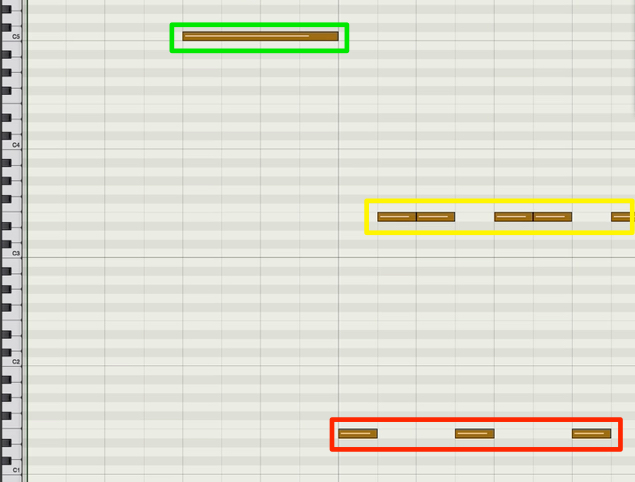
Different instruments in EXS24 have different articulations built in.
Combining keyboard octaves can greatly expand the expressive possibilities of your programmed parts.
Frequently asked questions
Q1. What is the articulation feature in EXS24?
It lets you switch between playing techniques for an instrument loaded into EXS24. Multiple instrument-specific techniques, such as strokes, vibrato, and staccato, are built in and can be selected and used by combining keyboard octaves.
Q2. Why do articulations make programmed parts sound more realistic?
Instrumentalists change their playing techniques to suit the expression of a song. Recreating those changes with articulations can add natural expression to performance data, bringing it closer to a live instrument.
Q3. Do the available articulations vary by instrument?
Yes. The available articulations depend on the instrument loaded into EXS24. Playing techniques suited to each instrument category, such as strings, brass, and woodwinds, are built in.
NEW ARTICLES
Latest English Articles































































































































































































































































































































































































































































































































