
UJAM IRON2 is a DAW plug-in that makes it easy to create high-quality heavy guitar backing parts, even if you cannot play guitar. With more than 300 presets, you can get started simply by choosing one, and its clean, intuitive interface is accessible to beginners. It offers several workflows: combining its extensive phrase patterns in Player mode, programming your own parts in Instrument mode, and converting phrases to MIDI for editing in your DAW. These options accommodate everyone from beginners to intermediate and advanced users. Even without guitar knowledge, you can shape the sound to your taste using the amp and effects controls.
The Popular Heavy Guitar Instrument IRON Reaches Version 2!
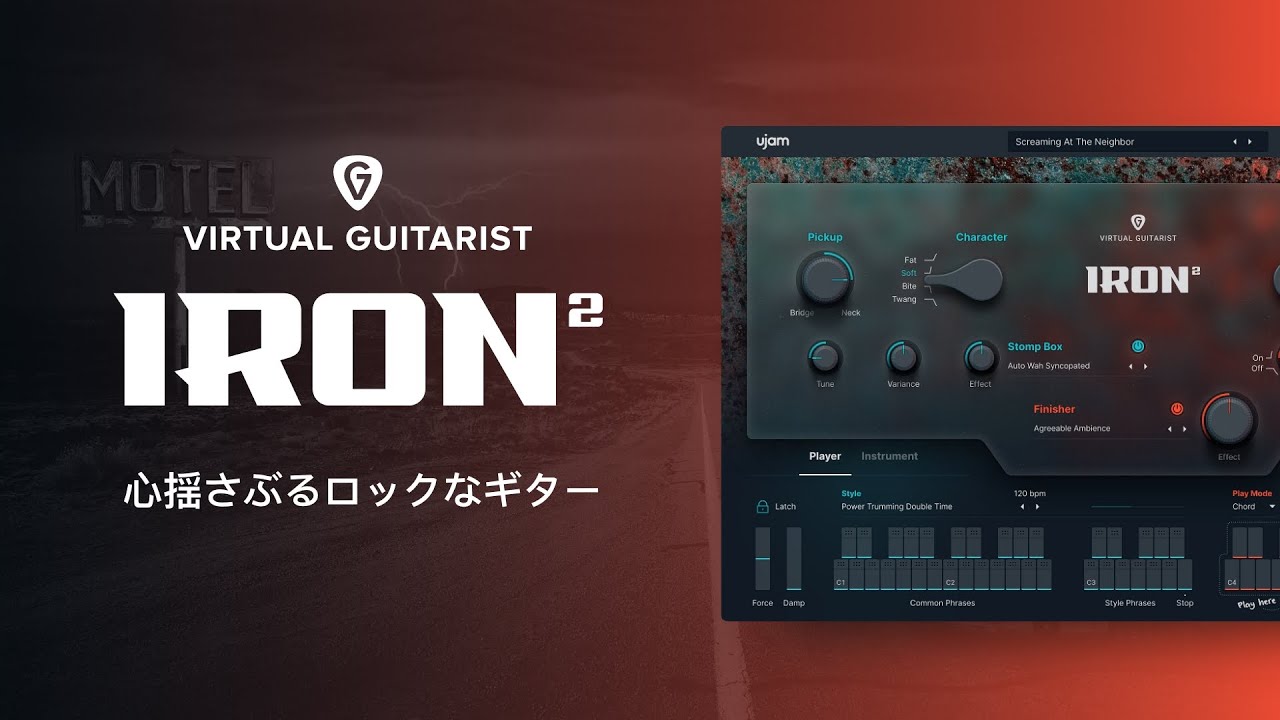
UJAM's IRON, which makes it easy to create heavy guitar backing parts, has received its long-awaited update.
Instrument mode for freely playing your own parts, and the ability to drag and drop phrase patterns into your DAW for editing are among the powerful new features.
Its excellent sound quality makes it a source of inspiration for guitarists as well as for those who do not play guitar.
UJAM IRON2 Video
Product URL: https://bit.ly/3Bi75BM
Interface Overview and Loading Presets
The interface is very simple and designed for intuitive operation.
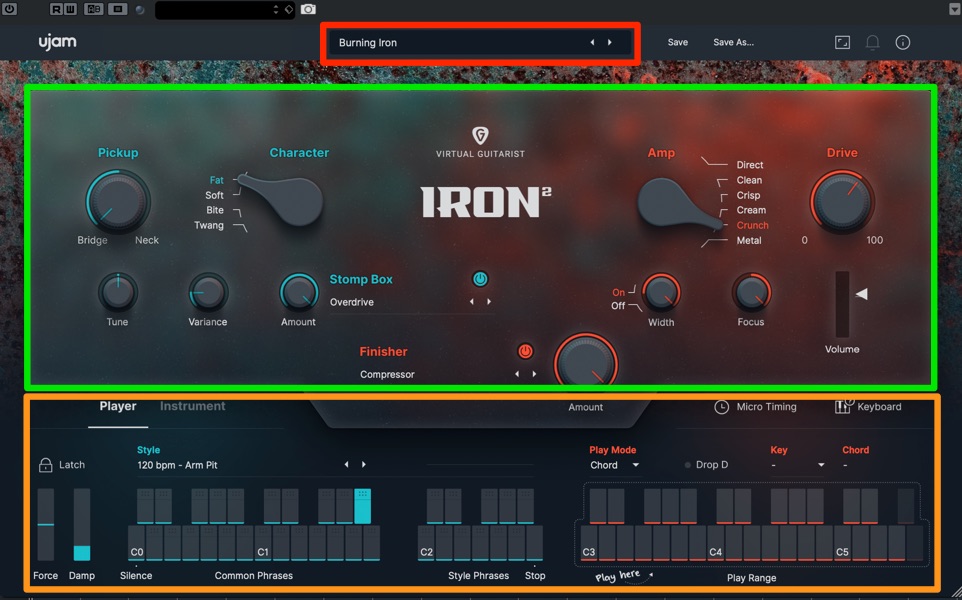
- Top: Switch presets that combine sounds and phrases
- Middle: Sound section
- Bottom: Phrase section
More than 300 presets provide plenty of variety simply by selecting them.
Start by choosing a preset sound you like, then make small adjustments to suit your song.
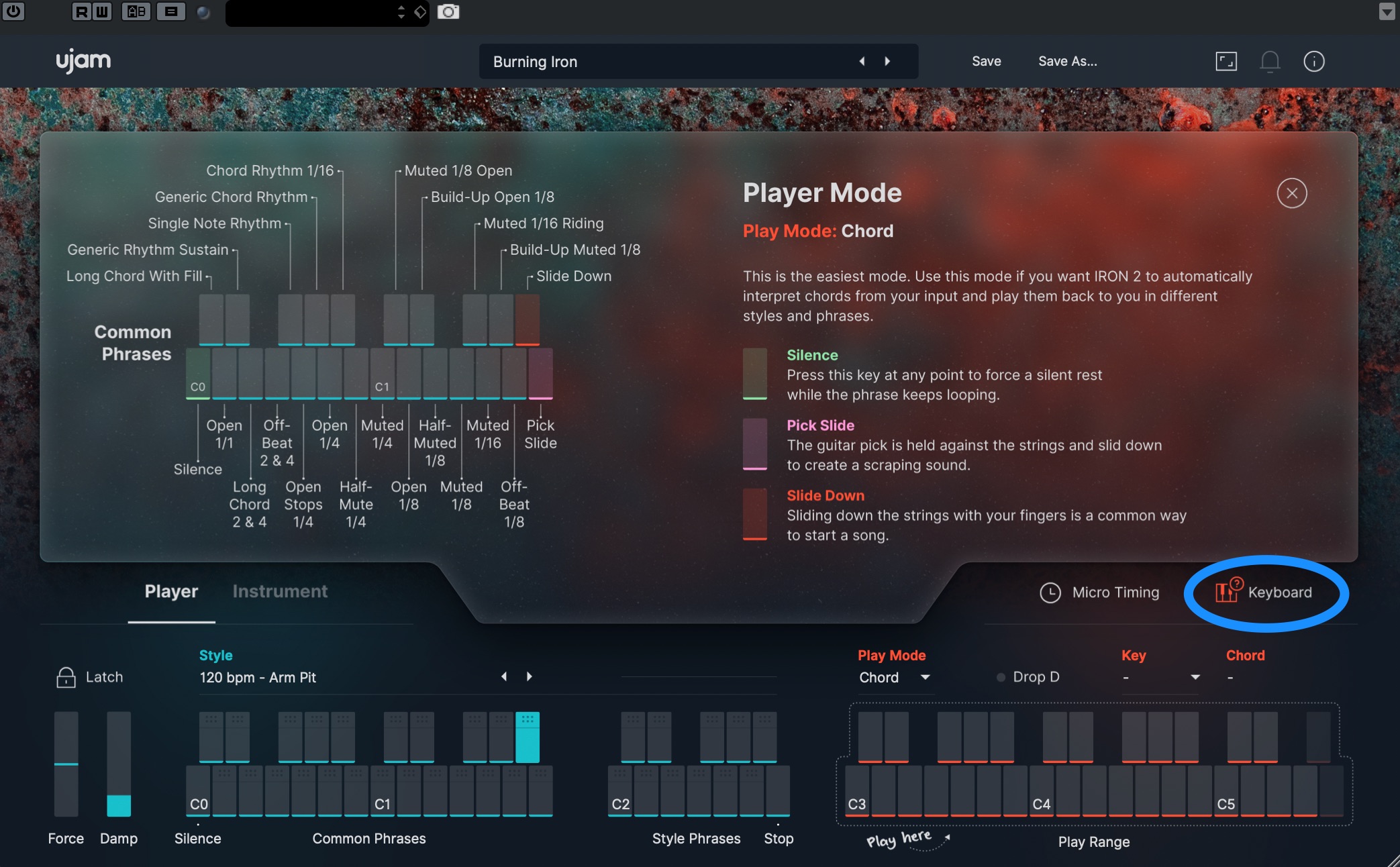
In the phrase section, you generally select chords or notes on the right and trigger phrases on the left.
Click Keyboard to switch to the detailed mapping view, where you can check the role of each key.
Editing the Sound
Sound editing is streamlined too, with what feels like just the essential controls.
A direct output also provides the flexibility to shape your tone with another amp simulator or similar processor.
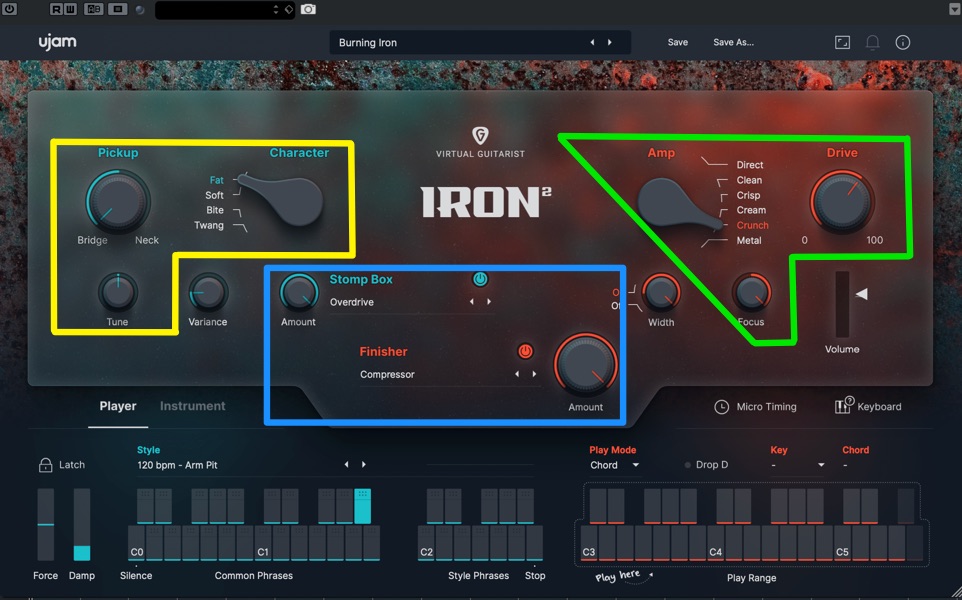
- Left: Guitar
- Right: Amp
- Center: Effects
The amp produces the most obvious tonal changes, so use it to establish the overall direction of your sound first.
Changes to the guitar itself are easier to hear with clean sounds than with high-gain sounds, so try a few different settings.
There are two effects sections: Stomp Box, offering effects commonly used by guitarists, and Finisher, the effects processor also available as a separate product.
You can select one effect from each section's extensive selection, then combine them to shape your tone.
Using Player Mode
Player mode lets you combine a wide range of built-in phrase patterns.
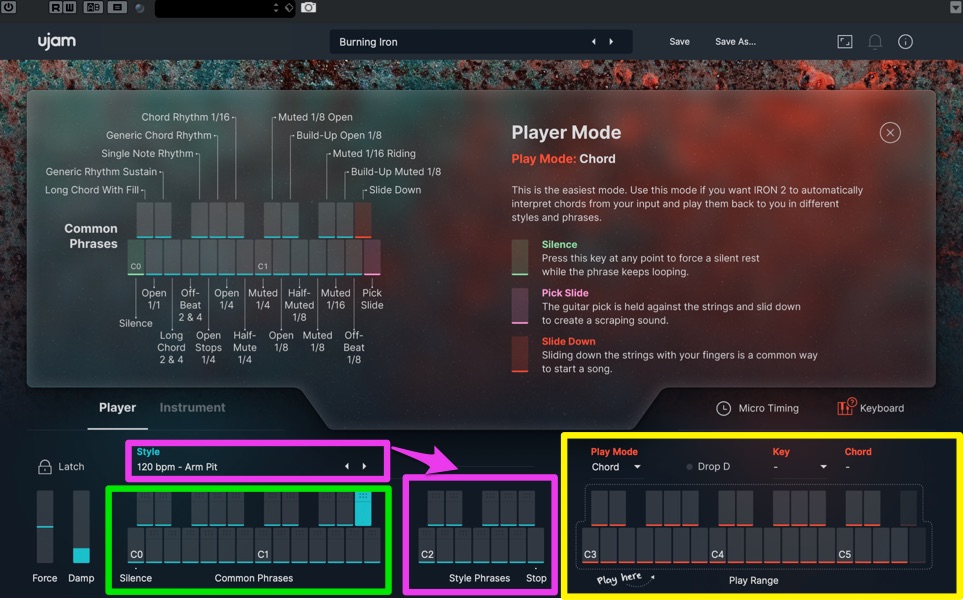
Specify the chord root in the Play Range on the right.
A single note produces a power chord, while multiple notes produce a chord. The software does not simply play those exact notes: it automatically adjusts them into a guitar-like voicing.
Next, select a phrase pattern on the left.
- Common Phrases: A set of conventional patterns, such as sustained whole notes and repeated eighth notes.
- Style Phrases: A set of more varied patterns. Switch Style presets to access different sets.
Choose a Style preset you like and combine it with Common Phrases to build your song.
Using Instrument Mode
Instrument mode lets you program parts directly instead of using phrase patterns.
It requires some practice and knowledge, but once you get comfortable with it, you can construct phrases with considerable freedom.
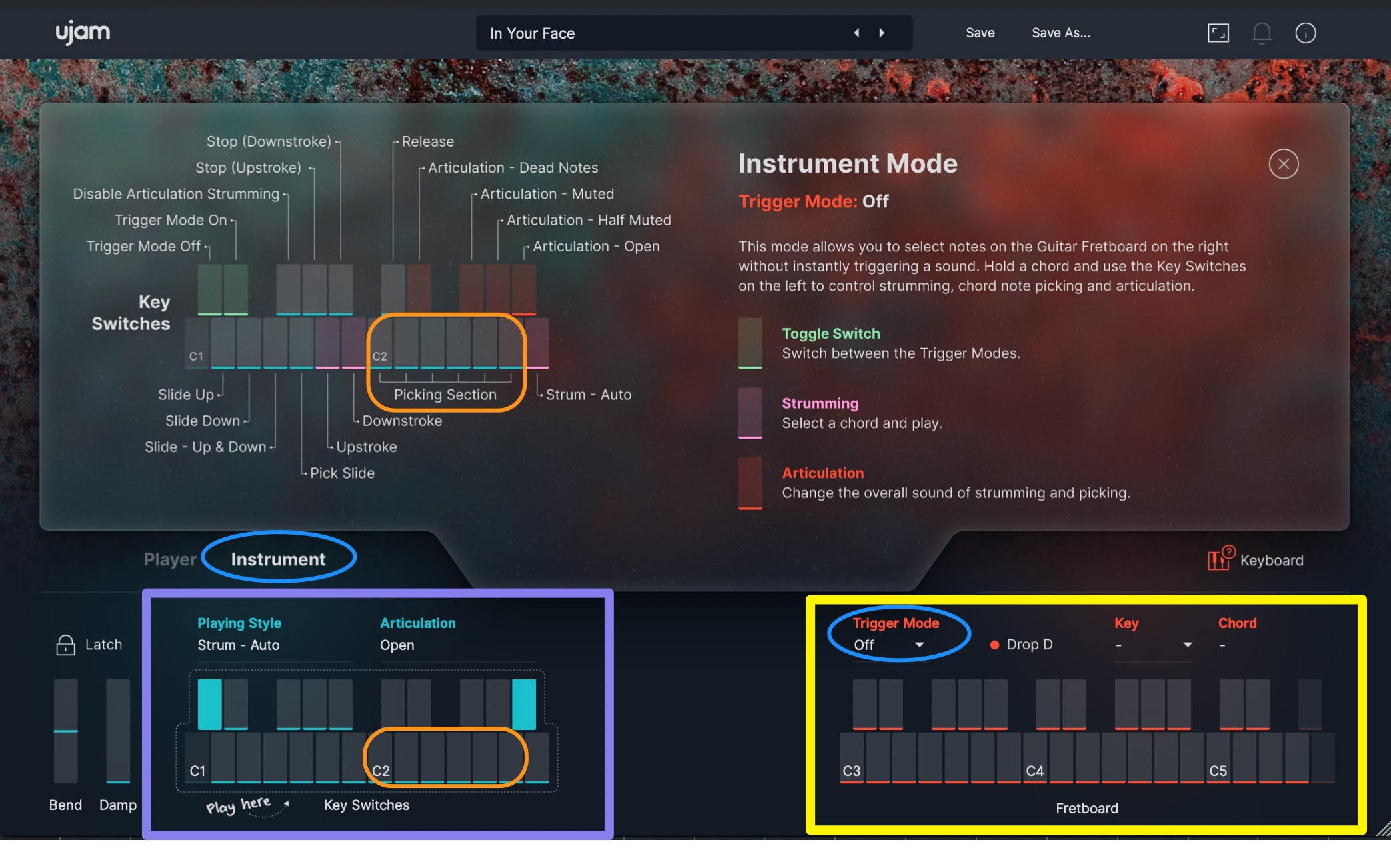
To play individual notes, switch to Instrument on the left and set Trigger Mode on the right to Off.
Specify the notes on the Fretboard on the right, then trigger them using notes in the Picking Section of the Key Switches on the left.
The notes held on the Fretboard are not necessarily the exact pitches that sound. The software assigns pitches based on the corresponding chord tones—for example, holding only C4 specifies a C power chord. In that case, C and G are assigned across the Picking Section, so select the note you want from there.
Dragging Phrases into Your DAW for MIDI Editing
Building a part from scratch in Instrument mode can be challenging if you are unfamiliar with guitar. Converting phrase patterns to MIDI is useful in this situation.
In Player mode, drag the area above the key for the desired pattern into your DAW to convert the phrase to MIDI.
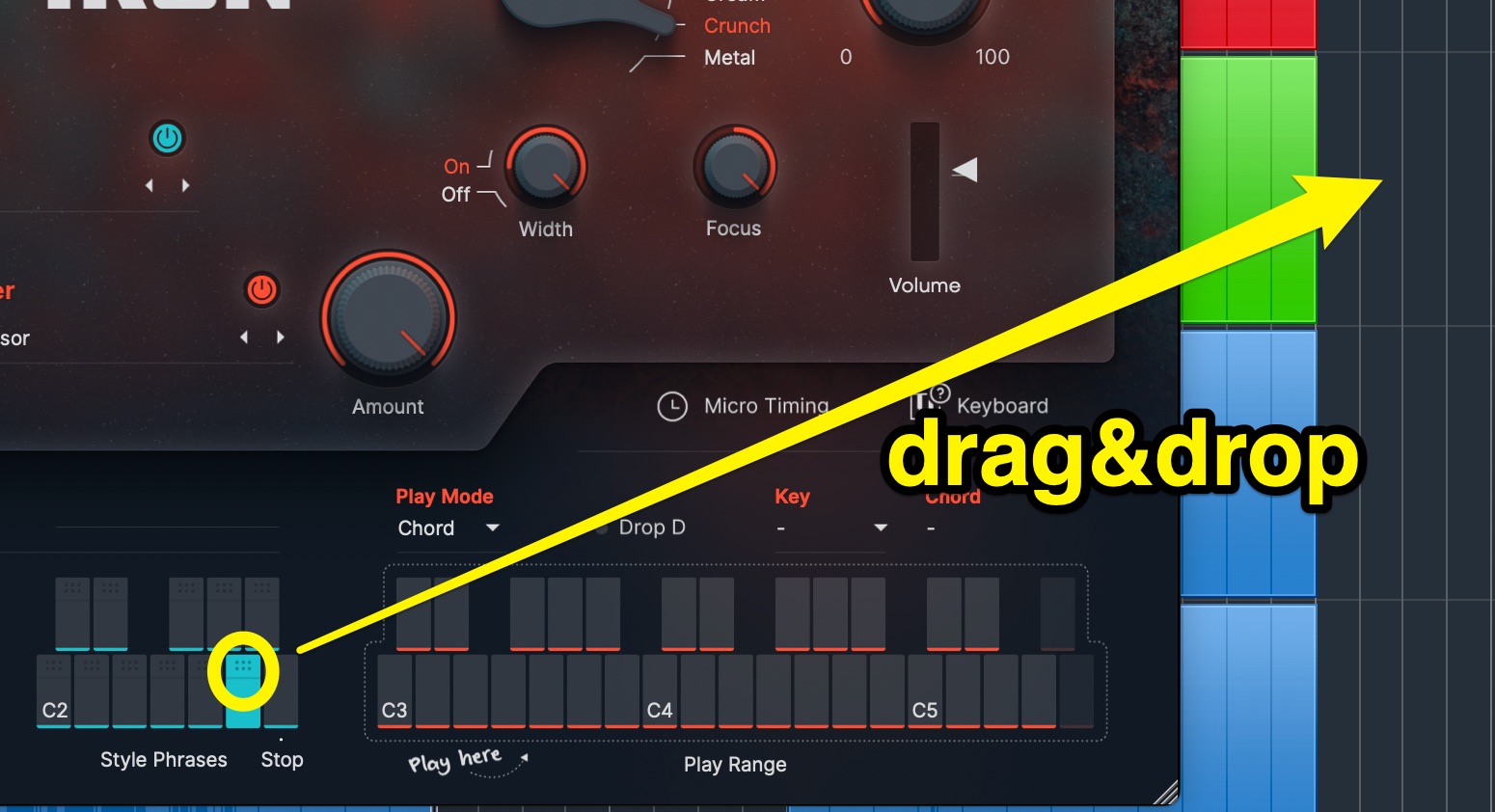
Use the resulting phrase in Instrument mode to edit it freely.
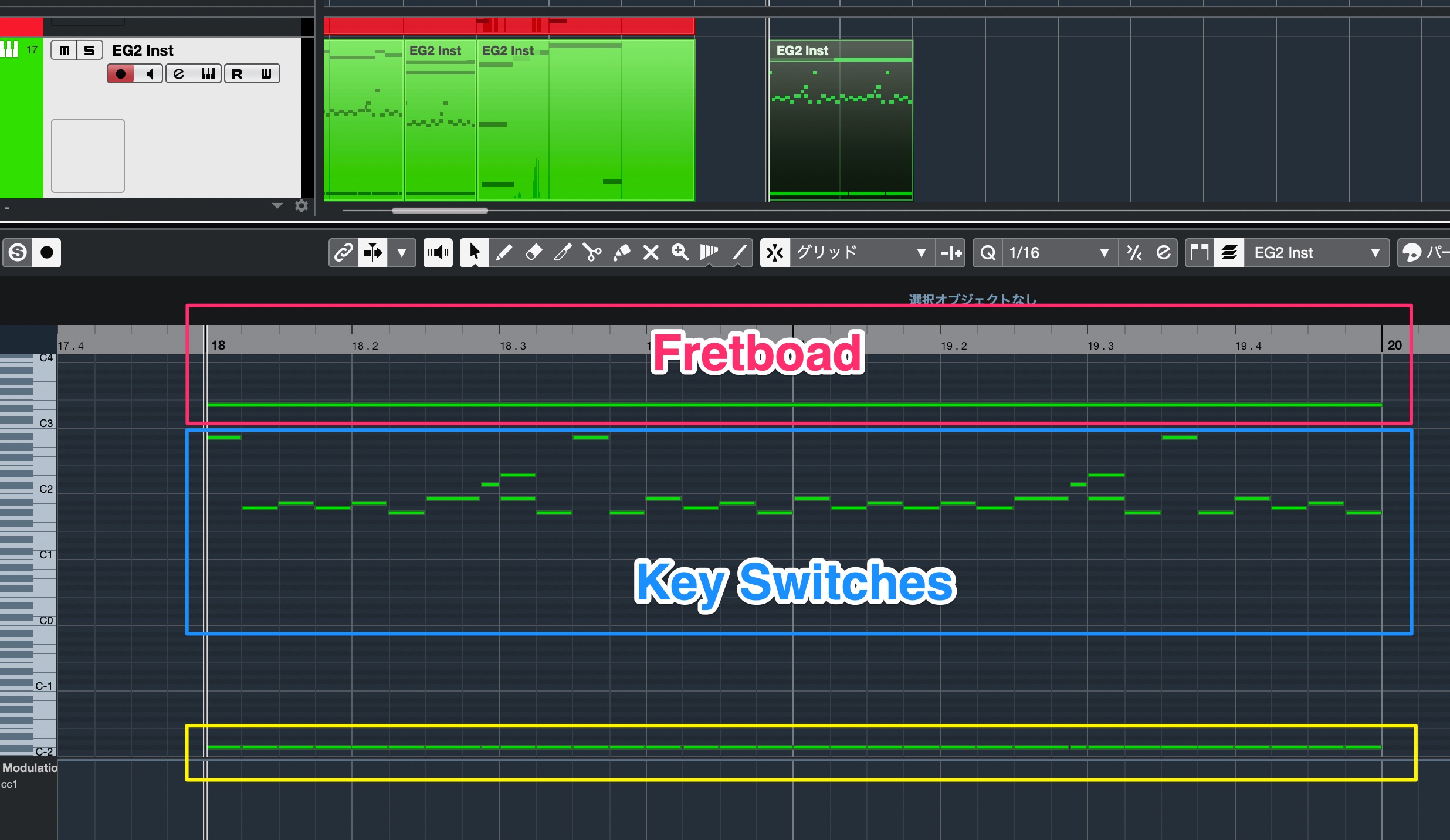
Looking at the MIDI data, you will see a note at C-2 in addition to the notes assigned to the Fretboard and Key Switches.
This note is needed to identify the dropped phrase, so be careful not to delete it.
IRON2 is therefore useful for a wide range of users, from beginners to intermediate and advanced producers.
It is ideal for quickly programming high-quality backing guitar parts. If it interests you, give it a try.
Product URL: https://bit.ly/3Bi75BM
UJAM IRON 2: An Easy-to-Use, High-Quality Guitar Instrument
Its excellent sound quality makes it a source of inspiration for guitarists as well as for those who do not play guitar.We will also feature this product on DTM Sale Information (@DTM_SALE).
Tutorial article: https://t.co/D2B6PZeBFO#DTM
— SLEEP FREAKS (@SLEEPFREAKS_DTM) November 22, 2021
Frequently Asked Questions
Q1. Can I use UJAM IRON2 if I cannot play guitar?
Yes. IRON2 is designed with non-guitarists in mind. Simply combine phrase patterns in Player mode to create high-quality backing guitar parts, with automatic adjustments for guitar-like voicings.
Q2. How many presets are included?
There are more than 300 presets, offering different combinations of sounds and phrases. Choosing a sound you like and then fine-tuning it is an efficient way to get started.
Q3. Can I edit the MIDI in my DAW?
Yes. Drag and drop a phrase pattern from Player mode into your DAW to convert it to MIDI, then edit and customize it freely. This lets you build your own phrases from the supplied patterns.
Q4. Can I use it with an external amp simulator?
Yes. The direct output lets you send IRON2's unprocessed guitar signal to another amp simulator or effects plug-in for further tone shaping.
Q5. Do beginners and advanced users use it differently?
IRON2 accommodates beginners through intermediate and advanced users. Beginners can start by combining patterns in Player mode, while more advanced users can program detailed parts in Instrument mode.
NEW ARTICLES
Latest English Articles





































































































































