
Home vocal recordings often contain background noise and room reflections, but careful mixing can substantially improve them. This article explains five stages of basic cleanup before fitting a vocal into a song: noise reduction with RX, subtractive EQ, limiting to control sudden peaks, de-essing, and compression to even out dynamics. Working through these stages in order can help address the limitations of a home recording environment and produce a cleaner vocal that is easier to blend into the arrangement. The settings below are starting points for this particular recording, not universal rules; the software versions and product links reflect the original September 2020 article.
Aim for Quality, Even When Recording at Home

This is the first of a two-part series on the basic process of mixing home-recorded vocals.
As computer-based music production has become more widespread, more people have started recording in their own rooms. However, the limitations of a home environment can make it difficult to capture the sound you want.
In this series, I will show you how to clean up a vocal take recorded under less-than-ideal conditions and then make it sit naturally in a song.
Here is the workflow for Part 1.
- 1Reduce Noise With RX: De-reverb and Spectral De-noise
- 2Use H-EQ to Cut Unwanted Lows and Harsh Peaks
- 3Control Sudden Peaks With the L1 Limiter
- 4Reduce Sibilance With Sibilance
- 5Control Dynamics With the CLA-76 Compressor
These are the basic cleanup stages before blending the vocal into the song. We will continue with that work in Part 2.
Let’s go through the process step by step.
Mixing Home-Recorded Vocals: Basic Cleanup
Reduce Noise With RX: De-reverb and Spectral De-noise
First, listen to the unprocessed vocal take.
You can hear familiar home-recording problems, including background noise from an air conditioner and reflections from the room.
We will use iZotope RX to reduce these unwanted sounds.
The first module is Spectral De-noise. It analyzes a profile of the unwanted noise and uses that profile to reduce it. Let’s use it to tackle the background noise.
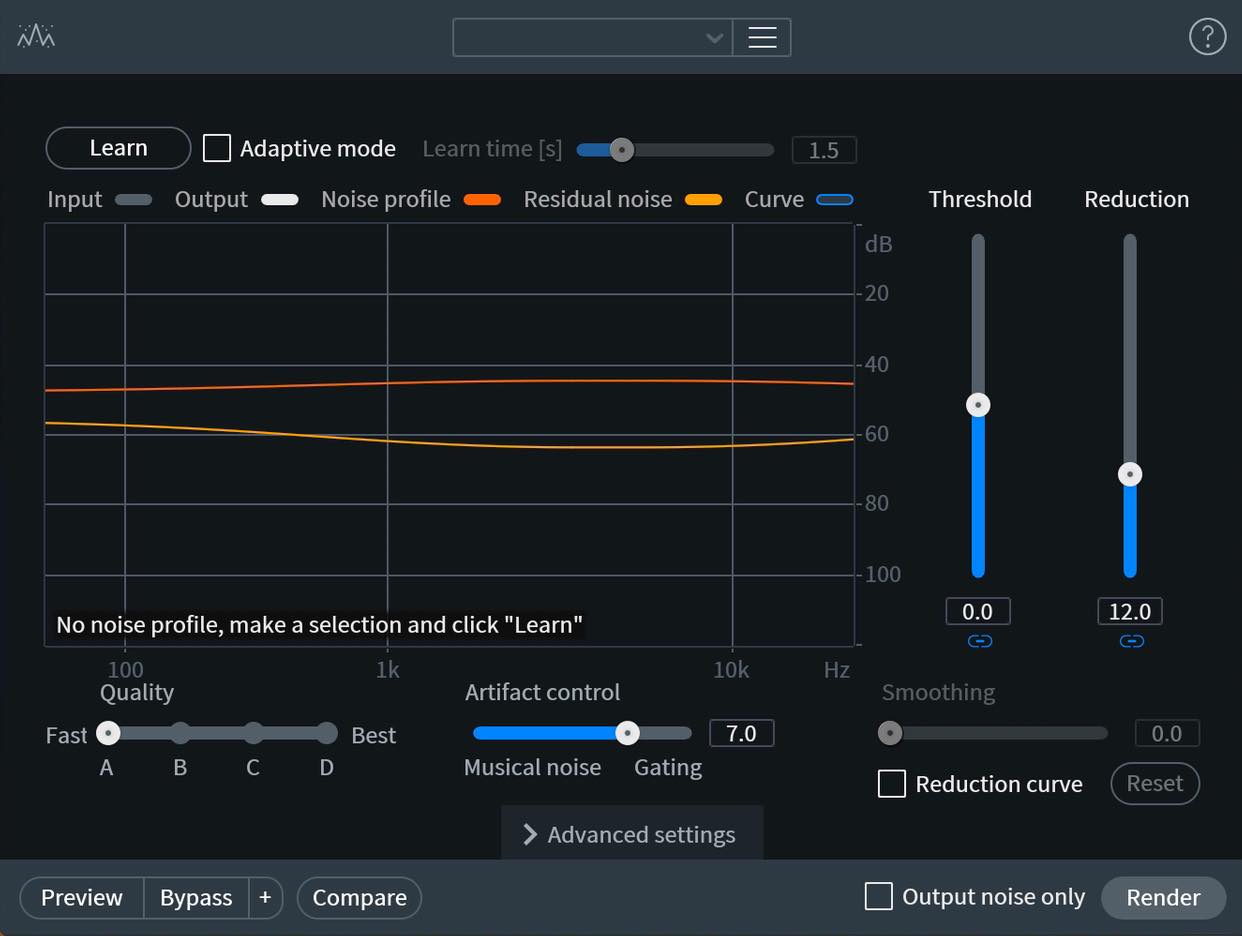
The basic procedure is simple: select a section containing only noise, then click Learn to capture its profile. That is the main preparation step.
For this example, try setting Quality to Best and moving Artifact control all the way to the left. If the result sounds clean, this is the setting I recommend here. If you hear artifacts, move Artifact control back toward the right.
The example now sounds much cleaner, with the background noise reduced.
For a more detailed explanation of the parameters, see the separate tutorial below.

Next, let’s reduce the room reflections. For this, we will use De-reverb.
As its name suggests, this module can reduce recorded room reverberation and reverb effects.
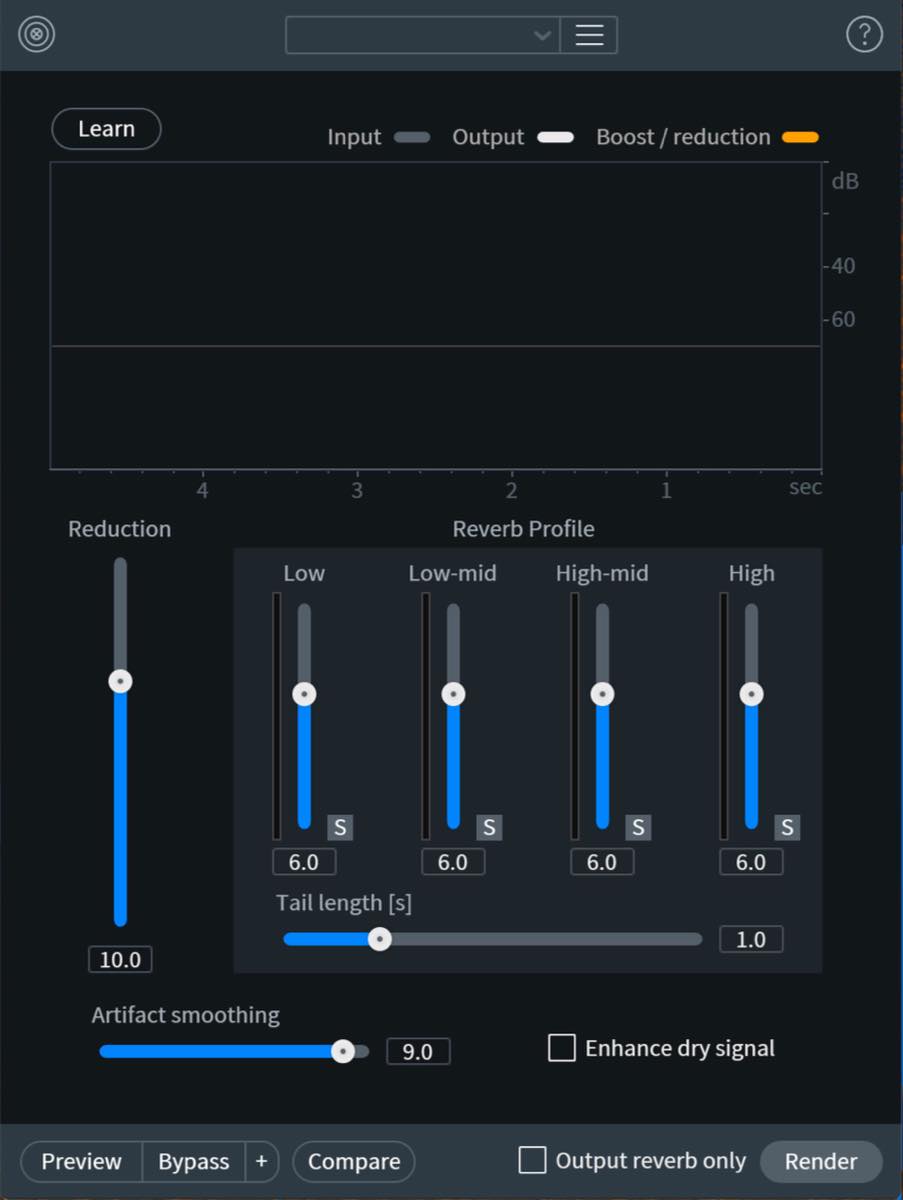
The basic setup is straightforward here too.
This time, rather than selecting a noise-only section, use Learn on the vocal recording to analyze the direct sound and its reverberation and suggest settings. The example uses the full recording; iZotope recommends learning from several seconds that include room tone, direct sound and reverb tails. Preview the result and reduce Reduction if the processing is too strong. You can also try Enhance dry signal to bring out the dry component.
In this example, most of the audible room reverberation has been reduced.
For a detailed explanation of these parameters, see the separate tutorial below.

Use H-EQ to Cut Unwanted Lows and Harsh Peaks
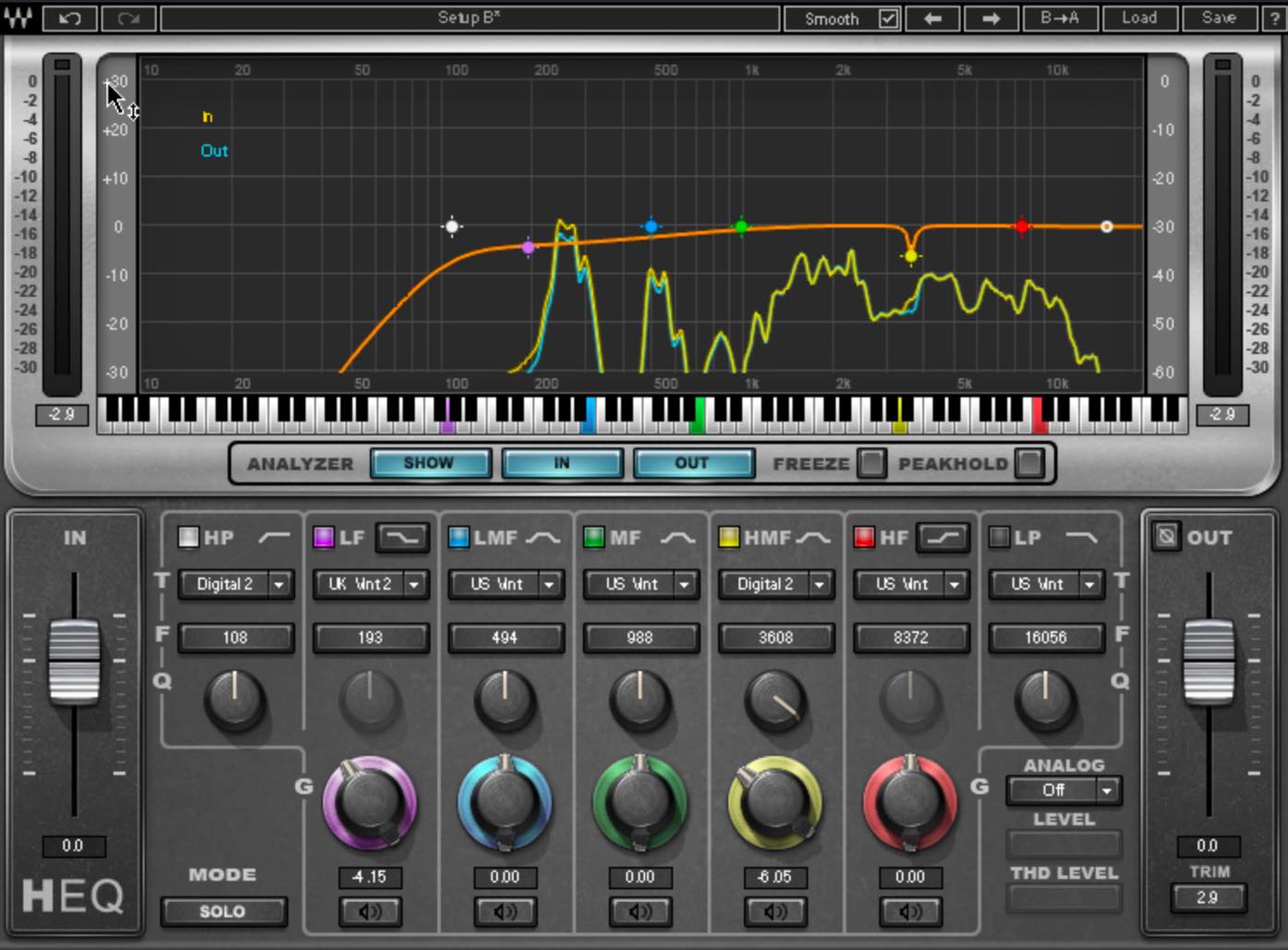
First, we will use EQ for subtractive processing. We will add another EQ later, but at this stage we are only making cuts.
A low cut is a basic starting point. Adjust it while watching H-EQ’s spectrum analyzer and listening. Although the RX cleanup has already removed much of the low-frequency content in this example, we will also cut up to a little above 100 Hz here as a precaution. Choose the cutoff to suit the voice rather than applying it blindly.
The low end of this vocal still feels a little heavy, possibly because of residual room reverberation. I will make a small low-shelf cut around 200 Hz.
In the higher frequencies, locate and cut any harsh peaks. Temporarily boost a band with a very narrow Q to help identify the frequency. Once you find it, lower the gain to make a cut of about 6 dB in this example.
Control Sudden Peaks With the L1 Limiter
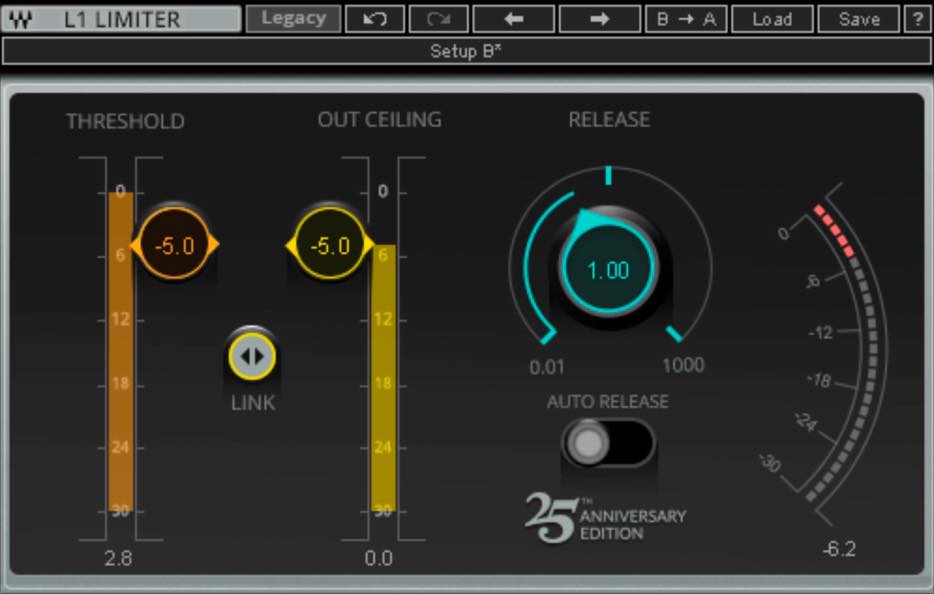
Next is a limiter. This stage is optional, but it can be useful if the waveform contains sudden peaks.
There are several sudden peaks in this example, which I suspect became more prominent during De-reverb processing. We will use limiting to control them before applying the compressor.
To adjust L1’s limiting while keeping the output ceiling linked to the threshold, drag the LINK control between THRESHOLD and OUT CEILING downward. This helps maintain a similar perceived level while you adjust the amount of limiting.
Lower the linked controls until the limiter catches the sudden peaks without reacting to the ordinary sections.
Reduce Sibilance With Sibilance
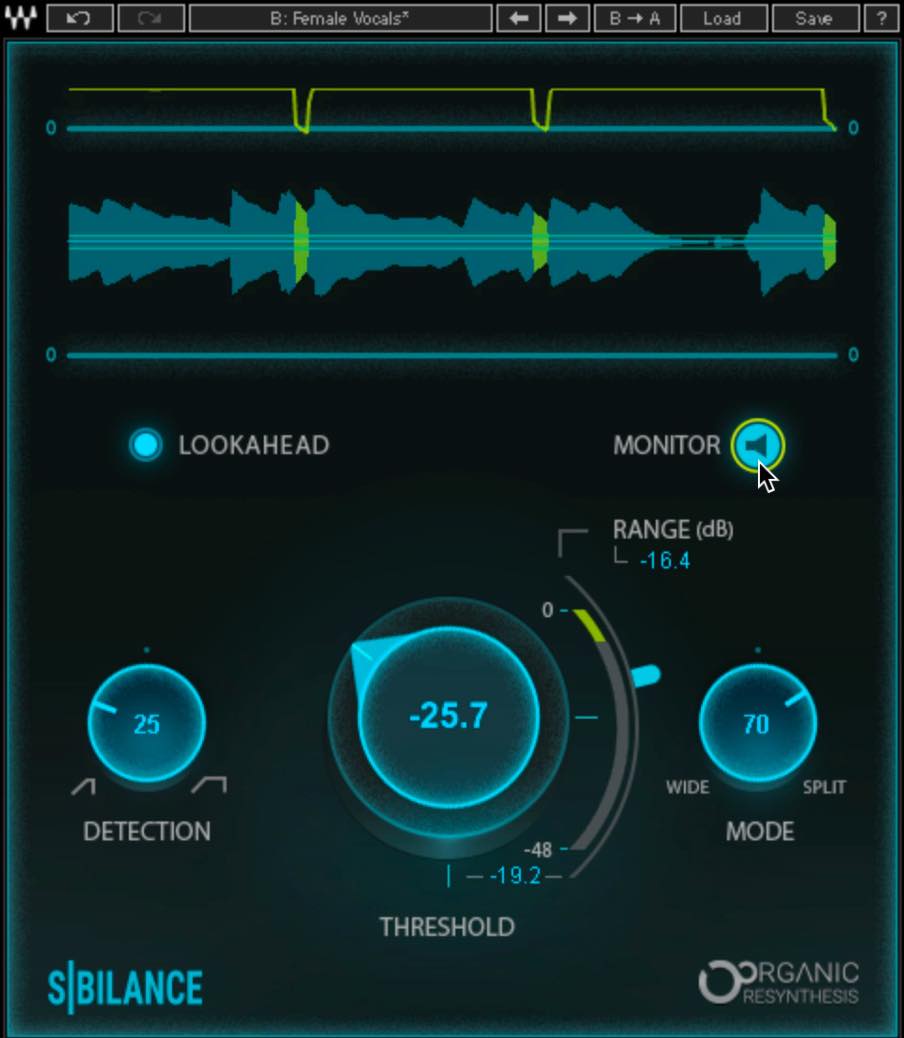
Next, we will use a de-esser.
For this example, I am using Sibilance, which makes de-essing quick and straightforward.
Start with a preset that suits the material—in this case, Female Vocal. Then adjust the parameters so that gain reduction responds mainly to sibilant sounds.
If it reacts too often to sounds other than sibilance, first try turning Detection to the left to narrow the detection range. Then adjust Threshold and Range to control when and how much reduction is applied.
While adjusting it, press MONITOR to listen to the detected sibilance on its own. This helps you hear exactly which sounds the de-esser is targeting.
Control Dynamics With the CLA-76 Compressor
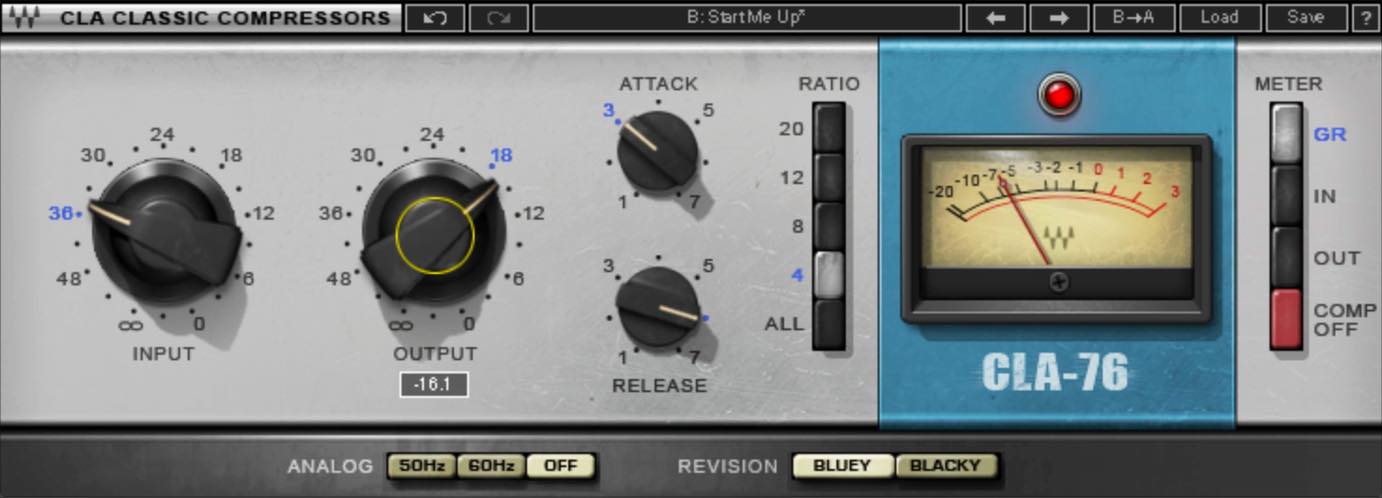
Next, let’s even out the dynamics with a compressor.
I am using the CLA-76 Bluey model here. In this example, it reaches the desired gain reduction with less input drive than Blacky, and to my ears the result feels less colored. That is my impression of these settings, rather than a rule that one model is always more transparent.
For a starting point on this CLA-76, try a ratio of 4:1 and an Attack setting of 3. I often find this works well on vocals. These control positions are specific to this compressor, rather than settings to copy directly to every compressor.
Adjust Input so that the gain-reduction meter moves across the range between 0 and roughly 6 dB of reduction. Adjust Release at the same time: the interaction between these two settings makes a substantial difference to the compression’s feel.
Here, I want to even out the level differences firmly and keep the vocal upfront. I therefore use somewhat deeper reduction and a faster release so that the compressor responds briskly to those changes. For a more natural result in this example, try less reduction and a slower release.
Once the compression feels right, compare the processed sound with bypass and adjust Output. Avoid a large perceived-level difference between the two, so that louder does not automatically seem better.
That completes the basic cleanup. Taking care of these stages first gives you a useful foundation for the rest of the mix.
In Part 2, we will move on to shaping the vocal’s character and making it fit the song.
▶ Product links (the following include affiliate and promotional links)
• iZotope RX 8: https://bit.ly/2RGmmYy
• Waves H-EQ: https://bit.ly/32HGDDz
• Waves L1 Limiter: https://bit.ly/3mv5ORA
• Waves Sibilance: https://bit.ly/3mxP5Nx
• Waves CLA-76: https://bit.ly/2ZMH79G
Recommended Reading
Improve Vocal Recording Quality With a Reflection Filter
The quality of a vocal recording has a major effect on the finished song. This article looks at capturing a better sound at the recording stage, rather than relying entirely on EQ and compression afterward…
A Practical Guide to Recording Vocals at Home
An in-depth look at important points in home vocal recording, for beginners and for experienced recordists who want to revisit the essentials.
Recording Vocals at Home, Part 2: Taking the Next Step
This article explains equipment choices and techniques for taking home vocal recording further, including external microphone preamps and the warm character of tube microphones…
Five Microphone Setup Tips for Vocal Recording
Microphone placement has a major effect on the sound of home-recorded vocals. This article covers microphone height, distance, pop filters and reflection filters…
🎙Mixing Home-Recorded Vocals: Basic Cleanup🎙
In this two-part series, we will show how to clean up a vocal take recorded in a difficult environment and make it sit naturally in a song.
Part 1 covers the basic cleanup before blending the vocal into the arrangement.
Read more: https://t.co/kymsgNlVVI #DTM pic.twitter.com/zUduwM92B1
— SLEEP FREAKS (@SLEEPFREAKS_DTM) September 26, 2020
Frequently Asked Questions
Q1. Which plug-in can I use to reduce noise in home-recorded vocals?
iZotope RX is a widely used audio repair tool. In this workflow, Spectral De-noise reduces background noise after learning from a noise-only section, while De-reverb analyzes the vocal and its reverberation to help reduce room reflections. Preview the results and adjust the processing to avoid artifacts.
Q2. What should I do first when EQing a vocal?
This example starts with a low cut reaching a little above 100 Hz, followed by a small low-shelf cut around 200 Hz to address low-end buildup. Finally, it uses narrow cuts of about 6 dB on harsh peaks. These are settings for this recording; adjust them to the voice and the problems you actually hear.
Q3. Is there a useful starting point for vocal compression?
On the CLA-76 used here, try a 4:1 ratio and Attack at 3, then adjust Input and Release while listening, with roughly 6 dB of gain reduction as a reference for this example. For a gentler result, try less reduction and a slower release. These values and control positions are not universal compressor settings.
Q4. What should I do if the de-esser is working too hard?
If Sibilance detects too much non-sibilant material, try turning Detection to the left to narrow its detection range; this control changes the range being analyzed, rather than acting as a general sensitivity knob. Adjust Threshold and Range to control the depth of processing, and use MONITOR to check that the detector is focusing on the intended sibilance.
Q5. Do I always need all five processing stages?
No. In this example, the limiter is used only to catch sudden peaks. Noise reduction, EQ, de-essing and compression are useful options for improving a vocal, but use only the processing the recording needs, and adapt the settings to the material and recording environment.
NEW ARTICLES
Latest English Articles




















































































































































































