
This beginner-friendly recipe shows how to create a nostalgic Famicom-inspired sound in your DAW. Choose a square wave on a synthesizer oscillator, shape its volume with an envelope, and add spatial effects such as reverb or delay. The result is a simple, polished sound that works for arpeggios, backing parts, and more.
Put a Nostalgic Famicom-Inspired Sound to Work
When I first got my hands on a synthesizer, I was amazed
that it could make sounds like the Famicom!
There is something irresistibly charming about its lo-fi character.
That is the appeal of the Famicom sound.
In this recipe, we will shape the volume and add spatial effects.
How to Make the Sound
Select a Square Wave on the Oscillator
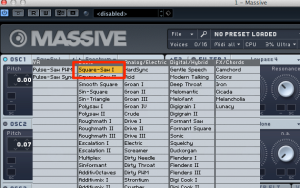
Set the oscillator to Square.
That alone gives you a Famicom-style sound!
But let’s take it a little further.
Shape the Volume
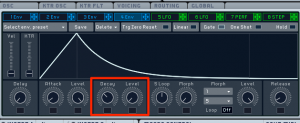
Use Env4 to adjust the volume envelope.
- Level: Set this to 0 so the sound can fade to silence even while you hold the key.
- Decay: Adjust the time it takes for the volume to reach zero in the context of your song.
This creates a crisp sound that works especially well for arpeggios.
Add Spatial Effects Such as Reverb
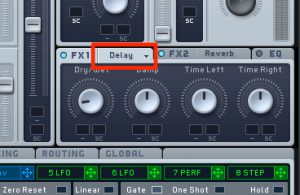
Delay and reverb add depth and give the sound a more spacious character.
That’s it!
Besides arpeggios, you can also use this sound for backing parts.
Frequently Asked Questions
Q1. What equipment do I need to make a Famicom-style sound?
You can get started with a synthesizer and a DAW (digital audio workstation). A synth plug-in, such as one included in Native Instruments KOMPLETE, can help you recreate this kind of sound.
Q2. Why choose a square wave on the oscillator?
The Famicom’s sound hardware included pulse-wave channels, which helped create its distinctive sound. A square wave is a simple starting point for a similar character.
Q3. How should I adjust Env4’s Decay parameter?
Adjust the time it takes the sound to fade to suit the song’s tempo and the rhythm of the arpeggio. A shorter decay helps create a crisp sound.
Q4. Are reverb and delay essential?
No, but these effects can add depth and give the simple sound a more spacious, polished character.
NEW ARTICLES
Latest English Articles

























































































































































































































































































































































































































































































































































































































