
Cubase 10 adds support for 32-bit integer recording, complementing the 64-bit float audio engine introduced in Cubase 9.5. A 32-bit integer format provides roughly 4.3 billion quantization levels and a theoretical dynamic range of about 192 dB, offering fine numerical resolution for quiet details such as breath and reverb tails. A 64-bit float engine can preserve that precision during processing, whereas 32-bit float cannot retain every bit of a full-resolution 32-bit integer signal. Compatible audio hardware and sufficient processing resources are required; these theoretical figures do not describe an interface's actual analog performance.
32-Bit Integer Recording Is Available in Cubase 10
In this article, we will explain 32-bit integer audio and the 64-bit float audio engine in Cubase.
Cubase 10 adds 32-bit integer and 64-bit float options to the project's recording bit depth settings.
Cubase has also offered a 64-bit float audio engine since version 9.5, completing a recording and mixing workflow that combines 32-bit integer audio with 64-bit float processing.
Recording in 32-bit integer format is an option for those seeking to preserve fine numerical detail across quiet and loud passages, or to retain high-resolution source recordings for future use.
Cubase 10: 32-Bit Integer Audio and the 64-Bit Float Engine Explained
Selected Questions and Answers from the YouTube Video

If my audio interface supports 24-bit audio, is there much point in selecting 64-bit float processing precision? Is 32-bit float sufficient?

For a 24-bit interface, 32-bit float processing is sufficient for the input signal's precision.
Thank you for the explanations. If my audio interface only supports up to 24-bit audio, does that mean I cannot record true 32-bit integer audio by choosing that setting in Cubase? Should I choose 24-bit, 32-bit float, or 64-bit float instead?
Yes. If your interface does not support 32-bit integer recording, choose 24-bit or 32-bit float; we recommend 32-bit float. Selecting a higher file bit depth cannot add detail that the interface did not capture.
Bit Depth and the Audio Engine
First, let's review the distinction between bit depth and the audio engine that we covered in our earlier explanation of 32-bit float.
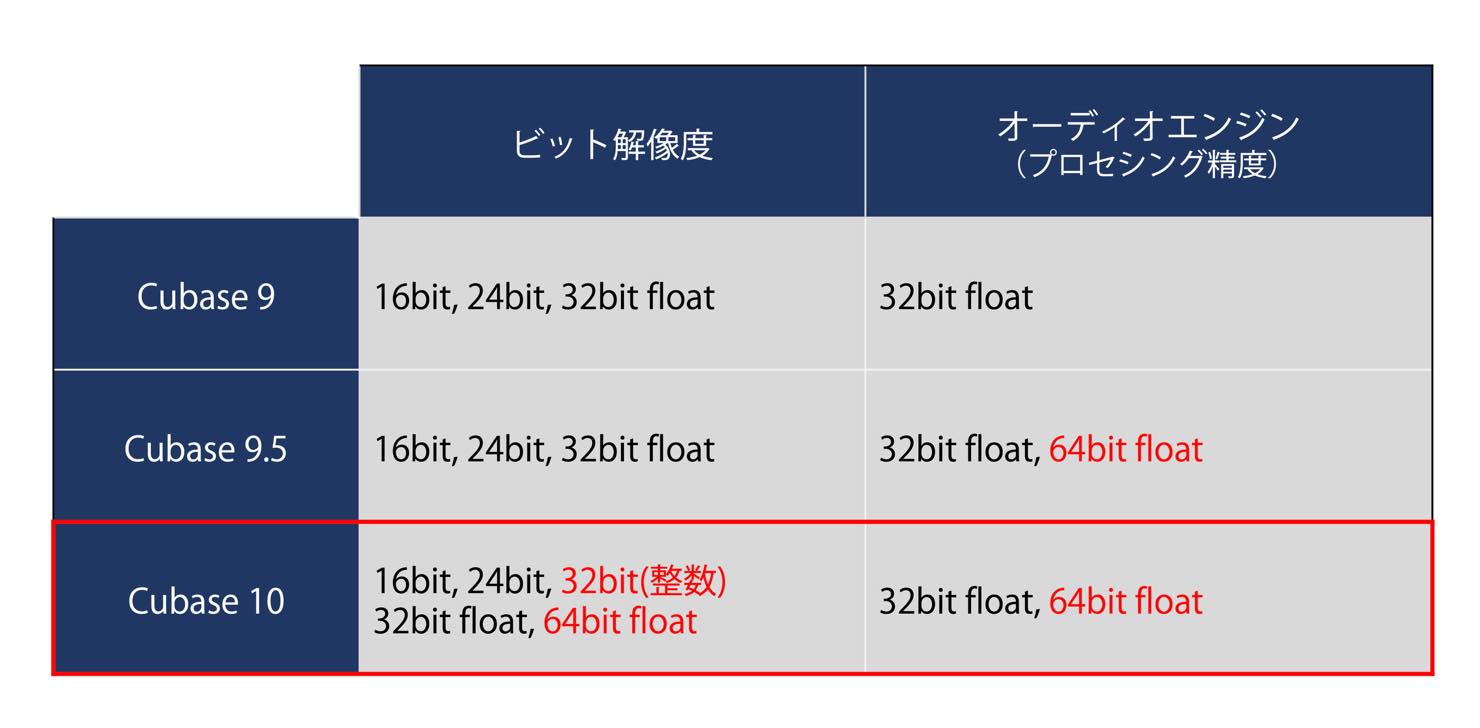
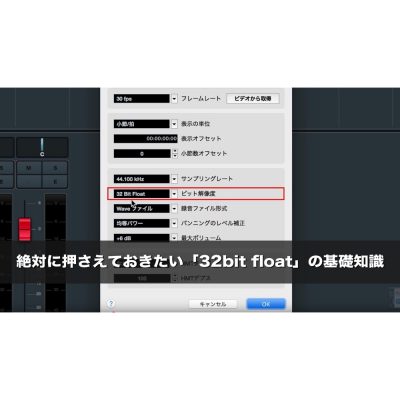
The bit depth in Project Setup specifies the recording file format, and can also determine the format used when converting imported files. The audio engine setting determines the precision of processing inside the DAW.
Remember that floating-point files are useful when recording through effects or exporting files to import back into your project.
In the hardware context of this tutorial, interfaces with 32-bit integer output represent the highest recording bit depth discussed. With such an interface, choose 32-bit integer or 64-bit float as the recording file format to preserve its full numerical precision.
As we will explain below, selecting the 64-bit float audio engine is the appropriate match when you want to preserve the precision of 32-bit integer or higher-precision audio files.
The Benefits of 32-Bit Integer Audio
What benefits can you expect when recording in Cubase 10 with an audio interface that supports 32-bit integer audio?
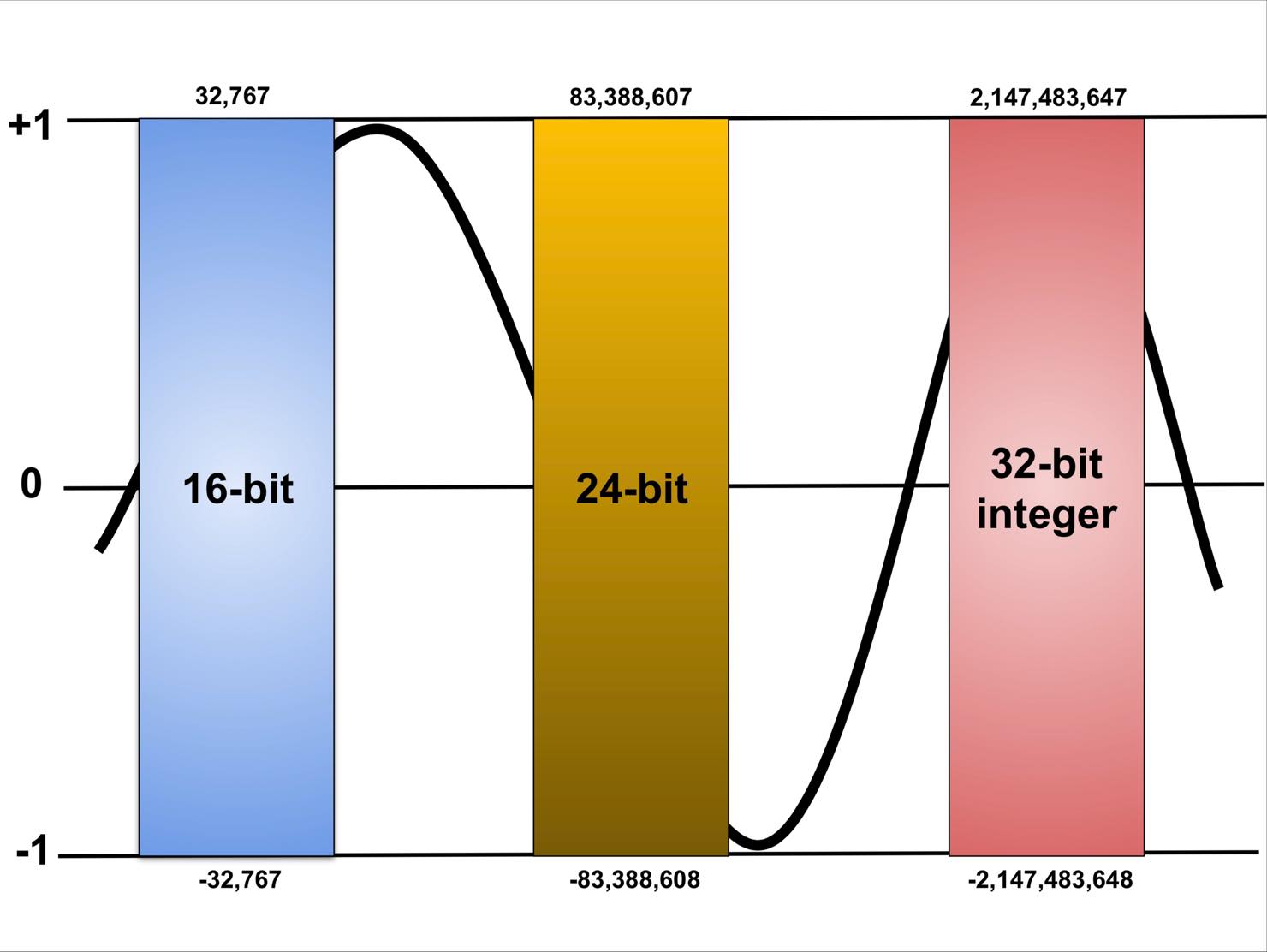
Bit depth describes amplitude resolution: more bits provide more finely spaced levels with which to represent the signal.
Specifically:
16-bit: 2 to the power of 16, or 65,536 levels
24-bit: 2 to the power of 24, or 16,777,216 levels
32-bit: 2 to the power of 32, or 4,294,967,296 levels
These figures show just how much finer the numerical resolution of 32-bit integer audio is.
Using the approximate rule of 6 dB per bit, the theoretical dynamic ranges are 96 dB for 16-bit, 144 dB for 24-bit, and 192 dB for 32-bit integer audio. These are format-level figures, not the measured dynamic range of real recording hardware.
Finer quantization can help preserve quiet details such as the breath at the end of a vocal phrase and subtle, complex hall reverberation, within the limits of the microphone, interface, and recording environment.
Integer and Floating-Point Audio
Let's also review the relationship between integer and floating-point formats.
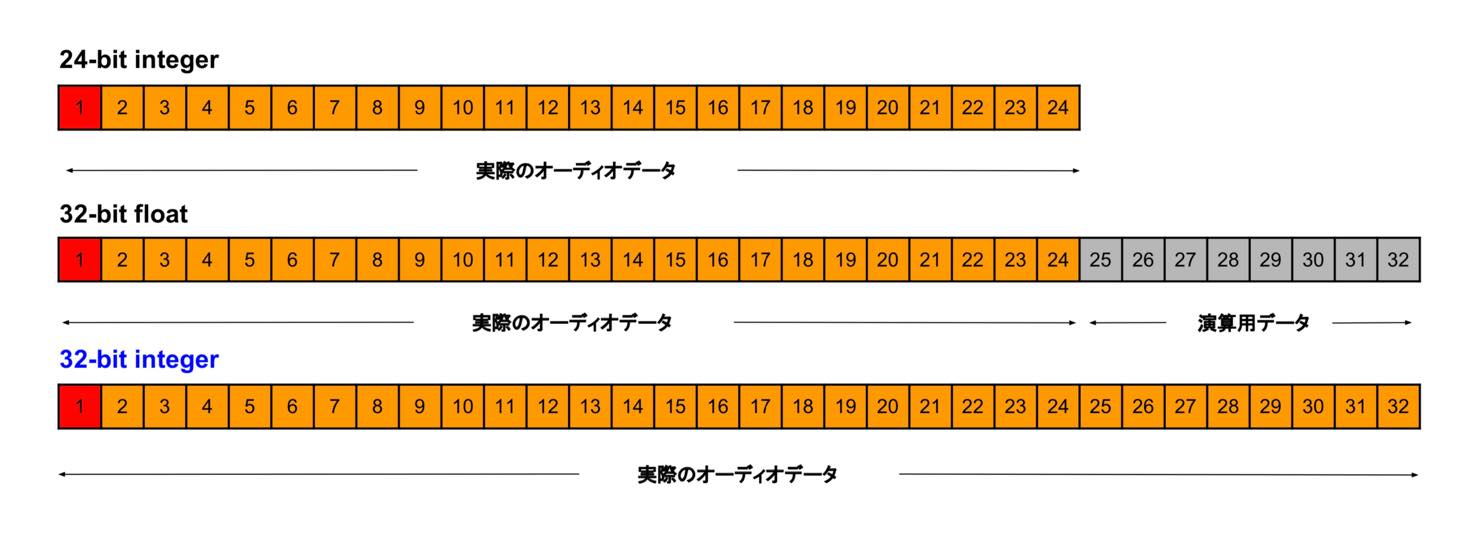
As discussed in our earlier video, 32-bit float uses an 8-bit exponent and has 24 bits of significand precision, including its implicit leading bit. Its wide level range should therefore be distinguished from its numerical precision.
A 32-bit float audio engine provides sufficient precision to represent 24-bit recordings. Cubase 10, however, also allows 32-bit integer recording.
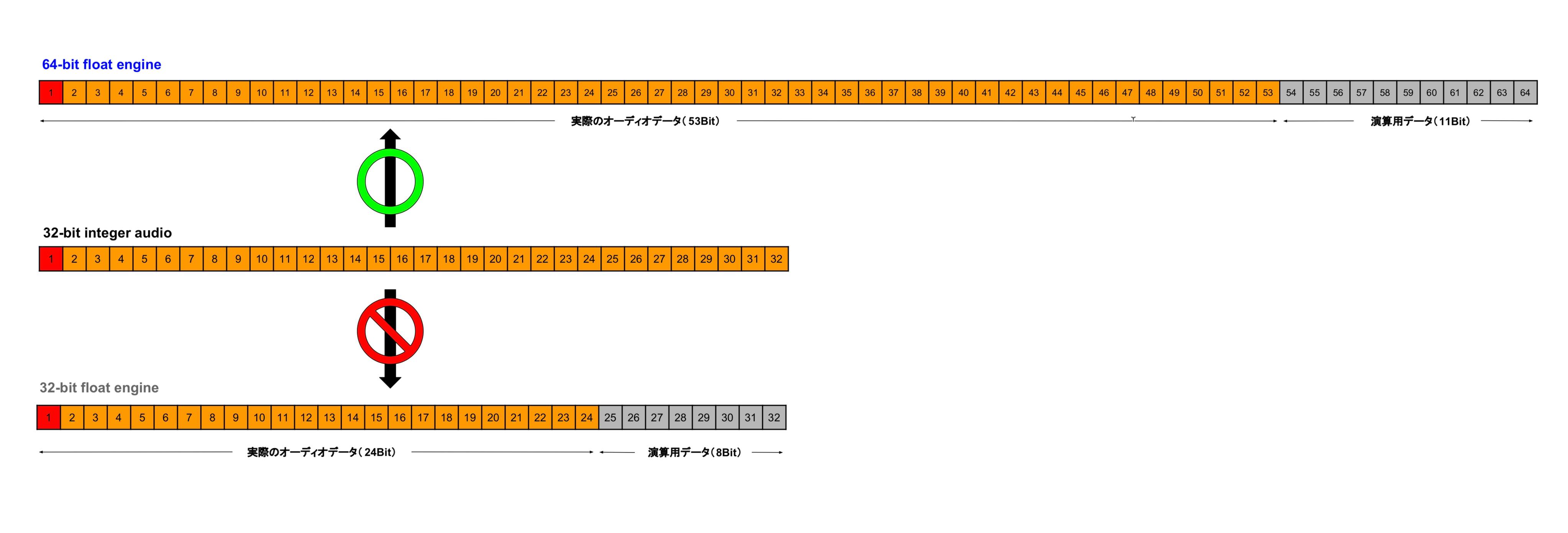
When 32-bit integer audio is processed by a 32-bit float engine, the latter's 24-bit significand cannot preserve every possible 32-bit integer value. Depending on the signal's magnitude, up to eight low-order bits of precision can be lost through rounding.
For this reason, select the 64-bit float audio engine when recording 32-bit integer audio and aiming to retain its full precision.
Even after accounting for the exponent and sign, 64-bit float has ample significand precision to represent all 32-bit integer values.
As explained in our 32-bit float video, floating-point processing also provides a very large internal level range. When working with 32-bit integer source files in a 64-bit float engine, a level above 0 dBFS inside a floating-point signal path can usually be brought back down at a bus or stereo output without permanent clipping. This does not repair clipping already caused by the interface or a clipping/nonlinear processor. Lowering a track fader also causes no practically significant loss of precision in this context. See the 32-bit float video for more details.
32-Bit Float Explained — Video
Things to Know About 32-Bit Integer Audio and the 64-Bit Float Engine
Finally, let's look at some practical considerations when using 32-bit integer audio and the 64-bit float engine.
Recording true 32-bit integer audio requires a compatible audio interface. Examples discussed here are Steinberg's AXR4T and AXR4U.
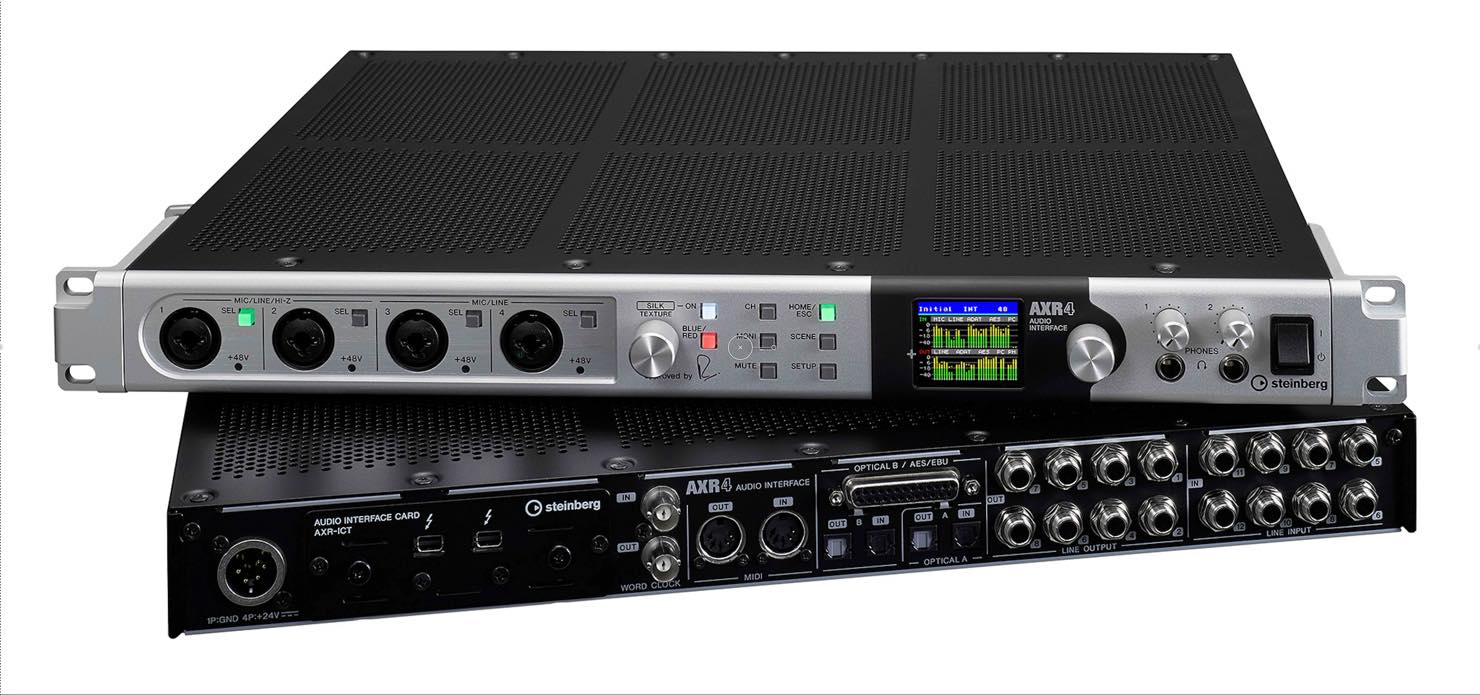
Even if you record to 32-bit integer or 64-bit float files, clipping that occurs inside the audio interface is captured in that clipped state. Take care to avoid it.
Higher-bit-depth recording files take up more storage space. Switching the audio engine to 64-bit float can also increase processing demands, but changing the engine precision alone does not change the bit depth or size of existing audio files.
If the additional processing load is manageable, you can leave Processing Precision set to 64-bit float.
When exporting audio that will be imported back into a 64-bit float processing workflow, use 64-bit float files if you want to preserve that processing precision through the round trip.
When sending files to a collaborator working in a different environment, choose a format that is compatible with their workflow and processing precision.
The Essential Guide, Part 2: 32-Bit Integer Audio and the 64-Bit Float Audio Engine
🎥 YouTube: https://t.co/SRPfu84MOG
📝 Article: https://t.co/TQYH2hKZ9f
Our earlier video on 32-bit float will help you understand this topic in more depth.
Presented by Nobuhiko Otsuru (@o2ring) #DTM #cubase pic.twitter.com/I20Hf1pbmj
— SLEEP FREAKS (@SLEEPFREAKS_DTM) September 15, 2019
Frequently Asked Questions
Q1. What is the difference between 32-bit integer and 24-bit audio?
Bit depth describes amplitude resolution. A 24-bit integer format provides about 16.7 million levels, while 32-bit integer provides about 4.3 billion. Their approximate theoretical dynamic ranges are 144 dB and 192 dB respectively. Actual recording performance remains limited by the analog hardware and noise floor.
Q2. Which audio engine should I choose when recording 32-bit integer audio?
Choose the 64-bit float audio engine to retain the full precision of 32-bit integer values. A 32-bit float engine has 24 bits of significand precision and cannot represent every 32-bit integer value exactly.
Q3. Which audio interfaces support 32-bit integer recording?
Steinberg's AXR4T and AXR4U are examples. Check the interface's specifications, since genuine 32-bit integer recording requires compatible hardware.
Q4. Are there any disadvantages to using the 64-bit float engine?
It can increase processing demands. Recording or exporting at higher file bit depths also increases file size, although changing engine precision alone does not. If your computer can handle the processing load, 64-bit float is a useful choice for retaining high precision.
Q5. Can clipping inside an audio interface be repaired?
No. Clipping already captured at the audio interface cannot be undone by choosing a floating-point file format or engine. Set the input level appropriately to avoid clipping.
NEW ARTICLES
Latest English Articles















































































































































































































































