
Harmonics are components at integer multiples of a sound’s fundamental frequency. They occur naturally in many pitched sounds, and nonlinear distortion in analog equipment can add or reshape them, changing depth and tonal color. In the listening examples below, different balances of odd and even harmonics produce impressions of clarity, cohesion, warmth, and punch. These are processing-dependent examples, rather than universal effects of harmonic parity. Analog-modeling plug-ins such as Waves Cobalt Saphira let you explore these changes on drums, bass, vocals, and other tracks.
Understand Harmonics and Take Your Mix to the Next Level
In this article, we’ll take a closer look at “harmonics,” a well-known effect of analog equipment and its modeled plug-ins, and explore what they mean in the context of mixing.
- 1 Why Analog Character Became So Popular
- 2 What Are Harmonics?
- 3 Odd and Even Harmonics
- 4 Testing with Waves Cobalt Saphira (Sine Wave)
- 5 Testing with Waves Cobalt Saphira (Tracks)
Let’s take a look at each one.
The Relationship Between Harmonics and Mixing
Why Analog Character Became So Popular
Before we get into the main topic, let’s look at why analog gear has become so popular in hardware and plug-ins.

Since the earliest days of recording, the characteristics of audio equipment meant that signals inevitably became distorted as they passed through its circuitry. This distortion added harmonics.
During the transition from analog to digital, this was seen as something that should simply be eliminated. Over time, however, a sound without the distortion and added harmonics of analog equipment came to be described as “bland” or “lacking character.”
Analog equipment gradually returned to use alongside digital systems. Plug-ins modeled after that equipment also appeared, bringing us to where we are today.
What Are Harmonics?
So what are the harmonics that are considered so important?
More precisely, harmonics are components at integer multiples of a sound’s fundamental frequency. That may be a little hard to picture, though.
For example, A=440 Hz is a commonly used tuning reference. On a piano, that is the A above middle C.
However, the A above middle C on a real piano is not made up of 440 Hz alone. Let’s look at it with a spectrum analyzer.
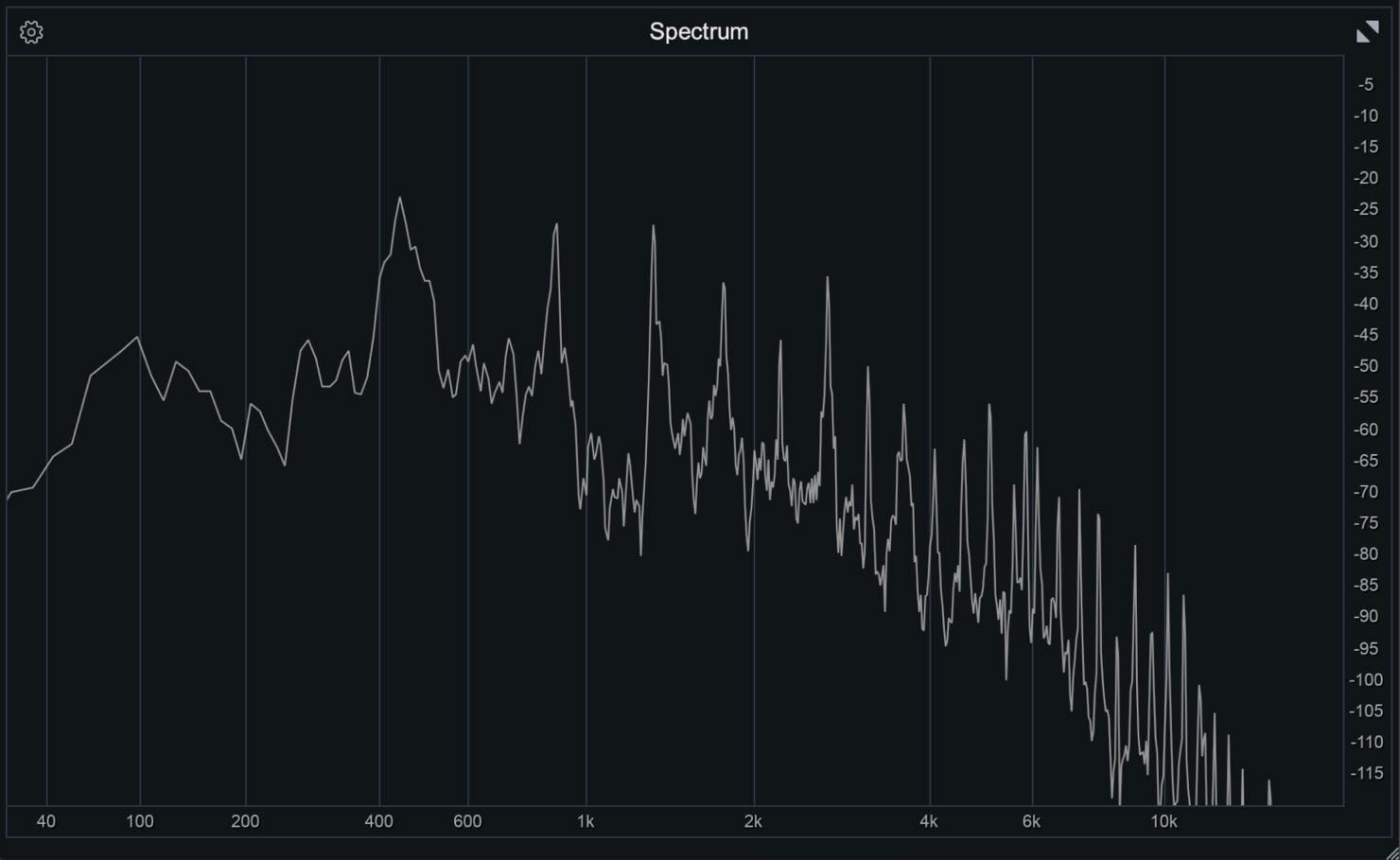
The spectrum shows a strong peak around 440 Hz, along with peaks across a range of other frequencies.
In this simplified harmonic description, the peaks at integer multiples above 440 Hz are higher harmonics. Their relative levels help shape a sound’s depth, color, presence, and character. Real piano strings can also have slightly inharmonic overtones.
For a single steady pitched tone, leaving only the fundamental produces a sine wave. Higher harmonics contribute to the differences we hear between instruments and voices; real timbre also depends on factors such as the amplitude envelope, noise, and inharmonic components.
As mentioned earlier, the fundamental frequency is the reference frequency whose integer multiples form the harmonics. For the A above middle C, that frequency is 440 Hz.
The harmonics are integer multiples of that frequency: 880 Hz, 1,320 Hz, 1,760 Hz, 2,200 Hz, and so on.
They are called the second, third, fourth, and fifth harmonics, continuing upward from the fundamental.
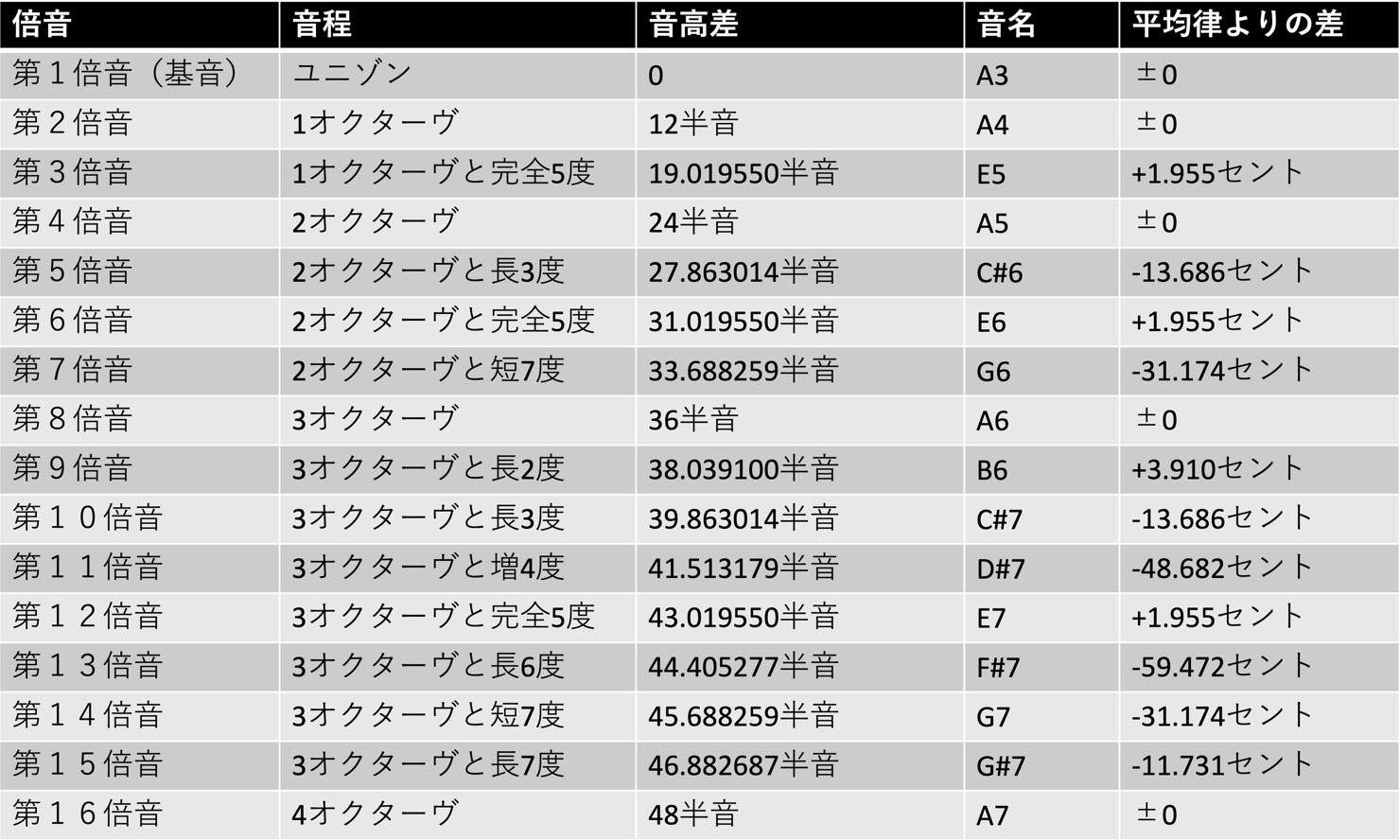
Odd and Even Harmonics
Harmonics can be divided into odd harmonics and even harmonics and the balance between them changes the character of the sound.

In the author’s examples, odd-harmonic processing gives an impression of definition, clarity, and cohesion, while even-harmonic processing adds warmth and punch. Some of the processed waveforms appear to have rounder peaks or sharper transients. These observations depend on the source, harmonic levels and phases, and plug-in settings: odd or even harmonics alone do not determine compression or dynamic range.
Analog-modeling plug-ins also vary in the balance of odd and even harmonics they add, depending on the type of equipment they model. That is why each one has its own distinctive character.
Testing with Waves Cobalt Saphira (Sine Wave)
Next, we’ll use Waves Cobalt Saphira to explore how odd and even harmonics change a sound.
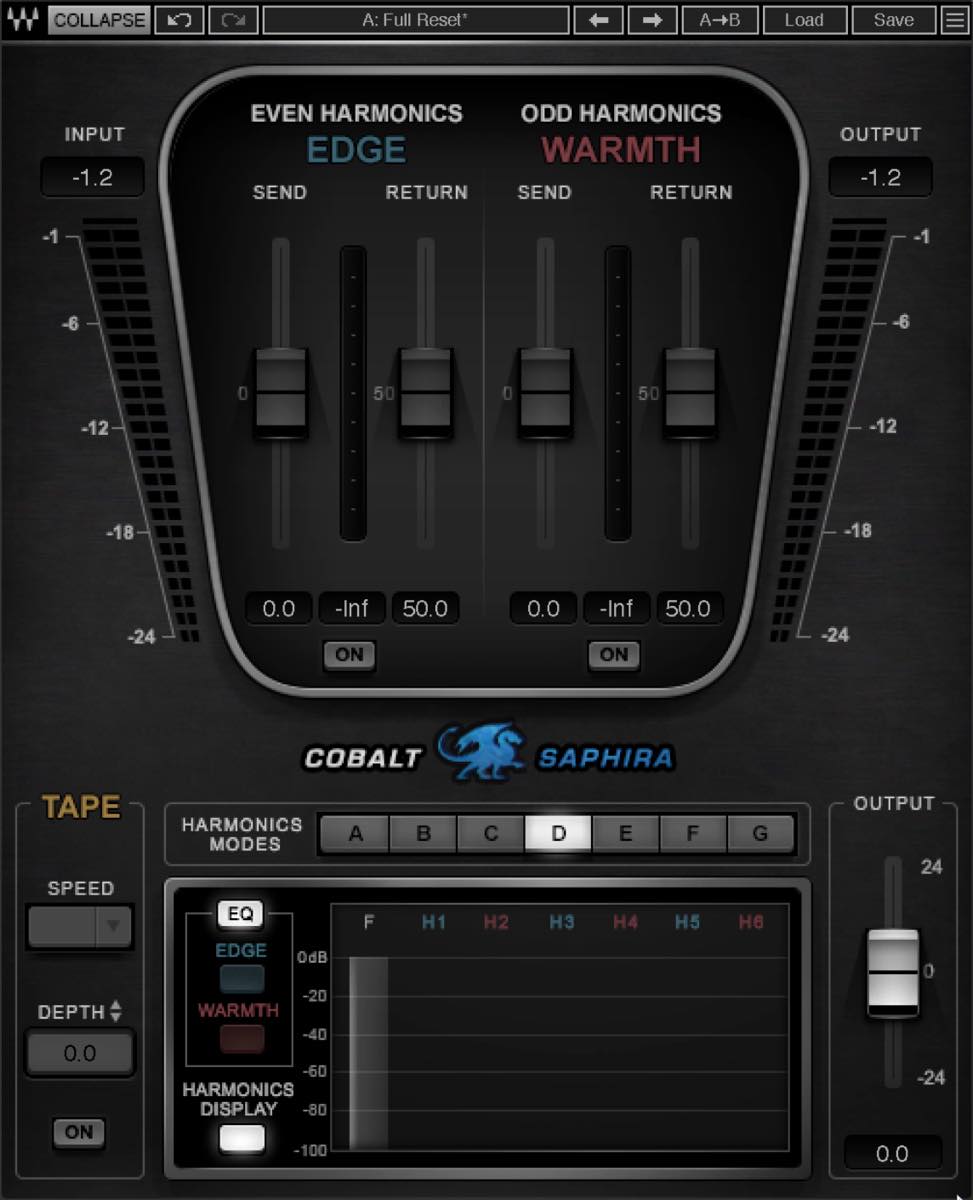
Cobalt Saphira can add even harmonics with Even Harmonics and odd harmonics with Odd Harmonics. By balancing the two, you can shape an analog character to suit your needs.
First, let’s use a sine wave to see exactly how the harmonics change.
A spectrum analyzer shows that a 1 kHz sine wave contains almost nothing but its 1 kHz fundamental.
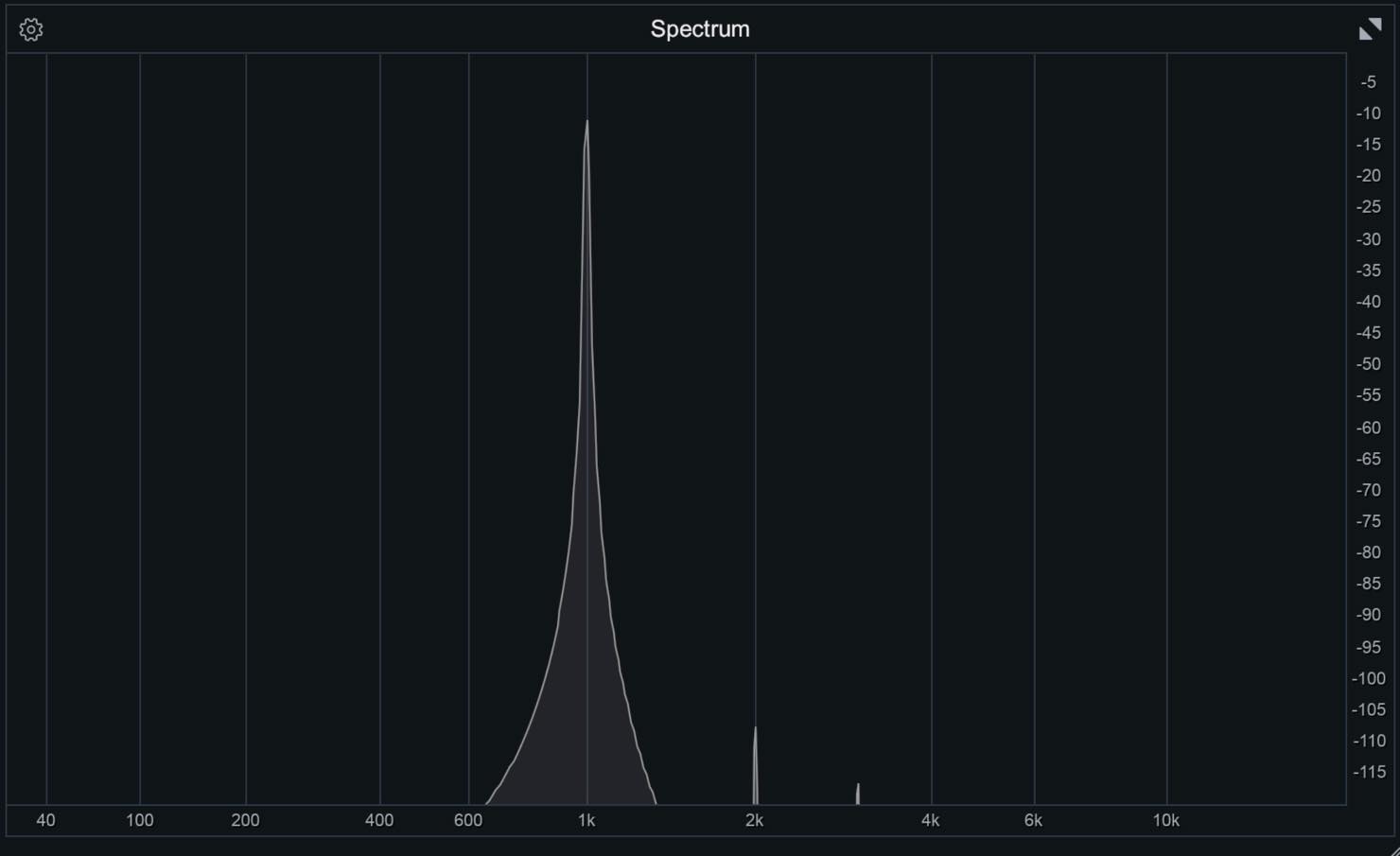
Let’s start by adding even harmonics. Turn on Even Harmonics only and raise Return slightly. The Return parameter controls the level of the added harmonics.
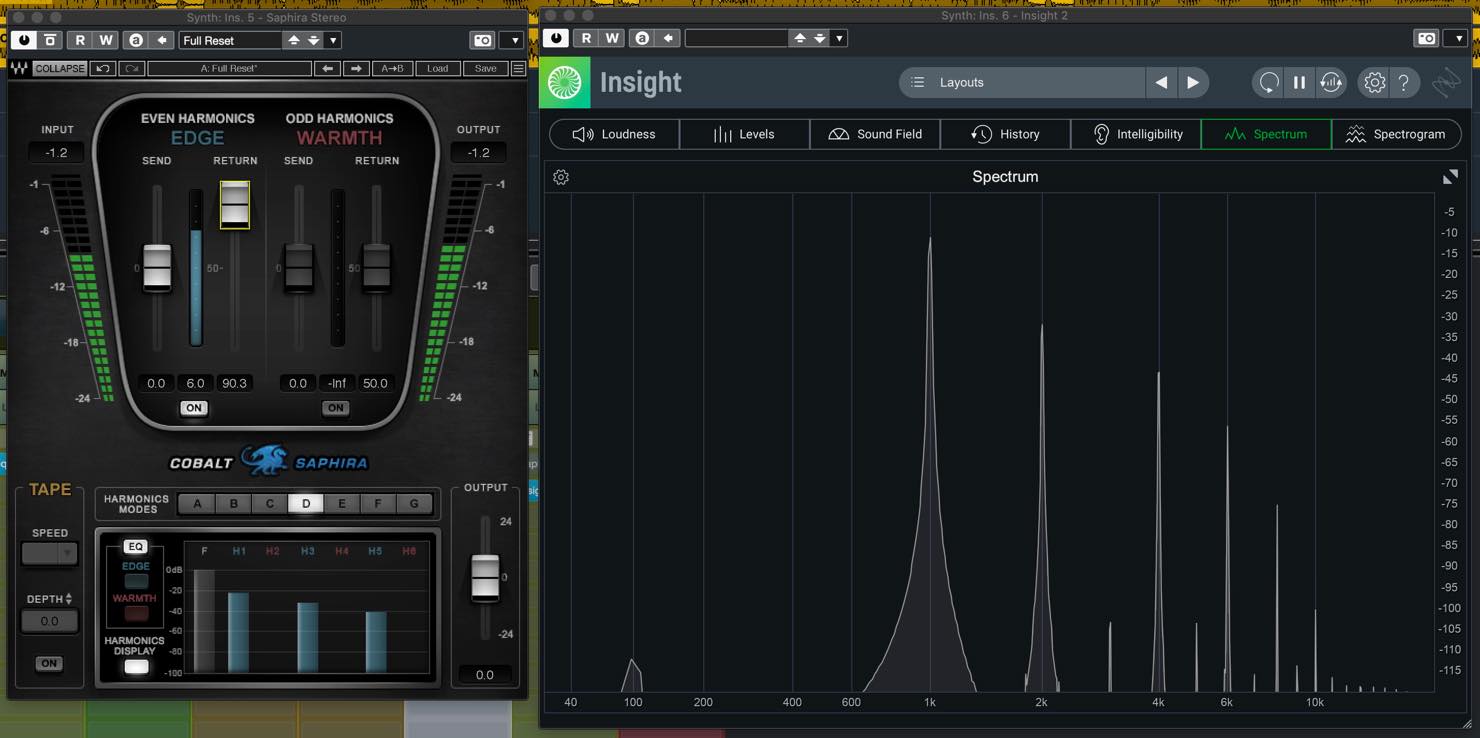
The analyzer shows that almost exclusively even harmonics have been added.
When you play a phrase, the sound takes on the character of a slightly overdriven organ.
The Send parameter next to it controls how much signal is fed in. Raising or lowering it changes the distribution of the harmonics.
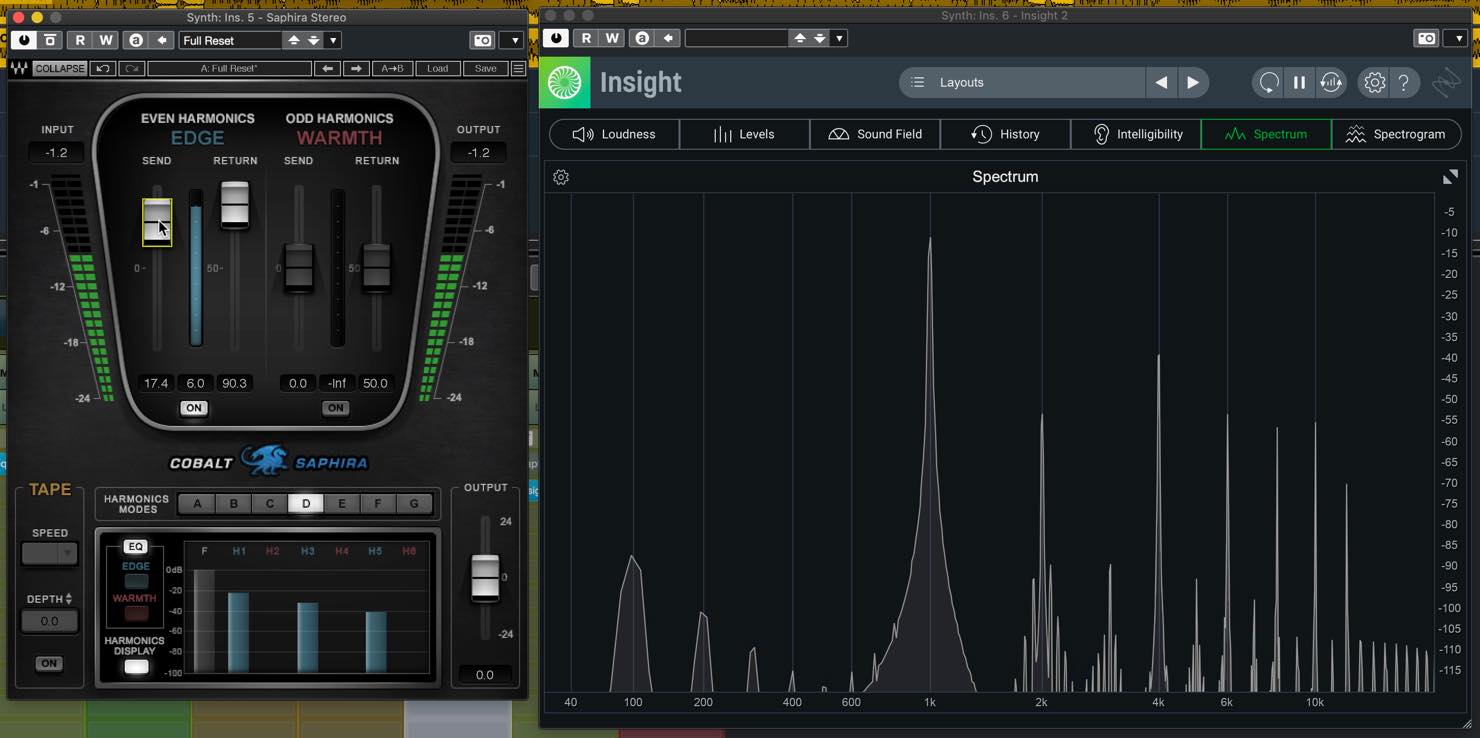
As a general tendency, increasing Send adds more high-frequency harmonics.
Now let’s add odd harmonics. Turn on Odd Harmonics and raise Return.
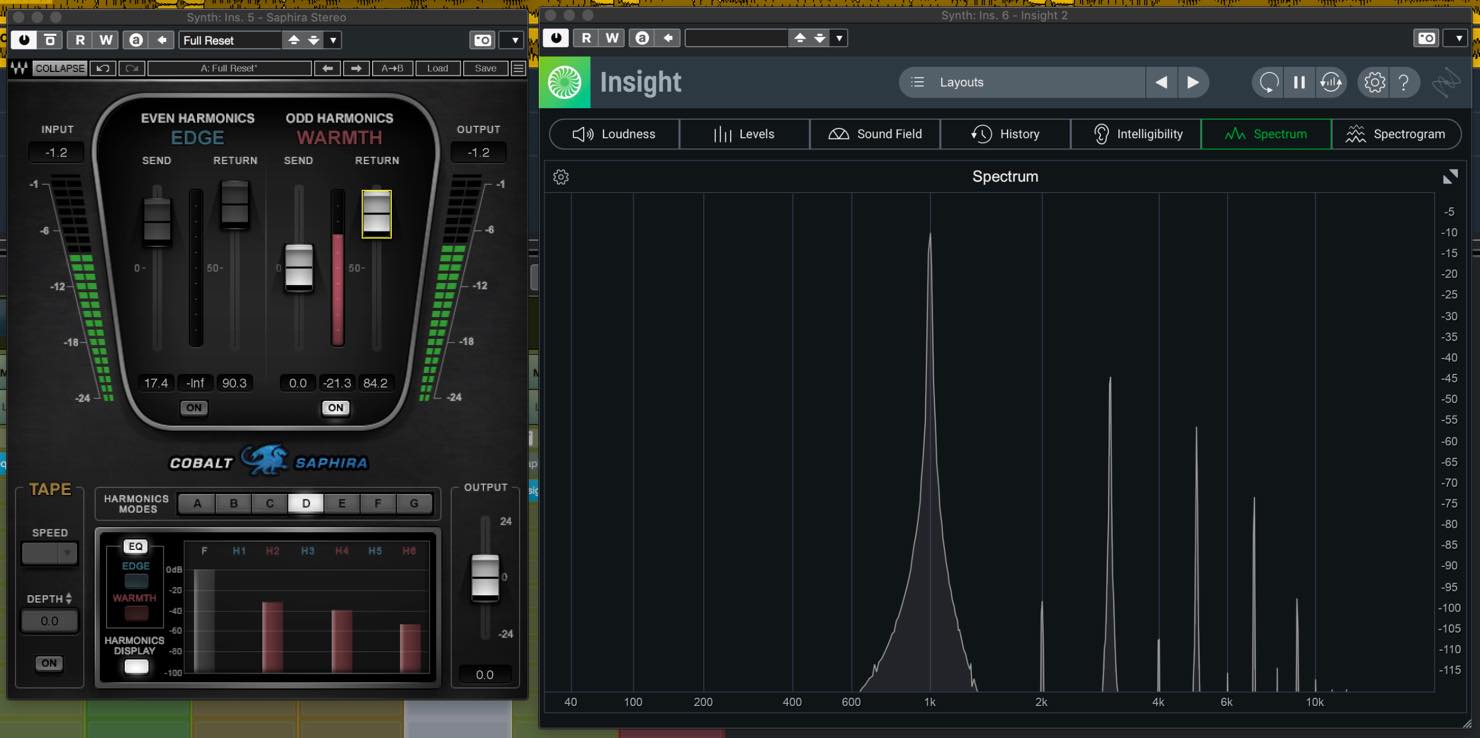
As you can see, almost exclusively odd harmonics are present.
When you play a phrase with these settings, the resulting tone has a triangle-wave-like quality. This is a listening analogy for this example; odd harmonics alone do not define a triangle waveform.
Adjusting Send also changes the distribution of the harmonics.
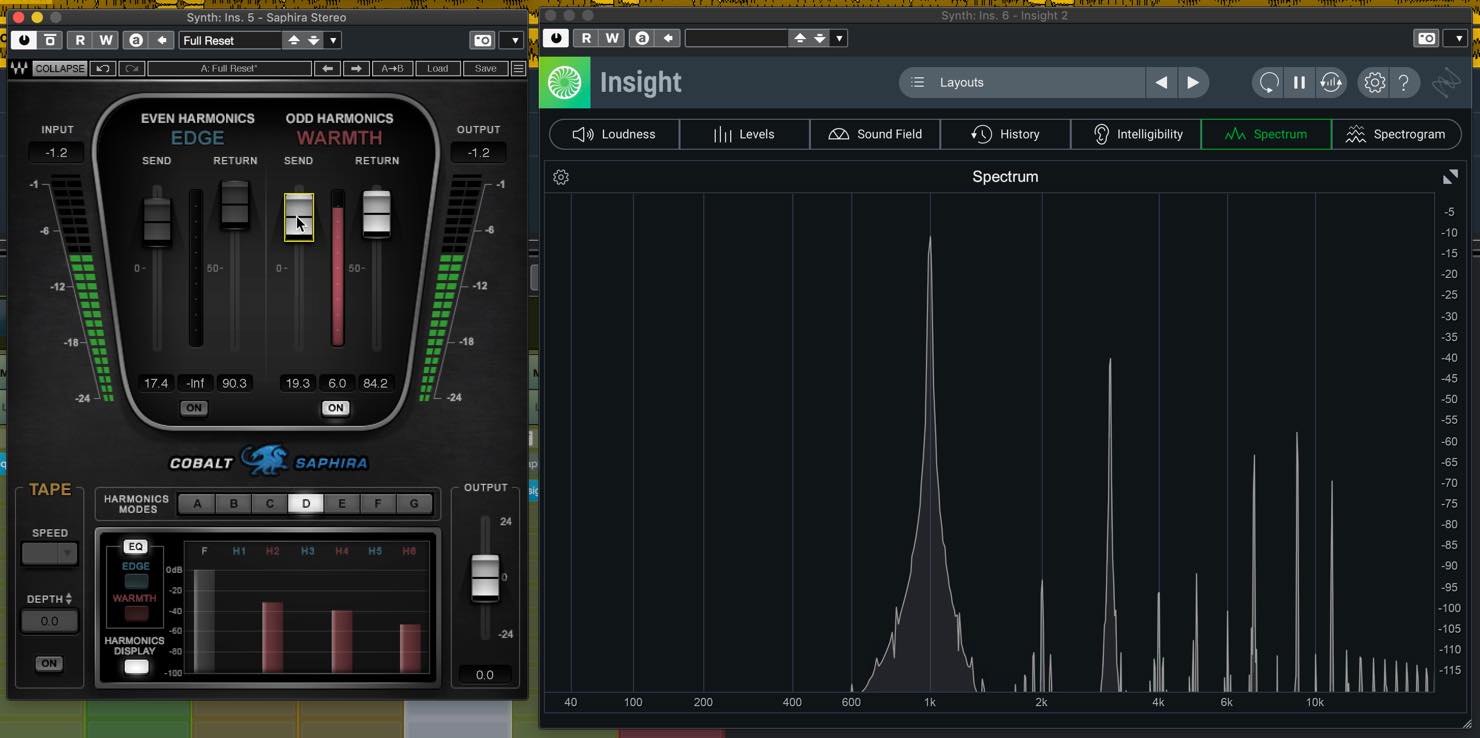
For reference, let’s also look at the harmonics added by a few analog-modeling plug-ins.
First, CLA-2A.
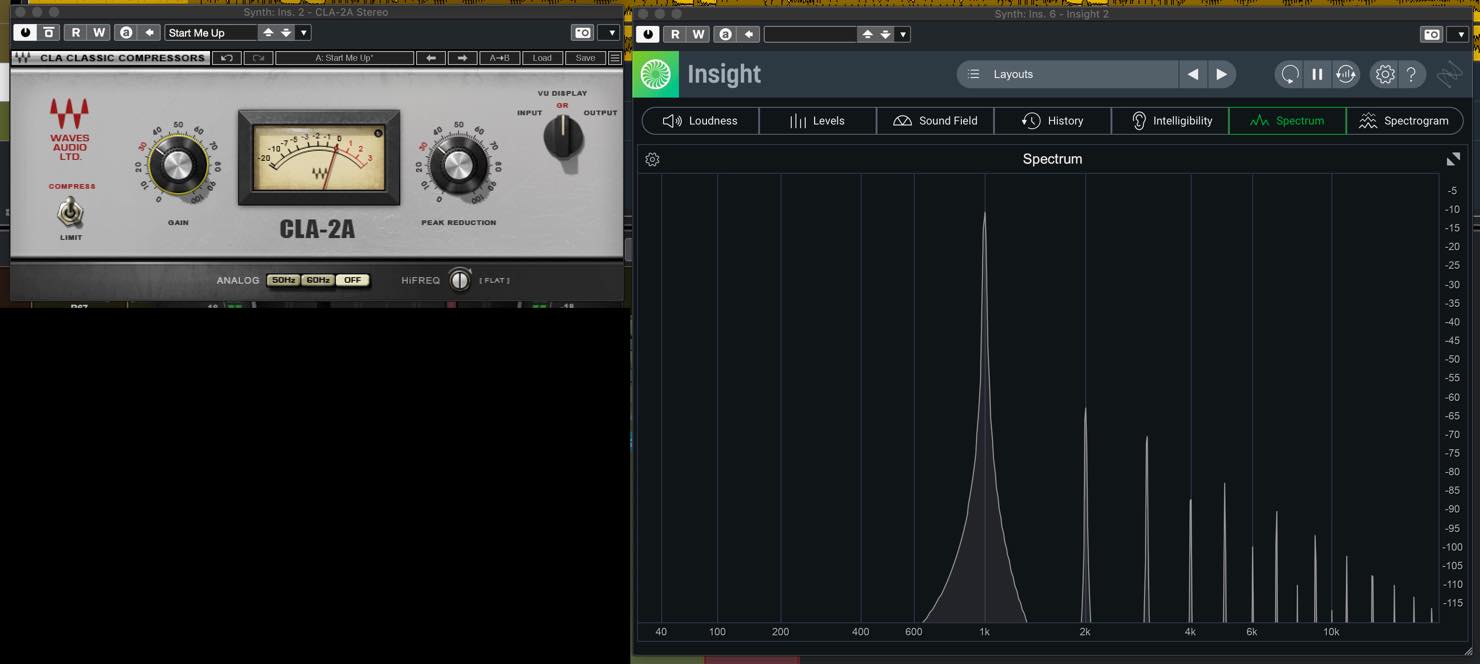
At the settings shown, it adds both even and odd harmonics, with odd harmonics more prominent higher up the spectrum.
Next, CLA-76.
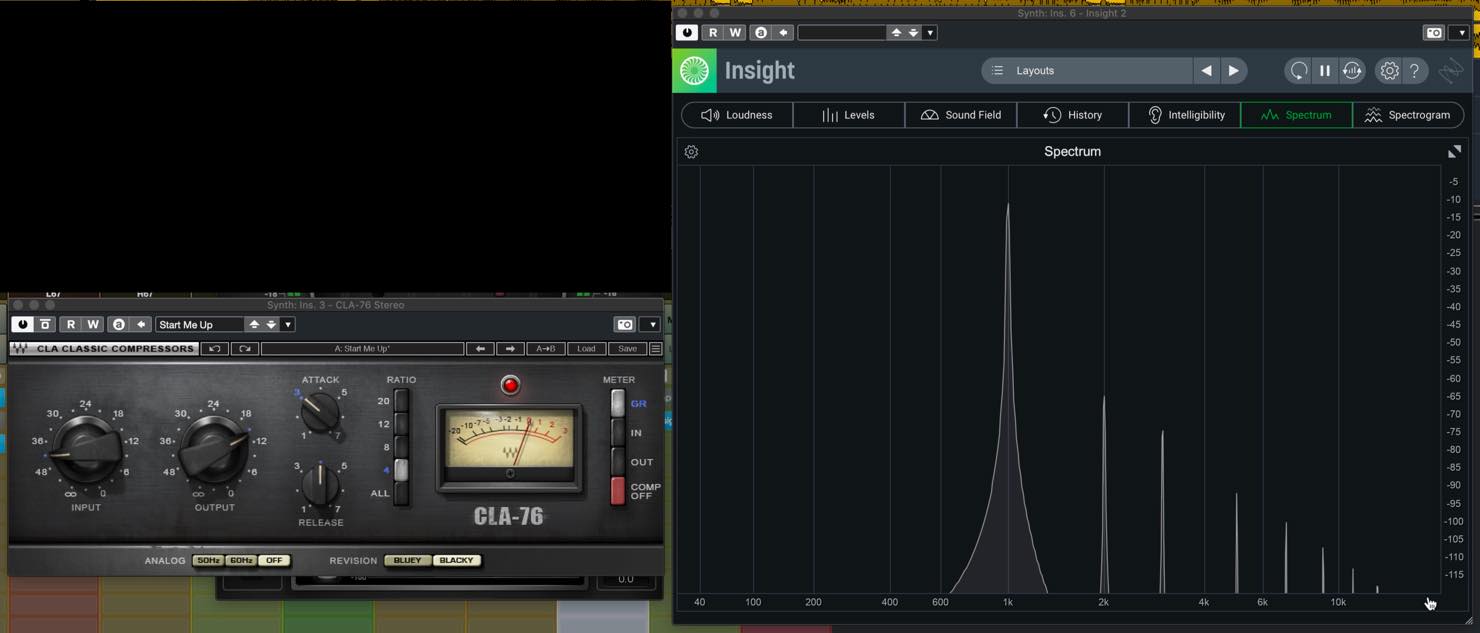
At the settings shown, the second and third harmonics are clearly present, while the visible higher harmonics are predominantly odd.
In both cases, we are only passing the signal through the plug-in. The results may change once compression is applied.
We’ve seen how analog-modeling plug-ins add harmonics and how each has a different character. You can choose a plug-in based on that character, or use Waves Cobalt Saphira to focus specifically on the harmonics and adjust them to your taste.
Testing with Waves Cobalt Saphira (Tracks)
Now let’s apply Cobalt Saphira to a track and listen to the effect of its harmonics.
Drum Bus
First, the drum bus. Here are the audio samples.
Drum bus: original
Let’s start with even harmonics.
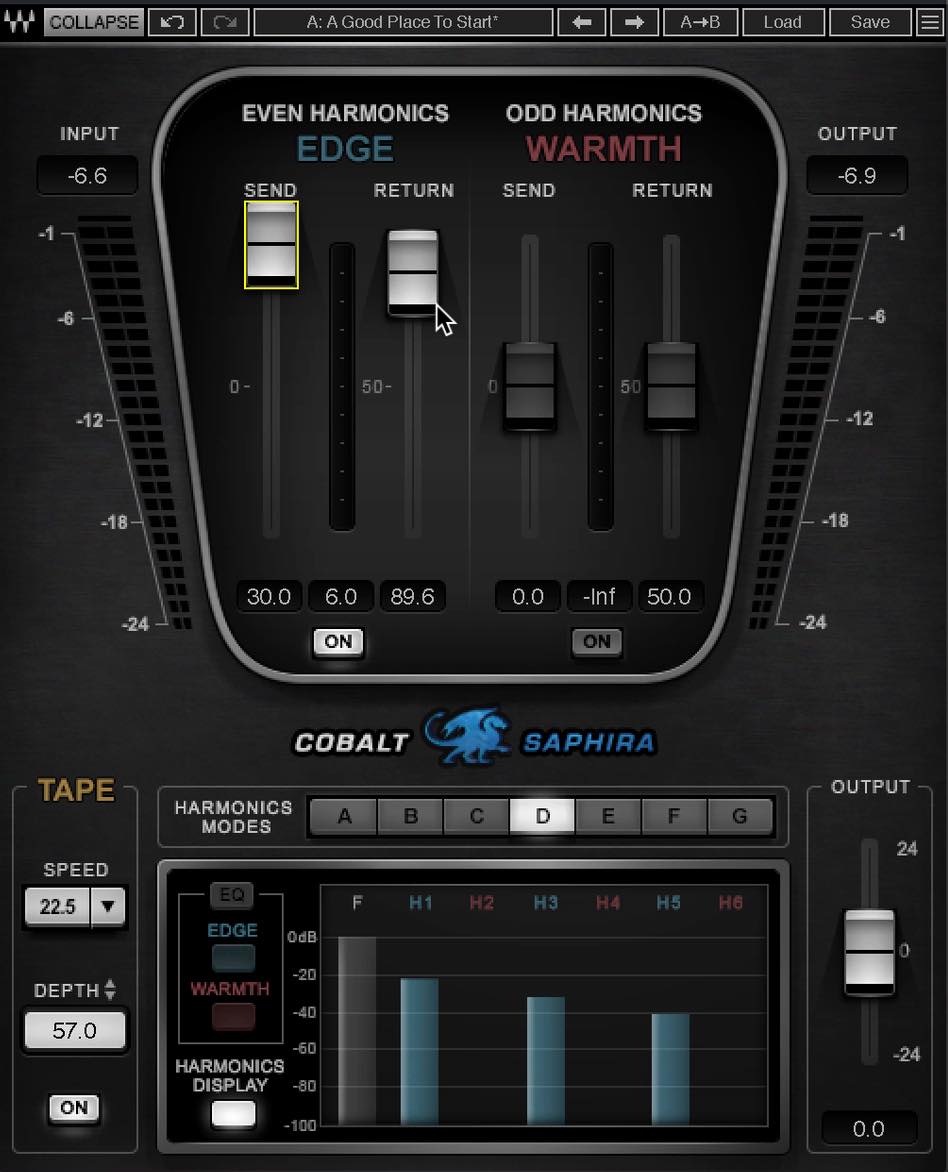
Drum bus: even harmonics
With Return at maximum, the sound becomes noticeably distorted. Lowering it to a moderate level brings the attack forward and adds punch to the kick and snare. If you want the punch to be easy to hear, you can set Send to maximum. This punch is likely why the control is called EDGE.
The sound does not change dramatically, but it feels slightly thicker, with a soft, rounded quality associated with analog gear. This is generally described as “warmth.” In Saphira, the odd-harmonics section is called “Warmth,” which can be confusing. As noted earlier, remember that even harmonics can contribute both warmth and punch.
Next, let’s try odd harmonics.
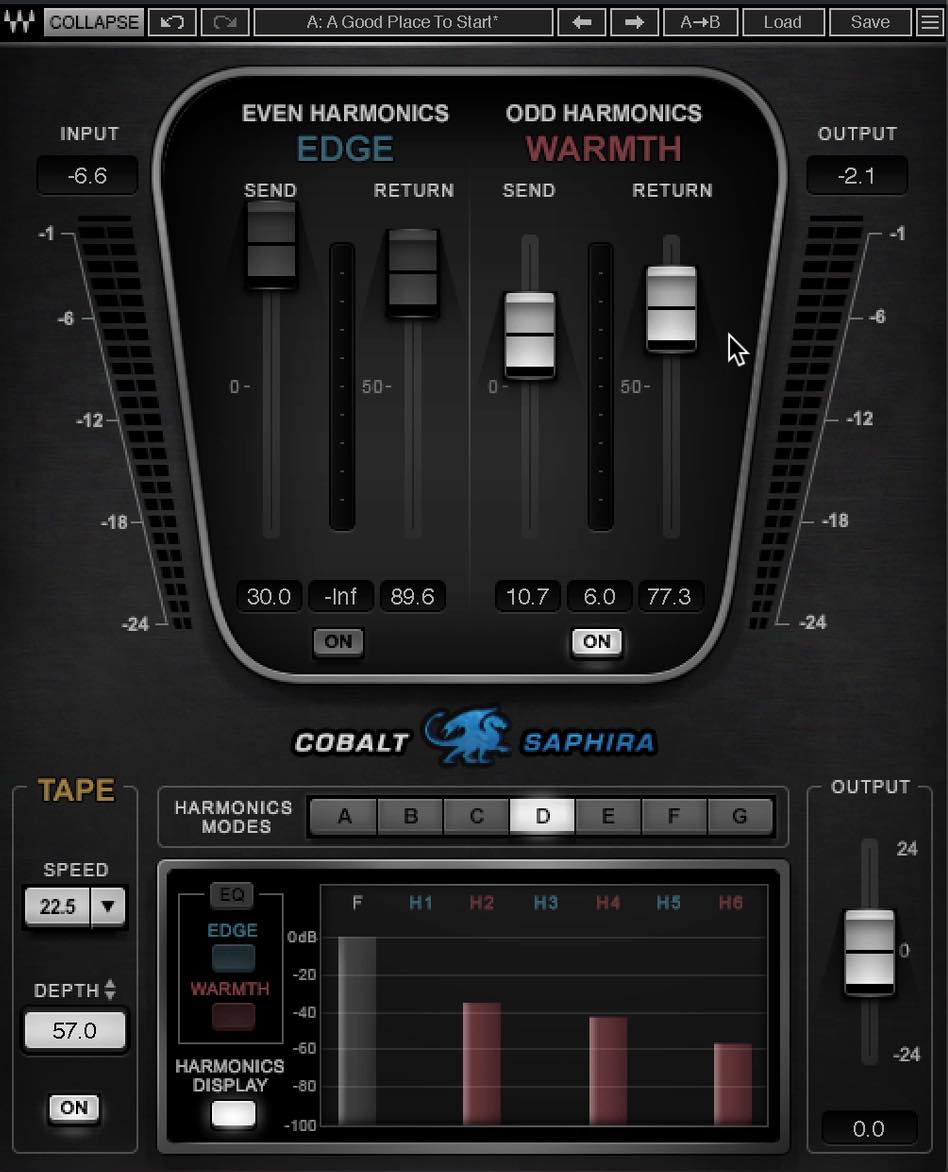
Drum bus: odd harmonics
With Return set to a moderate value, the sound takes on analog-like saturation and a sense of cohesion, as if it had passed through a compressor. The high frequencies in the cymbals and snare also seem livelier, making the overall sound clearer.
If Send is set too high, the sound can become a little thin, so in this case you may want to use a more restrained setting than you would for even harmonics.
Saphira calls this section “Warmth,” likely because of the saturation and cohesion it creates. Since clarity also increases at the same time, keep in mind that odd harmonics can have both effects.
Master Bus
Next, let’s apply it to the master bus. Here are the audio samples.
Master bus: original
Let’s start by adding even harmonics.
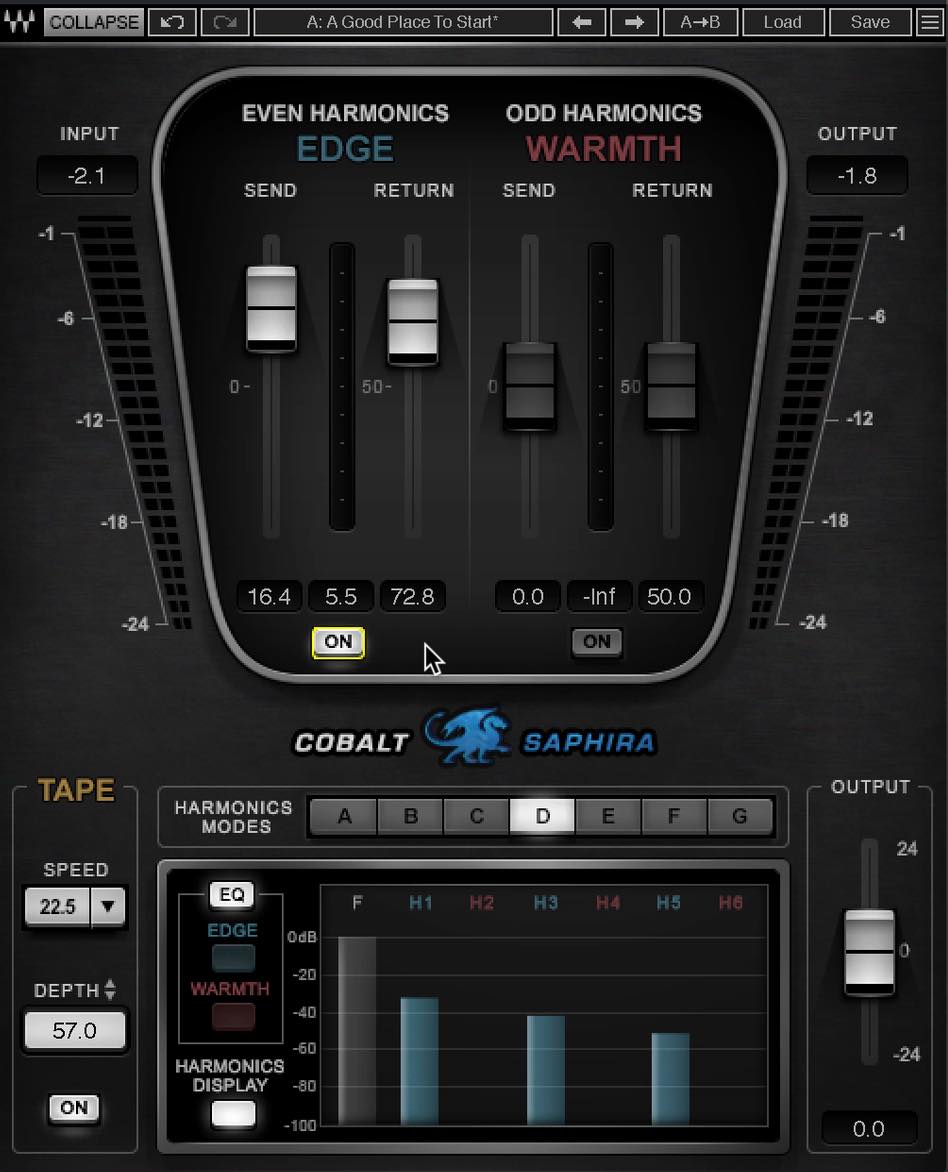
Master bus: even harmonics
The drums gain punch, and the low-mid range becomes fuller—especially the bass, which sounds denser and more solid.
At this point, both effects—punch and warmth—are showing up across the mix.
Next, let’s try odd harmonics.
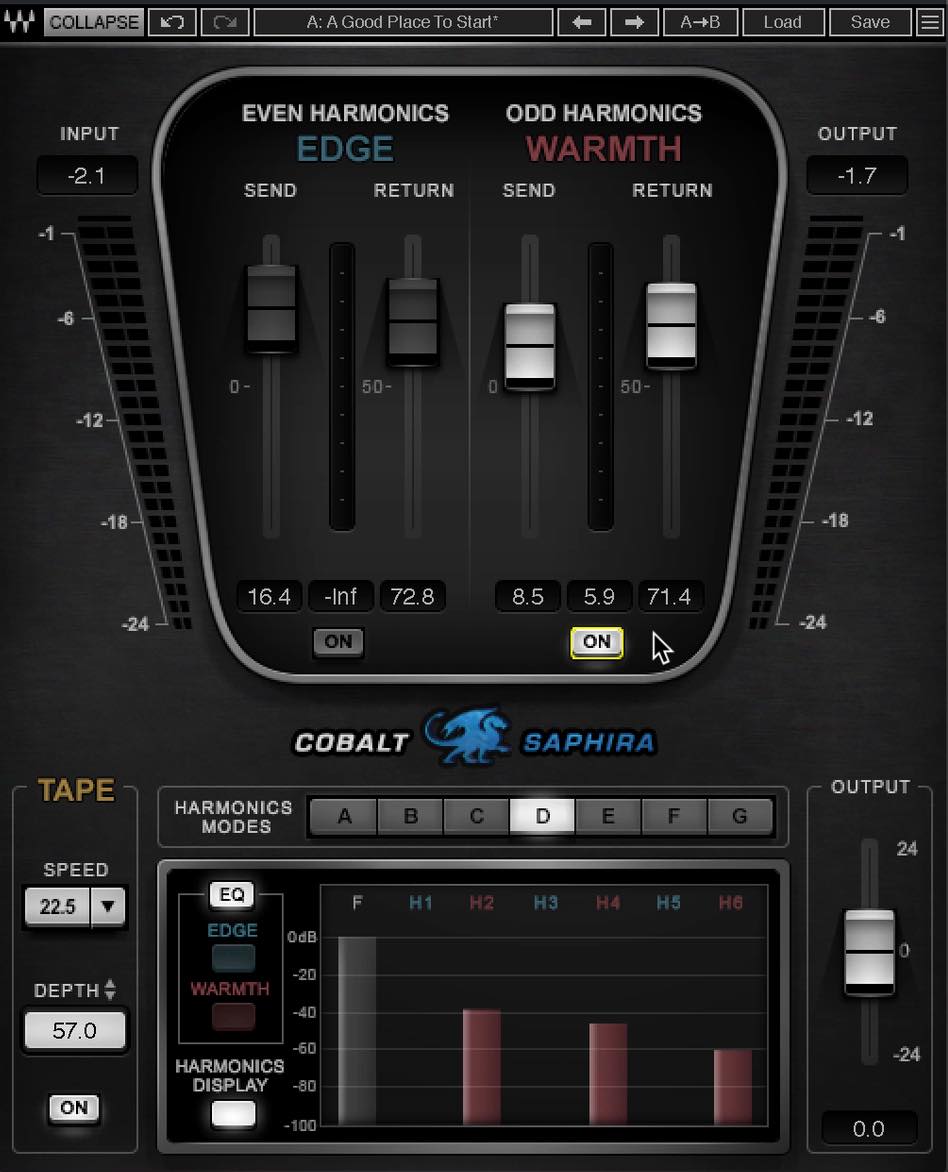
Master bus: odd harmonics
The effect is easy to hear here. The guitars gain presence, and the image sounds clearer, in addition to the added definition in the cymbals and snare. Odd harmonics can also help increase perceived loudness.
At the same time, the transients feel a little rounder. It is as if the gaps between instruments have been filled in, giving the mix a greater sense of cohesion.
As we’ve heard, even and odd harmonics can coexist. Get to know the character of each, then blend them to find the feel you like.
Cobalt Saphira also offers more detailed controls, including options for the type and strength of the harmonic structure and separate EQ for even and odd harmonics. You can use these features to shape your own analog character.
You could also analyze the harmonics added by the analog-modeling plug-ins you already own. Knowing whether a plug-in emphasizes odd or even harmonics may give you a useful basis for choosing when to use it.
The world of analog-modeling plug-ins and harmonics is deep, but understanding even a little of the underlying principles can help you make better mixing decisions.
Try these ideas with your own plug-ins and music.
The Relationship Between Harmonics and Mixing
Harmonics are a familiar effect of analog equipment and its modeled plug-ins. Understanding what they mean in mixing, even at a basic level, can help you make better mixing decisions.
Details: https://t.co/QSC8cjbooj #DTM pic.twitter.com/OL2zEfoUeE
— SLEEP FREAKS (@SLEEPFREAKS_DTM) January 10, 2021
Frequently Asked Questions
Q1. Why are harmonics important in mixing?
Harmonic levels help shape tonal color and presence. For a single steady pitched tone, keeping only the fundamental leaves a sine wave. Instrument timbre also depends on its envelope, noise, and inharmonic components. Nonlinear processing can add or reshape harmonics to create an analog-style character.
Q2. What is the difference between odd and even harmonics?
In this article’s listening examples, odd-harmonic processing gives impressions of clarity and cohesion, while even-harmonic processing adds warmth and punch. These are setting-dependent observations. Harmonic parity by itself does not guarantee a particular transient shape, compression effect, or dynamic range.
Q3. How does Cobalt Saphira adjust harmonics?
It lets you control Even Harmonics and Odd Harmonics independently. Return and Send adjust the harmonic level and frequency distribution, so you can shape an analog character to suit your needs.
Q4. Which analog plug-in should I choose?
Different pieces of equipment add different harmonics, as you can hear with plug-ins such as CLA-2A and CLA-76. Learn whether each plug-in emphasizes odd or even harmonics, then choose one to suit the sound you want.
NEW ARTICLES
Latest English Articles




































































































































































